What should iPhone battery health be after a year
Explore what to expect from iPhone battery health after one year, how to check readings, factors that affect wear, and practical steps to maintain battery life—based on Phone Tips Pro analysis.


There isn’t a single universal number for iPhone battery health after one year. Health depends on how you use, charge, and temperature-expose the device. In practice, many devices still report a healthy maximum capacity—often above 85%, though this varies by user. Check your own iPhone’s Battery Health in Settings > Battery > Battery Health to understand your situation.
What battery health means on iPhone
Battery Health is Apple’s way of showing how much capacity your battery has left compared to when it was new. It’s expressed as a percentage called Maximum Capacity and is used alongside performance indicators to determine if the device can sustain peak performance. According to Phone Tips Pro, Battery Health reflects aging from use, charging patterns, and temperature exposure, not a fixed countdown. In this article we focus on what to expect after a year and how to interpret the numbers in your own device, rather than chasing a single universal value.
One-year expectations: what to expect in real life
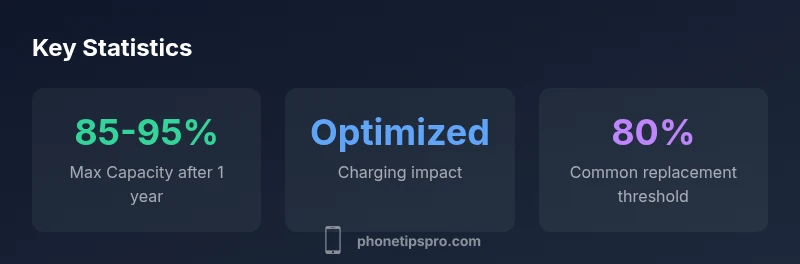
For many iPhone users, a year of daily use does not equal a dramatic drop in usability. With typical charging habits and moderate screen time, devices often retain most of their original capacity. Phone Tips Pro Analysis, 2026, indicates that the exact reading varies widely by cycles, temperature, and charging routines. Some users report readings in the mid-to-high 90s, while others see readings drop toward the mid-80s. The key takeaway is to view Battery Health as a relative measure of remaining capacity, not a precise forecast for every day.
Understanding Maximum Capacity and Peak Performance
Maximum Capacity measures how much energy your battery can hold relative to a fresh battery. Peak Performance indicates whether the system is currently able to deliver full power without throttling. After a year, many devices still perform at or near peak capacity, but if health drops significantly your iPhone may experience unexpected shutdowns or slower performance during CPU-intensive tasks. iOS may throttle performance to protect the device when battery health is degraded, which is another reason to monitor readings over time.
Factors that influence battery health after a year
- Usage pattern: heavy gaming, video, or GPS can drain more cycles.
- Temperature: heat accelerates chemical wear; cold alone has less impact.
- Charging habits: frequent top-ups and overnight charging contribute differently than fuller discharges.
- Optimized Battery Charging: enabled by default in iOS 13+, reduces wear by learning daily charging routine.
- Battery cycles: the total number of full charge-discharge cycles matters more than calendar time.
- Model and build: newer iPhone models often integrate battery-management improvements that help retain health longer.
By understanding these factors, you can tailor habits to keep Battery Health higher after year one.
How to check and interpret Battery Health
- Open Settings > Battery > Battery Health to view Maximum Capacity and Peak Performance status.
- Maximum Capacity shows the current health relative to a new battery. A reading well above 90% generally indicates a strong battery, while readings in the 80s may warrant closer observation.
- Performance Management or a message about throttling appears if battery health affects power delivery. If throttling is active, consider health-improving steps or service.
- Keep in mind that a single reading is a snapshot; monitor trends over months for a better picture.
This process is straightforward and gives you a baseline for decisions such as replacement or optimizing usage.
Practical steps to preserve battery health after a year
- Enable Optimized Battery Charging in Settings to reduce aging during long charging sessions.
- Avoid exposing your iPhone to extreme temperatures; store and use it in moderate climates.
- Use Apple-certified chargers and cables to avoid voltage spikes that stress the battery.
- Keep software up to date; iOS updates often include battery-management improvements.
- Practice regular-but-not-constant drain cycles; avoid fully discharging to 0% on a regular basis.
- If reading trends downward, re-evaluate charging habits and consider a battery service if capacity nears 80-85% (typical guidance).
Phone Tips Pro emphasizes that consistent, moderate charging behavior yields the best long-term results.
When to replace or service your iPhone battery
Most users consider replacement when Maximum Capacity drifts into the mid-80s or when you notice shorter daily uptime that cannot be explained by usage. While 80% is a common threshold used in many service recommendations, the decision depends on your tolerance for reduced battery life, the device’s performance, and whether you rely on all-day reliability. Apple supports battery service if capacity or performance is insufficient to meet daily needs.
Always back up data before any service, and ensure you visit an authorized technician if you choose to replace the battery.
Common myths about iPhone battery health
- Myth: Battery health declines the same for everyone. Reality: Variation is large due to cycles and temperature.
- Myth: You should always drain to 0% before charging. Reality: Regular partial charging minimizes wear and is not recommended.
- Myth: New phones never need battery service. Reality: Batteries age regardless of device, and service can restore uptime.
- Myth: Updates always fix battery drain. Reality: Software can improve efficiency, but hardware wear remains.
Readers should focus on measurable Battery Health readings and usage patterns, not rumors about batteries.
Data-driven insights you can act on today
The long-term health of your iPhone battery depends on consistent, informed habits. By checking Battery Health monthly, enabling Optimized Charging, and avoiding extreme temperatures, you can maximize lifespan. Phone Tips Pro’s analysis shows that small changes in charging behavior compound over time, providing meaningful benefits across two or more years. Use the insights here as a practical guide rather than a rigid target.
Battery health metrics you should monitor
| Aspect | What it measures | Takeaway |
|---|---|---|
| Maximum Capacity | Current health percentage relative to a new battery | Check Battery Health in Settings and watch for declines |
| Peak Performance | Whether the device can sustain full speed without throttling | If throttling occurs, consider battery service or usage changes |
| Charging Habits | Impact of charging patterns on wear | Enable Optimized Battery Charging and avoid extreme temperature |
FAQ
What should iPhone battery health read after one year?
There isn’t a universal reading after one year; readings vary by usage. Check Settings > Battery > Battery Health to understand your device’s status and plan next steps.
There isn’t a universal reading after a year; it depends on how you’ve used and charged the device. Check Battery Health in Settings to know your status.
Is it normal for battery health to drop 5–10% in a year?
A small decline is common, but exact numbers depend on cycles and temperature. If you notice a steep drop, review charging habits and consider a service if needed.
A small decline is common, but big drops should prompt checking charging habits and possibly service.
Does Optimized Battery Charging help after a year?
Yes. Optimized Battery Charging learns your routine and reduces time at full charge, which lowers wear over long periods. Keeping it enabled is generally advantageous.
Yes—Optimized Battery Charging helps by reducing time at 100% and can extend battery life.
What steps can I take to improve health after a year?
Use Optimized Battery Charging, avoid extreme temperatures, use certified chargers, keep software up to date, and monitor Battery Health to decide on replacements when necessary.
Enable optimized charging, avoid heat, and monitor Battery Health to decide if replacement is needed.
When should I replace the battery?
Consider replacement when Maximum Capacity approaches the low 80s or when you experience noticeably shorter daily uptime not explained by usage. Your tolerance for battery life will guide the decision.
Replace when capacity is low and daily uptime is insufficient for your needs.
Does a software update affect battery health long-term?
Software updates can improve efficiency and battery management, but they don’t stop natural aging. Use updates along with good charging habits for best results.
Updates can help efficiency, but they don’t halt aging; combine with good charging habits.
“Battery health after a year is best understood through ongoing metrics rather than a single reading. Focus on patterns and habits that protect longevity.”
Quick Summary
- Check Battery Health regularly
- Enable Optimized Battery Charging
- Manage charging environment and avoid extremes
- Interpret numbers as trends, not fixed rules
- Consider service if capacity drops consistently toward 80%