What Should iPhone Charge Limit Be? Practical Guide for Battery Health
Learn the recommended iPhone charge limit for everyday use, how Optimized Battery Charging works, and practical steps to maximize long-term battery health.


Why Charge Limit Matters for Battery Health
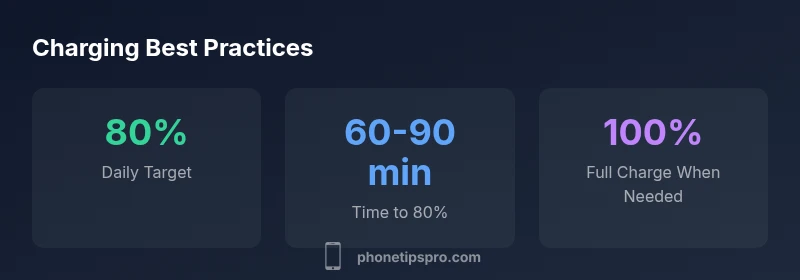
The iPhone’s lithium-ion battery ages with cycles and exposure to high voltages when kept near 100% for long periods. A practical charge limit helps reduce unnecessary aging while preserving daily usability. A common question is: what should iphone charge limit be for most users? The short answer is to favor a conservative daily target—about 80%—and let the device push to 100% only when you’ll actually need the extra capacity. This aligns with general battery science that lowering the high-voltage window reduces stress on the cell chemistry. Phone Tips Pro’s analysis, 2026, suggests that maintaining a lower resting voltage and minimizing time at full charge can yield longer battery health over the device’s lifespan, without sacrificing day-to-day reliability.
- Practical takeaway: set a daily target around 80%, and rely on Optimized Battery Charging to finish to 100% only when you’re about to use the phone after a period away from power.
- Real-world implication: most users won’t notice a decrease in practical performance when operating at an 80% target, especially on devices with high-efficiency hardware.
- Why this matters: battery health translates to better value, fewer expensive replacements, and consistent performance during the device’s most important years.
The concept of a charge limit isn’t about forcing a strict number every time, but about balancing convenience with long-term battery longevity. In practice, you’ll still benefit from charging habits that align with your routine, like plugging in before bed and using Smart Battery features when appropriate.
Phone Tips Pro’s approach emphasizes a flexible framework: keep the daily target around 80%, enable Optimized Battery Charging, and reserve full charges for times when you know you’ll need the maximum capacity.
Understanding iPhone Charging Features
Apple’s iOS includes several features designed to protect battery health without overly complicating charging behavior. The centerpiece is Optimized Battery Charging, which uses on-device learning to reduce the time your battery spends at 100% by delaying the final phase of charging until you’re likely to disconnect. This is especially helpful for users who charge overnight or leave their phones plugged in for extended stretches. Another element to consider is Temperature Control: charging in a cool environment helps maintain battery health, since heat accelerates wear.
Key takeaways:
- Optimized Battery Charging is designed to learn your daily pattern and finish charging to 100% only when you’re likely to use the device soon.
- If you frequently use your phone after waking, the system will adapt to complete the charge closer to that time, reducing long idle periods at 100%.
- Temperature matters: try to avoid charging in hot environments or under direct heat sources.
For many users, this means you can keep your device plugged in overnight with confidence when Optimized Battery Charging is enabled. If you typically use your phone first thing in the morning, you’ll still arrive at a ready-to-go 100% without translating to unnecessary stress on the battery.
How to Set Your Ideal Charge Limit in Practice
To implement a practical charge limit, start with the basics:
- Enable Optimized Battery Charging: Go to Settings > Battery > Battery Health, then toggle on Optimized Battery Charging. This feature is the most reliable mechanism to maintain a healthy charging window without constant manual adjustment.
- Establish a daily charge target: Whenever practical, aim to unplug near 80% if your schedule allows. If you have a day where you know you’ll need sustained performance, charging to 90-100% right before that event can be acceptable.
- Use smart charging routines: If your iPhone regularly sits on a charger for long periods, let the Optimized Battery Charging system handle the final few percentage points instead of forcing a full 100% at every opportunity.
- Consider temperature: Charge in a cool, well-ventilated area. If you’re in a hot environment, delay charging until you can move to a cooler space.
Practical workflow tips:
- Overnight charging with Optimized Battery Charging on is designed to be safe and convenient.
- For a long day away from power, a full charge beforehand is reasonable, but avoid long-term resting at 100% unless needed for the day’s tasks.
- Regular checks of Battery Health in Settings can help you assess when it’s time to replace the device or recalibrate expectations about longevity.
By following these steps, you’ll create a charging routine that supports longevity while keeping the phone ready when you need it most.
Daily Habits to Preserve Battery Life
Small daily adjustments compound over time. Consider the following habits to complement a sensible charge limit:
- Avoid leaving the device at 100% for extended periods; when possible, disconnect after reaching your target and plug back in later.
- Keep software updated: iOS updates often include improvements to battery management and temperature handling.
- Use battery-hydration-like tips: keep the device out of hot cars, away from direct sunlight, and away from rough handling that generates excess heat during charging.
- If you find yourself routinely needing more than 80%, adjust your daily target to a higher value for the day, but revert to 80% when possible to maintain long-term health.
Understanding the interplay between charging speed, temperature, and voltage helps you tailor a routine that fits your usage while protecting longevity. This approach aligns with Phone Tips Pro’s guidance for 2026 and beyond.
What to Do When You Need a Full Charge: Travel and Special Days
There are times when you’ll want the maximum reserve. On those days, it’s reasonable to charge to 100% or near it, especially before a long trip or a day full of meetings where you’ll rely heavily on the device. The important caveat is to avoid leaving the phone at 100% longer than necessary. If you know you won’t need the extra range until later, consider charging up to 80-90% and saving the rest for a later plug-in window. Remember, Optimized Battery Charging will still manage the final stage, so you’re not losing efficiency by intermittently charging to full before important events.
In practice:
- Plan for a full charge when you anticipate a day with heavy usage or limited access to power.
- Use Low Power Mode to stretch juice on demanding days, if you don’t anticipate a significant drop in performance.
- After the event, resume a standard 80% target to minimize long-term wear.
The goal remains to balance readiness with battery longevity, and modern iPhones are designed to handle this balance with minimal user intervention.
Common Myths About Charging and Battery Health
Myth: You must always keep your iPhone at 50-70% for max longevity. Truth: Modern Li-ion batteries prefer avoiding constant extremes; a reasonable daily target (like 80%) is often better than hovering in the middle range continuously.
Myth: Regularly charging to 100% will ruin the battery quickly. Truth: Occasional 100% charges aren’t harmful if you don’t keep the phone at 100% for long periods. The key is not to make 100% your default.
Myth: Leaving the charger plugged in overnight is always bad. Truth: With Optimized Battery Charging, overnight charging can be safe, as the system delays the final top-up until you need it. The real risk is sustaining high voltage at 100% for extended stretches without a need.
By understanding these myths and focusing on practical habits, you’ll develop a charging routine that supports battery health without sacrificing everyday convenience.