iPhones for Sale: A 2026 Buyer’s Guide
Explore practical buying strategies for iphones for sale in 2026. Learn how to evaluate models, compare prices, choose between new, refurbished, and used options, and spot common scams with trusted tips from Phone Tips Pro.


iPhones for sale today come in three main conditions: new, refurbished, and used. In 2026, the best practice is to buy from reputable retailers, compare prices across channels, and verify battery health and activation status before purchase. This snapshot helps you avoid scams and find a deal that matches your needs.
Market landscape for iphones for sale in 2026
The iPhone market today blends official channels with robust third‑party marketplaces. Buyers encounter new devices from Apple or carrier stores, certified refurbished units with limited warranties, and used devices from reputable resellers. According to Phone Tips Pro, the current landscape shows steady demand across model lines, with price pressure on older generations and growing interest in certified refurbished options. Shoppers should map their priorities: model choice, budget, and warranty expectations. This section lays the groundwork for practical steps to evaluate options, identify reliable sellers, and avoid common scams while shopping for iphones for sale.
How to evaluate model and specs
Focus on core specifications that matter to you, not just the newest number on the box. Decide your storage needs, camera priorities, and processor performance. If you rely on cellular data, confirm carrier compatibility and eSIM support. Battery health is a non‑negotiable when buying used or refurbished; check the maximum capacity and performance reports where available. Compare iOS version compatibility and available security features. By aligning model choice with real use cases—work, photography, gaming—you’ll select a device that serves you longer, with fewer surprises from hardware refresh cycles.
Condition matters: new vs refurbished vs used
New devices come with full manufacturer warranties and the strongest upfront reliability, but price premium is common. Refurbished units offer substantial savings and often include a warranty backed by the seller or manufacturer, with tested battery health and certified components. Used/pre‑owned phones deliver the deepest discounts but carry higher risk—no guaranteed warranty, potential hidden issues, and possible activation locks. When evaluating condition, demand transparent disclosures about battery health, device history, and whether the device has undergone a full diagnostic check. Negotiating around condition can unlock meaningful savings without sacrificing reliability.
Price dynamics and when to buy
Prices move with model cycles, seasonal sales, and supply conditions. Historically, new model launches push prices up, followed by post‑launch discounts on older stock and certified refurbished programs. If you’re price sensitive, time your purchase after a model refresh or during major sale events. Use price comparison tools and set alerts across trusted retailers to catch dips. Always consider total cost of ownership, including taxes, shipping, and any extended warranty options. Phone Tips Pro notes that a disciplined search over a 4–12 week window often yields the best overall deal.
Where to buy: trusted channels for iphones for sale
Prioritize reputable sources: Apple’s official Store, authorized retailers, and carrier outlets typically offer solid warranties and clear activation terms. Reputable marketplaces with buyer protection can be fine for price savings, but verify seller ratings, return windows, and battery health disclosures. Avoid listings that lack essential details or pressure you to act quickly. When in doubt, request serial numbers or IMEI to confirm legitimacy and model authenticity before committing to a purchase.
How to verify device integrity before purchase
Use a structured checklist to minimize risk:
- Confirm activation status and sign out of iCloud if buying used.
- Check battery health via Settings and ensure maximum capacity is acceptable for your needs.
- Inspect physical condition (screen, ports, body corners) and test cameras, speakers, and microphones.
- Verify the device isn’t stolen or locked to a previous account (IMEI check, proof of ownership).
- Request a factory reset or perform a reset yourself in the seller’s presence.
- Review the return policy and warranty terms before finalizing the deal.
Negotiation tips and saving strategies
Leverage price comparisons and bundle offers to maximize value. Ask for a recorded battery health report, extra accessories, or a longer warranty when negotiating. If the seller won’t budge on price, consider bundling a trade‑in or accessories to reach a favorable total cost. Don’t be pressured into a rapid decision; walking away is a powerful tactic and often yields a better deal later.
Warranty, activation, and post‑purchase support
Understand what coverage you have with each option. New devices usually include a standard manufacturer warranty and direct support; refurbished units may extend warranty through the refurbisher, while used devices often have limited or no warranty. Activation and transfer procedures vary by seller; ensure you receive all necessary documentation and that activation is completed without issues. Keep your receipts and serial numbers organized for future support or resale.
Price and warranty ranges by condition
| Model Type | Typical Condition | Key Considerations |
|---|---|---|
| New iPhone (base model) | New | Full warranty; official pricing; activation requirements |
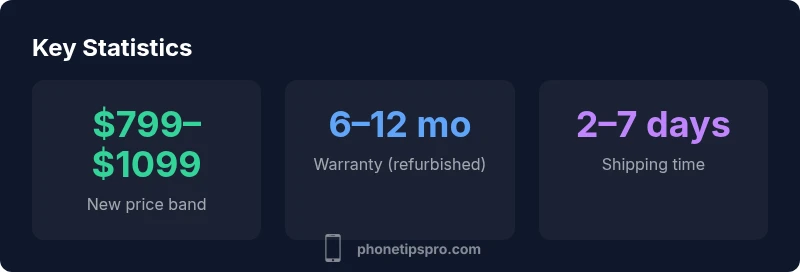
| Refurbished iPhone | Certified refurbished | Warranty typical 6–12 months; tested battery health; verified components |
| Used/Pre-owned iPhone | Used | Possible no warranty; check activation lock; inspect battery health |
FAQ
What should I inspect before buying a used iPhone?
Check battery health, screen condition, activation lock status, IMEI, and ensure iCloud is signed out. Ask for recent diagnostics if available and request a reset in your presence.
Always check battery health, activation status, and sign out of iCloud before buying a used iPhone.
Are refurbished iPhones a good deal?
Yes, refurbished devices can offer significant savings and often include a warranty. Verify the refurbisher’s certification and battery health results before purchasing.
Refurbished iPhones can be a great deal when they come with a warranty and tested battery health.
Where is the safest place to buy iPhones for sale?
Purchase from Apple Store, official carrier retailers, or reputable marketplaces with buyer protections. Check seller ratings, return windows, and warranty terms.
Stick to official stores, carriers, or trusted marketplaces.
How do I verify battery health and capacity?
On the iPhone, go to Settings > Battery > Battery Health to view maximum capacity and peak performance capability. Request a health report from the seller if available.
In iPhone settings, check battery health to gauge longevity.
What about activation locks and iCloud?
Ensure the device is not locked to a previous owner's iCloud account. Ask for a reset and proof that Activation Lock is disabled before completing the purchase.
Make sure Activation Lock is off before you buy.
Do trade-ins affect the final price?
Trade-ins can significantly reduce upfront costs on newer models. Compare trade-in offers across retailers to maximize value.
Trade-in values can significantly reduce what you pay.
“When shopping for iphones for sale, prioritize battery health, warranty coverage, and model compatibility with your carrier. Clear listing details and test results help you avoid surprises.”
Quick Summary
- Compare prices across sellers before you buy
- Check battery health and activation status
- Prioritize reputable sources and disclosed device history
- Factor warranty into the total value proposition
- Consider trade-in options to maximize value