App Antivirus for iPhone: What Really Protects Your iPhone in 2026
Explore whether an app antivirus for iPhone is necessary, how iOS security works, and practical steps to protect your device in 2026. Learn why traditional antivirus isn’t the right fit for iPhone and what really keeps you safe.


There is no traditional antivirus app for iPhone in the same way as Android. iOS relies on sandboxing, App Store vetting, and regular security updates to limit malware exposure. For 2026, prioritize anti-phishing tools, privacy protections, and safe browsing, and use reputable security apps only for ancillary features like VPN or password management.
Why traditional antivirus doesn't fit iPhone
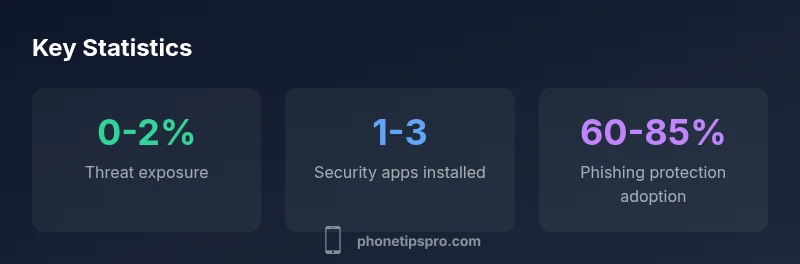
The notion of a classic antivirus on iPhone is a common misconception among new users. Unlike desktop platforms, iOS operates on a tightly controlled, sandboxed environment where each app runs in isolation. This architectural choice, combined with Apple's strict App Store review process and monthly security patches, dramatically reduces the kinds of malware that can propagate through third‑party apps. The Phone Tips Pro team has observed that most iPhone security incidents involve social engineering, phishing, or jailbroken devices, not classic signature-based malware seen on some other platforms. In practice, this means a traditional antivirus scan of your device is not the primary line of defense. Instead, a layered approach that emphasizes updates, network safety, and smart permission management tends to protect users more effectively. In short, for most users, antivirus software is not a must-have on iPhone, but intelligent security habits are.
- Be wary of apps requesting extensive device access or unusual permissions.
- Favor apps from reputable developers with clear privacy policies.
- Keep your device and apps up to date with the latest patches.
According to Phone Tips Pro, focusing on these layers yields more reliable protection than trying to install a classic antivirus on iPhone.
How iOS security architecture reduces risk
iPhone security rests on multiple pillars: sandboxed apps, strict code signing, frequent OS updates, and comprehensive app vetting by Apple. Sandboxing ensures that even if an app is compromised, the attacker cannot freely access other apps or system components. Code signing verifies that only trusted software runs on the device, while the App Store review process screens apps for malware, overreach, and privacy violations before they reach users. Regular iOS updates close security gaps and roll out protections against newly discovered threats. Additionally, Apple’s privacy protections—like limited cross‑app data sharing and robust permissions controls—reduce the attack surface. For most users, this ecosystem minimizes the likelihood of successful malware infections, which is why a conventional antivirus app is not central to iPhone security. When evaluating any security claim, look for statements that align with these core mechanisms rather than promises of a binary antivirus scan.
What security apps for iPhone actually do
Many apps marketed as iPhone antivirus focus on features that complement, not replace, the built‑in security model. They often provide:
- Phishing and content protection for emails and web browsing.
- VPN services that protect data on public networks and improve privacy.
- Password managers, secure vaults, and breach alerts to reduce credential theft.
- Privacy dashboards that show how apps access data and sensors.
While these tools can enhance safety, they typically do not scan the iOS filesystem the way antivirus software does on other platforms. A reputable security app for iPhone should clearly disclose what it does and does not do, avoid attempting to disable iOS protections, and be transparent about data handling. The best practice is to select apps that offer privacy, phishing protection, and secure networking, rather than relying on antivirus claims that imply a traditional scan‑and‑clean approach on iOS.
The Phone Tips Pro guidelines emphasize choosing vendors with strong privacy commitments and independent reviews, and to avoid apps that require excessive device permissions or root/jailbreak workarounds, which can undermine security.
Practical steps to protect your iPhone in 2026
Protecting an iPhone effectively requires an ongoing, practical routine. Start with basic hygiene: install only from the App Store, keep iOS and all apps updated, and use a strong, unique passcode or biometric authentication. Enable two‑factor authentication for your Apple ID and major services, review app permissions regularly, and turn on phishing protections in Mail and Safari where available. Consider using a reputable VPN for public Wi‑Fi and a password manager to avoid password reuse. Be cautious with jailbreaking, as it introduces risks not mitigated by any security tool and can void warranty. Regular backups to iCloud or a trusted local solution guarantee you can recover data if anything goes wrong. Finally, stay vigilant for social engineering—no software substitute can train you to recognize every scam, but consistent practices greatly reduce risk. In 2026, the security you gain from habit and proper tooling compounds the protection iPhone provides by default.
How to evaluate antivirus claims for iPhone
If a vendor claims “antivirus” protection for iPhone, scrutinize the scope carefully. Ask: Does the product claim to scan the iOS filesystem or just monitor network traffic and display privacy metrics? Are there independent third‑party reviews confirming the claim? Is the app transparent about data collection and sharing? Look for disclaimers about iOS limitations and ensure the product does not require jailbreaking or invasive permissions. Favor vendors that emphasize privacy, transparency, and compliance with iOS security policies, rather than those promising a traditional antivirus sweep on iPhone. Remember that, in practice, layered security that integrates with iOS protections tends to be more effective than raw antivirus claims on a closed platform.
When you might benefit from security tools on iPhone
Security tools on iPhone are most valuable for users at higher risk: those who frequently use public Wi‑Fi, travel to untrusted networks, or manage sensitive data. They can help with phishing protection, secure browsing, and password hygiene. Corporate devices with mobile device management (MDM) policies may also benefit from approved security bundles that complement enterprise controls. For everyday users, the security posture provided by iOS, plus prudent practices, already offers substantial protection. If you rely on multiple cloud services, frequently share data, or want extra privacy features, a reputable security app with privacy protections can add value—provided you understand its limits and do not expect a traditional antivirus scan on iPhone.
The bigger picture: privacy, phishing, and device hygiene
Beyond antivirus myths, the most reliable protection comes from privacy‑minded practices. Use Apple’s built‑in privacy settings, limit cross‑app data sharing, and enable features like Safari Fraudulent Website Protection and Mail privacy protections where offered. Be mindful of phishing attempts in emails and messages; verify sender legitimacy before clicking links or entering credentials. Regularly review app permissions for access to camera, microphone, location, and contacts. Consistent data hygiene—like routine password updates, two‑factor authentication, and careful network choices—creates a resilient security posture that leverages the strengths of the iPhone ecosystem.
iPhone vs Android protection approaches
| Aspect | iPhone Approach | Android Contrast |
|---|---|---|
| Malware risk | Low for non-jailbroken iPhones due to sandboxing | Moderate to high on some Android devices |
| App vetting & updates | Strict App Store review + rapid iOS security patches | Fragmented vetting; Google Play Protect varies by device, slower OS updates |
| Security tooling | Built-in security + optional privacy tools; antivirus is rare on iOS | Dedicated antivirus apps more common on Android |
| User controls | Granular permissions and privacy controls (Safari, apps) | Permissions prompts vary; deeper access possible on some OEM skins |
FAQ
Is there a true antivirus app for iPhone?
No. iOS does not allow traditional antivirus apps to scan the OS; threats are mitigated by sandboxing and App Store vetting.
There isn’t a real antivirus for iPhone; iOS keeps apps isolated, and malware is rare on non-jailbroken devices.
Do security apps slow the device?
Most security tools focused on privacy or VPN run in the background and are optimized; impact is typically minimal, but some features may use extra battery.
Some privacy tools can affect battery life; choose reputable apps and monitor battery.
Should I jailbreak my iPhone to install antivirus?
No. Jailbreaking increases risk and often disables security features; antivirus apps are not a cure.
Don't jailbreak; it makes you more exposed.
What should I look for in a security app for iPhone?
Look for privacy features, phishing protection, VPN with transparent policies, and clear data-handling practices; ensure App Store legitimacy.
Check privacy protections and a reputable developer.
Is iPhone malware a real concern?
Malware on iPhone is rare, especially on non-jailbroken devices; risk rises with jailbreaking and untrusted sources.
Malware is rare if you avoid jailbreaking.
Are VPNs considered antivirus?
VPNs improve privacy and security on networks but do not replace antivirus; choose reputable providers.
VPNs help on public Wi‑Fi but aren’t antivirus.
“"Apple's security model makes traditional antivirus largely unnecessary on iPhone for everyday users. Focus on secure habits and trusted privacy tools."”
Quick Summary
- Prioritize layered security over traditional antivirus.
- Keep iOS updated to maintain built-in protections.
- Enable phishing protections and privacy features in trusted apps.
- Avoid jailbreaking to preserve system integrity.