Should iPhone VPN Be On or Off? A Practical Guide
Learn when to enable or disable a VPN on iPhone, balancing privacy, speed, and battery life with real-world guidance and best practices.


should iphone vpn be on or off? In most everyday scenarios, keep your VPN off by default to preserve speed and battery life, and turn it on when you’re on public or untrusted networks. For sensitive tasks or when privacy is a priority, enable a reputable VPN with auto-connect rules; always assess the network you’re on before deciding. This quick answer guides you to the right balance.
should iphone vpn be on or off — key considerations
For many iPhone users, the question should iphone vpn be on or off isn't just about privacy; it's about how you value security, speed, and battery life in daily use. A VPN (virtual private network) creates a secure encrypted tunnel between your iPhone and the server you choose. This protects data on public networks and conceals your IP address from potential onlookers. Yet it can also introduce latency and drain battery when the tunnel is active for long periods. In this guide from Phone Tips Pro, we analyze the trade-offs and provide a practical framework to decide how to configure your VPN with iOS. We'll cover common networks, app behavior, and steps to automate protection without sacrificing performance. Throughout, our guidance aims to help the typical iPhone user make informed decisions in real-world scenarios.
Why VPNs matter on iPhone: core protections and limits
A VPN encrypts traffic leaving your device and reroutes it through a server you choose. On iPhone, this means all apps and websites can benefit from a consistent layer of privacy when connected. However, encrypting data adds processing overhead and can reveal a different IP address to some services. The key point is not absolute anonymity, but tunable privacy: you decide what you protect, when, and for which apps. Remember that VPN security relies on server trust, strong encryption, and a no-logs posture. For many users, a reputable provider is as important as the protocol it uses.
When to keep VPN on: ideal scenarios and networks
Turn the VPN on by default in settings when you are connected to networks you don’t control, such as hotel Wi‑Fi, coffee shop hotspots, airports, or public transit hubs. In these environments, a VPN helps shield sensitive actions like banking, messaging, or handling personal data. On trusted home or work networks, you may choose to keep the VPN off to maximize speed and reduce unnecessary overhead. If you enable an auto-connect feature, the VPN can engage automatically when joining new Wi‑Fi networks, offering protection without manual steps each time.
When to turn VPN off: performance and reliability considerations
VPNs can introduce extra latency, slightly higher CPU usage, and occasional connection drops during handoffs between networks. If you notice reduced streaming quality, gaming latency, or slower downloads on a trusted network, consider turning the VPN off temporarily. Some apps also perform better when a direct connection is used, especially on local networks or enterprise environments that have their own security controls. Disable the VPN for tasks where speed is essential and privacy needs are lower.
How VPNs affect iPhone performance: speed, battery, and behavior
The impact of a VPN on iPhone performance depends on several factors: server location, encryption protocol, and the device’s hardware. A distant server or stronger encryption typically increases latency and may drain battery a bit faster when used continuously. Modern iPhones manage background VPN activity efficiently, but prolonged use in demanding apps or media streaming can still be noticeable. To balance these effects, choose a nearby server, enable split tunneling if offered, and set auto-connect only on networks you don’t trust. These strategies help maintain a usable experience while preserving privacy where it matters most.
Choosing a VPN for iPhone: what features really matter
When evaluating VPN apps for iPhone, look for core assurances: strong encryption (AES-256), a transparent privacy policy, a no-logs claim, a reputable jurisdiction, and robust security practices. Preferences like a kill switch, automatic reconnect, and split tunneling can dramatically influence your daily use. Easy onboarding, clear client updates, and reliable customer support also matter. Finally, consider performance across common servers and the availability of dedicated iOS features like iOS 17 compatibility and App Tracking Transparency considerations.
Common myths vs reality about iPhone VPNs
Myth: A VPN makes you completely anonymous. Reality: VPNs increase privacy and mask your IP, but metadata, account behavior, or insecure apps can still reveal information. Myth: VPNs fix all security problems. Reality: VPNs protect data in transit but don’t secure endpoints or devices from malware or phishing. Myth: Free VPNs are just as good as paid options. Reality: Free services often impose limits, track data, or inject ads. Understanding these nuances helps you choose wisely and avoid misinformed decisions.
Practical setup and automation on iPhone: step-by-step
- Pick a reputable VPN provider with an iOS app and a transparent privacy policy. 2) Install the app from the App Store and follow onboarding prompts. 3) In iPhone Settings, configure a dedicated VPN profile if your provider suggests it. 4) Enable Connect On Demand or Auto-Connect on trusted networks, and disable auto-connect on networks you control. 5) Test the VPN on different networks to confirm it activates promptly and does not crash other apps. 6) Regularly review server locations and consider split tunneling for apps that don’t require full traffic encryption. 7) Keep the VPN app updated and monitor any permission requests from the OS, ensuring that privacy remains under your control.
Security considerations and best practices for ongoing use
- Use reputable providers with clear no-logs statements and strong encryption. - Reassess permissions periodically and disable unnecessary access. - Be mindful of provider trust, terms of service, and data handling practices. - Combine VPN usage with other privacy tools, like screen recording controls and app permissions, to minimize leakage risk. - Remember that VPNs protect data in transit; endpoint security and user behavior remain critical.
Comparison
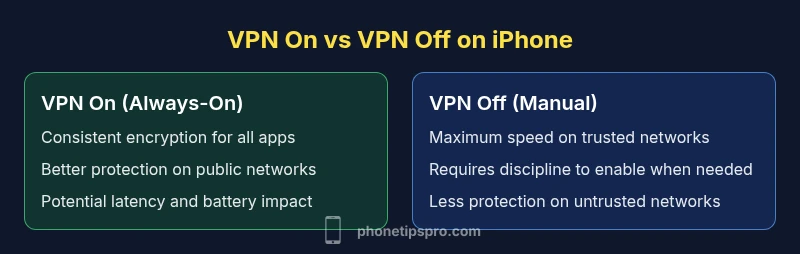
| Feature | VPN On by Default (Always-On) | VPN Off by Default (Manual) |
|---|---|---|
| Performance impact | Potentially higher latency due to the VPN tunnel | Minimal impact when VPN is off |
| Battery usage | May consume more battery when active | No extra drain when off |
| Privacy protection | Consistent protection across apps and networks | Protection only when manually enabled |
| Management and automation | Requires background activity and settings tuning | Requires manual activation and monitoring |
| Best use case | Public/untrusted networks, privacy-conscious browsing | Trusted networks, high-speed tasks, minimal interference |
Positives
- Enhances privacy on public networks
- Protects data in transit across all apps
- Can be automated to reduce user effort
- Helps bypass regional content restrictions when compliant
- Adds a barrier against local network snooping
Weaknesses
- May reduce connection speed and increase latency
- Drains battery faster when actively used
- Can introduce app compatibility issues on some networks
- Requires trust in the VPN provider and its policies
Choose VPN on iPhone selectively: enable it for untrusted networks and sensitive tasks, and disable when on trusted networks to preserve speed.
A balanced approach maximizes privacy where it matters while maintaining performance. Use auto-connect on untrusted networks and manual control on trusted networks for best overall experience.
FAQ
Should I always use a VPN on my iPhone?
Not always. Use a VPN on networks you don’t control or when handling sensitive data. On trusted networks (home or work), you may disable it to improve speed unless privacy needs dictate otherwise.
In short, enable the VPN on public or untrusted networks and consider keeping it off on trusted networks to save battery and speed.
Does using a VPN cause noticeable battery drain?
Yes, a VPN can use more battery because encryption and data routing require additional processing. The impact varies by device, server distance, and how long the VPN stays active. Short, targeted use or nearby servers can reduce drain.
VPNs can drain battery a bit depending on use; close-to-home servers and shorter sessions help.
Can a VPN protect me from all online tracking?
VPNs protect data in transit and mask your IP from external observers, but they don’t eliminate all tracking. Some trackers operate at the app level or rely on account data. Use a VPN alongside good privacy habits.
It helps with privacy, but it isn’t a magic shield against all tracking.
Is it safe to use free VPNs on iPhone?
Free VPNs can pose risks, including data limits, weaker encryption, and possible data collection. If you choose a free option, review its privacy policy and consider paid alternatives for stronger guarantees.
Free VPNs can be attractive, but they often come with hidden costs to privacy.
What’s the difference between a VPN and a private network proxy?
A VPN encrypts traffic and routes it through a remote server, protecting data in transit for all apps. A proxy typically handles browser traffic and does not always encrypt data across all apps. For system-wide protection, a VPN is usually the better choice.
VPNs encrypt everything; proxies usually only handle specific traffic and may not be as private.
Quick Summary
- Turn VPN on for public Wi‑Fi and unknown networks
- Use auto-connect rules to simplify protection
- Disable VPN on trusted home/work networks to save battery
- Choose providers with clear privacy policies and strong encryption
- Regularly review server lists and app permissions