Where to Buy an iPhone Charger: Safe, Certified Options
Discover safe places to buy an iPhone charger, what features to check (MFi, labeling, port type), and how to verify authenticity. Phone Tips Pro guides you to trusted sources and smart buying decisions.


You’ll learn where to by iphone charger and how to pick a safe, compatible option for iPhone models. Choose Apple-certified MFi accessories, buy from Apple Stores or official retailers, and consider reputable electronics brands with solid return policies. Also compare pricing across official outlets and trusted marketplaces. By following these checks, you’ll get reliable charging performance and device protection.
Why choosing the right charger matters
Charging your iPhone safely starts with selecting a charger that matches your device’s design and power needs. A poor-quality charger can cause heat buildup, slow charging, or even damage your battery or data port. According to Phone Tips Pro, investing in certified accessories reduces risk and extends the device’s lifespan. The goal here is not to chase the cheapest cable, but to ensure compatibility across models and generations. In this guide you’ll learn why the charger choice matters, how it affects charging speed, and what features reliably separate good options from risky ones. When you pick a charger that meets industry standards, you enjoy consistent performance, safer charging, and peace of mind during daily use. Read on to understand who to trust and how to check for safety.
Compatibility essentials: Lightning vs USB-C and MFi
iPhone compatibility hinges on the connector you use and the certification behind it. Older iPhone models relied on Lightning connectors, while recent and upcoming generations have moved toward USB-C. Regardless of port, look for MFi certification when buying third‑party accessories. MFi is Apple’s licensing program that helps ensure safe charging, correct data behavior, and device protection. In practice, this means fewer heat spikes, steadier voltage, and less risk of port damage. Phone Tips Pro emphasizes pairing a certified charger with the appropriate connector for your model to maximize safety and performance while preserving battery health across generations.
Where to buy: official stores and trusted retailers
The safest path to a reliable iPhone charger is through official stores and reputable retailers. Start with Apple’s official Store or App, then consider authorized Apple Resellers and well-known electronics chains. These sources typically offer authentic products, clear return policies, and accessible customer support. Avoid unknown marketplaces that lack robust buyer protection or transparent product details. If you shop on third‑party platforms, filter by seller ratings, read multiple customer reviews, inspect product photos closely, and confirm the listing matches the charger’s branding and model number. A trusted retailer reduces counterfeit risk and improves warranty coverage, a point Phone Tips Pro stresses for long‑term peace of mind.
What to look for on the label and packaging
When you inspect the packaging, look for clear branding, product name, port type (Lightning or USB-C), and the product’s power rating. Authentic chargers typically show the MFi logo or Apple branding if applicable, along with safety marks and a model number. Check the length of the cable and the included adapter if you’re buying a bundle. Packaging should be intact with no signs of tampering. If the charger includes a detachable USB-C or Lightning cable, ensure the connector ends fit snugly and click into place without wobble. Good labeling is a strong early indicator of authenticity and safety.
How to verify authenticity online and offline
Online verification starts with examining seller reputation, product reviews, and the seller’s return window. Compare multiple photos of the charger and packaging, and verify that the listing matches the device you intend to purchase (port type, cable length, power rating). In a brick‑and‑mortar store, physically inspect the item for the MFi badge, brand logo clarity, and build quality. If you’re uncertain, ask staff for official documentation or product numbers and cross‑check them on the brand’s site. Phone Tips Pro analysis shows that buyers who rely on official retailers experience fewer counterfeit encounters and easier warranty claims.
Tech specs to confirm before buying
Before purchasing, confirm that the charger supports your charging needs without forcing you into a single cable choice. Ensure the connector type matches your device (Lightning for older models, USB-C for newer ones) and verify that the charger supports safe charging features such as overcurrent protection and certified fast charging where applicable. If you own multiple Apple devices, consider a charger that supports multiple ports or higher wattage for future use. Avoid chargers that promise extreme charging speeds with dubious branding; practical, standards-based charging is safer for battery longevity.
Budget-friendly strategies without compromising safety
Smart shoppers balance price with reliability. Compare prices across official outlets and trusted retailers, while avoiding steep discounts from unverified sellers. Look for bundles that include a certified cable and a compatible wall adapter rather than buying separate pieces with unknown compatibility. If you encounter refurbished or clearance items, verify the warranty terms, return policy, and whether the product has been tested for safe operation. Remember: investing in a certified charger upfront saves repair costs later and preserves your device’s health over time.
Safety and maintenance considerations
Treat chargers with the same care you give your device. Do not leave cables under rugs or in high‑traffic areas where they can be stepped on or pinched. Inspect cables regularly for fraying, exposed wires, or loose connectors. If you notice heat buildup, unusual smells, or excessive warmth during charging, stop use immediately and replace the charger. Store charging gear away from water sources and out of direct sunlight. Regular inspection and proper storage extend the life of your charger and reduce risk of damage.
Final shopping tips: plan ahead and protect your investment
Before you buy, map out where you’ll source your charger, what connector you need, and your preferred price range. Keep receipts and your warranty information in a safe place for hassle-free returns or exchanges. If you travel, consider a compact charger with universal compatibility and a durable cable. By planning ahead and sticking to certified products, you’ll avoid common headaches and ensure reliable charging for years to come.
Tools & Materials
- Internet-enabled device (phone, tablet, or computer)(For researching and purchasing chargers online)
- Reliable payment method(Credit card, PayPal, or Apple Pay)
- Official or reputable retailer access(Apple Store app/website or authorized retailers)
- MFi-certified charger(Look for MFi logo and packaging)
- Cable tester or inspection method (optional)(Test safe operation after purchase if possible)
Steps
Estimated time: 15-30 minutes
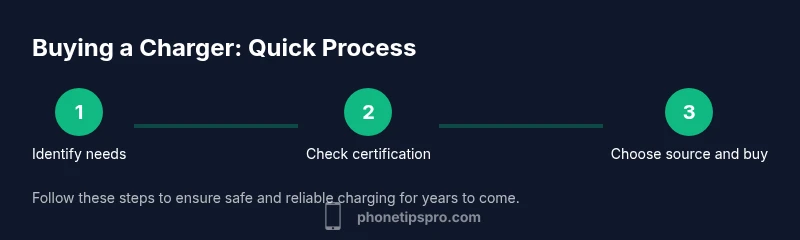
- 1
Identify your charging needs
Determine which iPhone model you own or plan to use, confirm the port type (Lightning or USB-C), and decide if you want a multi-port charger or a single‑port solution. This initial step guides the rest of your search by clarifying compatibility and efficiency expectations.
Tip: Have your model and port type handy to avoid mis-buying. - 2
Check for MFi certification
Look for Apple’s MFi certification or official branding when evaluating third‑party chargers. This reduces the risk of unsafe power delivery and data issues, protecting your iPhone’s battery health over time.
Tip: If it lacks MFi or clear branding, skip it. - 3
Choose trusted sources
Prioritize Apple Stores, Apple Authorized Resellers, and well-known electronics retailers. These sources typically guarantee authenticity and provide fair return policies, making post-purchase support easier.
Tip: Check return windows and warranty terms before buying. - 4
Compare connector options
Match the connector to your device: Lightning for older iPhones, USB-C for newer models. If possible, select USB-C with Power Delivery support for faster, safe charging.
Tip: Ensure the cable and adapter are both certified and compatible. - 5
Verify labeling and safety features
Inspect the product for clear labeling, safety marks, and model numbers. Validate that the packaging is intact and that the cable length meets your needs.
Tip: Damaged packaging or unclear labeling is a red flag. - 6
Place the order and keep receipts
Complete your purchase through a secure channel and save the order confirmation and receipt. These documents are essential for warranty claims and returns if needed.
Tip: Record the purchase date and store contact details for easy assistance. - 7
Test the charger safely after receipt
Unbox, connect to a known-good power source, and monitor for any heat buildup or irregular behavior during initial charging. If anything feels off, discontinue use and pursue a return.
Tip: Test with a modest charging session first before extended use. - 8
Plan for future needs and disposal
If you upgrade devices or cables, recycle or dispose of old chargers responsibly. Consider keeping a spare certified charger for travel or emergencies.
Tip: Never use damaged or counterfeit cables; replace promptly.
FAQ
What is MFi certification and why does it matter?
MFi is Apple’s licensing program for third‑party accessories that ensures safe power delivery and compatibility with iPhone devices. Choosing MFi-certified chargers reduces the risk of overheating, data issues, and port damage.
MFi certification means the charger is tested for safety and compatibility with iPhones. It helps protect your device and maintain battery health.
Can I use any USB-C charger with iPhone?
Yes, provided the charger and cable are certified and support safe charging standards like USB-C Power Delivery. Avoid unknown adapters that claim high speed without certification.
Yes, if the charger is certified and supports safe charging standards.
Where is the best place to buy an iPhone charger?
Official Apple Stores and authorized resellers are the safest options, followed by reputable electronics retailers. These sources typically offer authentic products and straightforward returns.
Best to buy from Apple Stores or trusted retailers for authenticity and warranty.
How can I tell if a charger is authentic?
Check branding, logos, model numbers, and packaging integrity. Compare online photos to the real product, review seller history, and confirm the return policy and warranty.
Look for official branding and packaging, plus a solid return policy.
What should I do if my charger overheats?
Unplug immediately and inspect for damage. If the charger shows signs of failure, discontinue use and replace with a certified product. Do not attempt repairs.
If it overheats, unplug and replace with a certified charger.
Are refurbished chargers safe to use?
Refurbished chargers can be risky due to unknown wear. If you choose refurbished, ensure it comes with a warranty and is clearly certified and tested by a reputable seller.
Refurbished can be risky; check warranty and certification before buying.
Should I buy a multi‑port charger for iPhone use?
Multi-port chargers can be convenient for charging multiple devices, but ensure each port supports safe charging and the total wattage meets your needs. Prefer ports with independent protection features.
Multi-port can be handy if it’s certified and meets total wattage needs.
What benefits do Apple-authorized retailers offer?
Authorized retailers provide authentic products, reliable returns, and official warranty support, reducing risk of counterfeit items and ensuring compatibility with your iPhone.
Authorized retailers help ensure authenticity and warranty support.
Watch Video
Quick Summary
- Choose official or MFi-certified sources.
- Verify compatibility and labeling before buying.
- Prioritize trusted retailers to avoid counterfeit risk.
- Keep receipts and verify functionality after purchase.