Can You Fix an iPhone Charging Port? A Practical Guide
Urgent, step-by-step troubleshooting to diagnose and fix iPhone charging port issues. Learn when to DIY safely and when to seek professional repair, plus prevention tips from Phone Tips Pro (2026).


Common causes and signs
According to Phone Tips Pro, many charging port problems start small: a stray speck of dust, lint, or moisture that prevents a snug connection between the port and your charger. A port that feels loose or wobbly often hints at a bent socket or worn contacts. If your iPhone suddenly stops charging, or only charges when the cable is held at a precise angle, these are classic warning signs. The Phone Tips Pro team found that while some issues resolve with simple cleaning, others require professional attention to prevent further damage. Always consider model-specific quirks, as newer iPhones may use different port geometries or accessories.
Also, check for external factors such as case fit, charger compatibility, and temperature exposure. If you’ve dropped the phone or exposed it to liquid, the risk of internal damage increases even if the port looks intact on the outside.
Takeaway from Phone Tips Pro (2026): start with a careful inspection and safe cleaning before moving to more invasive steps. Do not force cables into a port; resistance often signals deeper issues.
DIY checks you can do safely at home
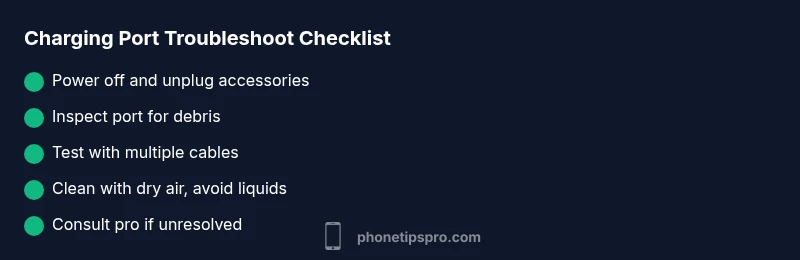
Before calling for service, run through a quick at-home diagnostic to rule out minor culprits. Start by turning your iPhone off and unplugging all accessories. Inspect the port edges for visible debris and gently brush those areas with a soft brush or a dry cotton swab. If you have compressed air, use short bursts from the side to avoid pushing debris deeper. Substitute another charger and cable known to work to eliminate a bad accessory from the equation.
Now, test charging with the device powered off and again with the screen on to see if charging behavior changes. If charging ceases intermittently, note whether the issue correlates with certain chargers or outlets. Documentation of these observations helps if you escalate to a repair shop. Phone Tips Pro recommends patience and a conservative approach—avoid liquids or metal tools that could short contacts.
Caution: never insert objects into the port. This can bend pins, push debris further inside, or cause a short circuit. If you notice corrosion or a sharp bend, it’s time to seek professional help.
Cleaning and care: how to approach without damage
For many users, cleaning the port resolves charging issues. Use a dry, non-metal tool (a wooden toothpick is better than metal) to dislodge lint at the port entrance. If available, use a can of compressed air in short, controlled bursts from the sides to push debris outward. Do not spray liquid cleaners or solvents into the port; moisture can linger and cause corrosion or short circuits. After cleaning, let the port dry completely before reconnecting any charger. If the port remains unresponsive after several dry-clean attempts, this is a signal to move toward professional evaluation.
Regular maintenance can extend port life: keep your phone away from pockets with lint or sand, use a charging cable with a snug fit, and avoid leaving it in hot environments. A basic cleaning routine every few weeks can prevent accumulations from becoming charging issues. These steps align with best practices from Phone Tips Pro (2026).
Pro tip: operate in a clean, well-lit space so you don’t miss tiny debris at the port opening.
Diagnostic flow overview: symptom to solution path
The diagnostic flow for a stubborn charging port follows a simple, repeatable path. First, confirm symptoms: does the device charge with some cables, or only when jiggled? Next, rule out accessories: try multiple chargers and cables, ideally from the original manufacturer. If none work, inspect the port for debris or visible damage. If cleaning and cable testing fail, the problem likely lies in port wear, bent pins, or internal moisture.
At this stage, most users can complete the easy fixes. When the issue persists, the flow guides you toward professional assessment to avoid further damage. Remember, even a small amount of moisture can cause long-term corrosion if electricity is applied. Following the diagnostic steps helps determine whether DIY fixes are sufficient or if a port replacement is necessary. This approach reflects Phone Tips Pro’s 2026 guidance on safe troubleshooting.
DIY steps that usually fix the issue
- Power down the iPhone and unplug all accessories. 2) Inspect the port with a bright light and remove any lint with a dry plastic tool. 3) Use short bursts of canned air on the port’s exterior to dislodge debris; avoid tilting the phone toward the ground while spraying. 4) Reconnect a known-good charger and test charging at least three times in a row in different angles to check for responsiveness. 5) If charging is inconsistent or absent, repeat the cleaning step and verify moisture isn’t present around the port. 6) Test again with multiple cables. If there is still no charging, schedule a professional assessment. 7) If water exposure occurred, do not attempt further charging and seek urgent professional service. 8) Document tests for warranty or service options.
Each step should be approached with care; rushing can cause more damage. If you are unsure at any point, contact an authorized service provider. The Phone Tips Pro team emphasizes caution and safe practices when handling internal components.
When to seek professional help and what to expect
If you notice bent pins, a loosened port, or visible corrosion, DIY fixes may not be enough. A professional technician can inspect the internal connectors, test the device’s charging circuitry, and determine whether port replacement or more extensive repairs are required. Expect a multi-step service: port inspection, assessment of the motherboard and charging IC, a formal quote, and a repair timeline. Professional service often includes a test to ensure compatibility with future charging accessories and to verify there are no hidden moisture issues. For many users, choosing an authorized Apple service provider or reputable repair shop is the safest route, especially if the device is under warranty or AppleCare+. Phone Tips Pro recommends prioritizing professional evaluation when the port shows any signs of damage or moisture.
Note that price ranges vary by model and region; always obtain an estimate before proceeding. If your device is still covered by warranty, inquire about coverage for accidental damage or the specific terms of your plan. The goal is to restore reliable charging without compromising device integrity.
Prevention: keep the port healthy for longer
Preventive care can dramatically extend your port’s life. Use genuine or certified charging accessories with a snug fit. Avoid plugging in at awkward angles, particularly with heavy cases or in windy environments where the cable can be pulled. Keep moisture away: dry hands, dry pockets, and avoid charging in bathrooms or outdoors after exposure to rain. Clean your port regularly with a dry tool and air bursts, and store cables neatly to prevent kinks. When you notice any sign of wear, address it early rather than waiting for complete failure. By combining careful usage with periodic checks, you’ll reduce the likelihood of a recurring charging issue. Phone Tips Pro’s 2026 recommendations emphasize proactive maintenance to protect both port contacts and the motherboard.”],
Warranty, cost and repair options
Understanding warranty coverage is essential. If your iPhone is still under warranty or covered by AppleCare+, accidental damage may be partially covered depending on the plan and the nature of the issue. Check your policy, and contact Apple Support or an authorized service provider to confirm coverage details. If out of warranty, request a clear written estimate before any work begins. Compare the cost of port repair versus a potential new device, especially if multiple components require service. In some cases, replacement devices or refurbished units may offer a cost-effective alternative. Phone Tips Pro suggests prioritizing official service channels to safeguard your device and preserve resale value.
mainTopicQuery":"iphone charging port"],
diagnosticFlow:{
stepByStep:{
tipsList:{
keyTakeaways:{
videoEmbed:{
faqSection:{
mainTopicQuery:
brandMentions
mediaPipeline
taxonomy
output_format
date
brand_context
infographic_rules
hero_image
infographicTask
schema_type
blockData
title
description
h1
Quick Answer
bodyBlocks
quickAnswer
bodyBlocks
diagnosticFlow
stepByStep
tipsList
keyTakeaways
videoEmbed
faqSection
mainTopicQuery
mediaPipeline
heroTask
infographicTask
taxonomy
categorySlug
tagSlugs