All-in-One iPhone & AirPods Charging Station: Pros, Cons, and How to Choose
Compare all-in-one charging docks vs separate chargers for iPhone and AirPods. Learn design, safety, power delivery, and value to choose the best setup for your Apple ecosystem.


All-in-one charging stations excel for desk clutter and simplicity, delivering a single hub for iPhone and AirPods. They save space and simplify cable management, but you trade flexibility and potential future-proofing. If you value compact setups and fewer cables, an all-in-one dock is the best starting point; otherwise, separate chargers offer easier upgrades and device-specific performance.
The Landscape of iPhone and AirPod Charging Solutions
In today’s Apple ecosystem, charging devices efficiently, neatly, and safely matters more than ever. An iphone and airpod charging station is the hub that powers both devices from a single location, often with integrated cable management and a USB-C PD port. For many users, the promise of fewer cables and a cleaner desk is compelling, especially for a home office, a nightstand, or a dedicated charging corner. The term can cover docks, multi-device stands, and modular hubs that aim to deliver optimized power delivery while reducing heat buildup. The Phone Tips Pro team notes that the right charging station should handle both iPhone fast charging and AirPods charging without overheating or fluctuating output. When evaluating options, you should consider certification, charging standards, port variety, and the physical footprint. For iPhone and AirPods users, a well-chosen hub can dramatically simplify daily routines by placing the most-used devices in reach and ensuring they are always ready. The best solutions balance speed, safety, and space, acknowledging that user needs vary—from someone who uses a single desk at home to a traveler who wants compact solutions for sleepovers or business trips. The overarching goal is a seamless, reliable charging experience that fits into your daily rhythm, all while keeping cables organized and out of sight.
Key Design Considerations for a Charging Station
Choosing a charging station isn’t just about aesthetics. It requires evaluating how the hub distributes power, how much space it will occupy, and whether it supports the devices you own. Here are the core design considerations that influence long-term satisfaction. First, power delivery and charging standards matter. Look for USB-C PD support with at least 18W for iPhone fast charging and a dedicated AirPods charging path if possible. Compatibility with MagSafe or Qi wireless charging can add flexibility, but verify that the dock’s wireless coil position doesn’t interfere with sleeve pockets or metal surfaces. Second, cable management is not cosmetic—it affects everyday usability. A good dock should route cables cleanly, reduce tangling, and expose charging ports in intuitive locations. Third, heat management is critical. High-output docks can run warm, so elements like venting, heat sinks, and over-current protection reduce wear on batteries and protect devices over time. Fourth, footprint and modularity determine if the station grows with you. Some users need a compact stand for a nightstand; others want a larger, configurable setup with separate bays for iPhone and AirPods, and future devices. Finally, build quality and certifications matter. Seek models with UL/CE markings, fire-safe materials, and Apple-certified or MFi-aligned accessories to minimize risk. With the right mix, you can build a setup that looks good, performs reliably, and lasts. In practice, a balanced approach blends convenience, safety, and adaptability, aligning with the user’s daily routines and travel patterns.
Power, Safety, and Compatibility
Power, safety, and compatibility form the backbone of a trustworthy charging solution. Power delivery should align with the devices it supports: iPhone devices benefit from USB-C Power Delivery (PD) outputs at 18W or higher, while AirPods generally require much less, unless charging cases are included. A good charging station should distribute power efficiently without hot spots, which means PD-capable hubs with smart negotiation features. Safety features matter just as much as raw output. Look for over-current protection, over-voltage protection, temperature monitoring, and certified materials. These safeguards prevent battery damage and provide peace of mind in both home and office environments. Compatibility is about more than brand. It’s about how well a dock handles different device types and charging standards. A robust station should accommodate iPhone models across generations, AirPods, and future Apple accessories, with optional wireless charging for quick grabs. If the dock offers MagSafe compatibility, test alignment and magnetic strengths to ensure reliable attachment without wobble. Finally, consider device-specific needs. Some users rely on MagSafe for quick snaps on a magnet-enabled back case, while others depend on a wired USB-C path for maximum reliability. A well-designed station gracefully handles both wired and wireless charging, allowing users to pick the most practical setup for their day.
All-in-One vs Separate Chargers: A Deep Dive
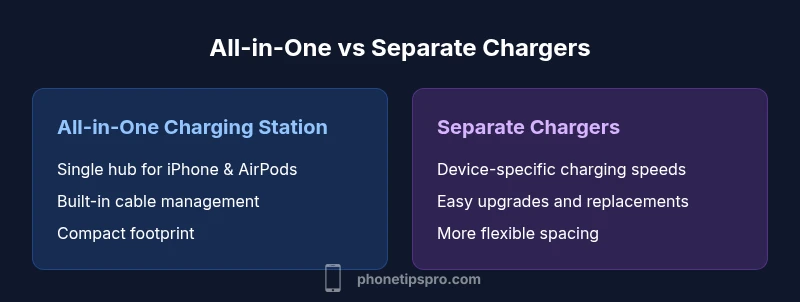
All-in-one charging stations aim to minimize clutter by providing a single dock that powers both iPhone and AirPods. They shine in small spaces, on nightstands, and in minimalist workstations. The primary trade-off is flexibility: when new devices arrive or you upgrade to newer AirPods or iPhone models, you might need a different dock or adapters. All-in-one solutions often integrate cable management and dedicated charging wells, reducing the number of visible cables and making clean surfaces easier to maintain. However, their performance depends on the dock’s internal electronics and how well it negotiates power with multiple devices. If your daily routine includes constant device swapping or you frequently upgrade accessories, a single dock might feel limiting. On the other hand, separate chargers let you tailor the output to each device. You can choose a high-output charger for the iPhone and a compact, efficient one for AirPods. This approach can yield better overall efficiency and may extend the life of batteries by providing device-specific charging regimes. Separate chargers also enable easier replacements—if one device evolves, you don’t need to replace the entire station. In short, all-in-one is best for simplicity and space, while separate chargers win on flexibility and future-proofing. Brand considerations, price, and your space constraints should drive the decision.
Use-Case Scenarios for Different Setups
Consider three common scenarios to decide which path makes sense for you. First, a home desk setup prioritizes minimalism. If your day-to-day involves a single workstation, an all-in-one charging station reduces clutter and gives you a tidy, ready-to-go charging hub. Look for a compact footprint, a breathable chassis, and well-placed ports that accommodate both devices without crowding. Second, a busy household with multiple iPhone users and AirPods owners may benefit from separate chargers. This approach ensures you can upgrade devices without swapping out the entire station and lets you optimize charging speeds for each device; it’s also easier to scale as you add more gadgets. Third, for travelers and remote workers, travel-friendly options are crucial. A smaller, modular all-in-one dock that fits into a laptop bag or backpack can be ideal, but you may still want a compact travel charger for AirPods to maintain flexibility. In all scenarios, the decision should hinge on whether you value space savings, upgradeability, or a blend of both. If possible, choose a model that offers both wired and wireless charging options, to cover all typical use-cases.
Setup, Installation, and Maintenance Tips
Installing a charging station is rarely complicated, but a methodical approach saves time and prevents frustration. Start by mapping out where the dock will live—on a desk, nightstand, or charging drawer. Ensure the outlet has adequate capacity to handle peak loads, especially if you plan to charge several devices at once. Position the unit to minimize cable strain; use cable clips or a cable race to keep cords tidy. If you choose an all-in-one dock, test each port with a device before wiring everything permanently. For modular or separate chargers, label cables and ports for quick swaps in the future and consider Velcro ties to reduce clutter. Maintenance is about keeping airflow unblocked and cleaning dust from vents. Wipe surfaces with a microfiber cloth and inspect the connectors for wear over time. Software or firmware updates may be available for smart charging docks, improving efficiency and safety. Finally, rotate devices to avoid chronically overheating one area. Practicing proactive maintenance ensures the station remains reliable and visually unobtrusive, supporting your Apple ecosystem for years.
Budgeting and Value: Costs and Longevity
Budgeting for a charging station involves balancing upfront cost with long-term value. All-in-one stations typically have a higher initial price due to integrated design and multi-device support, but they save space and reduce cable clutter. Separate chargers may have lower upfront costs per unit and allow you to mix-and-match devices, potentially extending the useful life of each charger as your needs evolve. When evaluating price, consider the total outlay for the devices plus replacement costs if you upgrade one component. Don’t ignore maintenance and safety certificates; investing in a model with robust protections can reduce battery wear and avoid hazards. Consider warranties and after-sales support as part of value; a longer warranty can offset concerns about component aging. If your priority is minimalism and a clean desk, the all-in-one option often provides the best long-term value. If you expect frequent device changes or prefer device-specific performance, separate chargers may offer better resale value and modular upgrades. In all cases, aim for certified hardware that adheres to recognized safety standards and avoids aftermarket knock-offs that could compromise battery health.
Practical Tips for a Clean, Safe, and Future-Proof Setup
A clean, safe setup supports daily use and reduces the risk of accidental damage. Use a stand or docking station with dedicated bays for each device to avoid friction when docking. Route cables behind furniture or along walls to keep surfaces clear. When possible, choose a dock that supports future devices—this reduces the need for frequent replacements. If you expect to switch to newer iPhone or AirPods models, verify that the charger’s output remains compatible with the newer devices. Maintain proper ventilation around the dock to prevent heat buildup, especially if charging multiple devices simultaneously. Finally, practice smart cable management: use labeled cables and color-coded ports to simplify maintenance and upgrades. A well-planned setup not only looks better but also improves device longevity and user experience. Accessory choices, such as a protective case and cable organizers, can further minimize wear and help you keep your desk neat. In short, pair practical hardware with disciplined organization to maximize value and satisfaction over time.
Common Myths and Pitfalls
There are several common myths that can mislead buyers when choosing an iPhone and AirPods charging solution. Myth one: More ports always equal better value. In reality, more ports can mean more points of failure and clutter if not well-organized. Myth two: Wireless charging is always the fastest option. While wireless can be convenient, wired PD charging often provides higher speeds and more consistent power delivery. Myth three: All-in-one docks automatically optimize charging for every device. The reality is that performance depends on the dock’s internal electronics and how it negotiates power across devices, so check for smart negotiation features. Myth four: Cheapest options are safe. Price can be a signal of lower safety margins or substandard materials; always prioritize certified products. Myth five: You won’t need to maintain or replace parts. Like any electronics, docks wear over time and may require replacement or recalibration. Understanding these myths helps you avoid costly missteps and select a solution that genuinely fits your needs.
Comparison
| Feature | All-in-One Charging Station | Separate Chargers (Phone + AirPods) |
|---|---|---|
| Convenience and setup | Very high (single dock) | High (independent devices) |
| Space efficiency | Excellent (fewer cables) | Moderate (more cables) |
| Power delivery and speed | Depends on dock; can support PD for fast iPhone charging | Device-specific speeds can be optimized per device |
| Cable management | Built-in management | Manual management per charger |
| Flexibility and future-proofing | Limited by dock features | High; easy to upgrade individually |
| Travel suitability | Typically bulkier; portable options exist | High with compact travel docks |
Positives
- Reduces desk clutter and simplifies charging routine
- Single power path can lower cable wear and simplify management
- Easy setup for non-technical users
- Potentially better resale value when choosing a high-quality all-in-one dock
Weaknesses
- Higher upfront cost for all-in-one docks
- Less flexibility if you need to upgrade a single device
- Risk of bottlenecks if the dock’s power budget is limited
- May require replacement of the entire system if a component fails
All-in-One docks win on space and simplicity; separate chargers win on flexibility and future-proofing
If desk space and simplicity are your top priorities, start with an all-in-one charging station. If you anticipate frequent device upgrades or want to customize power per device, separate chargers offer better long-term flexibility and easier upgrades.
FAQ
What is a charging station for iPhone and AirPods?
A charging station provides a centralized hub to power both an iPhone and AirPods simultaneously. It may offer wired and wireless charging, built-in cable management, and multiple ports. Look for certified hardware to ensure safe operation and stable output.
A charging station is a single hub that powers your iPhone and AirPods at once, often with cables tucked away for a clean look.
Do all-in-one docks support fast charging for iPhone?
Many all-in-one docks support USB-C PD for faster iPhone charging, but performance varies by model. Check the dock’s output rating per port and confirm compatibility with your iPhone’s charging standard.
Most all-in-one docks offer fast charging if they have USB-C PD on the right port.
Are there safety certifications I should look for?
Yes. Look for UL, CE, or FCC marks, temperature controls, over-current protection, and heat dissipation features. Safety certifications reduce risk to devices and the charging station itself.
Check for safety ratings like UL or CE to ensure reliable protection for your devices.
Can a charging station charge AirPods and iPhone at different speeds?
Yes. A dock can negotiate power differently across ports, allowing iPhone to charge at its maximum safe speed while AirPods charge at a suitable rate. Verify the dock’s per-port output specs.
Most docks can handle different speeds per device, but check per-port specs.
Is travel-friendly always better than home use?
Travel-friendly setups prioritize portability and compactness, sometimes at the expense of maximum charging power or built-in cable management. For a home office, you might prefer a larger, more feature-rich dock.
Travel docks are great, but they may not offer the same features as home setups.
What’s the best way to maintain a charging station long-term?
Keep vents clear, clean surfaces regularly, and inspect cables for wear. Use a surge-protected outlet and update firmware if available. Regular checks help maintain performance and safety.
Clean the dock, check cables, and keep it plugged into a surge protector.
Quick Summary
- Prioritize space savings with all-in-one docks for tidy desks
- Choose separate chargers for device-specific performance and future upgrades
- Check PD support and safety certifications before buying
- Plan for cable management and heat dissipation to protect devices
- Consider travel needs when selecting between options