iPhone and Apple Watch Charger: Official vs Third-Party
Compare official Apple chargers with high-quality third-party options for iPhone and Apple Watch. Learn about charging speeds, safety, and best setups for home, travel, and everyday use.


TL;DR: For a reliable, hassle-free setup, use official Apple chargers and accessories designed for iPhone and Apple Watch. They deliver consistent safety and compatibility but at a premium. If you value flexibility, travel-friendly options, or cost savings, choose a high-quality third‑party charger that is MFi-certified and supports both devices. This comparison shows the key tradeoffs.
Understanding the Charging Landscape for iPhone and Apple Watch
Charging an iPhone and an Apple Watch has become a daily ritual for many users, but the best approach depends on how you balance convenience, safety, and cost. When you think about an iphone and apple watch charger, you’re really choosing between two families of devices: dedicated Apple accessories that guarantee compatibility and a growing set of high-quality third-party options that can combine speed, portability, and value. According to Phone Tips Pro, the most important decision is to anchor your setup in certified gear that matches your typical usage, whether at home, at work, or on the go. In this analysis we provide a practical framework you can apply across desk, nightstand, and travel needs.
First, understand that iPhone charging is evolving with MagSafe and USB-C power delivery, while Apple Watch charging remains a compact magnetic puck. This divergence matters: you may want a single dock that handles both devices with minimal cable clutter, or you may prefer separate accessories tailored to each device’s charging profile. The rest of this article compares official Apple solutions against well-chosen third‑party options, and it explains how to optimize for battery health, safety, and long-term value. The goal is a rigorous, evidence-based framework you can apply in everyday life.
Key Charging Technologies: MagSafe, Qi, and the Apple Watch Dock
The iPhone supports wireless charging via Qi and, for recent models, MagSafe. MagSafe delivers faster charging when paired with a compatible 20W (or higher) USB-C power adapter and a MagSafe-certified accessory, but many third‑party docks cap the maximum speed if they aren’t optimized for MagSafe. Qi-based charging remains common and is compatible with most wireless pads, delivering reliable power but typically at a lower maximum rate than MagSafe. Apple Watch charging uses a dedicated magnetic charging puck, delivering a steady, regulated output designed specifically for the watch magnet system. When evaluating chargers, prioritize those that clearly specify compatibility with both iPhone and Apple Watch, and check for any case or accessory limitations that could impede magnetic alignment or heat dissipation. For travelers or mixed-use setups, a dual-device dock that supports MagSafe for iPhone and a proper Apple Watch cradle can reduce clutter and simplify daily routines.
Official Apple Chargers vs Third-Party Options: What You Get
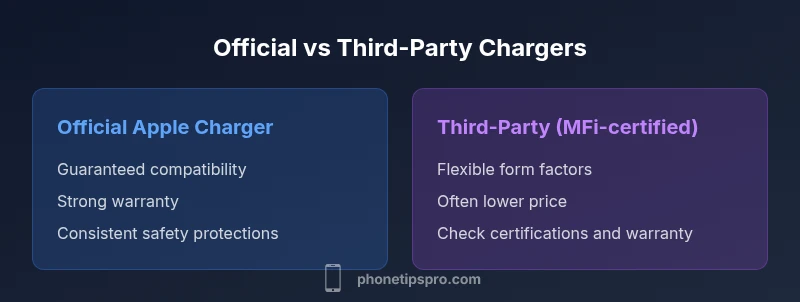
Official Apple charging gear is designed to work seamlessly within the Apple ecosystem. MagSafe Chargers, Apple Watch charging cables, and certified USB-C adapters provide consistent performance, strong safety guarantees, and reliable warranty coverage. Third-party options, especially those that carry MFi or other recognized safety certifications, offer competitive speed and sometimes better form factors (such as slimmer docks, integrated cable management, or travel-friendly designs). The key difference often comes down to reliability and protection: certified third-party chargers can be excellent value, but ensure the accessory carries the proper safety marks and has a credible warranty. If long-term reliability and minimal compatibility doubts are priorities, the official route minimizes risk; if you value flexibility and budget, a carefully chosen third-party option can meet most needs while preserving safety and performance.
How to Choose the Right Charger for Your Setup
Choosing the right charger starts with your daily routine. If you keep a dedicated charging station at your desk, a 2-in-1 dock that supports iPhone fast charging via MagSafe and a built-in Apple Watch puck can dramatically reduce cable clutter. For travel, look for compact, lightweight pads or docks with a robust travel pouch and a single power adapter that can supply USB-C PD. If you’re upgrading an older watch or phone, verify compatibility with your model’s charging speed, magnet strength, and any case you frequently wear. Remember to consider cable length, power supply quality, and whether you prefer a stand, pad, or cradle design. A practical rule: prioritize safety certifications (UL, CE, FCC where applicable) and look for devices that explicitly state compatibility with both iPhone and Apple Watch. This helps protect battery health over time and reduces the risk of heat buildup during charging.
To maximize value, map your typical charging scenarios—home, office, car, and travel—and annotate the minimum wattage you actually need for each device. Then identify a charger solution that covers your essentials without overpaying for features you won’t use. A well-chosen charger setup can simplify daily routines, protect battery health, and make charging faster and safer across devices.
Travel, Nightstand, and Desk Setups: Practical Scenarios
In a home desk setup, you might favor a sturdy, 2-in-1 dock with MagSafe compatibility for iPhone and a dedicated Apple Watch charger. This minimizes clutter and ensures a clean, organized workspace. On a nightstand, a compact stand with a short cable can keep both devices within easy reach without taking up precious space. For travel, look for ultra-compact solutions that can withstand frequent packing and include an all-in-one cable that handles both devices when possible. Each scenario benefits from verification of safety certifications and consistent battery management features. An efficient setup reduces friction and encourages regular charging discipline, which supports optimal battery longevity over years of use.
Safety, Battery Health, and Longevity Best Practices
To protect battery health, avoid charging on soft surfaces or in high-heat environments. Remove metal accessories that could affect magnetic charging alignment and keep charging areas clear of clutter that can trap heat. Use certified adapters and cables, and avoid stacking multiple adapters or using underpowered power sources, which can slow charging and generate excess heat. If you wear a protective case, confirm that it does not interfere with MagSafe magnets or watch charging alignment. Periodically inspect cables and connectors for wear and replace any damaged components promptly. While charging, ensure devices are not covered by blankets or pillows and avoid charging under heavy direct sunlight. Phone Tips Pro recommends using a single trusted charging setup for safety and battery longevity, especially when devices are used daily.
Price Ranges, Value, and Long-Term Costs
Official Apple charging gear tends to sit in the mid-range for price, with premium options offering faster speeds or more ergonomic designs. Third-party chargers occupy a wider price spectrum, from budget-friendly pads to premium multi-device docks with advanced cable management. When evaluating value, balance upfront cost with potential long-term savings from reduced wear and tear on both devices. A durable, certified charger may cost more initially but tends to deliver safer, more reliable performance and can outlast cheaper alternatives. In 2026, the market also includes modular docks and travel kits that offer great flexibility, though you should still verify safety certifications and warranty terms before purchase. The goal is to select a setup that remains safe, efficient, and compatible across your most frequent devices while minimizing recurring replacement costs.
Common Pitfalls and Myths About iPhone and Apple Watch Chargers
A common pitfall is assuming that any wireless charger will work identically for both iPhone and Apple Watch. While some two-device docks exist, watch charging is optimized for the Apple Watch’s magnetic puck, and iPhone charging benefits from MagSafe or USB-C PD. Another pitfall is buying a cheap, non-certified charger that lacks protections against surges or overheating. Always look for recognized safety marks and avoid stacking weak components. A frequent myth is that charging faster always harms battery health; in reality, using a certified, appropriately powered charger with smart heat management helps preserve longevity while delivering efficient charging for daily use. Finally, don’t overlook travel accessories—compact, multi-device docks can simplify packing and reduce cable clutter without compromising safety.
Comparison
| Feature | Official Apple Charger & Watch Dock | Third-Party Charger (MFi-certified) |
|---|---|---|
| Charging speed (iPhone) | Up to 15-20W with MagSafe depending on accessory and power adapter | Typically 10-20W for Qi/MFi-certified setups; speed varies by model |
| Charging speed (Apple Watch) | 5W standard on most docks | 5W standard or compatible certified speeds depending on dock |
| Compatibility & safety | Official Apple ecosystem integration; strong warranty coverage | MFi-certified options with safety marks; verify warranty terms |
| Form factor & clutter | Dedicated Apple Watch cradle plus a separate iPhone charger | Two-in-one or dedicated dual-device docks with built-in cable management |
| Price range | Mid-range to premium for official setups | Wide range from budget to premium depending on features |
| Best for | Reliability, warranty, and ecosystem consistency | Flexibility, value, and travel-friendly designs |
Positives
- Keeps charging simple with a single setup
- Certified options support battery health and safety
- Desks and nightstands stay organized with docks
- MagSafe speeds unlock faster iPhone charging when used correctly
- Travel-friendly options reduce clutter
Weaknesses
- Official gear can be pricier
- Some third-party docks may require extra verification for safety
- Not all docks support both devices equally (watch vs iPhone)
- MagSafe is case-sensitive and may be hindered by certain cases
Official Apple chargers excel in reliability; well‑chosen third‑party options offer value and flexibility
For most users, start with certified, ecosystem-friendly gear. If budget or portability is your priority, explore high-quality third-party docks that explicitly support both iPhone and Apple Watch with proper safety certifications.
FAQ
Can I charge my iPhone and Apple Watch with a single charger?
Yes, several dual-device docks exist that support iPhone charging via MagSafe or Qi and include an Apple Watch cradle. Check that the dock specifies compatibility with both devices and that it provides safe, regulated power for each.
Yes. Look for a certified dual-device dock that explicitly states iPhone and Apple Watch compatibility, and ensure it provides safe, regulated power for both.
Is MagSafe faster than standard wireless charging for the iPhone?
MagSafe can deliver higher power to iPhone models that support it when used with a compatible adapter and a MagSafe-certified accessory. However, Apple Watch charging remains a separate, slower process designed around the watch’s magnetic puck.
Yes, MagSafe can be faster for iPhone with the right adapter and accessory, while the Apple Watch uses its own slower, magnetic charging system.
Do I need to buy only official Apple chargers?
No. You can use high-quality third-party chargers that carry safety certifications like MFi, CE, or UL. The key is to choose reputable brands and verify compatibility with both iPhone and Apple Watch.
No. Certified third-party chargers can work well; just verify safety certifications and compatibility.
Will using a third-party charger affect my iPhone’s battery health?
A certified third-party charger should not harm battery health and can perform as well as an official option. Avoid non-certified products, as they may lack protections and could affect charging stability.
As long as it’s certified, a third-party charger won’t harm battery health; avoid uncertified options.
What should I avoid when charging near the bed or travel?
Avoid charging on soft surfaces that trap heat, and keep chargers away from pillows or blankets. For travel, pack compact, certified docks with a single power adapter to minimize heat buildup and maximize safety.
Keep chargers on solid surfaces, avoid heat traps, and use compact, certified docks when traveling.
Does using MagSafe require removing cases?
Some MagSafe setups require a thinner case or a case designed for MagSafe. If you use a metal or very thick case, charging efficiency and alignment may be affected.
Case compatibility can affect MagSafe charging—thin or MagSafe-certified cases work best.
Quick Summary
- Prioritize safety certifications and compatibility
- Choose a setup that reduces cable clutter and fits daily routines
- MagSafe adds speed for iPhone charging when used correctly
- Verify watch charging compatibility with the chosen dock
- Evaluate long-term value, not just upfront cost