When to Charge iPhone 16: Smart Battery Habits for Longevity
Learn when to charge iPhone 16 for maximum battery longevity. This step-by-step guide covers optimized charging, settings, heat management, and practical routines for daily use, travel, and overnight charging.


To maximize iPhone 16 battery longevity, charge before it drops below 20%, avoid keeping it at 100% for long, and rely on Optimized Battery Charging. Use a quality USB-C PD charger, keep cool while charging, and follow routines that balance daily needs with long-term health.
Understanding the iPhone 16 Battery and Charging Chemistry
The iPhone 16 uses a lithium-ion battery, and its charging behavior is shaped by both hardware and software controls. If you’re curious about when to charge iPhone 16, a quick primer on the chemistry helps explain why timing matters. Lithium-ion cells tolerate repeated charging cycles, but prolonged exposure to high voltage or heat can gradually wear the capacity that powers your screen, apps, and sensors. The iPhone’s built-in management system monitors temperature, battery health, and charge rate to optimize longevity. In practice, this means that the phone isn’t simply charging to 100% every time; it’s carefully modulating current and stopping short when the battery reaches thresholds that maximize life. The most important concept for daily use is balancing convenience with long-term health. For most people, that balance means charging in a way that prevents deep depletion and avoids long stints at full charge.
For the term "when to charge iPhone 16", think of it as a routine rather than a single moment. It’s better to plug in before you drop far below 20% and to unplug before you sit at a full 100% for hours at a time. When you handle charging with intention, you preserve battery capacity, minimize heat exposure, and keep performance steady across years.
Core charging principles for daily use
Daily charging should align with how you use your device. One core principle is to avoid letting the battery sit at very low voltages for long periods and to avoid habitual overnight charging to 100%. The 20-80% guideline is a practical heuristic many iPhone users rely on to extend cycle life without sacrificing daily usability. In real terms, charging from 20% to 80% most days reduces the time the battery spends in the top range of voltage, which, in turn, reduces stress and heat generation. The iPhone 16’s Battery Health feature and system software assist with this by smoothing charging curves and scheduling top-ups to minimize dwell time at the final percentile. If you’re in a situation where you frequently need the phone all day, a mid-range charge to 75–85% before leaving home can be a good compromise, as long as you avoid leaving it plugged in well past the point where it would naturally finish charging after you wake. In short, the best practice is to think of charging as a regular rhythm rather than a single event.
Battery efficiency also depends on environmental factors. Heat is a battery’s enemy; a warm room, a warm desk, or a hot phone during charging accelerates aging. If you routinely work in a hot environment or charge on a soft surface like a bed, consider moving to a cooler surface or using a ventilated charger pad to maintain safe temperatures. Phone Tips Pro recommends checking battery health periodically and adjusting routines as needed.
Optimizing charging settings on iPhone 16
iPhone 16 supports Optimized Battery Charging, a feature designed to reduce battery aging by learning your daily charging routine and delaying the final 20% until you need it. To enable it, go to Settings > Battery > Battery Health and Charging (terms may vary by iOS version) and toggle Optimized Battery Charging. When enabled, the phone charges to about 80% quickly and then finishes the last portion closer to the time you typically unplug. This works best if you have a consistent daily schedule. If you occasionally need a full charge for travel or a long workday, you can temporarily disable the feature by plugging in or turning it off in the same menu. The 80% target is not a hard limit; it’s a recommended baseline that helps minimize time spent at 100%.
Additionally, review Power settings: Enable Low Power Mode when battery is below 20% to conserve energy, and keep Background App Refresh limited during heavy charging times to reduce heat generation. Ensure you’re using a high-quality charger that supports USB-C Power Delivery (PD) to safely deliver faster charging without overheating. Regularly cleaning the port and cable ends can also prevent resistance that slows charging.
Choosing the right charger and cables
For iPhone 16, the safest and most efficient charging setup uses a USB-C Power Delivery charger. A 20W–30W PD adapter is typically sufficient for a full charge that remains safe and fast. Higher wattage chargers can charge quickly, but they are not necessary for daily use and may generate more heat if you’re not actively draining the battery. Use a high-quality USB-C to USB-C cable, preferably with an official or reputable third-party rating. Avoid third-rate cables with frayed insulation or inconsistent voltage. If you travel, a compact USB-C PD brick paired with a short, sturdy cable can reduce heat buildup and keep the device cooler during long charging sessions. If you’re charging from a laptop, ensure the port supports PD; otherwise, the phone might charge slowly or remain at a lower voltage than desired.
Cable quality matters as much as charger power. Subpar cables can produce voltage drops or warm up excessively, which reduces charging efficiency and battery health over time. When possible, choose cables that have undergone reputable safety testing and certifications. In addition, aim to avoid charging on heat-retaining surfaces like beds or couches; instead place the phone on a hard surface with air around it to dissipate heat.
Practical charging routines for different scenarios
At home desk: Start your day with a 60–80% charged phone if you woke up with a lower level. If you will be away from a charger for several hours, top up to ~80%. Use Optimized Battery Charging to prevent long dwell times at 100%. In the office, keep the phone in a cool spot and avoid charging overnight unless you disable Optimized Battery Charging for the night. On the road: If you’re commuting or traveling, use a compact USB-C PD charger in your bag. A quick 15–20 minute top-up can restore a meaningful amount of battery life without stressing the system. Overnight: If you must charge overnight, leave Optimized Battery Charging on and ensure the device has ventilation. If you’re worried about overcharging, use the built-in iOS feature to pause charging until morning. For heavy-duty use, a mid-day top-up can be a practical compromise to maintain around 70–85% during long days without spending more hours at 100% than necessary. The goal is a predictable charging rhythm that aligns with your daily schedule while protecting battery health.
Common myths and what to actually do
Myth: Fully charging to 100% every night is best. Reality: Continuous 100% exposure can accelerate aging. Myth: You must never charge from 0% to 100%. Reality: Deep discharges are more stressful than moderate top-ups; charging before 20% is practical, but occasional full cycles won’t ruin your battery. Myth: Heat doesn’t affect lithium batteries. Reality: Heat accelerates aging and reduces peak capacity; always charge in a cool environment. Myth: Fast charging is always dangerous. Reality: Modern iPhone hardware and PD chargers are designed to manage heat; fast charging is safe when used with proper equipment. Myth: Battery Health is permanent and unchanging. Reality: Battery Health changes with usage; monitor it in Settings to adjust your routine. Phased charging using Optimized Battery Charging integrates with your daily schedule to reduce stress on the battery over time.
Battery health monitoring and long-term planning
To plan for the long term, check the Battery Health section in iOS regularly. You’ll see Maximum Capacity and Peak Performance Capability. Aim to keep Maximum Capacity above 80% for normal daily use; as it declines, consider adjusting charging habits or planning replacement if necessary. For long-term planning, consider how often you replace devices; the iPhone 16 is designed for longevity, but battery wear remains inevitable. Phone Tips Pro recommends pairing practical charging habits—such as staying within the 20–80% range, enabling Optimized Battery Charging, and avoiding heat—with regular checks of battery health. When you notice rapid drain or unexpected battery behavior, consider re-evaluating routines or seeking professional help if you detect swelling, unusual heat, or other safety concerns.
Tools & Materials
- USB-C PD charger (20W–30W)(Original Apple or reputable third-party charger preferred)
- USB-C to USB-C charging cable(Quality cable with official certifications)
- Wall outlet or surge-protected power strip(Stable power supply; avoid daisy-chaining)
- Portable USB-C PD power bank (optional)(For travel; choose 20W+ PD output)
- Phone case (optional during charging)(Remove if device overheats during high-wattage charging)
Steps
Estimated time: Estimated total time: 15-20 minutes
- 1
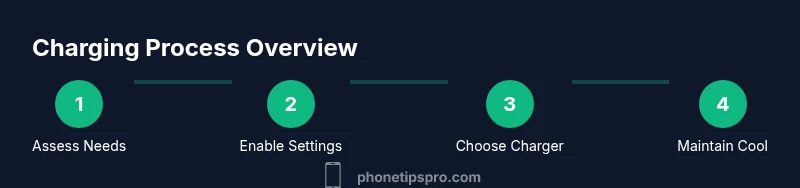
Assess your daily charging needs
Identify typical daily screen-on time, commuting patterns, and whether you often work away from a charger. This informs how aggressively you should top up to 80% and how often to rely on Optimized Battery Charging.
Tip: Aim to align charging windows with your regular schedule for predictable top-ups. - 2
Enable Optimized Battery Charging
Open Settings, then Battery Health and Charging, and toggle on Optimized Battery Charging. This reduces aging by learning your routine and delaying the final 20% until you unplug.
Tip: Keep a consistent daily pattern to maximize effectiveness. - 3
Choose a safe charger
Use a USB-C PD charger within the 20W–30W range and a certified USB-C cable. Higher wattage is not always better for daily use and can generate extra heat if not managed properly.
Tip: Avoid cheap, uncertified cables that can cause voltage drop and heat. - 4
Plan daily top-ups
If you wake up at 60–70%, consider a light top-up to 80% before leaving. For long days away from power, a brief mid-day top-up can prevent the device from nearing 0%.
Tip: Small top-ups are safer for battery longevity than deep discharges. - 5
Keep charging cool
Charge on a hard surface away from heat sources. If you notice the phone getting unusually warm, pause charging and let the device cool before resuming.
Tip: Ventilation matters; avoid charging on cushions or beds. - 6
Monitor battery health
Check Battery Health in Settings periodically and adjust routines if you see rapid capacity loss or unexpected performance changes.
Tip: Set a monthly reminder to review Maximum Capacity and Peak Performance. - 7
Travel or heavy days
During travel or heavy usage days, carry a compact PD charger and plan 15–20 minute top-ups to keep you in a comfortable range without forcing full charges.
Tip: Keep your device out of direct sun and heat while charging on the go. - 8
Review and adapt
At the end of each week, review how your charging pattern affected day-to-day performance and adjust to maintain a practical balance between convenience and battery health.
Tip: Small tweaks add up to meaningful long-term benefits.
FAQ
Should I always enable Optimized Battery Charging on iPhone 16?
Yes. Optimized Battery Charging is designed to reduce battery aging by learning your routine and delaying the final portion of charging until you typically unplug.
Yes. Optimized Battery Charging helps protect the battery by finishing the last part of charging closer to when you usually unplug.
Is it okay to charge overnight with Optimized Battery Charging on?
Generally yes. If you need to charge overnight, leave Optimized Battery Charging on; it will pause near 80% and finish closer to your wake time.
Yes, overnight charging is fine with Optimized Battery Charging on; it paces the final portion.
Does fast charging harm the iPhone 16 battery?
Modern iPhone hardware and USB-C PD chargers are designed to manage heat and voltage; fast charging is safe when used with certified gear and proper airflow.
No, fast charging is safe when using proper gear and good ventilation.
Will charging in heat damage the battery?
Yes. Excess heat accelerates battery aging and can reduce peak capacity. Charge in a cool environment and avoid soft surfaces that trap heat.
Yes, heat can damage the battery; keep the phone cool while charging.
Should I always aim for 100% before bed?
No. Keeping the phone near 100% overnight isn’t ideal for longevity; use Optimized Battery Charging to manage overnight charging effectively.
No, aim for around 80% and rely on Optimized Battery Charging overnight.
Is USB-C PD required for safe charging on iPhone 16?
USB-C PD is recommended for efficient and safe fast charging, but the device will still charge with standard USB-C connections that meet safety specs.
USB-C PD is recommended for safe, efficient charging, but other certified USB-C options can work too.
Watch Video
Quick Summary
- Charge within 20-80% for daily use.
- Enable Optimized Battery Charging to reduce aging.
- Use USB-C PD chargers and certified cables.
- Keep the device cool while charging.
- Regularly monitor Battery Health and adjust habits.