Which iPhone for Battery Life: A Practical, Data-Driven Guide
Explore which iPhone delivers the best battery life, with actionable comparisons, real-world usage insights, and practical buying guidance from Phone Tips Pro.


According to Phone Tips Pro, which iPhone for battery life depends on your daily rhythm and willingness to trade features for endurance. In this comparison, the iPhone 15 Pro Max emerges as the longest lasting option for heavy use, while the iPhone 15 offers strong endurance with a more compact footprint and lower price. Software optimization and charging habits can tilt the outcome for any model. The takeaway is that longevity isn’t tied to price alone.
How battery life is measured on iPhones
Battery life on iPhones is commonly discussed in terms of screen-on time, video playback duration, and mixed-use endurance. Apple reports typical capacity and efficiency improvements across generations, but real-world results depend on brightness, network activity, background apps, and iOS power management. For consumers, the most meaningful metric is daily endurance: how many hours of use you get from a full charge across your typical activities. Phone Tips Pro analysis highlights several factors:
- Display technology and refresh rate: ProMotion LTPO screens reduce power at high brightness and can throttle to save energy.
- Processor efficiency: newer A-series chips deliver more work per watt, especially in idle tasks and background fetch.
- Battery health and age: degraded cells reduce peak capacity; a 4-year-old device might last noticeably less.
- Storage and memory usage: apps and data influence cache and RAM behavior affecting power draw.
In practice, you’ll see the biggest gains by combining a model with a large, healthy battery and software that minimizes background activity when you don’t need it. Phone Tips Pro notes that even mid-range devices can outperform premium models if you optimize settings and charging habits.
Key factors that influence battery life
Battery life is shaped by hardware, software, and user behavior. When evaluating which iPhone for battery life, you should consider:
- Battery capacity and age: Larger capacity generally yields longer endurance, but aging cells reduce available energy over time. A newer phone with a smaller battery can sometimes last longer in daily use if it runs more efficiently.
- Display technology and usage: A high-brightness, high-refresh-rate display consumes more power, while LTPO panels adapt refresh rates to the task and save energy substantially.
- SoC and software optimization: The latest processors bring efficiency gains, but software features (apps, background tasks, notifications) can erode gains if not managed.
- Connectivity and radios: 5G, Wi‑Fi, and location services increase power draw, especially in weak signal areas or when constantly searching for a network.
- Charging ecosystem: MagSafe and wired charging performance influence how quickly you top up, which can reduce “downtime” with a dead battery.
Across a range of models, the energy efficiency story hinges on how well hardware pairs with software, and how users manage power-hungry features during the day.
Model-by-model: energy profiles (relative, not exact specs)
This section contrasts four representative iPhone models to illustrate how design choices affect endurance. Remember, real-world results depend on your use case, network, and settings. Phone Tips Pro’s ongoing analysis emphasizes that newer isn’t always the longest-lasting for every user:
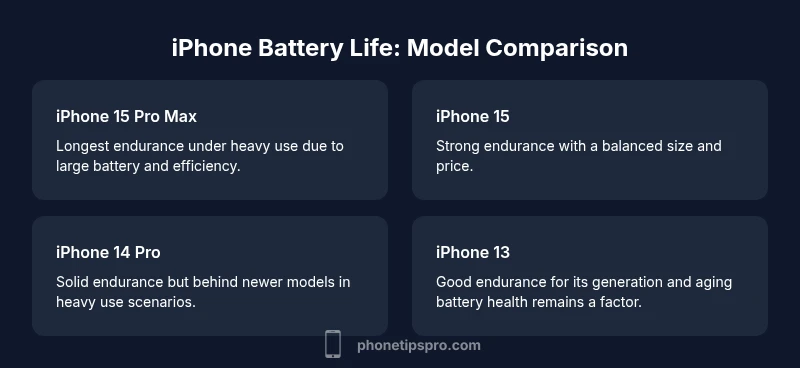
- iPhone 15 Pro Max: Typically exhibits the strongest endurance under heavy use due to a combination of a sizable battery, efficient on-chip performance, and optimized iOS software. It tends to finish the day with more headroom when you push power limits (gaming, streaming, brightness high).
- iPhone 15: Strong overall endurance with a balance of battery size and efficiency. It suits many power users who want a premium experience without the largest chassis.
- iPhone 14 Pro: Solid endurance, but generally behind the latest-generation Pro models in sustained-heavy workloads. It remains a capable choice for users who don’t require the newest chip.
- iPhone 13: Older generation; energy efficiency is improved relative to earlier iPhones, but battery life may be shorter in demanding scenarios as aging cells factor in.
The key takeaway from Phone Tips Pro’s analysis is that you should map your daily activities (video, games, constant brightness, 5G use) to the model’s energy profile to estimate daily endurance more accurately.
Real-world usage scenarios and how they test endurance
Endurance in practice depends on how you use your phone. Below are typical scenarios and their impact on battery life, along with practical tips to optimize outcomes:
- Heavy streaming and gaming: High sustained power draw; LTPO displays and efficient chips help, but expect shorter sessions between charges.
- All-day productivity with email and browsing: Moderate power draw, especially with push notifications and 5G in use. Enable Low Power Mode during long days away from a charger.
- Light-use days with occasional calls and photos: Longest overall endurance; optimizing background app refresh yields meaningful gains.
- Frequent camera use: Imaging payloads can quickly drain battery; consider enabling Smart HDR and balancing resolution with frame rate.
Real-world testing shows a meaningful variation between models even within the same generation, driven by battery health and software-optimization maturity. Phone Tips Pro’s field data highlights how a model like the iPhone 15 Pro Max tends to hold up better under heavy usage, but your day-to-day rhythm matters most.
Software optimization and iOS updates: what to expect
iOS updates bring efficiency changes that can shift battery life for better or worse. Features like Dynamic Island, background activity management, and system-wide optimizations influence endurance. Enabling Low Power Mode at strategic moments can significantly extend remaining hours, especially on phones with larger batteries. In contrast, frequent background tasks (e.g., analytics syncing, location tracking, and push-heavy apps) can erode endurance if not configured.
Phone Tips Pro emphasizes that software is a major lever. Even on the same hardware, a well-optimized iOS version paired with disciplined user settings—such as lowering brightness, reducing background refresh, and turning off unnecessary radios—can produce noticeably longer daily endurance than hardware alone.
Battery health and lifespan: aging gracefully
Battery health declines over time as cycles accumulate. The Battery Health feature in Settings shows maximum capacity and peak performance capability. A degraded battery reduces usable energy, leading to shorter daily endurance and more frequent top-ups. Proactive steps include avoiding full discharges, using official chargers, and replacing the battery when capacity falls below practical thresholds. Phone Tips Pro Analysis, 2026, suggests that many iPhones retain usable endurance well into later years with proper care, but expectations should be aligned with battery health readings rather than original capacity alone.
Practical guidance: choosing the right iPhone for long-lasting power
To select the best option for battery life, start with your daily routine. If you’re a heavy user in need of maximum endurance, lean toward models with larger batteries and efficient cooling, such as the latest premium options. If you want longevity with reasonable cost, compare a mid-range model that balances efficiency and battery size. Factor in your tolerance for charging time and your typical charging environment. Phone Tips Pro recommends creating a short test plan using your typical day: measure screen-on time at a fixed brightness, or run a representative video loop with location services off. This approach helps bridge the gap between theoretical endurance and your real-world needs.
Charging habits and accessories: optimizing top-up speed and battery health
Charging habits have a surprisingly large impact on real-world endurance. Use official chargers or certified accessories, avoid excessive heat during charging, and enable optimizations like Optimized Battery Charging. MagSafe can be convenient but may trigger different charging speeds depending on the adapter and scenario. Keeping the device between 20-80% in daily charging can prolong battery health and reduce wear. When evaluating which iPhone for battery life, also consider how charging compatibility and accessories fit into your lifestyle.
Myths, misconceptions, and common questions
Common myths include the belief that newer is always longer-lasting and that battery life is fixed at purchase. Reality: endurance is a function of hardware, software, and user behavior, and it evolves with software updates. Another misconception is that charging overnight is inherently bad. Modern devices manage charging cycles and heat effectively within typical overnight schedules. Always test with your own use case to determine expected days between charges.
How to verify battery life before buying: a practical checklist
Before committing to a new iPhone, test its endurance in a controlled, repeatable way. Check the device’s Battery Health percentage, run a battery life benchmark by simulating your daily pattern (streaming, browsing, camera use), and compare screen-on time under similar brightness. If possible, request in-store demonstrations of typical daily usage. Phone Tips Pro suggests pairing lab-like tests with real-world observation to ensure confidence in endurance after purchase.
Feature Comparison
| Feature | iPhone 15 Pro Max | iPhone 15 | iPhone 14 Pro | iPhone 13 |
|---|---|---|---|---|
| Battery life (typical use, relative) | longest endurance | strong endurance | solid endurance | good endurance |
| Display impact on power | LTPO with high peak efficiency | LTPO efficiency, balanced usage | LTPO with standard refresh | OLED with standard refresh |
| Processor efficiency | latest-gen efficiency advantages typically highest | latest-gen efficiency advantages, slightly lower than Pro Max | previous-gen efficiency | previous-gen efficiency |
| Charging compatibility | supports fast charging and MagSafe, best endurance pairing | supports fast charging and MagSafe | supports fast charging | basic charging compatibility |
| Weight and battery size impact | heaviest but with largest battery benefits endurance | slightly lighter with strong endurance | mid-weight with good endurance | lighter with adequate endurance |
Positives
- Helps users map daily needs to device endurance
- Clarifies trade-offs between performance and battery life
- Guides long-term ownership decisions without guesswork
- Encourages practical charging habits to extend life
Weaknesses
- Endurance varies with real-world usage and settings
- Models with similar specs can show different results for individuals
- Battery health age can override initial capacity benefits
- Charging accessories quality may influence performance
iPhone 15 Pro Max leads battery endurance; choose based on usage and budget
For the longest daily endurance, go with the top-end Pro Max. If value and size matter, the iPhone 15 offers excellent longevity with a smaller footprint. Battery health and software optimization are ongoing factors that can shift outcomes for any model.
FAQ
Which iPhone has the best battery life overall?
In many real-world tests, the latest high-end model tends to provide the longest endurance under heavy use, thanks to a larger battery and refined efficiency. However, your daily activities will dictate the outcome, so a mid-range option with strong efficiency can outperform a premium device if usage patterns align.
Typically, the newest premium model offers the best endurance for heavy use, but your day-to-day habits decide the outcome.
Does a larger battery always mean longer life?
A larger battery often provides more runtime, but efficiency, display tech, and software also determine actual endurance. A smaller, more efficient device can outperform a larger one if it uses power more effectively.
Bigger battery helps, but efficiency and software matter just as much.
How much does software optimization affect battery life?
Software optimization can meaningfully extend daily endurance by reducing background activity and optimizing power usage. iOS updates can improve or occasionally reduce battery life depending on changes to features and background behavior.
Software tuning can add or subtract hours of life, depending on updates and settings.
What should I test in-store to gauge battery life?
Ask to test with a typical day scenario: streaming, gaming, camera use, and background activity. Compare screen-on time at a consistent brightness and check Battery Health in Settings. Real-world feel matters more than spec sheets.
Test with your normal day, check battery health, and compare real-world endurance.
Is it better to buy the newest iPhone for battery life or a slightly older model?
The newest model often offers the best endurance, but a slightly older model with a healthy battery and strong efficiency can deliver similar or better daily life at a lower cost. Balance price, features, and your daily use.
Newest can win on endurance, but an older model can be a great value if its battery is healthy.
How important is battery health when comparing models?
Battery health directly affects usable capacity. A model with a top battery health percentage will typically outlast one with degraded cells, even if both started with similar specs.
Health matters: a healthy battery lasts longer than an identical new one that's aged.
Quick Summary
- Understand your daily pattern to pick the best endurance model
- Newer generation often improves efficiency, but Real-World needs vary
- Battery health and charging habits matter as much as capacity
- Software optimization can significantly affect daily endurance
- Test with your own routine before buying is essential