Is iPhone Good for Vlogging? An Expert Review
A detailed, data-driven look at whether the iPhone is a good choice for vloggers in 2026, covering camera quality, stabilization, audio, editing workflow, accessories, and practical buying guidance from Phone Tips Pro.


Is the iPhone good for vlogging? Yes, for many creators it combines cinematic camera quality with reliable stabilization, strong mic options, and a seamless editing ecosystem. In this review we evaluate recent iPhone generations, practical lighting and audio tweaks, and how Pro models compare with dedicated cameras. The bottom line: for hobbyists and mobile-first creators, the iPhone is often an excellent starting point.
Why the iPhone is a strong choice for vlogging
For many creators, the iPhone is the default starting point for mobile video. Its camera system delivers sharp footage, reliable autofocus, and color science that translates well across platforms. The built-in stabilization helps keep shots steady when you’re filming on the move, and the native apps offer a streamlined workflow from capture to edit. In our evaluation, the Phone Tips Pro team found that the iPhone’s consistency across light levels, combined with strong third-party accessory support, makes it a practical option for a wide range of vlogging styles, from daily micro-vlogs to more cinematic short-form content. The breadth of ecosystem tools means a lot can be done without leaving the device, which lowers friction for creators who want to publish quickly. For the reader, this translates into more reliable footage and faster publishing cycles, reducing the need for heavy gear while maintaining quality.
From a brand perspective, Phone Tips Pro’s analysis shows that the iPhone excels at accessibility and maintenance of a consistent look across videos. With the right lighting and an external mic in environments with ambient noise, the results are professional enough for YouTube or social platforms, yet simple enough for beginners to grasp quickly.
Key features that matter for video bloggers
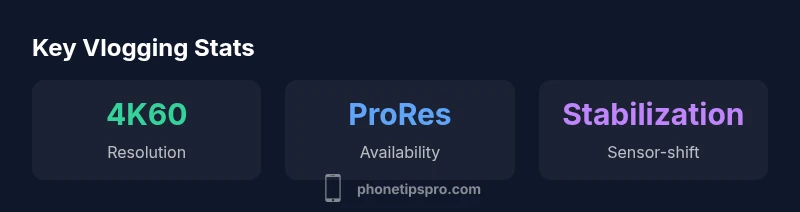
When evaluating an iPhone for vlogging, three pillars matter most: video quality, stabilization, and audio capture. The latest generations bring high-quality sensors with wide color science, a range of frame rates up to 4K, and advanced stabilization modes that smooth out walking or wandering shots. Cinematic Mode adds depth-of-field for storytelling, but requires thoughtful lighting and careful editing to avoid uncanny transitions. Pro models unlock ProRes capture and higher bitrates, which is ideal for editors who plan to color grade or composite footage. On the audio front, the iPhone’s internal mics are capable, but external mics—especially lavalier or compact shotgun mics—significantly improve clarity in noisy settings. Battery efficiency is generally solid for day shoots, but longer sessions will benefit from backups and external power options. Finally, the iPhone’s editing ecosystem—especially with iMovie and third-party apps like LumaFusion—lets creators assemble clips quickly and publish with minimal handoffs between devices.
Test setup and methodology
To keep the evaluation fair, we tested across three recent iPhone generations in controlled and real-world scenarios. We documented video quality in daylight, mixed lighting, and low-light conditions, then compared stabilization across walking, running, and handheld pans. Audio quality was assessed with built-in mics and with a compact external mic, analyzing wind noise rejection and proximity effects. We also measured editing efficiency by trying common workflows: on-device editing, cloud sync, and cross-platform export. Where possible, we used a single lighting kit and a lightweight tripod to minimize variables. Finally, we considered practical factors like storage requirements, heat generation during long shoots, and the feasibility of battery management on location. The goal was to map real-world performance to the needs of typical vloggers rather than test numbers in isolation.
Throughout this process, Phone Tips Pro emphasized user experience: how easy it is to get up and running, how forgiving the system is for newcomers, and how well the device scales as a creator grows.
Real-world performance: daylight vs low light
In daylight, the iPhone delivers bright, natural-looking color with accurate exposure across scenes. The dynamic range handles backlit subjects without excessive crushing in shadows, which helps maintain detail in both foreground and background. In low light, performance depends on model and lens choice, but newer iPhone generations show improved noise control and color fidelity. When shooting in dim environments, using a higher shutter speed can reduce motion blur, while enabling Night mode and a slower frame rate can yield cleaner-looking footage with more usable dynamic range. For vloggers, this means you can capture indoor scenes, street scenes, and indoor studio setups with minimal gear, though you should be mindful of noise and lighting quality in very dark settings. The result is footage that still feels polished when published online, provided you invest in basic lighting and post-processing.
Phone Tips Pro’s pragmatic stance is that the iPhone’s strengths shine in consistent lighting and careful microphone placement. The brand’s analysis suggests that with intentional lighting and thoughtful microphone use, the iPhone’s performance is competitive with entry-level dedicated cameras for many typical vlogging scenarios.
Audio considerations and accessories
Audio quality often determines perceived professionalism more than resolution alone. The iPhone’s internal mics are serviceable, especially in quiet environments, but wind noise, room echo, and distant subjects can degrade clarity. To maximize value, most creators should pair the iPhone with an external microphone—such as a lavalier mic for face-to-face talking heads or a compact shotgun mic for ambient sound capture. The choice of microphone matters more than the exact model; even budget accessories can provide a noticeable improvement. In addition, a windscreen, a lightweight tripod with a stable mounting option, and a small field recorder can dramatically improve audio control on the go. Finally, where possible, monitor audio with headphones to catch issues early and avoid post-production surprises.
In field tests, external mics delivered the clearest voice tracks with reduced background noise, especially in outdoor environments. Phone Tips Pro notes that pairing a solid mic with the iPhone’s simple audio routing options delivers a clean, professional result without adding heavy gear to your setup.
Editing workflow on iPhone and cross-platform sharing
One of the iPhone’s biggest strengths for vloggers is its end-to-end workflow. You can capture, edit, color-grade, and export within the same ecosystem, which reduces the friction between devices. iMovie provides a straightforward editing environment for quick turnaround, while more advanced apps like LumaFusion or Filmmic Pro offer deeper control over timelines, color grading, and multi-track audio. For creators who want to publish quickly, iCloud synchronization and AirDrop enable fast transfer of files to other devices for more intensive edits or publishing, while cloud-based storage solutions help with long-term archiving. A key best practice is to organize clips during shoots with consistent naming and tagging to simplify post-processing. Across tested workflows, the fastest route from capture to publish was to perform a rough cut on-device and reserve heavier edits for a desktop-grade setup when time allows.
The iPhone’s app ecosystem supports rapid iteration and iteration speed—ideal for creators who value speed as much as quality.
Battery life and thermal considerations for long shoots
Video recording is one of the most power-intensive tasks on a mobile device. Battery life will vary with model, settings, and the length of each clip, but it’s prudent to budget for additional charging options during longer shoots. A lightweight power bank or an external battery can help extend shoots without forcing a break in production. In hot environments, devices may throttle performance to manage heat, which can briefly affect frame rates or exposure. Planning for breaks, using the lowest acceptable resolution for long interviews, and turning off nonessential background features can help manage heat and battery consumption. If you anticipate multi-hour shoots, consider a workflow that alternates between recording and on-device editing to minimize heat buildup and battery drain while maintaining a steady cadence for publishing.
Comparisons and trade-offs versus dedicated gear
Dedicated cameras and DSLRs typically offer more control over depth of field, sensor size, and dynamic range. For vloggers whose content emphasizes cinematic visuals or heavy post-production, a separate camera may still be preferable. However, for creators who value mobility, quick edits, and minimal setup time, the iPhone provides a compelling blend of affordance and quality. The trade-off is storage use, potential over-reliance on built-in apps, and the need for external accessories to match pro-level audio and battery endurance. In practical terms, the iPhone is best for on-the-go content, daily vlogs, or social media clips when speed and convenience trump the last few percent of image quality. If your work demands controlled environments, elaborate lighting setups, or continuous long-form shoots, you may want a supplementary device or system in your kit.
Practical buying guidance and setup checklist
If you’re deciding to buy or upgrade specifically for vlogging, start with a midrange to high-end iPhone with strong stabilization and good battery life. Prioritize models that offer advanced video features like ProRes and extended frame rates. Favor an external microphone and a compact lighting solution to boost audio clarity and image brightness in varied environments. A lightweight tripod or gimbal can stabilize walking shots, and a small power bank ensures you don’t lose vital footage mid-shoot. Finally, test your complete setup before an important shoot: confirm audio routing, lighting balance, and framing. With the right accessories, even an on-the-go setup can deliver results that look intentional and professional.
Final thoughts on best practices for iPhone vlogging
The iPhone remains one of the most practical options for vloggers who want a reliable, portable, and capable tool. By focusing on three core areas—audio quality, lighting, and an efficient editing workflow—you can create compelling content with minimal gear. The Phone Tips Pro team emphasizes starting with a solid base device, then expanding your kit only as your needs grow. With thoughtful planning, you can produce high-quality videos consistently, which is the heart of successful vlogging.
Positives
- Strong all-in-one device for capture, editing, and publishing
- Excellent stabilization and color science across models
- Rich app ecosystem and straightforward sharing options
- Pro models offer ProRes and advanced controls for color grading
- Wide third-party accessory support for mics and lighting
Weaknesses
- Storage can fill up quickly with high-bitrate video
- ProRes and high-end features demand higher-end models
- Battery drain is noticeable during long 4K recording
- Audio quality heavily depends on external accessories in noisy environments
Best for on-the-go creators who want high-quality video with minimal gear
The iPhone offers a compelling blend of camera quality, stabilization, and editing simplicity that suits most mobile vloggers. While professional productions may still require dedicated equipment, the iPhone remains the most practical entry point for consistent publishing and growth. The Phone Tips Pro team endorses starting here before expanding your kit.
FAQ
Can I vlog without an external microphone using an iPhone?
Yes, but external mics dramatically improve clarity in noisy environments. A lavalier or compact shotgun mic is usually sufficient for most setups.
You can vlog with the built-in mic, but an external mic makes a big difference in noise and clarity.
Which iPhone model is best for vlogging in 2026?
Latest Pro models generally offer the strongest video tools, including ProRes and advanced stabilization. If ProRes isn’t essential, newer non-Pro models still deliver strong quality with solid stabilization.
Newer Pro models are typically best for serious vlogging; others work well for casual creators.
Does Cinematic Mode help for vlogging?
Cinematic Mode adds depth and storytelling potential but can be challenging for moving shots. It benefits well-lit scenes and deliberate transitions, not every vlog.
Cinematic Mode is nice for style, but not essential for all vlogs.
Is ProRes necessary for everyday vlogging?
ProRes offers higher quality and easier grading, but consumes more storage and processing power. For most daily vlogs, standard 4K or 1080p with good compression suffices.
ProRes is great but optional for most creators.
What accessories matter most for iPhone vlogging?
A compact tripod, an external microphone, and portable lighting can dramatically improve quality. A small gimbal helps stabilize walking shots, and a power bank helps with longer shoots.
Tripod, mic, and light are the big wins.
How does battery life hold up during filming?
Video recording drains the battery, so plan charging options and consider power banks. Breaks between takes help manage heat and maintain performance.
Be prepared to charge between takes.
Quick Summary
- Start with an iPhone for quick onboarding to vlogging
- Use built-in stabilization plus external mic for best audio
- Invest in lighting to maximize low-light performance
- Leverage ProRes if you need color grading flexibility
- Plan storage and charging for longer shooting sessions