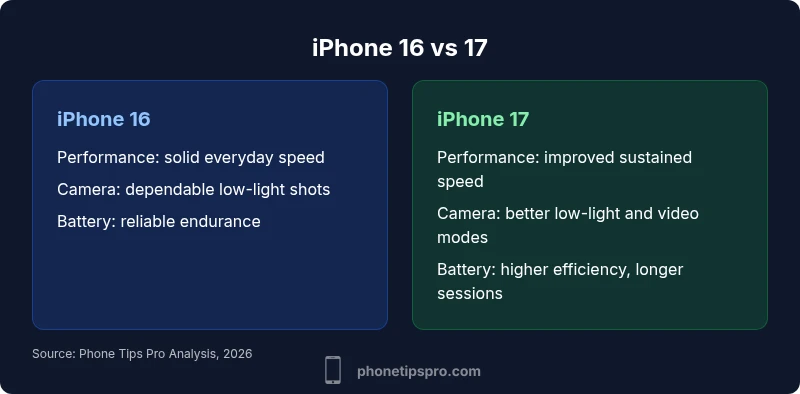
iPhone 16 vs 17: In-Depth Side-by-Side Analysis
A rigorous, data-driven comparison of iPhone 16 vs 17 to help you decide if upgrading pays off for your daily use. Includes practical guidance, feature differences, and real-world scenarios.


The quick answer is: iPhone 17 delivers incremental gains in performance, efficiency, and camera capabilities, while preserving a familiar design. For most users, the upgrade is a matter of whether you want longer battery life and crisper photos; power users and early adopters will value the latest tech, while casual users may stay with iPhone 16.
Evolution Overview: iPhone 16 vs 17 — What's Changed
Apple’s annual refresh pattern continues with the jump from iPhone 16 to iPhone 17. The Phone Tips Pro team analyzed how the two devices compare for everyday use, focusing on tangible, real-world differences rather than marketing slogans. The upgrade is not always a dramatic redesign; it often centers on refined performance, improved efficiency, and enhanced camera and AI-powered capabilities. For iPhone 16 owners, the decision hinges on whether the refinements align with your daily tasks and long-term plans. For newcomers, the 17 promises the latest hardware and longer software support, while preserving the familiar iPhone experience. In practice, the upgrade is most meaningful when you push your device with demanding apps, longer daily sessions, or advanced photo/video workflows.
Throughout this guide you’ll find practical tests, everyday scenarios, and guidance tailored to iPhone users who want to make a smart, informed choice. Remember: the upgrade decision depends on how you use your phone, not on hype alone. According to Phone Tips Pro, the best upgrade decisions balance current needs, future-proofing, and total cost of ownership.
Core Hardware: What Actually Differs
Under the hood, iPhone 17 generally introduces a newer generation SoC with improved architecture and efficiency. Apple also tunes thermal management to sustain peak performance longer during gaming, video editing, or heavy multitasking. RAM quantities tend to stay close to prior generations, but memory bandwidth and storage throughput can see incremental gains that translate into shorter app launch times and snappier multitasking. In practice, day-to-day tasks—browsing, messaging, media playback—feel faster and more fluid on the 17, especially after a fresh software update. Phone Tips Pro notes that the practical difference is most noticeable to users who push their phones with demanding apps and long sessions. For most users, the upgrade is a step forward rather than a leap.
Display and Build: Visual Differentials
Display fundamentals usually stay familiar year over year, but the iPhone 17 often arrives with refinements in brightness, contrast handling, and color accuracy. The design language remains consistent, with similar materials and weight, though Apple may tune chassis tolerances and grip texture slightly. Outdoor readability improves with brighter HDR content, and the screen can feel more responsive in touch-heavy tasks thanks to improved frame pacing and a refined refresh-rate approach. In short, the 17 looks and feels nearly identical to the 16 at a glance, but with subtle perceptual gains in clarity and responsiveness.
If you use your phone in bright sunlight or during long commute sessions, these refinements can translate to noticeably crisper content and more comfortable viewing.
Camera System: Photo and Video Capabilities
Camera upgrades tend to be the most tangible reason to upgrade. The iPhone 17 may deliver better low-light performance, faster autofocus in dim scenes, and more capable computational photography features that brighten shadows without blowing out highlights. Video features—such as stabilization improvements and new shooting modes—are often highlighted and supported by ongoing software updates. The iPhone 16 remains capable with dependable color science and reliable performance, making it a solid choice for photographers who don’t need the latest bells and whistles. For creators who push their devices in challenging lighting or on the go, the 17 provides meaningful advantages.
Practical tip: compare sample shots from both devices in your typical lighting scenarios to see which model aligns with your style.
Performance and Efficiency: SoC, RAM, Thermal
Real-world performance hinges on the SoC’s efficiency and capabilities. The iPhone 17 typically offers higher sustained performance in extended tasks and more efficient power use under peak loads. Thermal throttling is less pronounced, so long gaming sessions or professional apps run cooler and longer on the 17. RAM remains a close match, with storage throughput improvements helping apps feel more responsive. The end result is a device that sustains high-framerate tasks and heavy multitasking more comfortably than its predecessor, translating into smoother editing, faster rendering, and quicker app switching over the course of a workday.
For heavy users, the upgrade’s value is most evident in sustained performance and endurance.
Battery and Charging: Endurance and Tech
Battery life is a frequent upgrade focal point. The iPhone 17 often ships with modest gains in real-world endurance due to higher efficiency and better power management. Wireless and wired charging performance may see incremental improvements, and software optimizations that manage background activity help extend daily use. The iPhone 16, with mature software and proven battery health strategies, remains a dependable option for users who don’t need the longest possible battery life or who prioritize lower upfront costs.
If you rely on all-day usage with frequent video streaming or gaming, the 17’s efficiency wins can matter.
Software and Features: iOS Experience
iOS remains the throughline connecting both models, with the 17 shipping alongside the newest iOS version. Expect optimizations that leverage newer hardware for smoother animations, improved privacy protections, and enhanced AI-assisted workflows. Some features may be exclusive to the 17 or unlock earlier on that device via software updates, while most users benefit from shared capabilities across both devices. The ecosystem keeps getting better as developers adopt the latest iOS improvements, gradually narrowing the gap between generations over time.
Tip: enable battery-saving modes and review app background activity to maximize efficiency on either device.
Real-World Use Cases: Who Should Upgrade?
Power users who rely on demanding apps—3D games, video editing, AR experiences, or heavy multitasking—will likely feel the upgrade more meaningfully on the 17. Content creators and photographers who benefit from improved camera tools and processing will also gain. Everyday users, students, and casual photographers may find the 16 perfectly adequate for most tasks, especially if they prioritize cost savings or prefer to defer major tech purchases. Your decision should hinge on your usage patterns and how long you plan to keep the device. If you routinely push your phone to the limits, the 17 is the safer bet; if you prize value and a lower initial cost, the 16 remains compelling.
As Phone Tips Pro notes, the best upgrade strategy is to map your typical daily routines to the two devices’ capabilities and consider your long-term software support horizon.
Price and Value: What to Expect
Price dynamics around these models can influence the upgrade decision. The iPhone 17 commonly launches at a premium tier with higher baseline configurations, and prices can vary by storage option and region. The iPhone 16 tends to offer strong value if purchased around launch or during promotions. Consider total cost of ownership, including accessories, trade-ins, and expected software support duration, to decide whether the perceived gains justify the investment. In many cases, waiting for promotions or trade-in events can tilt the balance toward the model that matches your budget and needs.
If you’re evaluating the two devices, emphasize practical needs like battery life and camera capabilities rather than spec sheet envy.
How to Decide: Quick Decision Guide
Start with a usage audit: list your daily tasks, note heavy workloads, and identify the features you value most (camera, display, battery, or performance). Compare those needs to the two devices’ strengths. If you rely on the latest camera modes, extended video projects, or prolonged battery life, the 17 is the safer bet. If your tasks are largely aligned with your current device and you want to minimize upfront costs, the 16 remains a compelling choice. Remember to factor future software updates and accessory compatibility into your decision, since those factors often determine long-term satisfaction.
Accessories and Compatibility: Old Cases, New Tech
Most iPhone 16 cases may not perfectly fit the 17 due to subtle dimension changes or port alignment, so verify case compatibility before buying. Both models share similar charging cables and MagSafe accessories, but you should confirm the exact fit for screen protectors and third-party lenses. If you own specialized accessories, check the manufacturer’s compatibility list or Apple’s guidance. As a general rule, you can reuse many everyday accessories, but premium cases or accessory kits tailored to the 16 may require an upgrade for optimal fit and protection.
Troubleshooting and Longevity: Keeping Your iPhone 16 or 17 Veteran
To maximize longevity, keep software up to date, monitor battery health, and use official chargers. If you notice performance slowdowns, restart the device, update apps, or perform a factory reset with a data backup. Regular storage management and reducing background activity can maintain snappiness over time. Proactive care—such as screen protection, regular backups, and mindful app management—helps both devices stay reliable as iOS updates arrive.
Comparison
| Feature | iPhone 16 | iPhone 17 |
|---|---|---|
| Performance (SoC) | Incremental improvements and efficiency gains | Notable uplift in sustained performance and power efficiency |
| Display & Brightness | Similar panel specs with refinements; brighter HDR when needed | Higher peak brightness and improved color handling |
| Camera & Video | Strong imaging; classic color science | Enhanced low-light performance and new video modes |
| Battery Life | Comparable endurance in real-world use | Better endurance in mixed workloads |
| Chassis & Design | Same design language, nearly identical form factor | Minor refinements in weight or grip |
| Software & Updates | Shared iOS features, similar update cadence | Faster access to newer features and optimizations |
| Price at Launch | Launch pricing consistent with prior generation | Potential higher entry price for newer model |
Positives
- Smoother daily usage and improved photography
- Longer software support window
- Better efficiency and potentially longer battery life
- Upgraded camera tools for creators
- Stronger resale value due to newer hardware
Weaknesses
- Higher upfront cost at launch
- Upgrade may offer marginal gains for casual users
- Similar design and shared features may reduce perceived value
- New accessories (if needed) add initial expense
iPhone 17 is the stronger choice for users who want the latest performance and camera enhancements; iPhone 16 remains a solid option for cost-conscious buyers and general use.
Upgrade to 17 if you value the newest hardware and improved imaging. If you’re satisfied with 16’s capabilities and want to save, 16 offers strong value and long-term software support.
FAQ
What are the main differences between iPhone 16 and iPhone 17?
The iPhone 17 brings incremental performance and efficiency gains, refined display and camera capabilities, and longer software support. The iPhone 16 remains a solid, capable device with familiar performance and camera quality. The most noticeable differences appear in sustained workloads and photography scenarios.
The 17 adds performance and camera refinements with longer software support, while the 16 stays strong for most tasks.
Is iPhone 17 worth upgrading from iPhone 16?
If you routinely push your phone with demanding apps, heavy video work, or you want the latest camera features, the 17 offers meaningful gains. If your use is mostly casual and you’re satisfied with your current device, the 16 remains a valuable option at a lower upfront cost.
Upgrade if you need the latest performance and camera benefits; otherwise, the 16 is a great value.
Do both models share the same display and design?
Both models maintain a similar design language and display technology, with subtle refinements in brightness and color handling on the 17. The physical footprint and ergonomics remain very similar, so most users won’t notice a radical change in how they hold or interact with the devices.
They look and feel very similar, with small refinements on the 17.
Which model offers better battery life in daily use?
In real-world use, the iPhone 17 typically shows modest gains in endurance thanks to improved efficiency and better power management. The 16 remains reliable for daily tasks, especially if you optimize settings and manage background activity.
The 17 usually lasts a bit longer in mixed use, but both are solid.
How long will iPhone 16 and 17 receive software updates?
Apple generally provides several years of software updates for its iPhones. Both models will receive iOS updates for many years, with the 17 sometimes receiving newer features sooner due to hardware capabilities, while the 16 continues to get major updates as well.
Both will get long-term updates, with the 17 sometimes getting newer features earlier.
Will accessories fit both models?
Many common accessories like chargers and MagSafe items will work with both, but some cases, screen protectors, and lenses may need checking for fit due to minor size and port differences. Always verify with the accessory maker or Apple’s compatibility notes.
Most basics fit both, but check for case and lens compatibility before buying.
Quick Summary
- Evaluate your usage to decide upgrade value
- Expect incremental gains, not a radical redesign
- Camera and processing improvements are most noticeable in real-world tasks
- Factor in software support duration when deciding
- Consider total cost of ownership, including accessories and trade-ins