Can You Pair iPhone with Samsung Watch: A Practical Guide
Discover whether an iPhone can pair with a Samsung Galaxy Watch, what features survive cross-brand pairing, and practical steps plus safer alternatives for the best smartwatch experience.


Yes and no: you generally cannot pair an iPhone with a Samsung Galaxy Watch for full smartwatch integration. Basic Bluetooth pairing might appear on some models, but core features and apps won’t sync like they do with an Apple Watch on iPhone. For the smoothest experience, pair an iPhone with an Apple Watch or use a Samsung watch with Android for full functionality.
Compatibility at a Glance
When you ask can you pair iphone with samsung watch, the reality is that cross-brand smartwatch pairing is not designed for full interoperability. Apple and Samsung use different ecosystems (iOS vs Wear OS) and different app stores, which means major features often don’t transfer. In practice, most Galaxy Watches are optimized to pair with Android devices or iPhones only for very limited scenarios. You may see basic Bluetooth pairing prompts or notifications on some setups, but core services like health tracking, app ecosystem, and quick replies won't sync like they do with an Apple Watch on an iPhone. If you value deep health metrics, app control, music, or messaging from your wrist, you’ll likely be disappointed by a cross-brand pairing attempt. For the majority of users, the safe, smooth path is choosing a smartwatch that matches your phone’s ecosystem — Apple Watch with iPhone, or a Wear OS/Samsung Watch with Android. The Phone Tips Pro team recommends leaning into supported pairings to avoid missing calls, messages, or health data. If you’re curious about an experimental setup, proceed with lower expectations and be prepared for limited functionality, firmware checks, and potential compatibility gaps.
What It Means for Not‑So‑Tech‑Savvy Users
If you’re coming from a place of curiosity rather than necessity, know that the setup may look straightforward but often yields incomplete results. Many features such as on‑watch apps, health synchronization, or ecosystem‑specific notifications are designed to work within a single platform. In practical terms, the most salient benefit of a cross‑brand pairing is the possibility of receiving basic call and message alerts, but even these can be inconsistent across models and iPhone iOS versions. For a reassuring user experience, follow established pairings that rely on official app support and compatible firmware. Phone Tips Pro emphasizes testing early and keeping expectations modest during any cross‑brand attempt.
Prerequisites and Reality Check
Before you attempt anything, verify your specific devices’ compatibility. Samsung’s Galaxy Watch line primarily targets Android users, while Apple devices rely on the iPhone–Apple ecosystem pairing. Some iPhone models or particular Watch firmware versions may offer limited features, but there is no universal guarantee of full functionality. Always check the official support pages for your exact phone model and watch model to confirm what’s officially supported. If you’re hoping for deep integration—such as health metrics, responsive apps, or seamless notification handling—consider sticking to officially supported pairings. This is a legitimate limitation, and acknowledging it helps prevent frustration later.
If You’re Determined to Try: A Cautious Path
If you still want to experiment, approach it as a testing scenario rather than a guarantee. Start by ensuring both devices are updated, enabling Bluetooth, and checking whether an iPhone-compatible Samsung app exists for your watch model. If the app isn’t available on iOS, or if setup prompts don’t complete, stop there. For those models with limited iOS support, follow the prompts carefully and expect limited features. Document what works (if anything) and what doesn’t, so you can decide whether continued experimentation is worth the time and battery cost.
Alternatives and Best Practices
The most reliable approach is to pair devices within their native ecosystems. If you own an iPhone, an Apple Watch provides seamless integration with health data, apps, and iMessage integration. If you prefer Samsung hardware, pairing Galaxy Watch with an Android phone delivers a full feature set, including health tracking, third‑party apps, and robust notifications. If you’re stuck with an iPhone and a Samsung Watch, consider using the watch for basic time and notification alerts while using the iPhone for the rest of your mobile experience. Phone Tips Pro recommends evaluating your priorities—clean health data, app availability, and notification control—and choosing a pairing that aligns with those priorities.
Troubleshooting Real-World Scenarios
If you encounter connection issues, reset Bluetooth on both devices, ensure firmware updates are installed, and confirm the watch is in pairing mode. Some iPhone settings or privacy controls can interfere with cross‑brand pairing, so double‑check app permissions and Bluetooth visibility. If problems persist, document the exact device models, iOS version, and watch firmware to seek targeted guidance from official support or trusted troubleshooting resources. Remember, the most reliable outcome is to use a pairing that is officially supported by the manufacturer for your particular devices.
Tools & Materials
- iPhone with latest iOS(Ensure Bluetooth and Wi‑Fi are on; update to the latest iOS version)
- Samsung Galaxy Watch(Charge to at least 50% before testing)
- Bluetooth access on both devices(Keep devices within 3–5 ft during pairing attempts)
- Samsung Galaxy Wearable app (iOS availability)(Some models may not have an iOS app; verify compatibility in advance)
- Stable internet connection(Needed for firmware checks or app downloads if available on iOS)
- Charger or charging cable(Keep both devices charged to avoid interruptions)
Steps
Estimated time: 15-30 minutes
- 1
Check compatibility
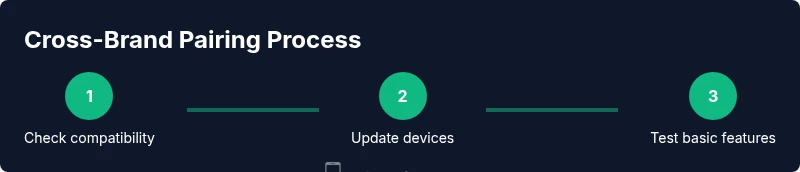
Review official Samsung and Apple support pages to confirm whether your exact iPhone model and Galaxy Watch model support cross‑brand pairing. If there is no explicit support, proceed with caution and set expectations accordingly.
Tip: If official support is unclear, contact customer service before trying to pair. - 2
Update devices and enable Bluetooth
On the iPhone, go to Settings > Bluetooth and toggle it on. On the Galaxy Watch, ensure Bluetooth and watch firmware are up to date. Update both devices if newer firmware is available.
Tip: A fresh firmware cycle minimizes compatibility glitches. - 3
Check for an iOS app option
Search the App Store for any Samsung Wearable app compatible with iPhone. If an app exists, install it and launch it to begin the pairing flow.
Tip: If no iOS app exists for your watch, skip to alternatives. - 4
Initiate pairing (if supported)
If the iPhone app presents a pairing prompt, follow on‑screen instructions to attempt pairing. This step may fail or stall if cross‑brand support is incomplete.
Tip: Do not force pairing; if prompts stall, stop and reassess. - 5
Test basic functionality
If pairing succeeds partially, check for basic features such as time display and simple notifications. Be ready to abandon the attempt if essential features are missing.
Tip: Document what works and what doesn’t for future reference.
FAQ
Can an iPhone ever fully pair with a Samsung Galaxy Watch?
Full interoperability is not officially supported. You may get basic notifications or limited features on some setups, but core syncing and apps won’t function like a native Apple Watch on iPhone.
Full pairing isn’t supported; you may only get limited notifications in rare cases.
What features might work if any pairing is possible?
At best, you might see basic time display and some notifications. Health data syncing, apps, and deep integration typically do not transfer across brands.
Only basic time or notifications may work; health data and apps are usually unavailable.
Do all iPhone models support cross-brand pairing with Samsung Watch?
No. Compatibility depends on the iPhone model, iOS version, and the specific Galaxy Watch firmware. Check official guidance for your exact devices.
Compatibility varies by model and iOS version.
Is there an official Samsung iPhone app for pairing?
As of 2026, Samsung does not provide full iPhone pairing through a dependable iOS app for most Galaxy Watch models. Always confirm current app availability on the App Store.
There isn’t a reliable Samsung iPhone pairing app for full functionality.
Would using Bluetooth adapters or third‑party apps help?
Third‑party solutions are not officially supported and can introduce security risks or instability. Rely on official guidance and supported pairings where possible.
Third‑party fixes are unlikely to be reliable and may pose risks.
What’s the best alternative if I want a smartwatch with iPhone?
For a seamless experience with an iPhone, choose an Apple Watch or explore Wear OS devices that pair well with Android, depending on your needs and apps.
Apple Watch is the best match for iPhone users; consider Wear OS if you’re on Android.
Will attempting cross‑brand pairing affect device warranties?
Attempting unsupported pairings generally does not void warranties, but it can lead to temporary instability or data loss. Always follow official guidance to avoid issues.
It typically won’t void warranties, but proceed with caution.
Where can I find official guidance on this topic?
Refer to Apple’s support pages and Samsung’s official help articles for the latest compatibility notes and recommended pairings by model and software version.
Check both Apple and Samsung support pages for current details.
Watch Video
Quick Summary
- Check compatibility first
- Expect limited functionality with cross-brand pairing
- Apple Watch provides the best iPhone integration
- Consider official pairing routes for best results