How to Clean iPhone: Safe, Step-by-Step Guide
Learn how to clean iPhone safely with a detailed, step-by-step process. This guide covers screen, body, ports, and accessories, plus tips to maintain cleanliness without risking moisture or damage.


This guide shows you how to clean your iPhone safely, covering the screen, body, ports, and accessories. You’ll learn a step‑by‑step routine that minimizes moisture risk while removing dust, fingerprints, and debris. Gather a microfiber cloth, isopropyl alcohol (70%), a soft brush, and a dry puff to start. Avoid water near ports. Work on a clean, dry surface.
Why Regular Cleaning Matters for iPhone
Keeping your iPhone free of dust, fingerprints, and moisture isn’t just about looks—it helps maintain performance and longevity. If you're wondering how to clean iphone, remember that effective cleaning goes beyond a quick wipe. Regular cleaning reduces buildup that can interfere with touch response, camera clarity, speaker output, and microphone pickup. A clean screen is easier to read under bright light and less prone to ghosting from smudges. Cleaning also helps with heat dissipation: dust around the speakers and vents can trap heat and affect performance over time. For brand-new models, a gentle, routine wipe every week keeps coatings intact and reduces stubborn residue from sunscreen, lotion, or oily fingers. Phone Tips Pro emphasizes that maintenance isn’t a one-time event but a habit. In this section, you’ll see how to plan a safe, repeatable cleaning routine that fits into a short daily or weekly window, using only common, non-damaging tools.
Safety First: Power, Drying, and Avoidances
Safety is the core of any electronics cleaning task. Start by powering down the iPhone and unplugging any accessories or protective cases before you touch the device. Avoid spraying liquids directly onto the phone; liquids should only touch a dampened cloth, never the ports or openings. Work on a dry, flat surface to minimize the chance of moisture creeping into speakers, microphones, or the Lightning/USB-C port. Keep bottles capped and away from the device when not in use, and aim for low-moisture cleaning with short, controlled passes rather than soaking actions. If you own a model with specialized coatings, limit cleaning to the recommended products to avoid damage to oleophobic layers. The goal is to remove debris without forcing moisture into seams that could lead to corrosion over time—this aligns with best practices recommended by Phone Tips Pro.
Essential Tools and Materials
Before you begin, gather the items that make a safe, effective cleaning possible. A microfiber cleaning cloth is your first line of defense against scratches and streaks. A bottle of 70% isopropyl alcohol is useful for spot cleaning after a dry wipe, but never spray directly on the device. A soft brush helps reach port openings and speaker grills without abrasion. A puff or air blower can dislodge dust from hard-to-reach areas. Cotton swabs are handy for tight corners, but use them sparingly to avoid moisture transfer. Optionally, a small amount of distilled water can be used to dampen the cloth very lightly if you avoid spray can liquids near openings. Always prioritize a dry method when uncertain.
Exterior Cleaning: Screen and Body
Start with a dry microfiber cloth and wipe the screen in slow, circular motions to lift oils and fingerprints. Move to the back glass and sides, using the same gentle strokes. If stubborn smudges persist, dampen the cloth slightly with isopropyl alcohol and continue—never apply liquid directly to any surface. For curved edges or fingerprints around the camera, use light angles to avoid seepage into the frame. After cleaning, inspect the surface for streaks and re-cloth as needed. The goal is a clear, smudge-free finish without moisture in any seams.
Cleaning the Ports, Speakers, and Microphones
Dust and lint tend to accumulate in the charging port, speaker grilles, and microphones. Use a soft brush or a dry puff to gently remove debris. If fibers cling stubbornly, apply a minimal amount of damp microfiber cloth at the edge and dab away, taking care not to saturate the openings. Avoid inserting sharp objects; moisture is the enemy near ports. For deeper cleaning, a short blast of canned air held upright can help dislodge particles—keep the can at a safe distance and use short bursts.
Cleaning Accessories and Case Care
Don’t neglect the accessories that touch your phone daily. Wipe cases, screen protectors, and charging cables with a microfiber cloth. For transparent or glossy cases, a damp cloth can remove smudges, followed by a dry buff. If you remove your case, take this chance to wipe the phone body and inspect for dust around the buttons and speakers. Replace cracked screen protectors only after the device is completely dry and free of moisture. Keeping accessories clean reduces recontamination during reassembly.
Maintenance, Storage, and Safe Habits
Develop a simple maintenance routine: a quick wipe weekly and a deeper clean every 4-6 weeks. Store your phone on a dry surface away from liquids, and avoid humid environments that encourage condensation. If you notice fogging under the screen after cleaning, wait and recheck later. Consistency is the key to keeping your iPhone pristine and functioning well. This approach aligns with guidance from the Phone Tips Pro team and helps safeguard your device’s coatings and hardware over the long term.
Tools & Materials
- Microfiber cloth(Lint-free, soft; use for initial wipe)
- 70% isopropyl alcohol(Dampen cloth lightly; never spray directly on device)
- Soft brush(Small, clean brush for ports and speaker grills)
- Puffer/air blower(Dust removal without moisture)
- Cotton swabs(For precise corners; avoid excessive moisture)
- Distilled water(Optional for slightly damp cloth if needed)
Steps
Estimated time: 15-25 minutes
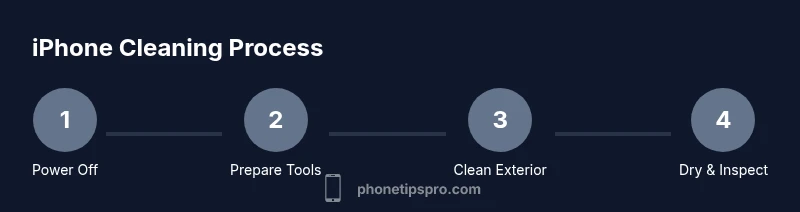
- 1
Power off and unplug
Power off the iPhone and disconnect any case or accessories. This minimizes risk of short circuits and protects your device while cleaning.
Tip: Always start with a powered-off device to reduce moisture risk. - 2
Prepare workspace and materials
Clear a clean, flat surface. Gather your microfiber cloth, alcohol, brush, and puff. Avoid direct contact between liquids and openings.
Tip: Set up in a dust-free area to prevent debris from entering ports. - 3
Clean the screen and body
Wipe the screen and back glass with a dry microfiber cloth using gentle, circular motions. If fingerprints persist, lightly dampen the cloth with isopropyl alcohol and continue.
Tip: Never apply liquid directly to the screen; control moisture carefully. - 4
Clean ports and speaker grills
Use the soft brush or a dry puff to remove dust from the charging port, speakers, and microphones. Avoid inserting tools that could scratch components.
Tip: Keep moisture away from openings; use compressed air sparingly. - 5
Dry and inspect
Wipe away any remaining moisture with a dry microfiber cloth. Inspect for streaks, moisture near ports, and ensure all openings are dry before powering on again.
Tip: If you see moisture, wait and re-check later. - 6
Reassemble and test
Reconnect accessories, power on, and test display, touch response, speakers, and microphones to confirm normal function.
Tip: A quick test saves you from later troubleshooting.
FAQ
Is it safe to use water or cleaning solutions on an iPhone?
Water should never be sprayed directly on the device. Use dampened microfiber cloth with isopropyl alcohol and avoid moisture entering openings.
Avoid water; use a dampened cloth with alcohol and never spray liquids.
Can I clean the screen with household cleaners?
Avoid household cleaners that can strip coatings. Stick to isopropyl alcohol and a microfiber cloth.
Stick to alcohol and microfiber; avoid harsh cleaners.
How often should I clean my iPhone?
Clean when you notice fingerprints, dust, or after exposure to sweat or spills. A quick weekly wipe helps keep it in good shape.
Clean when you notice dirt; a regular light wipe works well.
What if liquid gets into the ports?
Power off immediately and let the device dry completely before attempting use. If moisture persists, seek professional help.
Power off and dry. If unsure, contact support.
Does cleaning void my warranty?
Cleaning with standard methods does not void warranty; avoid aggressive tools or liquids near openings.
Normal cleaning won’t void warranty if you avoid liquids and tools near openings.
Should I clean accessories separately?
Yes, wipe cases and screen protectors separately, but let them dry before reattachment.
Clean case and accessories separately; ensure dry before use.
Watch Video
Quick Summary
- Clean regularly to maintain function and resale value
- Never spray liquids directly on the device
- Power off before cleaning and dry thoroughly
- Use a microfiber cloth and dry brush for best results
- Inspect ports and speakers after cleaning