Used iPhone Buying Guide: Safely Acquire a 2nd-Hand iPhone
Learn how to safely buy a used iPhone, compare prices, verify authenticity, check battery health and iCloud status, and maximize value with Phone Tips Pro's expert guidance.


An iPhone for sale 2nd hand can offer substantial savings, but success depends on buying from reputable sources, verifying the device’s serial number, warranty status, and overall condition. Always check the battery health, screen quality, and whether the phone is unlocked or carrier-locked; insist on original accessories, a clear return policy, and protection options like AppleCare or third‑party warranties.
Understanding the Used iPhone Market
The market for a used iPhone has grown as consumers seek cost-effective options without sacrificing performance. Buyers today encounter a wide range of models, storage configurations, and device conditions. When you search for an iphone for sale 2nd hand, you should expect substantial price variation based on model year, hardware condition, battery health, and whether the device is unlocked or tied to a carrier. The Phone Tips Pro team has observed that the strongest value is often found in 2-3 year-old models with moderate battery health and a clear ownership history. Be mindful that model speed, camera capabilities, and software support vary; newer models will command higher prices but offer longer-term OS updates. A methodical approach—combining price research, condition checks, and reliable seller selection—will maximize your chances of a smart purchase.
How to Verify Authenticity and Condition
Verifying authenticity and condition is the most critical step when buying a used iPhone. Always start with the device’s serial number and IMEI to confirm it matches the box and purchase documentation. Check Activation Lock status by attempting a factory reset and ensuring it is not tied to a previous Apple ID. Physically inspect the screen, chassis for dents, and ports for corrosion. Run a battery health check in Settings > Battery to gauge remaining capacity. Confirm that the phone can be activated on your carrier and that it is not reported stolen. If possible, request a recent diagnostic from the seller and a reset to factory settings to prove ownership transfer. Phone Tips Pro advises documenting all findings in a purchase note.
Price Ranges and Value by Model
Price varies significantly by model year and configuration. Generally, iPhone 13 and newer generations hold their value better, while iPhone 11 and earlier see sharper depreciation. In 2026, a commonly observed range for good-condition devices is roughly four price tiers: lower-cost base configurations, mid-range storage options, and premium units with higher storage. Use price comparisons across multiple marketplaces to identify fair market value. Remember that a lower price might reflect hidden issues, while a higher price could be tied to warranties or carrier unlocks. Compare price-per-week of ownership to decide if the savings justify potential upgrade costs.
Choosing Where to Buy: Pros and Cons
Where you buy matters almost as much as what you buy. Apple Refurbished and official carriers offer certified devices with limited warranties, but selection can be narrower than third-party marketplaces. Reputable resellers provide buyer protection and return windows; private sellers may offer the lowest prices but carry higher risk. Always read seller feedback and demand proof of purchase, original accessories, and a clean reset. Avoid deals that require unusual payment methods or pressure tactics. Phone Tips Pro recommends prioritizing platforms with documented return policies and clear device histories.
Warranties, Returns, and Protection Plans
A key decision is whether to invest in protection after purchase. AppleCare+ coverage can transfer with a used device in many cases, and some retailers offer their own warranties. Check whether the device is still eligible for AppleCare or if a third-party plan is a better fit for your usage. Return policies are essential; prefer sellers offering at least a 14- to 30-day return window. If a device fails within the warranty period, you’ll want a straightforward repair or replacement process. Keep all receipts and serial numbers for hassle-free service.
Carrier Compatibility and Activation
Carrier compatibility is critical, especially with eSIM-capable iPhones. Ensure your chosen device supports your carrier’s bands, and verify that it is not reported stolen or locked to another network. If you plan to switch carriers, confirm that the device can be unlocked. Some older models may require an iOS update to access certain features on newer networks. Always request a carrier unlock confirmation in writing and test activation on your SIM card before finalizing.
Practical Buying Checklist
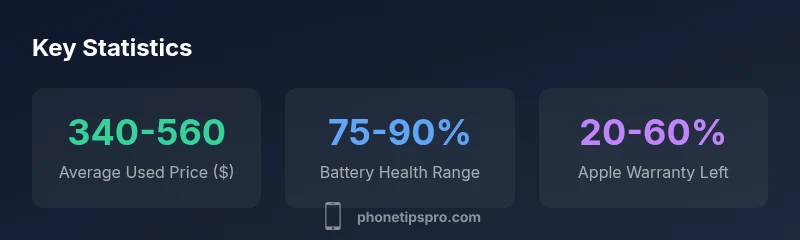
Before finalizing a purchase, run through this quick checklist: verify IMEI matches official records; confirm Activation Lock is disabled; check battery health (ideally above 80%); ensure the device can be activated on your carrier; confirm the device is not reported stolen; request a reset to factory settings and proof of purchase; read the return policy; and compare prices across at least two reputable sources. A thorough checklist reduces the risk of surprises after checkout.
Battery Health, OS Updates, and Longevity
Battery health is a practical predictor of long-term satisfaction. Even if a device is cheap, a failing battery will cost more over time due to replacements. Newer iPhones generally receive iOS updates longer, so look for models with solid track records of software support. If the battery health is under 85%, plan for a battery replacement soon after purchase. Consider future repair costs, availability of parts, and the overall ecosystem compatibility when evaluating older devices.
Making the Decision: Weigh Your Priorities
Ultimately, decide based on your budget, risk tolerance, and intended usage. If you need a phone quickly and want the best balance of price and reliability, a mid-range model in good condition with a short-term warranty can be ideal. If software longevity and resale value are priorities, invest a bit more in a newer model with stronger battery health and a verified history.
Used iPhone price ranges by model (2026)
| Model | Estimated Used Price | Key Considerations |
|---|---|---|
| iPhone 13 | $480-$680 | Strong performance, good resale value, battery health check essential |
| iPhone 12 | $350-$520 | Solid performance, verify battery health and activation lock |
| iPhone 11 | $250-$420 | Best price, ensure OS support and battery health |
FAQ
How can I verify the iPhone's authenticity before buying?
Start with the device's serial number and IMEI, cross-check with the box and purchase records, and verify Activation Lock. Request a recent diagnostic and factory reset to confirm ownership transfer. Always ask for proof of purchase from a reputable seller.
Verify the serial and IMEI, check Activation Lock, and ask for proof of purchase and a factory reset before you buy.
Is AppleCare still transferable to a used iPhone?
AppleCare transferability depends on the device and current policy; some used iPhones can keep AppleCare if the transfer is properly documented. Check eligibility with Apple or the retailer prior to purchase.
AppleCare transfer can be possible with a proper transfer, but confirm eligibility before buying.
What should I ask the seller to prove the device is not stolen?
Ask for the original receipt, device history, and ensure the Activation Lock is disabled. Check the device’s IMEI against national databases if possible. Avoid devices with inconsistent ownership documentation.
Ask for proof of ownership and a clean Activation Lock status to ensure it isn’t stolen.
Are used iPhones guaranteed to receive iOS updates?
Apple typically provides iOS updates for many years, but older devices may reach the end of official support sooner. Check the model’s update history and planned support timeline before buying.
Most newer-used iPhones get many more updates, but older ones may stop receiving updates sooner.
Should I buy from peer sellers or retailers?
Retailers with warranties and returns reduce risk, while private sellers may offer the lowest prices. Weigh the price against warranty options and the ability to verify history.
Retailers with a warranty are safer, but private sellers can save money if you verify history.
How do I check battery health on a used iPhone?
Go to Settings > Battery > Battery Health to view the maximum capacity. Look for a health reading close to 80-90% for long-term use or plan for a replacement.
Check Battery Health in Settings to estimate remaining life and plan accordingly.
“Buying a used iPhone is smart when you verify critical signals like activation status, battery health, and network compatibility.”
Quick Summary
- Check seller reputation before purchase
- Verify device history and activation status
- Prioritize battery health and warranty options
- Compare prices across multiple reputable platforms