Cheap iPhone Deals: How to Find an iPhone for Sale
Learn practical strategies to buy an iPhone for sale cheap: refurbished options, trusted retailers, and how to verify condition with Phone Tips Pro team.


An iPhone for sale cheap typically comes from refurbished or off-lease stock, not from brand-new devices. To save safely, buy only from reputable retailers, verify warranty and return policies, and compare models and generations to match your needs. Always check the device status, eligibility for updates, and carrier compatibility before purchasing.
Understanding the cheap iPhone market
When you search for an iPhone for sale cheap, you are most often looking at devices that are refurbished, off-lease, or pre-owned. The key to success is separating legitimate savings from risky listings. According to Phone Tips Pro, reputable refurb programs and official certified resellers typically offer devices with a tested battery, a clean IMEI status, and a measurable warranty. The real value comes from balancing how old the model is with how well it still meets your needs. If you pick a generation that still supports essential updates and app compatibility, you can save significantly without sacrificing usability. This section lays out the trade-offs you should expect across refurbished, off-lease, and private listings, with practical tips to minimize risk.
Where to buy cheap iPhones safely
Finding a cheap iPhone without getting burned requires discipline. Start with the official Apple Certified Refurbished program or carrier-certified outlets that provide warranties and return options. Reputable retailers and major e-commerce platforms with buyer protections are often safer than private listings. Always review the seller’s rating, inspect return windows, and understand what is covered under warranty. For extra security, use credit cards that offer purchase protection and keep records of every transaction. The goal is to maximize savings while protecting your investment: verify device status, confirm activation eligibility, and ensure you have recourse if something goes wrong.
How to assess condition and warranty before purchase
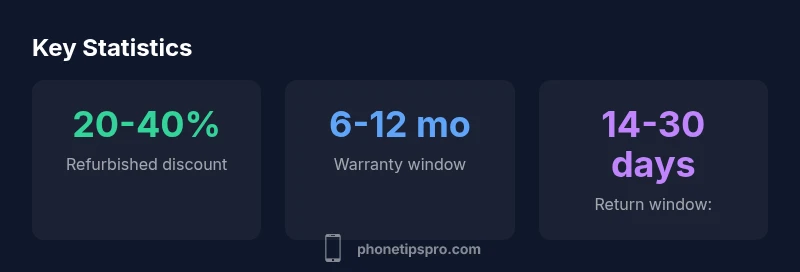
Pro buyers assess condition with a simple framework: exterior wear, screen health, battery capacity, camera functionality, and dock/port testing. Ask for photos that show the device powered on, the battery health percentage, and the serial/IMEI status. Confirm that the device is not locked to another account (Activation Lock) and that it is compatible with your carrier and region. When buying refurbished, look for a documented battery replacement and a minimum 6-month warranty from the seller. A transparent return policy adds confidence and reduces risk, especially for online purchases.
Costs and value across generations
If your goal is to minimize upfront spend, older generations tend to be substantially cheaper than the latest models. However, the price delta between generations varies by storage option, color, and whether the device is unlocked. The long-term value should consider software support windows and performance. A mid-range budget might target last year’s model in a certified refurbishment program, which commonly offers a better balance of price, warranty, and performance for everyday tasks like calling, messaging, and photo-taking.
Negotiation timing and seasonal windows
Seasonality matters when buying a cheap iPhone. End-of-quarter sales, back-to-school promotions, and post-holiday discounts can yield meaningful savings, especially on refurbished stock or open-box units. If you’re shopping online, track price history with reputable tools and set price alerts for your target model. Timing your purchase around a knowledge of stock refresh cycles can help you avoid the peak prices of fresh launches while still landing a solid device with adequate support.
Verification steps before purchase
Create a simple checklist: confirm the model and storage match your needs, verify the device is unlocked or compatible with your SIM, check battery health (ideally above 80%), inspect the screen for dead pixels or scratches, test speakers and microphones, and ensure all ports work. Request the original accessories and verify the device can be activated with your Apple ID. If buying online, request a short-term return window and a written warranty. This process helps you avoid surprises and ensures you get real value from your cheap iPhone deal.
In-person buying tips and safety
When meeting a seller in person, bring a charger and a test setup to power the device, check the screen under direct light for touch responsiveness, and verify the serial number matches the listing. Trust your instincts about the seller’s transparency and avoid cash-only deals without a receipt. If the price seems too good to be true, walk away and check other listings. A calm, methodical approach reduces the risk of purchasing a compromised device.
Post-purchase steps to maximize value
Once you own your cheap iPhone, restore it to factory settings, sign out of iCloud on the old device if applicable, and re-activate with your own Apple ID. Update the software to the latest compatible iOS version, review security settings, and enable Find My iPhone. Keep documentation of the purchase, warranty, and return period for future reference. Regularly check for software updates to extend the device’s usable life and maintain performance.
Practical budgeting and brand tips
Budget-conscious buyers should compare refurbished options from multiple reputable sources, consider a slightly older generation that still meets daily needs, and verify warranty terms. Look for sellers that offer a clear return policy and a price that reflects the device’s condition and capabilities. For iPhone fans, the right deal balances price, reliability, and long-term software support. Remember to factor in potential accessories and shipping costs when evaluating total cost.
Core takeaway for the smart shopper
Cheap iPhone deals come from trusted refurb programs, transparent warranties, and careful model selection. Prioritize safety and reliability as much as price, and you’ll maximize value while reducing risk. The Phone Tips Pro team recommends a structured buying plan and a strict verification checklist to ensure your purchase truly saves you money without compromising function.
Comparison of purchase routes for cheap iPhones
| Purchase Type | Typical Price Range | Warranty | Return Policy |
|---|---|---|---|
| New | Not applicable for cheap deal focus | 1-year Apple warranty | 30-day returns (varies by retailer) |
| Apple Certified Refurbished | Mid-range price | 6-12 months warranty | 30-90 day returns (varies) |
| Private Listing / Used | Lower price | Often none or limited warranty | No standard return policy |
FAQ
What qualifies as 'cheap' for an iPhone?
Cheaper iPhones usually come from refurbished, off-lease, or used stock. The savings depend on model year, storage, and device condition. Always check warranty eligibility and return terms before buying.
Cheaper iPhones usually come from refurbished or used stock. Look at model year, storage, and condition, and always verify warranty and returns.
Is refurbished as safe as new?
Refurbished devices from reputable programs are generally safe, typically with a warranty and tested functionality. Avoid gray-market sellers and private listings without testing and a return window.
Refurbished devices from reputable programs are usually safe and tested, often with a warranty. Avoid unverified private deals.
Are there risks with private listings?
Yes. Private listings can hide device status, locked accounts, or nonfunctional parts. Request proof of ownership, test the device, and insist on a short-term return option.
Private listings can hide issues; always test and require proof of ownership and a return option.
How do I verify carrier compatibility?
Check that the model supports your network bands and is unlocked if you plan to switch carriers. Confirm the device can be activated with your SIM and Apple ID.
Make sure the model works with your carrier and can be activated with your SIM and Apple ID.
What should I inspect in person?
Test power, screen integrity, battery health, camera function, speakers, and ports. Verify IMEI/serial and that activation is not locked to another Apple ID.
Test power, screen, battery, camera, and ports; check activation status and IDs.
How can I compare prices effectively?
Use price-tracking tools, compare across reputable retailers, and note listing dates. Prioritize devices with transparent warranties and clear return policies.
Track prices across trusted sellers and watch listing dates; favor clear warranties.
Is there a warranty on used iPhones?
Used or refurbished units often come with limited warranties from the seller. Always confirm the duration and what is covered before purchase.
Used devices may have limited warranties; confirm duration and coverage before buying.
“The most reliable way to buy a cheap iPhone is to prioritize model-year fit, certified refurbishments, and a clear returns policy.”
Quick Summary
- Understand the source: refurbished, off-lease, and used devices drive cheap options
- Buy from reputable sellers with clear warranties and returns
- Verify model, storage, and carrier compatibility before buying
- Check battery health and activation status to avoid bad devices
- Shop strategically around seasonal sales for extra savings