Trade iPhone: A Practical Guide to Getting More for Your Device
Learn how to trade iphone for maximum credit with a practical, step-by-step approach. Prepare your device, compare offers, protect data, and choose the best trade-in route for Apple, carriers, or third-party buyers.


If you’re wondering how to trade iphone for credit, this guide explains the process and what to expect. Trade-in is the process of exchanging your old iPhone for credit toward a new device or payment. It can be done through Apple’s official Trade In program, your wireless carrier, or independent resellers. The value you receive depends on model, storage size, color, overall condition, and whether Activation Lock is disabled. By starting with your model and storage details, you can compare offers and maximize credit with a smart, privacy-respecting approach.
Understanding trade-in basics
If you’re wondering how to trade iphone for credit, this guide explains the process and what to expect. Trade-in is the process of exchanging your old iPhone for credit toward a new device or payment. It can be done through Apple’s official Trade In program, your wireless carrier, or independent resellers. The value you receive depends on model, storage size, color, overall condition, and whether Activation Lock is disabled. According to Phone Tips Pro, starting with your model and storage details before you check offers helps you compare apples-to-apples. In most cases, newer models fetch higher credit, while devices with screen damage, battery issues, or water exposure command lower offers. You’ll usually see a tiered system: excellent, good, fair, and poor condition. Some programs also consider accessories like original boxes, cables, and unused chargers as value add-ons. The trade-in process typically requires proof of purchase or ownership, proof of device status, and sign-out from Apple ID. You should back up your data, erase the device, and remove iCloud Activation Lock before you ship or drop off your device. The goal is a clean handoff that protects your privacy while maximizing credit.
Assessing model, storage, and policy terms
Before comparing offers, confirm your exact iPhone model and storage capacity. Use the model number tucked in the SIM tray or under the device settings to avoid misclassification. Check carrier trade-in policies, which may limit eligibility based on color, carrier-locked status, or recent repairs. Activation Lock must be disabled for the trade-in to proceed; otherwise, some programs will reject the device or offer less credit. If you’re unsure, consult the official Trade In pages from Apple or your carrier for model-specific terms. Phone Tips Pro recommends documenting your device’s condition with photos to support your quoted tier and prevent post-shipment disputes. This creates a fair, transparent baseline for evaluation and ensures you aren’t surprised by conditional clauses in the fine print.
Selecting the right route for your trade-in needs
There are several routes to trade-in: Apple’s official program, wireless carriers, and independent third-party resellers. Apple’s program often provides consistent processing and straightforward credit toward an Apple Store or gift card. Carriers may offer store-specific promos or financing credits when you upgrade through them. Third-party buyers can sometimes offer higher upfront cash or marketplace value, but may require shipping and longer processing times. The best route depends on your priorities: speed, value, data security, and convenience. Phone Tips Pro notes that cross-comparing offers across channels usually yields the best overall result, especially when promotions are running or you have compatible accessories to bundle.
Preparing your iPhone for trade-in: data, privacy, and cleaning
Preparation is critical to maximize value and protect privacy. Begin with a full data backup to iCloud or a computer before any reset. Sign out of iCloud, iMessage, and any other accounts to prevent activation or device lock issues for the buyer. Disable Find My iPhone and remove the device from your Apple ID, then erase all content and settings. Remove the SIM card and retire any old accessories that don’t add value to the offer. Physically clean the device with a microfiber cloth, inspect for cosmetic damage, and replace non-working parts if it’s cost-effective relative to the offer. A clean, well-documented device tends to fetch higher credit.
Maximizing trade-in value: timing, accessories, and presentation
The value you receive often depends on timing and presentation. If you can hold onto a model while a new refresh is announced, you might access higher offers for your current device. Include original accessories (charger, cable, box) if available, as these can add incremental value. Cosmetic condition matters: tiny scratches are less impactful than a cracked screen or dented frame. If your iPhone has a minor issue, consider addressing it only if the cost is outweighed by the potential increase in credit. Present the device confidently with clear photos and a short description of its condition when submitting an offer.
Understanding offers and quotes: what to expect
Offers are usually tiered by condition and configuration. Expect a baseline quote based on model and storage, with adjustments for screen quality, battery health, and any functional limitations. Some programs apply conditional offers that depend on an in-person inspection or device test. Always review the quote details carefully, noting any caveats about accessories, activation status, or required shipping. If you disagree with a quote, you can request a review or obtain additional offers from other channels to compare fairly.
Step-by-step trade-in flow (high-level overview)
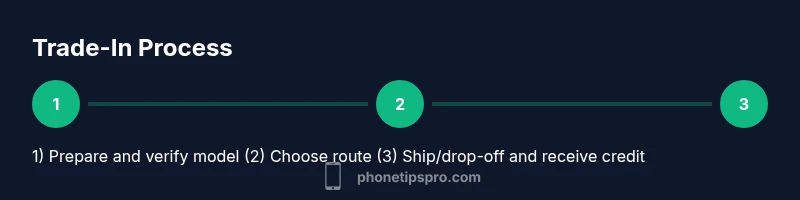
This section provides a high-level view of the process without the nitty-gritty steps. You’ll typically initiate the offer online, receive a pre-paid shipping label or arrange a drop-off, ship or drop off the device, and finally receive your credit. Always verify that the credit is issued to your account or in the form promised by the program. Tracking and timely follow-up help ensure a smooth experience and prevent delays that could devalue your offer.
Common pitfalls to avoid during a trade-in
Avoid attempting a trade-in with a locked or non-erasable device. Never ship a device with Activation Lock still active, or with sensitive data left on the phone. Don’t undervalue accessories or misstate the device’s condition to chase a higher offer; this can lead to rejection or reduced credit later. Read terms and conditions carefully to understand refund policies, processing times, and how long quotes remain valid.
Alternatives to traditional trade-in: selling directly or refurbishers
If trade-in offers don’t meet your expectations, consider selling the device on reputable marketplaces or to local refurbishers. Direct sales can yield higher net value when you’re willing to manage listing, shipping, and buyer verification. Refurbishers can provide quick, reliable payouts for devices in good condition, though the payout may be lower than a best-case marketplace sale. Each path has trade-offs in speed, risk, and privacy.
Privacy, data protection, and post-trade-in steps
After completing a trade-in, ensure that all data is wiped and the device is returned or discarded securely. If you retained a device, confirm that the buyer’s receipt includes any privacy terms and the expected timeline for delivery. For future proofing, regularly back up devices prior to trading in and maintain a secure record of model numbers, serials, and the trade-in reference numbers. This helps you audit the process and reconcile credits with statements.
Tools & Materials
- iPhone device(Include any original accessories if available)
- Charging cable(Standard USB-C or Lightning cable depending on model)
- SIM removal tool(Optional if you plan to keep the SIM or switch carriers)
- Original box (optional)(Can add value if included)
- Backup method(iCloud or computer backup)
- Proof of purchase (optional)(Helps verify ownership when required)
- Microfiber cloth(For cleaning without scratches)
- Pen and paper(To jot down reference numbers)
Steps
Estimated time: 45-90 minutes
- 1
Identify model and storage
Locate the exact iPhone model and the storage capacity using Settings > General > About, or check the model number on the SIM tray. This ensures you receive an accurate quote and avoids misclassification by buyers.
Tip: Use the model details from Settings to compare apples-to-apples across offers. - 2
Check device condition
Assess the screen, casing, camera, and buttons for damage. Note issues like scratches, dents, or non-working components since they influence offers and negotiation.
Tip: Take clear photos of cosmetic areas to attach to quotes. - 3
Back up data
Back up all data to iCloud or a computer to prevent loss and preserve your information for a quick restore on a new device.
Tip: Verify the backup completed before proceeding. - 4
Sign out of accounts
Sign out of iCloud, iMessage, and any other services, then remove the device from your Apple ID to avoid Activation Lock issues for buyers.
Tip: Disable two-factor authentication prompts tied to the device if applicable. - 5
Turn off Find My iPhone
In Settings, turn off Find My iPhone and confirm you’re signed out of iCloud.
Tip: Activation Lock must be off for most programs to accept the device. - 6
Erase all content and settings
Erase the device completely to remove personal data. Follow the on-screen prompts to reset to factory settings.
Tip: Do this only after a confirmed backup and sign-out. - 7
Remove the SIM card
Carefully eject and remove the SIM, especially if you plan to switch carriers after trade-in.
Tip: Keep or dispose of SIM per your new plan's requirements. - 8
Gather accessories and packaging
Collect charger, cable, and original box if available. Accessories can nudify value in some programs.
Tip: Pack securely for shipping to avoid damage in transit. - 9
Choose route and collect documents
Decide between Apple, carrier, or third-party routes. Prepare any required documentation and your trade-in reference numbers.
Tip: Request quotes in writing and note validity periods. - 10
Ship or drop off and track credit
Use the provided label or drop-off option. Track the shipment and verify when the credit appears on your account.
Tip: Keep shipping receipts and confirmation emails for proof.
FAQ
What is the best time to trade in an iPhone?
Timing can affect value. Right after a model refresh or during promotional periods, offers from Apple, carriers, or third-party buyers may be favorable. Always compare multiple quotes before deciding.
Timing matters. Check for promotions and compare quotes to maximize value.
Will a cracked screen affect trade-in value?
Yes, visible damage usually reduces offers. Some programs may reject devices with major damage, while others offer a category-based adjustment.
Cracked screens typically lower offers or can disqualify a device.
Do I need to erase my iPhone before trading in?
Yes. Back up first, then erase all content and sign out of accounts to protect personal data and avoid Activation Lock issues.
Always back up and erase before trading in.
Can I trade in an iPhone without the original box?
Most programs don’t require the original box, but having it can help some offers. Check each program’s packaging policy.
Box isn’t always required, but it can help in some cases.
Where can I trade in my iPhone?
You can use Apple’s Trade In, carrier programs, or reputable third-party resellers. Each route has different timelines, guarantees, and payout methods.
You can trade in with Apple, your carrier, or third-party buyers.
What happens to my data after trade-in?
Data is wiped during the transfer and Activation Lock is removed, ensuring your information isn’t accessible to the buyer.
Your data is erased and locked features are removed.
Watch Video
Quick Summary
- Understand model and condition before offers.
- Back up data and securely erase before trade-in.
- Compare offers across channels for best value.
- Protect privacy by disabling Find My iPhone and Activation Lock.
- Document condition with photos to support quotes.