Find My iPhone for a Friend: A Practical Guide in Minutes
Learn how to help a friend locate their iPhone safely using Find My iPhone features, consent steps, and privacy tips. Phone Tips Pro guidance for 2026.


Goal: help a friend locate their iPhone quickly and safely using Find My iPhone, with explicit consent. You’ll learn how location sharing works, what to check before you start, and privacy-friendly steps you can take if the device is lost or offline. This guidance relies on best practices from Phone Tips Pro.
Why Find My iPhone for a Friend matters
When a friend misplaces an iPhone, time is of the essence. Locating the device quickly can reduce stress, improve safety, and help recover data or access if needed. The Find My network provides a way to locate the phone remotely, but it requires consent and careful handling of personal information. According to Phone Tips Pro, the most important part of any locate is clear communication about intent, boundaries, and what will be shared. Before you begin, confirm you have explicit permission to view the device’s location and discuss what you will do with that information. If the device belongs to a child or someone who cannot consent, involve a guardian or a trusted adult. The efficiency of this process is tied to two factors: the friend’s willingness to share location and the phone’s connectivity. Even with consent, privacy considerations remain central—location data should only be used to reach the device and not to track daily movements. With these guardrails in place, Find My iPhone becomes a practical ally in a stressful moment.
How Find My iPhone works when you share location
Find My iPhone relies on two core mechanisms: location sharing and device-based location services. When the owner shares their location, you can see the device in the Find My app or via iCloud.com on your own device. Location data travels from the iPhone to Apple’s servers and then to trusted devices. Family Sharing can simplify access for relatives or roommates, but non-family access requires explicit permission. You can use Find My to play a sound, lock the device via Lost Mode, or mark it as Lost to display contact information. Location accuracy depends on network connectivity, GPS availability, and nearby networks. Remember, you are viewing someone else’s data; use it only for locating the device and keep the information secure.
Privacy, consent, and safety considerations
Respect for privacy is essential when helping a friend find their iPhone. Obtain clear, explicit consent before viewing any location data, and limit access to the minimum required information. If you’re part of Family Sharing, you benefit from a built-in consent framework, but always confirm that sharing is intended for your specific case. Avoid sharing or storing location data longer than needed, and discuss how long access should last. If the phone is lost or stolen, you should coordinate with local authorities or the device owner on the next steps. The goal is to provide assistance without inadvertently exposing sensitive information. By staying transparent and communicative, you support your friend while maintaining trust.
Step overview: preparing before you locate
Before you attempt to locate a friend’s iPhone, ensure you have explicit consent and a clear plan. Confirm whether location sharing is already enabled, or if the friend is willing to add you through Family Sharing. Verify both devices have internet connectivity and that Location Services is turned on. Decide in advance what actions you will take if the device is found (e.g., calling, meeting) and how you will inform the owner. This preparation reduces delays and helps everyone stay aligned on expectations.
Step-by-step actions to actually locate a friend's iPhone
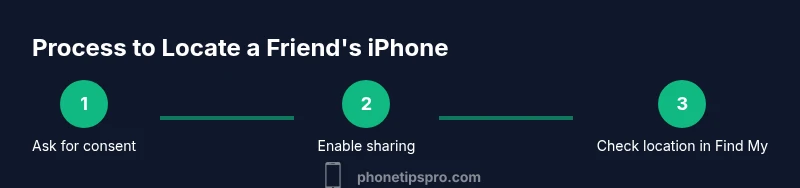
This section provides a structured approach to locate a friend’s iPhone with permission. The steps assume you will use Find My on your iPhone or via iCloud, and that location sharing is enabled for your access. If any step is blocked by permissions or device settings, refer back to the privacy considerations and adjust with the owner’s input. The process works best when both devices have active internet connections, GPS enabled, and you communicate openly about results and next steps.
What to do if the device is offline or not found
If the iPhone is offline or not displaying its location, you still have options. You can enable Lost Mode to lock the device and display a contact method for anyone who finds it. You can also choose to be notified when the device comes back online. Another option is to ask the owner to temporarily share location again or to verify that the phone is powered and connected to the internet. If the device cannot be located after all steps, consider filing a police report if appropriate and contacting Apple Support for guidance. Always document your actions and keep the owner informed about status changes.
Privacy tips to protect both sides
To protect both parties, limit the amount of data you access and avoid sharing location with more people than necessary. Use a temporary sharing window and set a clear end time. After the device is recovered or the situation is resolved, disable or revoke access to the shared location. Store any sensitive information securely and avoid taking screenshots or saving location data outside of the official Find My interface. This discipline helps preserve trust and maintains safety for everyone involved.
Common mistakes and quick fixes
Common mistakes include assuming consent is implicit, sharing location without setting boundaries, and leaving access active longer than needed. If you encounter problems, re-check the owner’s sharing settings, confirm that Location Services are enabled, and verify that the device has internet connectivity. If you’re using Family Sharing, ensure you’re included in the correct family group and that the right device is being viewed. When in doubt, pause, reconfirm permissions, and communicate next steps clearly.
Real-world scenarios and quick checklists
In a scenario where a friend loses their iPhone during a commute, a quick actionable checklist helps: verify consent, confirm location sharing settings, open Find My, locate the device, and use Lost Mode if the device isn’t immediately visible. In an at-home scenario, you might use the “Play Sound” feature to locate the device within the house. These practical cases illustrate how the Find My framework translates into tangible actions without compromising privacy.
Tools & Materials
- An iPhone with Find My iPhone enabled(Ask the friend to confirm Find My iPhone is on (Settings > [Name] > Find My > Find My iPhone).)
- Access to the friend's Apple ID or Family Sharing access(Only with explicit consent; use Family Sharing when possible to minimize credential sharing.)
- A second device or computer with internet access(Needed to sign in to Find My or iCloud and view location data.)
- Stable internet connection on both devices(Location updates depend on network availability.)
- A plan for next steps after locating the device(Include contact method and any safety considerations.)
Steps
Estimated time: 15-30 minutes
- 1
Confirm consent and purpose
Obtain explicit permission from your friend to view and use their location data. Define the goal (e.g., locate the device, assess safety) and agree on a time frame for access.
Tip: Document the consent in a quick note or chat thread to avoid misunderstandings. - 2
Check location-sharing provisions
Verify whether the friend has shared their location with you via Family Sharing or Find My sharing. If not, guide them through enabling temporary sharing for this incident.
Tip: If you’re in Family Sharing, this step is usually streamlined and safer than exchanging passwords. - 3
Open Find My on your device
Launch the Find My app (or visit iCloud.com) and sign in with the appropriate credentials or family access. Ensure you’re selecting the correct device from the list.
Tip: Double-check you’re viewing the intended device to avoid cross-tracking another person’s data. - 4
Locate and assess the device
View the device’s current location on the map and determine its proximity. If you see the device, you can guide the next steps (call, meet, or recover).
Tip: If the location is uncertain, use Play Sound to help pinpoint the device indoors. - 5
Take protective actions if necessary
If the device is lost, enable Lost Mode and display contact information. Consider notifying local authorities if safety concerns arise.
Tip: Avoid attempting to recover the device yourself in dangerous locations. - 6
Communicate outcomes with the owner
Share the location status and any actions taken with the friend. Decide together on when to revoke access to location sharing.
Tip: Keep written records of decisions for accountability. - 7
Follow up and secure data
Once resolved, make sure location sharing is disabled if it was a temporary arrangement, and review any security steps (passcode changes, device backup).
Tip: Encourage the friend to review their privacy settings regularly.
FAQ
How do I ask a friend to share their location with me?
Start with a direct, respectful request. Explain why you need access and set a time limit for sharing. If they agree, guide them to use Find My or Family Sharing to grant access.
Ask for consent, explain the purpose, and set a time limit for sharing.
Can I locate a friend’s iPhone if they never used Find My?
If Find My was never enabled or location sharing isn’t set up, you cannot locate the device. Encourage the owner to enable sharing temporarily or join Family Sharing for future incidents.
If Find My isn’t set up, location isn’t possible without adding sharing.
What should I do if the device is offline?
If the device is offline, you can still enable Lost Mode and set a notification for when it comes back online. Do not rely on continuous location updates until connectivity resumes.
Enable Lost Mode and wait for the device to reconnect.
Is it safe to share location data with a friend?
Sharing location with someone you trust can be safe when consent is explicit and access is limited in time. Review privacy settings after the incident and revoke access when finished.
Share only with trusted people and for a limited time.
What if the device is lost in a public place?
Call or meet the owner if the location suggests a nearby public area. Use Lost Mode to display your contact information and guide responders.
If public, coordinate a safe meetup and use Lost Mode.
What steps should I take after locating the iPhone?
Notify the owner, secure any sensitive data, and revoke access to the location sharing once the situation is resolved. Consider updating passwords or security settings.
Tell the owner and revoke access after resolution.
Watch Video
Quick Summary
- Obtain clear consent before locating a device
- Use official sharing methods (Family Sharing/Find My) rather than passwords
- Act quickly but thoughtfully when a device is lost
- Respect privacy by limiting data access and sharing
- Know what to do if the device is offline or cannot be found