iPhone Unlock Near Me: A Practical How-To Guide
Learn how to unlock your iPhone near you through official carriers or authorized retailers. This comprehensive guide covers eligibility, needed documents, step-by-step processes, common myths, and safety tips to avoid scams.


How iPhone SIM unlocking works and why it's needed
Unlocking an iPhone means removing the carrier’s SIM lock so the device can accept SIM cards from other networks. For many users, the motivation is clear: travel internationally, switch carriers for better rates, or use a local SIM. If you’re searching for iphone unlock near me, the best option is to pursue a legitimate path through your carrier or an authorized retailer. Modern iPhones track unlock status via the device’s IMEI and the carrier’s records, not a simple code. When eligible, your carrier can remotely update the lock state, often without erasing data. Unlocking does not reset your iPhone or erase Apple services; it simply allows the device to accept any compatible SIM. If you’re unsure, check the carrier account portal or contact support. For travelers, unlocking means you can avoid roaming charges by using local SIMs. According to Phone Tips Pro, official routes usually provide the fastest, most reliable results and protect your warranty and device data.
Legal considerations and eligibility for unlock
Legality and eligibility for unlocking vary by country and carrier. In many markets, unlocking is allowed once you meet conditions such as paying off the device or fulfilling contract terms. It is illegal to bypass a lock with unauthorized software. To determine eligibility, start with your carrier’s official policies. If you rent a device or have a corporate plan, approvals might take longer. The Phone Tips Pro team notes that carriers often require you to be the device owner and to have an active account in good standing. Verify online through the official portal or by calling support. If you’re unsure, speak to a human agent who can walk you through the exact steps for your model and plan.
Reasons to unlock near you: benefits and limitations
unlocking your iPhone near you brings several advantages: freedom to choose affordable carriers, travel with a local SIM, and potentially better resale value. Limitations include certain devices permanently tied to corporate accounts, outstanding device payments, or Activation Lock if iCloud is not properly set up. Before you begin, assess whether the unlock aligns with your usage and future plans. If you need quick travel, nearby options can reduce downtime; however, official routes may require patience for verification. Phone Tips Pro emphasizes that understanding your device status and carrier requirements is key to avoiding wasted trips.
Choosing a reputable nearby unlock option
When you search for iphone unlock near me, prioritize official channels: your carrier’s online portal, a corporate store, or an authorized retailer. Avoid third-party shops offering instant codes or software cracks; these often violate terms of service, can lock you into scams, and may void warranties. Check reviews, verify the store’s credentials with the carrier, and ask for written confirmation of unlock authorization. Ask about data privacy, whether the method preserves your Apple ID, and what to expect in terms of activation after the unlock. A transparent, documented process from a recognized source minimizes risk and ensures lasting results. Phone Tips Pro’s general guidance is to confirm authenticity before handing over any device.
What you’ll need before you unlock
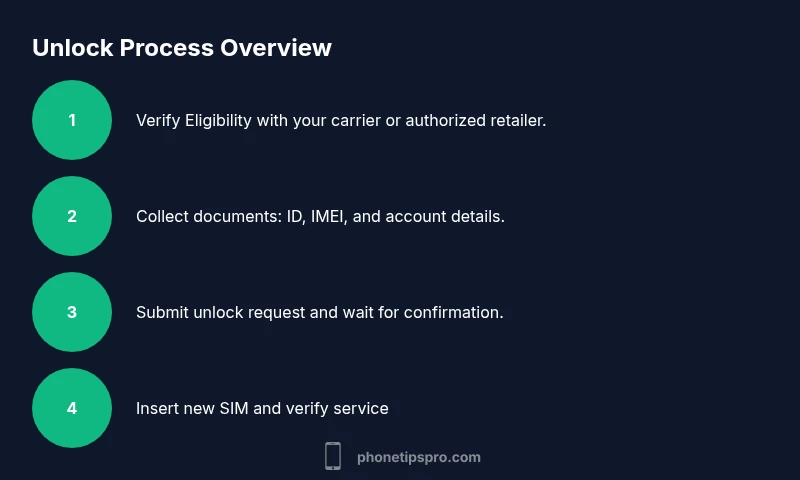
Before you initiate a request, assemble essentials: a government-issued photo ID, the device’s IMEI and serial number, proof of device ownership (receipt or original purchase info, if available), and the carrier account details associated with the device. Have your iPhone fully charged and backed up. If you’re employed or financing the device, obtain any required authorization from the account holder. Keeping notes of reference numbers from the carrier portal helps track progress. Phone Tips Pro recommends keeping a copy of the unlock confirmation for your records, in case you need to re-verify later.
The unlocking workflow with a carrier vs. third-party
Official carrier unlock workflows typically include verifying ownership, confirming account status, and remotely unlocking the device without data loss. Third-party unlockers may promise fast results but often require bypassing protections that can void warranties and endanger security. Stick to official portals or stores; expect a verification step and possible a short waiting period. After approval, you’ll receive instructions to insert a non-carrier SIM and complete the activation. If you encounter issues, contact the carrier’s support line or visit the authorized retailer where you began the process. Phone Tips Pro cautions that legitimacy reduces risk of Activation Lock complications later.
Common myths vs. reality
Myth: Unlocking will erase all data. Reality: A legitimate unlock changes only the carrier lock; data remains intact. Myth: Any SIM will work immediately. Reality: You may need to insert the new SIM and reboot, then verify service. Myth: If it’s expensive, it’s better. Reality: Expensive options aren’t inherently better; choose official routes to avoid scams. Myth: It’s illegal everywhere. Reality: Legality varies; follow local laws and carrier policies. Phone Tips Pro reinforces careful verification and avoiding gray-market services to protect your device’s safety and warranty.
Activate and verify your unlocked iPhone
After you receive unlock authorization, power off your iPhone and insert a non-carrier SIM from your new provider. Power on and go through the usual setup, ensuring cellular service appears and you can make a call. If service isn’t available, double-check activation steps and contact the carrier for confirmation. Test data, messaging, and FaceTime/iMessage across networks to confirm full functionality. Keep the unlock confirmation handy in case you need to re-verify in the future.
Privacy and security safeguards after unlock
unlocked iPhones should retain iCloud protections and Activation Lock when properly unlocked. Always sign out of iCloud if you’re planning to sell or give away the device, then re-sign in with your credentials after reinstalling. Be cautious with third-party unlock services and avoid exposing device data. Use strong passcodes, enable Find My iPhone, and keep software up to date to minimize security risks after an unlock. Phone Tips Pro emphasizes protecting your personal information and confirming the unlock method preserves your privacy.
Long-term considerations and next steps
Once unlocked, you can trim roaming costs, choose flexible plans, and explore regional SIM options when traveling. Regularly review carrier terms, especially with firmware updates and iOS changes, to ensure ongoing compatibility. If you plan to unlock multiple devices or upgrade to newer models, maintain a checklist of official procedures and store contacts for support. The goal is to maintain device integrity while enjoying carrier freedom, not to chase risky shortcuts.