Can iPhone 13 charge wirelessly? A practical guide
A data-driven guide to wireless charging for iPhone 13, covering Qi and MagSafe options, charging speeds, battery health, and setup tips from Phone Tips Pro.


Yes. The iPhone 13 can charge wirelessly using Qi-certified chargers and MagSafe accessories. It supports Qi wireless charging up to 7.5W and MagSafe up to 15W with a compatible MagSafe charger, with slower charging when using certain cases or non-MagSafe pads. For best results, use Apple-certified or trusted brand chargers and avoid extreme heat.
can iphone 13 charge wirelessly — what this means
Wireless charging on the iPhone 13 represents a practical convenience that reduces cable clutter and makes daily top-ups effortless. can iphone 13 charge wirelessly? The short answer is yes: Apple integrated both Qi wireless charging support and MagSafe compatibility into the device. This means you can use a wide range of chargers, from inexpensive Qi pads to premium MagSafe accessories. Understanding these options helps you pick the right charger, avoid repeated heat buildup, and optimize battery health over time. In practice, most users will rotate between Qi pads at home or work and a MagSafe charger when convenience and speed matter most. The key is to manage heat, alignment, and compatibility so charging remains safe and efficient. According to Phone Tips Pro, recognizing the difference between a simple Qi pad and a magnetically aligned MagSafe setup is the first step to smarter charging.
How wireless charging works on iPhone 13
At a high level, wireless charging uses inductive coils inside the phone and the charger to transfer energy without a physical plug. The iPhone 13 supports the Qi standard, which defines power transfer and safety protections, and adds MagSafe compatibility for stronger magnets and improved alignment. Qi chargers create a magnetic field between the pad and the phone coil; the receiver on the iPhone then converts that field into usable electrical energy. MagSafe, on the other hand, uses a ring of magnets to align the device with a MagSafe charger, allowing higher peak power when paired with compatible accessories. This combination of standards gives iPhone 13 users flexible options for charging across environments.
Qi wireless charging on iPhone 13
Qi charging is the universal wireless charging standard widely adopted by third-party pads. For the iPhone 13, Qi charging typically delivers up to 7.5W of power on compatible pads, though real-world speeds depend on the charger’s quality, the phone’s temperature, and the presence of any case. If you frequently top up at a desk or on a nightstand, a well-made Qi pad that supports 7.5W can be a dependable choice. It’s important to place the device correctly on the pad to maximize energy transfer and minimize heat buildup. Note that some cheaper or poorly designed chargers may underperform, so choosing a reputable model is wise. Phone Tips Pro’s analysis indicates that consistent, cooler charging tends to preserve battery health over time when using Qi charging regularly.
MagSafe charging on iPhone 13
MagSafe charging harnesses built-in magnets for precise alignment, enabling higher peak output when used with an official MagSafe charger or quality certified accessories. On the iPhone 13, MagSafe can deliver up to 15W of wireless power under ideal conditions, which can noticeably reduce charge time compared with Qi pads. However, the actual result depends on factors like case compatibility, the charger’s design, and the thickness of any protective cover. If you use a thick or metal-enhanced case, the magnetic alignment may weaken, reducing the charge speed. For best results, pair the iPhone 13 with a genuine MagSafe charger and a case designed to support MagSafe compatibility. In daily use, MagSafe is often the fastest wireless option and pairs well with short charging sessions during commutes or desk tasks.
How to choose a charger and case
Choosing the right charger and case makes a big difference in wireless charging performance. For Qi charging, aim for a well-reviewed pad rated to deliver 7.5W, with a flat surface and good thermal dissipation to avoid heat buildup. If you’re leaning toward MagSafe, select an official MagSafe charger or a trusted third-party equivalent that can deliver 15W, and ensure your case is MagSafe-compatible to preserve alignment. In addition, consider charger placement: a clutter-free, flat surface minimizes misalignment and heat. For day-to-day use, a simple Qi pad at your desk and a MagSafe setup by your bed covers most charging scenarios. Phone Tips Pro notes that access to reliable chargers and properly designed cases significantly improves charging consistency and battery health over time.
Battery health and charging habits
Battery health matters as much as speed. The iPhone 13 supports iOS features like Optimized Battery Charging, which reduces aging by learning your daily charging routine and limiting peak charging until you need it. When using wireless charging, try to avoid prolonged heat exposure, which can accelerate battery wear. Regularly using a mix of Qi charging for convenience and MagSafe for speed—while keeping temperatures moderate—helps balance charging efficiency and long-term health. If you frequently keep your iPhone plugged in overnight, enabling Optimized Battery Charging is especially important. Phone Tips Pro’s guidance emphasizes moderate heat, mindful charging windows, and updating iOS to benefit from the latest battery health features.
Temperature, safety, and certification
All wireless charging methods introduce heat as energy is transferred into the battery. The iPhone 13 has safety protections to manage this heat, but user behavior can still affect outcomes. Avoid charging on soft surfaces that trap heat, keep chargers and cables away from direct sunlight or heat sources, and choose certified products from reputable brands. Look for chargers that carry credible certifications and defender features such as overcurrent protection, temperature regulation, and foreign object detection. By sticking with certified chargers and avoiding exposure to excessive heat, you minimize risks and prolong battery life. The combination of proper hardware and responsible charging habits is the best defense against unwanted wear.
Real-world charging times and efficiency
In real life, wireless charging times vary based on the charger, the iPhone 13’s temperature, and whether you’re using Qi or MagSafe. Qi charging tends to be slower than MagSafe, especially on budget pads. MagSafe can deliver faster energy transfer with the right setup, but any time spent waiting for the device to reach a higher percentage is time spent charging wirelessly. If you’re aiming for a quick top-up, a MagSafe charger paired with a compatible case is typically faster than many Qi pads. For desk-use scenarios or travel, carry a high-quality Qi pad for broad compatibility and a MagSafe option for maximum speed when you’re near a compatible charger. Phone Tips Pro’s data suggests that user experience hinges on charger quality and device temperature, more than the theoretical maximums on paper.
Common myths and misperceptions
A common belief is that wireless charging is always slower than wired charging; while that’s often true, MagSafe brings a practical speed advantage over many Qi pads. Another myth is that every case blocks wireless charging; while thick, metal, or magnetically reactive cases can hinder performance, MagSafe-compatible cases are designed to minimize this issue. Some users assume charging on a plastic surface will be flawless; however, surface material can still influence heat dissipation and stability. It’s also tempting to think that wireless charging harms the battery more than wired charging; modern devices use smart charging profiles to protect the battery, and Optimized Battery Charging helps reduce aging when used correctly. Phone Tips Pro encourages readers to test different chargers and cases to identify the best combination for their routine.
Quick reference: charging options at a glance
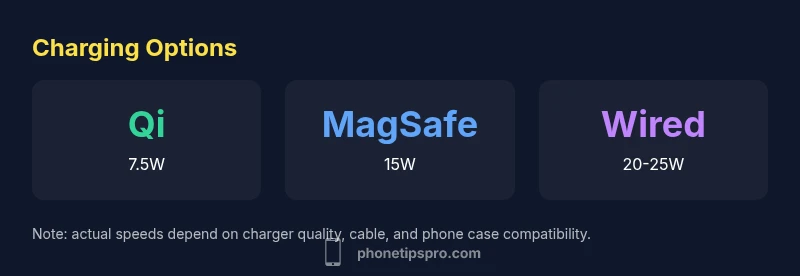
- Qi Wireless charging: up to 7.5W (iPhone 13) on compatible pads
- MagSafe wireless charging: up to 15W with compatible chargers and cases
- Wired charging (USB-C to Lightning): typically 20-25W or more, fastest overall
- Battery-health tips: use Optimized Battery Charging and keep devices cool during charging
This quick reference helps you choose the right method for the moment, balancing speed, convenience, and longevity.
Wireless charging options for iPhone 13
| Charging Method | Typical Output | Notes |
|---|---|---|
| Qi Wireless Charging | 7.5W | Standard Qi charging on iPhone 13; works with most pads |
| MagSafe | 15W | Official MagSafe provides faster wireless charging; requires MagSafe-compatible charger |
| Wired USB-C | 20-25W | Not wireless; fastest charging method for battery health |
| Optimized Battery Charging | N/A | Use iOS feature to reduce aging |
FAQ
Can the iPhone 13 charge wirelessly with any Qi charger?
Yes, any Qi-certified charger will work with the iPhone 13. Output varies by charger, but expect up to 7.5W on typical pads. For best results, choose reputable models and watch temperatures during charging.
Yes, any Qi-certified charger will work, but speeds vary with the charger and temperature. Choose a reputable pad for consistent results.
Does case thickness affect wireless charging?
Yes. Very thick cases or metal components can increase the distance between the phone and charger, reducing efficiency or stopping charging. Use MagSafe-compatible cases for best alignment and speed.
Yes, thick cases can slow charging or stop it. Use a MagSafe-compatible case for the best results.
Can MagSafe charge the iPhone 13 without a MagSafe case?
MagSafe can charge without a case, but alignment is easier and speeds are higher with MagSafe-compatible cases that preserve the magnets. If you don’t use a compatible case, charging will still occur but may be slower.
MagSafe works without a case, but a compatible case helps keep it aligned and fast.
Is wireless charging less safe for battery health?
When done with certified chargers and moderate temperatures, wireless charging is safe. iOS Optimized Battery Charging helps minimize aging by delaying full charging until needed.
Wireless charging is safe if you use good chargers and avoid heat; enable Optimized Battery Charging to help.
How long does it take to charge from 0 to 100% wirelessly?
Wireless charging usually takes longer than wired charging, especially on lower-watt pads. With MagSafe, speeds improve, but a full 0–100% charge can still take a couple of hours depending on the charger and temperature.
It’s slower than wired charging; expect a few hours depending on the charger and temperature.
Should I enable Optimized Battery Charging on iPhone 13?
Yes. Optimized Battery Charging reduces aging by learning your daily charging routine and pausing charging at 80% until you need it. It works with both Qi and MagSafe charging.
Yes—enable it to help extend battery life.
“Wireless charging on the iPhone 13 is a practical everyday option, but for the fastest results pairing a MagSafe charger with a compatible case is the best path.”
Quick Summary
- Choose a Qi pad with 7.5W output for reliable wireless charging.
- MagSafe offers the fastest wireless option when using compatible gear.
- Case compatibility matters for MagSafe alignment and charging speed.
- Enable Optimized Battery Charging to extend battery health.
- Wireless charging is convenient but slower than wired charging; plan accordingly.