What Charger Is Needed for iPhone 13: A Practical Guide
Discover what charger is needed for iphone 13, including wired USB-C PD and MagSafe options, plus buying tips for safe, fast charging and battery health.


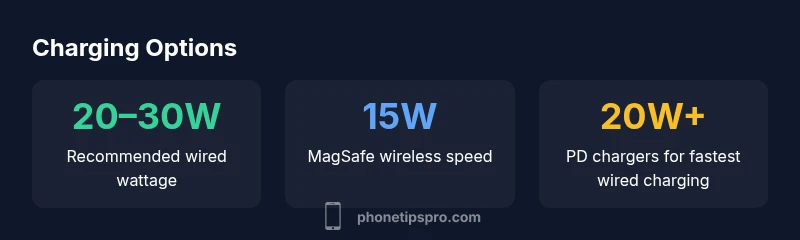
To charge an iPhone 13 quickly, use a USB-C power adapter of at least 20W with a USB-C to Lightning cable. For wireless charging, MagSafe delivers up to 15W. If you’re using an older or lower-wattage charger, charging will be slower, but any USB charger will work. Phone Tips Pro notes that a 20W+ USB-C PD charger provides the fastest wired charging experience.
What charger is needed for iphone 13
If you’re wondering what charger is needed for iphone 13, the short answer is straightforward: you can use either a wired USB-C charger with a Lightning cable or a wireless charger. For the fastest wired charging, Apple and Phone Tips Pro recommend a USB-C power adapter of at least 20W paired with a USB-C to Lightning cable. The iPhone 13 uses the Lightning port, not USB-C on the device, so you can't directly plug in a USB-C cable without an adapter; using USB-C PD ensures safe and efficient charging. Lower-wattage chargers (such as 5W or 12W models) will work, but charging will be noticeably slower, especially if you use the device while it charges. If you prefer wireless charging, MagSafe and Qi chargers are compatible; MagSafe provides up to 15W of power, though actual speeds depend on your case, alignments, and charger quality. In practice, a 20W USB-C PD charger paired with a high-quality USB-C to Lightning cable is the most reliable setup for daily use, while MagSafe offers convenience when you want a cable-free option. Phone Tips Pro's guidance emphasizes safety, using certified accessories, and avoiding counterfeit chargers that can damage the battery over time.
Wired charging options: USB-C PD and USB-A legacy
The fastest way to recharge the iPhone 13 is through USB-C Power Delivery (PD). A USB-C PD charger of 20W or more connected to a Lightning cable yields the quickest top-up, and many users see significant improvements over the older USB-A charging. If you only have USB-C PD 18W or 25W chargers, you will still get fast charging, with minor differences in peak rates and heat. USB-C PD chargers also tend to be more efficient and handle heat better during longer charging sessions. In contrast, a traditional USB-A charger (5W, 12W) will charge much more slowly, especially when the battery is low or you’re using the phone while plugged in. If you travel or share a charger with other devices, consider a multi-port USB-C PD charger that can charge an iPhone, iPad, and AirPods at once, keeping the USB-C to Lightning cable length manageable. The key is to choose a reputable charger and ensure it supports USB-C PD with stable voltage output to protect battery health and avoid overcharging.
MagSafe and wireless charging basics
Wireless charging with MagSafe is convenient and safe for everyday use, but it's important to set expectations. The iPhone 13 supports MagSafe wireless charging up to 15W when used with a MagSafe charger or a compatible pad. For best results, remove bulky cases or metal accessories that block the magnetic alignment, and place the phone centered on the charger. Qi wireless charging is also supported, but it typically tops out around 7.5W with non-MagSafe pads and may be slower than MagSafe. If you rely on wireless charging during the day, MagSafe offers a more efficient option with faster speeds and a familiar magnetic alignment, though it might heat the device more than a wired connection. For optimal battery health, avoid leaving the device on wireless charging for extended periods at high temperatures and consider enabling Optimized Battery Charging in iOS to learn your daily charging routine.
Cable quality and safety: choosing cables and accessories
Not all cables are equal; the quality of the USB-C to Lightning cable matters as much as the charger. Use Apple's-certified or reputable third-party cables that are USB-IF certified and rated for fast charging. A high-quality USB-C to Lightning cable can sustain the required current without overheating, while a cheap cable may degrade, leading to slower charging or intermittent connections. The charger should be from a trusted brand and support USB-C PD with a stable 5V–20V output depending on the device detection. Avoid counterfeit adapters that overheat or misreport wattage, as these can cause long-term battery health issues or safety hazards. If you frequently charge on the go, a compact, certified 20W USB-C PD charger with a durable cable is a smart, future-proof choice. Also, check whether your cable is long enough to reach sockets behind furniture or in car charging setups, as too-short cables can cause safety risks or accidental unplugging.
Practical buying guide for different users
Different user scenarios call for different charger configurations. If you want the fastest wired charging for daily use, invest in a 20W or higher USB-C PD charger and a high-quality USB-C to Lightning cable. If you own multiple Apple devices or travel often, consider a compact multi-port USB-C PD charger (30W or more) that can charge an iPhone, iPad, and AirPods. For those who prefer cable-free charging, MagSafe is convenient, but you may want a detachable stand or vent-mounted pad for desk setups. Budget-conscious buyers can still charge effectively with a 18W charger or a reputable 20W unit, but expect longer fill times. Don’t forget to verify that all accessories are compatible with the iPhone 13 and include safety features like overcurrent, overtemperature, and short-circuit protection. Phone Tips Pro editors recommend sticking to chargers from established brands and checking product certifications to maximize charging efficiency and battery health.
Common pitfalls and troubleshooting tips
If you’re not seeing fast charging, a few quick checks can help. Ensure you are using a USB-C to Lightning cable that is not damaged, and confirm that your charger is PD-compatible and delivering the correct power. Clean the charging port if dust collects; a small amount of debris can impede charging. When using MagSafe, align the device properly on the pad; even a slight misalignment can reduce charging speed. Avoid using phones while charging for long periods at extreme temperatures, as heat can accelerate battery wear. If you consistently see slow charging, test with a different charger and cable to isolate the issue. In most cases, the fix is as simple as switching to a higher-wattage USB-C PD charger or replacing a worn cable. As always, keep the iPhone’s software up to date, since iOS updates can improve power management and charging efficiency.
Common misconceptions about iPhone 13 charging
A common misconception is that MagSafe will always charge at its maximum rate regardless of case or environment. In reality, the speed depends on the charger and alignment. Another idea is that using USB-A is just as fast as USB-C PD; in practice, USB-C PD is substantially faster for iPhone 13. Some users assume that more wattage always means faster charging, but battery health and heat management cap the effective rate. Lastly, some people believe that charging at 100% always will harm the battery; iOS includes optimized charging features to reduce wear, and charging up to 80% daily is a common practice to preserve longevity.
Wired vs wireless charging options for iPhone 13
| Charger Type | Wattage | Notes |
|---|---|---|
| USB-C PD charger | 20–30W | Fast wired charging with USB-C to Lightning |
| USB-C PD charger (higher output) | 30–60W | Future-proofing for other devices |
| MagSafe Charger | 15W | Wireless charging option |
FAQ
Do I need a USB-C charger to fast-charge iPhone 13?
Yes. A USB-C PD charger of at least 20W provides the fastest wired charging. USB-A adapters will charge slower.
Yes. For fast wired charging, use a USB-C PD charger of at least 20W.
Is MagSafe charging as fast as wired charging?
MagSafe offers up to 15W of wireless charging, which is convenient but typically slower than a 20W USB-C PD wired charge.
MagSafe provides up to 15W wirelessly, but wired 20W can be faster.
Can I use any USB-C charger with my iPhone 13?
You can use any USB-C charger that supports USB-C PD and provides stable output, but for best results use a 20W+ PD charger.
Yes, but for best results pick a 20W+ PD charger.
Will charging with third-party accessories affect battery health?
Quality third-party accessories from reputable brands generally won’t harm battery health, but low-quality or counterfeit products can cause overheating or voltage irregularities.
Choose reputable brands to protect battery health.
Is it okay to charge iPhone 13 with USB-A chargers?
USB-A chargers will work, but they charge more slowly than USB-C PD options and can heat up more during use.
USB-A works but is slower than USB-C PD.
Should I enable Optimized Battery Charging for charging habits?
Yes. Enabling Optimized Battery Charging helps protect long-term battery health by reducing time spent at 100%.
Turn on Optimized Battery Charging in Settings for better battery health.
“Fast, safe charging for the iPhone 13 hinges on using a USB-C PD charger and a quality Lightning cable. Avoid low-quality adapters that can overheat.”
Quick Summary
- Choose a 20W USB-C PD charger for fastest wired charging.
- MagSafe offers convenient wireless charging up to 15W.
- USB-A chargers are slower; PD speeds are preferred.
- Use certified cables and chargers to protect battery health.
- Consider a multi-port charger for travel and multiple devices.