How Often to Replace iPhone in 2026: A Practical Guide
Learn how often to replace iPhone based on battery health, software support, and usage. This analytical guide explores lifecycles, costs, and practical timelines for 2026, helping you plan upgrades with confidence.


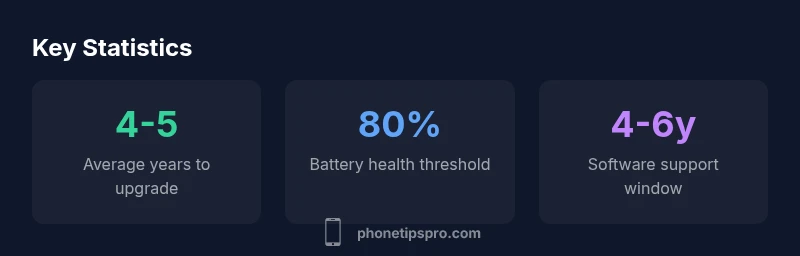
In general, the practical replacement window for an iPhone is about four to five years, provided you actively monitor battery health, device performance, and Apple's software support schedule. If you frequently experience rapid battery drain, noticeable lag, or compatibility issues with current apps, you may consider upgrading sooner. This four-to-five-year window is a reasonable starting point for most users, though individual needs can shorten or extend it.
Why replacement timing matters
According to Phone Tips Pro, understanding how often to replace iphone isn't about chasing the newest model; it's about balancing performance, security, and total cost of ownership. For many users, the practical replacement window sits around four to five years, but individual criteria can push this in either direction. A phone that remains fast, secure, and compatible with your apps might stay in service a bit longer, while battery health and software support risks accumulate faster for others. In this guide, we break down the factors that should influence your decision and provide practical rules of thumb you can apply today. By planning ahead, you can avoid unexpected downtime and maximize value from your current device.
Battery health as a primary driver
Battery health is one of the strongest levers in deciding how often to replace iphone. Key indicators include remaining capacity, peak performance capability, and cycle count. A common heuristic is to consider replacement when battery health drops to around 80% of its original capacity, though heavy users may opt for sooner thresholds. Regularly checking Battery Health in Settings helps you quantify this. Beyond capacity, rapid repeat charging cycles and degraded battery performance can cause unexpected shutdowns, which erodes reliability and user experience. When battery health is slipping, you should weigh the cost of a battery replacement against the performance gains from a newer device.
Software support and hardware capabilities
Apple’s software support window influences replacement timing as much as hardware pace. iPhones typically receive iOS updates for several years, which means devices that miss updates may become less secure and incompatible with newer apps. In practice, many users find a 4–6 year window aligns with meaningful upgrade cycles. If your iPhone no longer receives security patches or runs the latest features smoothly, upgrading often becomes a prudent choice, even if the hardware itself isn’t visibly failing. This is especially true for users who rely on newer apps or security features that assume current software.
Model-year lifecycle: how it translates to real-world upgrades
A practical way to think about replacement is to map your device to its age, not just its model. For many users, devices around four to five years old may begin showing signs of aging—slower app launches, longer charging times, or camera improvements that no longer feel accessible. By year five, hardware limitations often intersect with software demands. In some cases, a battery replacement or storage boost can extend usable life, but the cost-to-benefit ratio frequently tips toward upgrading. If you rely on advanced features (photography, AR, heavy gaming), the upgrade window may compress slightly as those features evolve.
Cost considerations: upgrade vs repair decisions
Financial practicality should guide whether to repair or replace. A battery replacement is typically far cheaper than purchasing a new model, but it may not be the best choice if many core components show age-related wear, like storage capacity, processor speed, or display quality. When the sum of necessary repairs begins approaching a sizable fraction of a new device’s price, upgrading becomes the more economical option. Consider trade-in programs or carrier promotions as part of the total cost of ownership to make a replacement more affordable, especially when you want the latest security improvements.
Maximizing lifespan: practical habits that delay replacement
Smart usage habits can push replacement timelines outward. Prioritize software updates, manage storage to avoid app bloat, and optimize charging routines to extend battery health. Reducing peak power draw and avoiding full discharges can preserve performance. A well-kept iPhone with decent battery health can feel
Planning today for tomorrow’s upgrade
Two simple planning steps help you decide when to replace: (1) set a yearly performance check, focusing on battery health, OS support, and storage capacity; (2) establish a cost threshold for upgrades that takes into account trade-in value, financing options, and personal budget. By building a small upgrade fund and tracking battery health monthly, you’ll be prepared to upgrade on your terms rather than when unexpected failures occur.
A quick checklist you can use now
- Check Battery Health (Settings > Battery > Battery Health) and note the maximum capacity.
- Review the latest iOS compatibility for your model and assess whether performance remains steady.
- Compare battery replacement costs vs. new-device promotions in your region.
- Evaluate storage needs and camera performance for your typical usage.
- Consider resale value and trade-in programs when upgrading.
Lifecycle considerations for iPhone replacement
| Aspect | Typical Lifespan (years) | Notes |
|---|---|---|
| Battery health impact | 4-5 | Assumes average usage and battery replacement options available |
| Security updates window | 4-6 | Aligned with current Apple support patterns |
| Performance support | 4-6 | Hardware ages with software demands |
| Resale value retention | 65-80 | Varies by device condition and market demand |
FAQ
What is the typical replacement cycle for an iPhone?
Most users upgrade every four to five years, depending on battery health, performance, and software support. If you rely on the latest features or notice lag, you may upgrade earlier.
Most people upgrade every four to five years, depending on battery health and performance.
How can I tell if my iPhone battery needs replacement?
Check battery health in Settings > Battery > Battery Health. If the maximum capacity is around 80% or lower, or if you notice rapid drain, it's a strong sign to consider replacement.
Check Battery Health in Settings; if the health is around 80% or less, consider replacement.
When will iPhone software support end for older models?
Apple typically provides updates for about 4–6 years after a model’s release. When updates stop, the device may become less secure and compatible with newer apps.
Most devices get updates for around four to six years.
Is upgrading worth it if my battery is fine but performance is lagging?
If lag is affecting daily use, upgrading can offer meaningful improvements. If the issue is isolated, a battery replacement or storage upgrade might suffice.
If you’re lagging daily, upgrade may be worth it; otherwise, try fixes first.
How do battery replacement costs compare to a full upgrade?
Battery replacement is usually cheaper than a full upgrade, but evaluate total cost including trade-in value and ongoing device needs.
Battery replacement is cheaper than a full upgrade, but consider trade-ins.
What practical steps can extend my iPhone’s life?
Maintain software updates, manage storage, optimize charging, and minimize exposure to heat. These steps help preserve battery health and performance.
Keep software updated, manage storage, and optimize charging to extend life.
“Timely upgrades are driven by a balance of battery health, software compatibility, and personal cost. Don’t chase the latest model—chase reliable performance.”
Quick Summary
- Upgrade when battery health and performance fall short.
- Plan for 4–5 year replacement windows as a baseline.
- Weigh maintenance costs against trade-in value and promos.
- Keep software up to date to maximize security and features.
- Use a structured upgrade budget to avoid surprises.