What Battery Health Is Bad for iPhone: Signs, Impacts, and Fixes
Learn what 'bad' battery health means for iPhone, how it affects performance, when to replace, and practical steps to extend battery life—based on Phone Tips Pro Analysis, 2026.


Battery health on iPhone is the device's maximum capacity relative to when the battery was new, shown as a percentage in Settings. A health reading around 80% or lower typically signals degraded capacity and may justify battery replacement, while higher values indicate fresher battery and longer peak performance. Regular checks help avoid unexpected downtime.
What Battery Health Means for iPhone
According to Phone Tips Pro, battery health is a practical measure of how much of the original battery capacity remains. On an iPhone, this is presented as a percentage in Settings > Battery Health. It represents the maximum charge your battery can hold relative to when it was new, and it directly influences how long the device can run between charges. As a rule of thumb, readings around 80% or higher indicate the battery still performs reasonably well, while around 80% or lower suggests degraded capacity and the potential need for service. Remember, health is influenced by usage, charging habits, and environmental conditions. Regular checks help you anticipate changes and plan maintenance before it impacts daily use.
How Apple Defines Battery Health
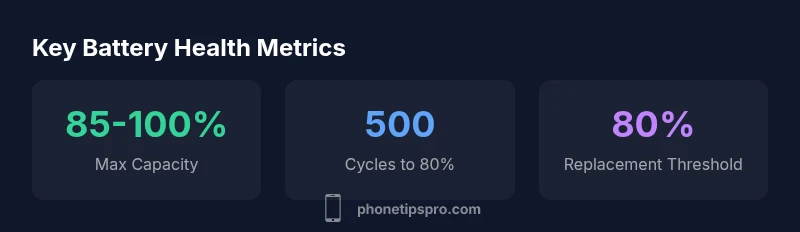
Apple defines battery health as the maximum capacity of the battery relative to when it was new. In iOS, the Battery Health section displays the current maximum capacity (a percentage) and notes whether the battery has degraded sufficiently to affect performance. This health percentage is not a measure of current charge but of potential capacity. The device may appear to run well even with lower health, but features like peak performance capability and throttling can be impacted as health declines. Understanding this helps you decide when a battery replacement makes economic and practical sense. For context, Apple targets the battery to retain up to about 80% of its original capacity after 500 full charge cycles, though individual results vary.
When Is Battery Health Considered 'Bad'?
There is no single magic number that makes health 'bad' for everyone. In practice, many users consider health around 80% or lower as signaling degraded capacity that could justify replacement, especially if you notice shorter daily life, longer charging times, or unexpected shutdowns. However, significant issues like swelling, rapid drops in capacity, or persistent throttling can occur even at higher percentages. The real decision point is a mix of capacity percent, observed performance, and safety concerns. Regularly tracking the trend over months helps you decide when to act.
How Battery Health Affects Performance
Battery health directly influences peak performance capability. When health is high, the phone can meet demanding tasks without sudden slowdowns. As health falls, iPhones may throttle CPU performance to prevent unexpected shutdowns, leading to slower app launches, stuttery animations, and reduced battery life. If you notice your device feeling slower than before or apps taking longer to respond, check Battery Health for any signs of degradation. A replacement often restores full performance and reliability.
Practical Ways to Check Battery Health
To check battery health, go to Settings > Battery > Battery Health. Look at the Maximum Capacity percentage and the Peak Performance Capability note. If you see a message like Service or a lower capacity with performance issues, plan for service. For older devices, you may also notice battery-related alerts in Settings, or you may need to contact Apple Support for a hands-on diagnostic. Keeping iOS updated helps ensure the health metrics reflect current software and hardware status.
Extending Battery Health: Practical Tips
Keep temperatures moderate; avoid leaving your iPhone in hot cars or in direct sun. Charge cycles matter: aim for regular charging rather than long, constant top-ups. Utilize Optimized Battery Charging and iOS updates that include battery-life improvements. If you rely on heavy tasks, consider charging breaks or a power adapter. Calibrating the battery (full discharge then full recharge) can help older iPhones recalibrate reporting, but avoid deep discharges frequently. Finally, replace the battery when health nears the 80% threshold and you notice performance issues.
Should You Repair or Replace?
If Battery Health sits around or below 80% and you’ve noticed shorter battery life or throttling, replacing the battery is usually the most cost-effective option to restore performance. Evaluate the device’s age, current performance, and total replacement cost. For older models, a battery replacement can extend usable life by many months to years. If the device is very old or has other issues, weigh the cost of replacement against buying a newer model.
Common Myths and Realities
Myth: Poor battery health can be reversed. Reality: Battery health cannot be improved; it can only be preserved or decline more slowly with proper care. Myth: Fully charging to 100% always helps. Reality: Avoiding extreme charging patterns helps reduce wear. Myth: Throttling only happens with bad health. Reality: Some performance management is normal and can occur even with moderate health, though severe health increases the chance of throttling.
Quick Maintenance Checklist
- Check Battery Health monthly or after major updates
- Keep iOS updated and enable Optimized Battery Charging
- Avoid heat exposure and direct sunlight
- Use a charger from reputable sources and avoid overnight heavy charging
- If health is near 80% and you notice issues, consider replacement or a professional diagnostic
Battery health metrics at a glance
| Aspect | What it means | Notes |
|---|---|---|
| Battery Health (Max Capacity) | Percentage of original capacity | 100% when new; declines with use |
| Performance Throttling | Protection when battery can’t meet demand | May occur as health drops |
| Replacement Threshold | Common guideline for service | Around 80% or lower is often discussed |
FAQ
What is considered bad battery health on iPhone?
A health reading around 80% or lower is commonly considered degraded and may warrant a battery replacement, especially if you notice reduced life or unexpected shutdowns.
A battery health around eighty percent or lower is often a sign you should consider replacing the battery, especially if performance is affected.
Does battery health affect performance?
Yes. Lower health can trigger throttling and shorter run times. High health generally maintains peak performance.
Yes, lower health can slow things down and cause shorter battery life.
Can battery health improve over time?
Battery health cannot improve; it can only stay the same or decline. Proper care slows degradation but cannot restore lost capacity.
Battery health doesn’t improve on its own, but you can slow its decline with good habits.
How do I check health on an older iPhone?
Go to Settings > Battery > Battery Health. If you see a Service message or reduced capacity, plan for maintenance.
Open Settings, tap Battery, then Battery Health to see your status.
Is it worth replacing the battery or buying a new iPhone?
If the device still meets your needs and the battery is degraded, replacing the battery is often cost-effective. For very old devices, a new iPhone could be better value long-term.
If your iPhone still fits your needs, a battery replacement is usually cheaper than a new phone, unless you’re chasing new tech.
What if my phone is slow but battery health reads high?
High health doesn’t guarantee speed. If apps lag, check other factors like storage, RAM use, and background activity.
If it’s slow, look beyond health—clear storage, close apps, and update software.
“Battery health is a practical indicator of when service is likely necessary. Understanding it helps you avoid surprises and keep your iPhone reliable.”
Quick Summary
- Know that battery health is a capacity percent, not a charge level
- 80% is a common threshold for considering replacement
- Performance throttling can occur as health declines
- Regular checks help you plan maintenance before downtime
- Use iOS Optimized Battery Charging to extend life