What iPhone Uses Lightning Cable: A 2026 Guide
Understand which iPhone models use Lightning, why Apple shifted to USB-C, and what it means for charging, data transfer, and accessories in 2026. Practical tips and a quick reference for port compatibility.


What iPhone uses Lightning cable? The short answer: Lightning is used by older iPhone models, while the current lineup uses USB-C. Specifically, iPhones released through the iPhone 14 era relied on Lightning, and Apple shifted to USB-C with the iPhone 15 (introduced in 2023). This port change affects charging, data transfer, and accessory compatibility across generations.
What the Lightning Port Means for iPhone History
If you ask what iphone uses lightning cable, the answer depends on the model. Since its introduction in 2012, the Lightning port defined how iPhones charge, transfer data, and connect to a wide range of accessories. Early iPhones used Lightning across generations—from iPhone 5 through the iPhone 14—building a large ecosystem of docks, car chargers, headphones adapters, and charging hubs. For many users, Lightning was a stable standard that kept accessories interchangeable across years. However, the port also represented a proprietary solution, tied to Apple’s hardware and certification ecosystem. In 2023, Apple began a transition with the iPhone 15 to USB-C, signaling a shift toward a universal standard. By 2026, USB-C is the dominant port on new iPhones, while Lightning remains in use only for legacy devices and older accessories. Understanding this history helps you plan purchases, replacements, and the kinds of adapters you might need during multi-generational ownership.
The Lightning Era: iPhone Models and Key Accessories
From the iPhone 5 (2012) up to the iPhone 14, Lightning cables supported charging, syncing, and a growing ecosystem of accessories. Lightning’s small, reversible design made connected accessories compact and reliable, supporting docks, car chargers, audio adapters, and external battery packs. Many households still have Lightning cables and docks tucked in drawers or in handbags, and some older cars or desktops continue to rely on the Lightning port. Apple’s licensing and certification helped ensure accessory compatibility and consistent performance. As new iPhones appeared with Lightning, third-party brands produced a wide range of cables, hubs, and audio accessories. The result was an expansive, but somewhat fragmented, ecosystem that remained popular for years. While Lightning was popular, the buildup of adapters finally faced competition as USB-C gained prominence in other devices and in regulatory environments that encouraged standardization.
The USB-C Transition: Timeline and Rationale
Apple’s transition to USB-C began with the iPhone 15 in 2023, aligning with a broader industry shift toward a universal charging standard. USB-C offers higher potential charging speeds through Power Delivery and faster data transfer, enabling smoother syncing with MacBooks, iPads, and other devices. The move also reduces the need to stock multiple cables across households and can cut waste when the same cable works across multiple devices. In 2026, USB-C has become the norm for new iPhones, and many accessory makers have updated their product lines to USB-C as well. For consumers, the timeline means planning for USB-C cables and PD adapters while preserving legacy Lightning accessories only if you own older devices or specialized car docks.
How This Impacts Charging and Data Transfer
Charging and data transfer are the two core functions of the iPhone port, and the switch to USB-C changes both. USB-C cables with Power Delivery enable rapid charging on compatible models, and USB-C ports support higher data transfer rates when connected to a computer or external drives. Lightning accessories, by contrast, often rely on older data-transfer approaches and may be slower or less consistent. If you still own a Lightning-based iPhone or accessory, you’ll likely need adapters to bridge to USB-C. In daily use, USB-C reduces cable clutter since a single USB-C cable can power multiple devices. The practical takeaway: for new purchases in 2026, prioritize USB-C gear and keep Lightning adapters only for legacy setups.
Accessory Compatibility: Adapters, Cables, and Bridge Options
With a mixed-port environment, adapters become essential. A USB-C to Lightning adapter lets you use existing Lightning accessories with a newer iPhone, but you should verify that the adapter supports data transfer and sufficient power for charging. Alternatively, Lightning-to-USB-C cables can bridge some connections, though they may not support the fastest PD charging or high-speed data transfer. When buying cables, prefer USB-C cables that specify PD support and product certifications. For Lightning users who must connect to a USB-C device, choose reputable adapters from trusted brands to minimize battery heat and performance issues. In short, standardize on USB-C where possible, and plan adapters thoughtfully for the remaining legacy gear.
What This Means for Consumers in 2026
For consumers shopping in 2026, USB-C is the practical default for new iPhones and many accessories. If you have a sizeable library of Lightning cables or older docks, you’ll want to identify which items you actually use and assess whether adapters or replacements are worth the cost. Consider the EU and other regulatory contexts that push for standardization, which has accelerated the move toward USB-C. Your buying decisions should weigh convenience, future-proofing, and environmental impact, keeping a balance between upgrading essential gear and maintaining necessary legacy functionality.
Best Practices for Managing Lightning and USB-C Gear
- Standardize on USB-C for new devices to maximize compatibility and charging speed.
- Maintain a dedicated Lightning adapter kit for legacy gear.
- Prioritize USB-C cables with PD support and ensure devices’ charging wattage is compatible.
- Label cables and devices by port type to reduce confusion during upgrades.
- Recycle or donate old Lightning accessories where possible to reduce e-waste.
How to Identify Your iPhone's Port Type Quickly
Two quick methods help you identify your port: check the port visually; USB-C is an oval connector with rounded sides, while Lightning is a smaller, symmetrical 8-pin design. If you’re unsure, look up your iPhone model’s official specs or use Apple’s support site. In many cases, models released from 2023 onward use USB-C, while older models rely on Lightning. Finally, you can test a cable with a charged USB-C or Lightning plug to see which port type your iPhone accepts.
Troubleshooting Common Port-Related Issues
When charging or syncing is inconsistent, start with the simplest checks: inspect the port for lint or debris, try a known-good cable and charger, and confirm your device isn’t in a power-saving mode that restricts charging speeds. If you’re bridging Lightning and USB-C with adapters, ensure the adapter supports the required data rates and power levels. For recurring problems, contact Apple Support or a certified technician; port issues can indicate broader hardware concerns.
Port status across iPhone generations
| Category | Port Type | Notes |
|---|---|---|
| Current iPhone lineup (2026) | USB-C | All latest models use USB-C; Lightning is legacy for older accessories |
| Legacy iPhones (pre-USB-C) | Lightning | Older devices and some car docks use Lightning |
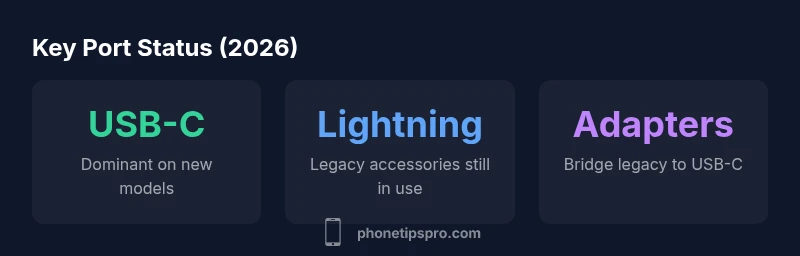
| Accessory ecosystem (2026) | USB-C / Lightning | Adapters bridge between ports; USB-C wins in new gear |
FAQ
Do all new iPhones use USB-C?
Yes. Apple moved to USB-C starting with the iPhone 15 in 2023, and by 2026 USB-C is the standard for new models. Lightning remains only on a subset of legacy accessories.
New iPhones use USB-C, and Lightning is now mainly for legacy gear.
Will Apple phase out Lightning completely?
Apple has been transitioning away from Lightning toward USB-C on new devices. As of 2026, USB-C is the primary port on current models, with Lightning support mainly for older accessories and devices.
Lightning is being phased out; USB-C is the standard now.
Can I use Lightning accessories with USB-C iPhones?
You can use Lightning accessories with USB-C iPhones via adapters, but ensure the adapter supports both charging and data transfer at adequate speeds. Not all adapters support high-speed data.
Adapters let you use Lightning accessories with USB-C iPhones, but check speed and data support.
What adapters are recommended?
Choose Apple-certified USB-C cables and PD-enabled adapters. For Lightning, pick reputable adapters from trusted brands to maintain charging performance and safety.
Go for Apple-certified USB-C cables and PD adapters.
Is Lightning still supported for data on iPhone 14?
Lightning data works on iPhone 14 and earlier models. Newer models use USB-C, and adapters may be required to bridge to older Lightning accessories.
Lightning data works on older devices; new ones use USB-C.
“Lightning era defined iPhone accessories for years, but USB-C standardization finally aligns devices across ecosystems.”
Quick Summary
- New iPhones use USB-C; Lightning is legacy.
- Keep a Lightning adapter kit for older gear.
- Prefer USB-C cables with PD support.
- Plan to upgrade accessories to USB-C for future compatibility.