When to Change iPhone Battery Reddit: A Practical Guide
Find practical guidance on when to change your iPhone battery, inspired by Reddit discussions and Phone Tips Pro analysis. Learn signs, health metrics, and cost considerations to decide whether to replace now or later.


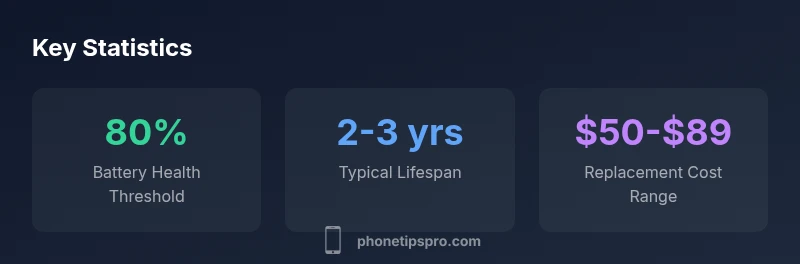
There is no universal Reddit deadline for battery replacement. In practice, most iPhone users replace the battery when health is around 80% of original capacity, or when rapid drain, unexpected shutdowns, or performance lag become persistent. According to Phone Tips Pro, this 80% threshold provides a practical balance of reliability and cost, adjusted for model and usage.
Why Reddit Timing Varies for iPhone Batteries
Reddit threads on iPhone battery timing reflect a broad spectrum of user experiences. Some users chase the latest model and operate devices well past the typical two-year mark, while others replace sooner to avoid disruptions. The variability comes from several factors, including the device’s model, usage patterns, storage conditions, and whether the phone is still under warranty or AppleCare+. According to Phone Tips Pro, these discussions are useful for setting expectations but should not replace personal diagnostics. Think of Reddit as a starting point for your decision rather than the final trigger. By understanding common signals and health metrics, you can align Reddit chatter with your own data and needs.
Understanding Battery Health and the 80% Rule
A central theme in Reddit discussions is the 80% health threshold. Apple’s Battery Health metrics indicate that capacity is not linear over time, and health declines as cycles accumulate. The practical takeaway echoed by the Phone Tips Pro Team is that around 80% health is a reasonable cue to begin planning a replacement, especially if the phone shows signs of degraded performance. This threshold is not a hard mandate—some users function comfortably below 80% for years, while others replace earlier to maintain peak reliability. When deciding, balance the health percentage with real-world performance: longer charging times, device overheating, or propensity to shut down mid-use all deserve attention.
Signs That Indicate Replacement Is Due
Battery health is not the only signal; performance symptoms are equally important. Sudden shutdowns, unexpected restarts, apps freezing at critical moments, or noticeable lag during routine tasks can point to inadequate battery support. If you notice these symptoms alongside a health reading around 80% or lower, it’s time to schedule a service appointment. On Reddit, many users also cite screen brightness and general device heat as indirect indicators: batteries under duress often vent more heat under normal usage. A data-driven approach is to combine health percentage with symptom frequency over a two-week window before deciding.
How to Check Battery Health on iPhone (Step-by-Step)
Checking Battery Health is straightforward and should become part of your regular device maintenance. Go to Settings > Battery > Battery Health & Charging. Here you’ll see the maximum capacity percentage and a message about peak performance capability. If your device shows performance management features or asks you to enable a feature to manage performance during battery aging, take note of how often it triggers. Record any changes in battery life over a couple of weeks, and compare those numbers with your daily usage. The combination of a numerical readout and observed usage is your most reliable guide. For more context, see the detailed guidance from Phone Tips Pro.
Costs, Warranty, and Service Options
Battery replacement costs vary by model and region, and warranty status matters. If your iPhone is under AppleCare+ or a current warranty, a replacement may be significantly cheaper or even covered. Outside of warranty, official Apple service typically falls within a broad price range and can include diagnostic fees. Third-party repair shops may offer lower upfront costs but come with potential risks to device warranty and battery authenticity. When evaluating options, consider the total cost of ownership, the reputation of the shop, and whether the replacement is performed by trained technicians using certified parts. Phone Tips Pro’s analysis emphasizes choosing trusted service channels to minimize future issues.
DIY Battery Replacement vs Professional Service
DIY battery replacement can be tempting for cost savings, but it carries risks, including voiding warranties and physical damage if performed incorrectly. iPhone batteries are not user-serviceable for most models, and attempting a DIY replacement can compromise water resistance and internal integrity. Professional service ensures proper insulation, calibrated battery health reporting, and proper disposal of old cells. If you’re not confident in the procedure, it’s usually wiser to opt for a certified tech rather than attempting a home fix. The Phone Tips Pro Team highlights that the safest route is professional service for most users.
Extending Battery Life and Delaying Replacement
Even when replacement is on the horizon, you can stretch current battery life with smart habits. Use Optimized Battery Charging, avoid high-heat environments, and reduce background activity by trimming unnecessary background app refresh. Keeping iOS updated can contribute to efficiency improvements, and managing screen brightness helps reduce load. Another practical step is to moderate charging patterns: partial cycles (charging to 80-90% rather than always charging to 100%) may help extend overall lifespan. These practices don’t replace a worn battery, but they can delay the point at which replacement becomes necessary.
A Practical Decision Framework (What to Do Next)
Develop a simple decision framework to decide when to replace. Start with a health check: is the capacity around 80% or lower? Then assess performance: do you experience frequent slowdowns or unexpected shutdowns? If both are present, schedule a service. If only health is low but performance remains acceptable, monitor for a few weeks and compare battery drain to prior periods. Keep warranty status in mind; replacements under warranty or AppleCare+ may be more cost-effective. Finally, document your findings and align them with your personal tolerance for risk and inconvenience. This framework helps you move from Reddit generalities to a concrete action plan.
Key indicators and actions for iPhone battery replacement decisions
| Aspect | What it Means | Recommended Action |
|---|---|---|
| Battery Health | 80% or below indicates aging battery | Plan replacement or service |
| Unexpected Shutdowns | Battery cannot sustain load | Schedule a diagnostic appointment |
| Charge Cycles | Heavily used devices accumulate cycles faster | Use Optimized Battery Charging and monitor usage |
FAQ
What is the 80% battery health rule and why does it matter?
The 80% rule is a practical guideline used by many iPhone users. When battery health falls to about 80% or lower, you may begin to notice shorter battery life and more frequent recharging. If performance also declines, replacement is worth considering. This rule is a balance between reliability and cost, and it should be adjusted based on model and usage.
The 80% rule helps you decide when to replace. If your phone shuts down unexpectedly or drains quickly and health is around 80% or less, plan for replacement.
How can I check iPhone battery health?
Open Settings, go to Battery, then Battery Health. You’ll see the maximum capacity percentage and a message on performance capability. If capacity reads around 80% or lower, consider monitoring closely for performance issues and planning a replacement if needed.
Go to Settings, Battery, Battery Health to check capacity. If it shows around eighty percent or less and you notice issues, plan for replacement.
Should I replace my battery if it’s swelling?
Yes. Battery swelling is a serious safety issue. Stop using the device, power it down if possible, and seek immediate professional service. Do not press, puncture, or attempt to discharge the device yourself.
If you notice swelling, stop using the phone and get professional help right away.
Are third-party battery replacements safe?
Third-party replacements can be safe with reputable technicians and certified parts, but they may void warranties or affect water resistance. Always verify the shop’s accreditation and ask about part quality and guarantees before proceeding.
Only use trusted shops with genuine parts and warranty, and be aware of potential warranty implications.
Does replacing the battery affect resale value?
Replacing a worn battery can improve resale value by boosting battery life and reliability. However, the impact varies by buyer and device condition. Document the replacement to provide transparency to potential buyers.
A fresh battery can help resale, but buyers weigh many factors. Document the replacement for trust.
Is AppleCare+ required for battery replacement?
AppleCare+ coverage often reduces out-of-pocket costs for battery replacement while it’s active. If out of warranty, you’ll typically pay a service fee or replacement cost, depending on model and region.
With AppleCare+, battery replacement is usually cheaper. Outside of warranty, expect standard service charges.
“Battery health is a practical proxy for reliability. When health nears 80% and performance suffers, plan a replacement to maintain device trustworthiness.”
Quick Summary
- 80% health is a practical cue to plan replacement
- Watch for performance issues beyond the health number
- Choose trusted service channels to avoid warranty risks
- Extend battery life with smarter charging and cooling habits
- Document symptoms to justify the replacement decision