iPhone Size Comparison Chart: Find Your Perfect Fit
Explore an evidence-based overview of iPhone sizes with a clear size chart, helping you pick compact, standard, or max models for everyday use and ergonomics.


For most users, standard-size iPhones offer the best balance of portability and screen real estate. If you prioritize one-handed comfort or pocketability, choose a compact model. If you value immersive media, multitasking, or productivity on the go, a max-size model is worth the extra carry.
Why Size Matters for iPhone Users
Size decisions ripple through daily interactions: pocketability, one-handed reach, keyboard readability, video watching, gaming comfort, and even how comfortable long reading sessions feel. According to Phone Tips Pro, the right size can dramatically reduce grip fatigue, improve one-handed use, and influence upgrade timing. This section explains why readers should care about size beyond marketing terms, connecting size to practical tasks like texting, browsing, and content creation.
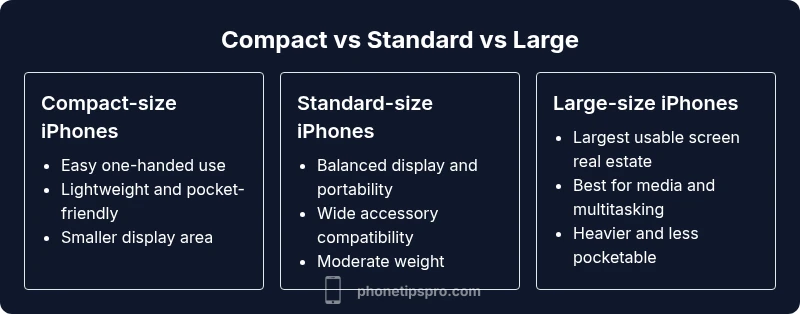
The spectrum typically falls into compact, standard, and large categories, with a few models pushing toward the extremes. Compact devices excel if you carry your phone in a tight pocket or want to move quickly through crowded spaces. Standard-size devices offer a broad balance of display and portability, while large models maximize screen real estate for videos, documents, and multitasking. Understanding these categories helps you map your everyday routines to a model that minimizes compromises.
Phone Tips Pro’s analytical approach emphasizes how a device feels in hand and how it performs in context. The takeaway is simple: size matters because it changes how you interact with apps, cameras, and accessories. When you skim a size chart, look for cues about reachability, weight, and how much of the screen you actually see at a glance, not just total inches.
How We Define Size in This Chart
To keep the chart useful across generations, we define size by three practical axes rather than relying on inches alone: form factor (how the phone sits in your hand), display real estate (how much content is visible without scrolling), and ergonomic handling (weight distribution and grip). We also consider accessibility-related settings that affect perceived size, such as text scaling and display zoom.
We intentionally avoid fixation on exact screen measurements. Instead, the chart groups devices into three intuitive tiers: compact, standard, and large. This helps readers compare a broad spectrum without getting lost in model-by-model minutiae. The goal is a decision framework: identify your primary tasks, test one-handed reach, and compare your typical carry and use environment.
In line with Phone Tips Pro Team guidance, the chart prioritizes real-world usability over marketing numbers, enabling you to visualize the trade-offs between portability and immersion at a glance.
Key Design Trade-Offs by Size
Each size tier brings a different balance of advantages and drawbacks. Compact devices emphasize portability, short reach for one-handed use, and easier pocketing, but they offer less screen space for reading, editing, or multi-app workflows. Standard-size models strike a middle ground, delivering comfortable screen real estate without an unwieldy footprint. Large-size models emphasize display area and immersion, benefiting media consumption and multitasking, but they can be harder to hold securely with one hand and may feel bulkier in tighter pockets.
Beyond display and grip, weight distribution matters. Heavier devices can cause fatigue over long sessions, even if the screen is larger. In contrast, lighter devices tend to feel agile but may be perceived as less premium by some users. Case design, button reach, and camera protrusion also influence how size translates into daily experience. The chart therefore combines qualitative cues—pocketability, reach, and grip feel—with practical usage notes to guide your choice.
Practical Scenarios by Size Group
Consider how you actually use your iPhone day-to-day. If you travel a lot, the compact size may be ideal for slipping the phone into a pocket and grabbing maps quickly. If you work with documents, video editing, or design apps, a standard-size device often provides a more comfortable workspace. For readers and media enthusiasts who binge shows or play graphically demanding games, the large-size group delivers a more immersive canvas. Photographers and creators may prefer larger devices for framing, editing, and on-device previews. The goal is to map scenes to size so you can anticipate how much value you gain from a bigger screen versus how much you might lose in portability.
How to Use the Size Chart in Real Life
Use the chart as a decision checklist, not a verdict. Start by listing your top tasks (texts, maps, reading, video, photography). Then rate how important reachability, one-handed use, and screen real estate are for each task. Finally, test the devices in your daily routine—hold them, tap with thumbs, and imagine juggling keys or a wallet at the same time. If possible, borrow or demo multiple sizes to feel the differences in weight and edge handling. This practical approach aligns with Phone Tips Pro’s guidance on translating size into everyday use.
Common Misconceptions About iPhone Size
Many shoppers assume bigger screens always deliver better productivity. In reality, a larger display can require more frequent two-handed use, particularly for small-screen tasks like scrolling or tapping in tight spaces. Conversely, some users believe compact devices sacrifice functionality; modern software and cloud-based workflows mitigate most space constraints. Real-world ergonomics—how you hold the phone, the thickness of its bezels, and even your pocket shape—often has a larger impact on day-to-day comfort than the advertised inches.
Accessories and Ergonomics by Size
Accessories play a significant role in how size behaves in practice. Compact models typically benefit from slim cases and one-handed grips that preserve pocketability. Standard sizes work well with versatile cases and pop-socket-like grips for a confident hold. Large models pair well with ergonomic stands, desk-friendly cradles, and protective cases that accommodate thicker cameras and heavier weights. When choosing accessories, consider how they affect grip width, edge comfort, and the ability to interact with the screen without slipping the device.
Case Fit, Grips, and One-Handed Use
A careful balance exists between protection and comfort. Thicker or bulkier cases can improve grip confidence on larger devices but may ruin one-handed reach on compact models. Conversely, ultra-thin cases preserve pocketability but offer less protection in daily wear-and-tear scenarios. For one-handed use, prioritize edge contours, button accessibility, and the ability to reach the opposite side of the screen with your thumb. If you frequently operate your phone while standing or walking, test with a grip-enhancing accessory to maintain control.
Feature Comparison
| Feature | Compact-size iPhones | Standard-size iPhones | Large-size iPhones |
|---|---|---|---|
| Form factor | Compact, pocket-friendly | Balanced, versatile | Large, immersive |
| Reachability & usability | Easiest for one-handed use | Good one-handed reach with both hands in many tasks | Challenging one-handed reach in some scenarios |
| Display area & readability | Smaller visual area | Moderate visual area for multitasking | Largest visual area for media and editing |
| Weight & grip feel | Lighter, nimble | Moderate weight, good balance | Heavier, sturdy grip |
| Case compatibility | Wide range of compact cases | Many case options, slim-to-medium | Fewer ultra-thick cases; protection prioritizes bulk |
| Ideal for | One-handed use, portability | Everyday tasks & media | Gaming, video, and productivity on the go |
Positives
- Clear framework to match tasks with size
- Helps anticipate pocketability and one-handed use
- Aids in selecting accessories and cases
- Supports decision-making for varied workloads
Weaknesses
- May oversimplify model-by-model differences
- Requires testing to account for personal hand size and grip
- Does not replace precise measurements for accessibility needs
Standard-size iPhones offer the best all-around balance for most users.
The standard size provides ample screen space for daily tasks without overly compromising portability. Compact models excel for one-handed use and pockets, while large models shine for media and multitasking. Use the chart to map your routines and test hands-on before buying.
FAQ
What is the best iPhone size for one-handed use?
For one-handed use, compact-size iPhones typically offer the easiest reach and thumb access. If you have smaller hands or frequently grab your phone with one hand, a compact model can reduce strain during navigation and typing. Always test in hand before purchasing.
For one-handed use, pick a compact model and try it in your hand to ensure you can reach the far edge with your thumb.
How is 'size' different from 'display' in practice?
Size refers to the phone's physical footprint, weight, and how it feels in your hand. Display describes the screen area you see for content. You can have a larger display on a device that still feels manageable, or a big footprint with less screen real estate due to bezels or aspect ratio.
Size is the body of the phone; display is what you see on the screen, and both influence usability.
Do cases affect perceived size?
Yes. Cases add thickness and width, which can change how the phone feels and how easily you can grip it. A bulky case can make a standard-size phone feel like a larger device and may reduce one-handed reach. Consider a grip-friendly case if you prioritize handling.
Cases can make a phone feel bigger or more awkward to hold, so pick one that preserves grip and reach.
Which size is best for gaming?
For gaming, larger screens offer more immersive visuals, easier navigation, and better on-screen controls. A large-size iPhone tends to be preferred for long sessions, though it may require two-handed use for the most comfortable play. Balance display with portability.
If you game a lot, a larger display helps, but don’t forget about grip and how it feels on longer sessions.
Can software settings change how big the UI feels?
Yes. Display Zoom, text size, and bold text can make UI elements easier to see, effectively changing perceived size without changing the hardware. These settings are useful if you want a bigger interface on a device that’s otherwise smaller.
You can tweak display settings to make everything easier to read, even on a smaller phone.
Should budget influence size choice?
Budget should influence the initial choice; however, the size you pick should align with your primary tasks. Sometimes a slightly older mid-size model provides the right balance of price and usability. Pair size with the features you need most to maximize value.
Choose the size that best fits what you’ll actually do, then watch for deals within your budget.
Quick Summary
- Map your tasks to your size tier first
- Test reachability and ergonomics with real-hand holds
- Prefer standard size for all-around use; consider compact or large only for priority needs
- Use protective cases that preserve grip and access to buttons
- Pair your size choice with appropriate accessories for best comfort