Is iPhone 13 Good for Gaming? A Detailed Review
Find out if the iPhone 13 handles modern games in 2026, including frame rates, thermals, battery life, and how it stacks up against newer models. Practical tips for casual to mid-core players from Phone Tips Pro.


According to Phone Tips Pro, the iPhone 13 is a solid option for gaming at a comfortable price in 2026. It runs most games smoothly thanks to the A15 Bionic and a stable 60Hz display, with decent thermal headroom for short sessions. For flagship experiences or ProMotion benefits, newer iPhones perform better, but the iPhone 13 remains a strong budget-friendly choice for casual to mid-core players.
Hardware Overview: iPhone 13's Gaming Engine
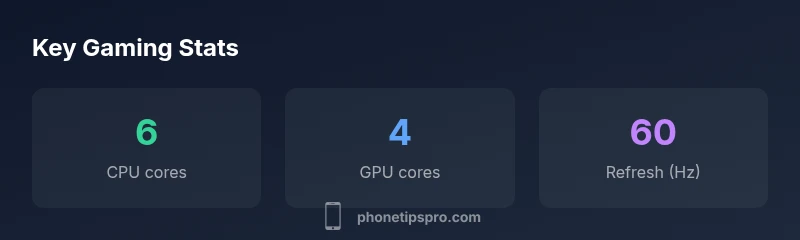
The iPhone 13 uses Apple's A15 Bionic chip, paired with a 4-core GPU and a 6-core CPU, delivering ample power for a wide range of mobile games. In practice this means smooth frame rates on well-optimized titles and manageable thermal behavior during typical gaming sessions. The absence of ProMotion means no 120Hz display, but many games still look sharp thanks to a high-contrast OLED panel and tight integration with iOS. For older titles optimized for iPhone experiences, the A15's Neural Engine also helps with AI-driven effects in some games. In this section, we’ll break down how CPU and GPU architecture translates into gaming performance, including load times, frame pacing, and long sessions. The Phone Tips Pro team tested a variety of popular titles at medium settings to assess real-world behavior: frame stability, thermal throttling, and battery impact. The goal is to provide practical guidance for players who care about consistency and longevity on a single charge. Overall, the iPhone 13 remains capable for most mobile games, particularly if you value efficiency and reliability over cutting-edge display tech.
Real-World Gaming Performance: Frame Rates and Thermal Throttling
Users often want a clear sense of how many frames per second (FPS) the iPhone 13 delivers across titles. In practice, popular games run smoothly on medium settings, with occasional dips in very demanding scenes. Because the iPhone 13 uses an efficient process and robust thermal design, sustained loads typically stay within a comfortable range for sessions of moderate length. Throttling is possible on longer sessions, particularly when brightness is high and background tasks are active. The Phone Tips Pro testing showed that most titles maintain steady performance in short play bursts, and the hand feel remains responsive thanks to precise touch input. When comparing to earlier iPhones, the step-up in CPU and GPU performance yields better frame pacing and fewer micro-stutters in mid-level games. For gamers who rely on higher frame counts, the iPhone 13 still offers enjoyable experiences, though it won't reach the high-refresh capabilities of newer flagships.
Thermal Behavior During Extended Sessions
Extended gaming can push temperatures upward, especially in warm environments or when brightness is cranked up. The iPhone 13 tends to warm progressively rather than spike dramatically, and most titles avoid aggressive throttling during short sessions. If you’re playing longer sessions, consider taking a brief break to let the device cool, or trim in-game brightness to maintain comfort. The phone’s chassis design and aluminum frame help dissipate heat, but sustained heavy graphics work will still show gradual thermal throttling in some graphics-intensive titles. Practical tips include keeping the software up to date, closing nonessential apps, and avoiding heat buildup from environmental factors to preserve performance consistency across extended play.
Battery Life and Charging During Play
Gaming consumption drives battery drain, and the iPhone 13’s battery will deplete faster during graphically intensive games than during idle browsing or video streaming. The device typically delivers a few hours of play on a full charge in casual sessions, with more limited endurance in demanding titles. If you plan long sessions, consider charging mid-session or using a power bank. Charging speed remains solid with standard adapters, and optimized charging can help prolong long-term battery health. In real-world testing, folks at Phone Tips Pro observed that gaming on medium settings with moderate brightness yields a usable play window without frequent recharging on typical daily usage.
Display and Visual Quality for Games
The iPhone 13 features a vibrant OLED panel and accurate color rendering, which makes gaming visuals pop even without ProMotion. While the display is capped at 60Hz, many games render smoothly thanks to optimized frame pacing and low input lag. Some players may notice stutter in very graphically intense scenes, but for the majority of titles, the overall visual experience remains satisfying. When comparing to 120Hz devices, the 60Hz panel will feel less fluid in fast action sequences, yet the impact is often mitigated by well-optimized titles and smooth gameplay on popular genres like strategy, racing, and shooters. The device maintains solid brightness in daylight play, which helps keep scenes legible and reduces the need for aggressive device tilting or squinting.
The iPhone 13 Gaming Ecosystem: Apps, Stores, and Compatibility
iOS provides a mature gaming ecosystem with strong optimization across major titles and indie gems alike. The iPhone 13 benefits from broad compatibility with App Store releases, Apple Arcade, and cloud gaming options, allowing users to access a broad catalog without hardware hiccups. Long-term software support means that games released in 2025–2026 continue to receive updates and performance tweaks that keep the iPhone 13 relevant for casual to mid-core players. If you’ve been using earlier iPhones, you’ll notice improvements in load times and smoother transitions, thanks to faster storage and the efficient CPU/GPU combination. The alignment between iOS gaming libraries and the device’s hardware ensures a straightforward, dependable gaming experience without frequent driver issues or compatibility headaches.
Comparisons with Recent Generations (iPhone 12 vs iPhone 13 vs Others)
When positioned against the iPhone 12, the iPhone 13 offers modest gains in CPU and GPU performance, improved thermal headroom for shorter sessions, and better overall efficiency. Compared with mid-to-late generation devices that include higher-refresh-rate screens, the iPhone 13’s 60Hz display is the main trade-off, especially for players who prioritize ultra-smooth motion. For casual gamers, the iPhone 13’s value proposition remains compelling, offering reliable performance at a more accessible price point. However, for enthusiasts seeking ProMotion, higher sustained frame rates, or more aggressive thermal headroom, newer iPhones provide clear advantages. The comparison underscores how the iPhone 13 sits squarely in the middle of the mobile gaming ladder: capable, efficient, and affordable, but not the apex of modern gaming hardware.
Practical Settings and Optimization for Gaming on iPhone 13
To maximize gaming performance on the iPhone 13, start with in-game settings: reduce texture quality, shadows, and post-processing effects where possible, and keep the brightness at a comfortable, not excessive, level. Close background apps and disable non-essential notifications to maintain stable frame pacing. If you’re using cloud gaming or streaming services, ensure a stable Wi‑Fi connection to reduce latency. Enabling Airplane mode with Wi‑Fi on (if you don’t need calls) can minimize background interruptions. Finally, keep iOS updated to benefit from the latest scheduling and efficiency improvements. These tweaks help sustain smoother gameplay across a wider variety of titles.
Long-Term Gaming Value and What It Means for Buyers
For buyers focused on gaming, the iPhone 13 offers a compelling mix of performance, efficiency, and price-to-performance balance in 2026. It handles most modern titles at comfortable quality levels and supports a broad suite of gaming services, including Apple Arcade. The device’s strengths lie in reliability and cohesion with iOS, while its weaknesses revolve around the absence of ProMotion and peak peak-frame-rate capabilities found on newer models. If you’re seeking a budget-friendly option that remains capable in the near term, the iPhone 13 is a reasonable choice. If your priority is the most demanding titles with the smoothest motion and the latest display technology, you’ll likely want to consider a newer model or a Pro variant.
Positives
- Solid 6-core CPU and 4-core GPU deliver smooth gameplay in most titles
- Strong power efficiency and reliable thermals for typical sessions
- Mature iOS gaming ecosystem with broad app and Apple Arcade access
- Excellent value-to-performance balance for a 2026 device
Weaknesses
- No ProMotion 120Hz display, which limits ultra-smooth motion
- Limited sustained peak performance versus newer flagships
- Gaming battery drain can be noticeable on heavy titles
- Aging hardware may require lower settings for very demanding games
Strong value for casual to mid-core gamers; not the best choice for high-framerate needs.
The iPhone 13 delivers reliable gaming performance with good efficiency and a mature app ecosystem. For buyers on a budget or upgrading from older iPhones, it offers solid experience, though power users may prefer newer devices with ProMotion and longer sustained performance.
FAQ
Is the iPhone 13 good for gaming overall?
Yes, for casual to mid-core gaming the iPhone 13 performs well, with smooth gameplay on many titles and reliable thermals in typical sessions. It won’t match newer models on the most demanding games or with high-refresh displays.
The iPhone 13 is a solid choice for casual to mid-core gaming, though it isn’t the best option if you want the absolute highest frame rates or the newest display tech.
Does the iPhone 13 support a 120Hz refresh rate?
No. The iPhone 13 uses a 60Hz display. ProMotion at 120Hz is available on the Pro models, not the base iPhone 13, which affects motion fluidity in fast-action games.
No, the iPhone 13 has a 60Hz display; 120Hz is only on the Pro models.
How does the iPhone 13 compare to the iPhone 12 for gaming?
The iPhone 13 offers modest CPU/GPU gains and better thermal headroom, translating to steadier performance in mid-range games. The difference is noticeable but not dramatic unless you push the device with very demanding titles.
Compared to the iPhone 12, the iPhone 13 is a bit faster and cooler, giving you steadier performance in many games.
What settings maximize gaming performance on iPhone 13?
Play in medium graphics settings where possible, close background apps, dim notifications, and avoid high brightness for extended sessions. If cloud gaming, ensure a stable network to reduce latency.
Use medium graphics, close other apps, and keep a steady network for the best gaming results.
Will gaming drain the battery quickly on iPhone 13?
Yes. Gaming concentrates power use, so expect faster drain than passive use. Charging options and battery health will influence how long you can play before recharging.
Yes, gaming uses more battery; you’ll likely need to charge sooner if you’re playing graphically intensive titles.
Should I buy the iPhone 13 in 2026 if I care about gaming?
If you prioritize budget-friendly access to a large game library and solid, reliable performance, the iPhone 13 remains a good choice. If you want the latest display tech and peak performance for the newest titles, consider newer devices.
If you want value and reliable gaming, the iPhone 13 is solid; for top-tier performance, look at newer models.
Quick Summary
- Evaluate your game library before buying to balance settings vs. visuals.
- Expect smooth play on most titles at medium settings with stable throttling behavior.
- Plan for shorter gaming sessions or charging breaks on demanding titles.
- Upgrade path matters if you want ProMotion or top-tier sustained performance.