Do Not Disturb iPhone vs Sleep: A Thorough Comparison
Explore the do not disturb iphone vs sleep comparison to optimize notifications, sleep health, and daily focus. Learn setup steps, differences, and best practices for iPhone Focus modes in 2026.


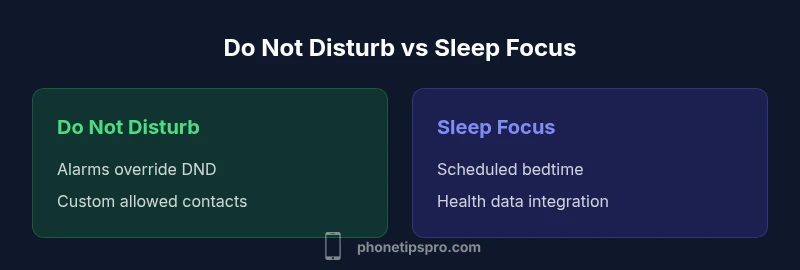
Do Not Disturb (DND) and Sleep Focus are two iPhone features designed to curb interruptions, but they serve different goals. DND silences most alerts while still allowing alarms to ring, and it can be tailored by contacts and apps. Sleep Focus adds a bedtime routine, automatic schedule, and health-related options. For most users, Sleep Focus is the best starting point, with DND as a flexible backup.
What Are Do Not Disturb and Sleep Focus?
In the do not disturb iphone vs sleep comparison, Apple’s Focus system provides layered control over interruptions. Do Not Disturb (DND) is a long-standing mode that silences calls, alerts, and notifications when you need quiet. Sleep Focus is a more specialized profile designed to support nighttime routines, improved sleep quality, and healthier device habits. Both modes can be customized with allowed people, apps, and auto-replies, but Sleep Focus extends beyond silence by integrating with Health data and bedtime automation. The Phone Tips Pro Team notes that while DND is a quick toggle for moments of focus, Sleep Focus is better for routine-driven days because it enforces a sleep-friendly environment and aligns with health insights. In 2026, Phone Tips Pro analysis shows that many users achieve better boundaries by starting with Sleep Focus and refining DND for exceptions and work hours.
How Do They Differ: Core Mechanics
The core mechanics of DND and Sleep Focus reveal why the do not disturb iphone vs sleep distinction matters. DND generally silences non-critical alerts, with alarms typically still audible, and allows you to permit calls from favorites or repeated contacts. Sleep Focus builds on this by introducing a scheduled profile, automatic activation around bedtime, and options to dim the lock screen or hide sensitive content. Sleep Focus can trigger based on time, location, or usage patterns, and it often integrates with the Health app to encourage healthier sleep hygiene. The practical takeaway is that DND is a flexible momentary shield, while Sleep Focus enforces a structured routine that supports rest, recovery, and daily rhythm. Phone Tips Pro’s guidance emphasizes pairing both modes when needed to preserve essential notifications while maintaining sleep integrity.
When to Use Do Not Disturb
Use Do Not Disturb when you need temporary quiet without committing to a full routine. It’s ideal for meetings, classes, or focused work sessions where you don’t want interruptions, but you still want your alarms to wake you and crucial people to reach you. DND is best for short, dynamic blocks of time and can be quickly toggled from Control Center or the Settings app. In the do not disturb iphone vs sleep comparison, DND shines in flexibility: you can customize who can call, which apps can break through, and whether repeated calls bypass the mute.
When to Use Sleep Focus
Sleep Focus is the better option for nightly routines and longer periods of sleep emphasis. It supports a bedtime schedule that aligns with your circadian goals, and you can set it to mute notifications in a way that reduces screen time and blue-light exposure before bed. Sleep Focus can auto-activate and deactivate based on time or location, and it can work in tandem with Health data to encourage consistent sleep patterns. If your goal is to improve sleep quality and establish boundaries around late-night device use, Sleep Focus should precede DND in the do not disturb iphone vs sleep decision.
Customization: Scheduling, Exceptions, and Automation
Both modes offer customization, but Sleep Focus offers deeper automation. You can specify a daily schedule, create pages of allowed apps, and configure auto-replies for messages. You can also enable focus filters that hide or tailor content in specific apps (e.g., Messages, Mail, Calendar) during Sleep Focus. The do not disturb iphone vs sleep debate often lands on who can alert you during critical times: DND lets you maintain essential channels, while Sleep Focus enforces a stricter environment. For many users, a layered approach—Sleep Focus at night and DND during crucial daytime blocks—provides the best balance.
Phone Tips Pro suggests starting with a Sleep Focus baseline and then enabling DND during urgent periods. This approach minimizes missed alarms while preserving a calm, sleep-supportive environment.
Real-World Scenarios and Use Cases
Consider a typical weekday where you work from 9 to 5, exercise after work, and want a solid night’s sleep. A reasonable strategy is Sleep Focus from 10 PM to 7 AM to minimize late-night pings and app distractions, with a few essential notifications allowed. During meetings or deep work blocks, you can temporarily enable DND with a quick toggle, allowing only your boss or a trusted contact to break through. On weekends, you may prefer a more relaxed Sleep Focus schedule or temporarily disable it for social activities. The core idea is to align Focus modes with your actual routines rather than leaving devices in a permanent default state.
For iPhone users seeking practical tips, systematizing your focus settings around sleep health and daily productivity often yields noticeable benefits. Phone Tips Pro’s 2026 guidance emphasizes evaluating how notifications affect your mood, focus, and rest, and then customizing settings to support those outcomes.
Setup Walkthrough: Quick Start Guide
To begin, open Settings > Focus and create Sleep Focus and Do Not Disturb profiles. Start by configuring a bedtime schedule, including the hours you expect to sleep. Add allowed people (Favorites) and permitted apps, and adjust Focus Filters for Messages, Mail, and other apps. Test the behavior by simulating notifications during the Sleep Focus window and ensuring alarms still ring in the morning. Next, create a DND shortcut in Control Center for quick activation during urgent tasks. Finally, review automation options (location-based or time-based triggers) to ensure the modes activate as intended. With practice, you’ll refine thresholds for what constitutes an interruption and align notifications with your goals.
Potential Pitfalls and Troubleshooting
Common issues include missed important alerts when the focus is overly strict, alarms not sounding under the wrong profile, or notifications slipping through due to misconfigured allowed lists. If you notice content hidden in Sleep Focus or DND, double-check Focus Filters and app settings. Ensure that your alarm is set to override on both modes and that group messages aren’t accidentally silenced. If you rely on critical communications (emergency contacts or service providers), consider keeping at least one contact allowed and periodically testing the system during different times of day. Regular audits of Focus configurations help prevent drift over time.
Practical Tips for Balancing Notifications and Sleep Health
Start with Sleep Focus as a default for nighttime and early mornings to improve sleep quality. Use Do Not Disturb for random interruptions, but keep alarms and crucial contacts accessible. Periodically review which apps are allowed to break through and whether Focus Filters are aligning with your current routines. Consider pairing Focus modes with screen-time habits, such as dimming the lock screen, reducing notification previews, and enabling wind-down routines. A thoughtful blend of Sleep Focus and DND can unlock better sleep, productivity, and mental clarity.
Comparison
| Feature | Do Not Disturb | Sleep Focus |
|---|---|---|
| Scheduling | Manual quick toggle | Time/location-based automation with bedtime routine |
| Interaction with Alarms | Alarms always ring | Alarms override and sleep-friendly visual cues |
| Auto-Reply/Status | No auto-replies by default | Smart auto-replies and easier status sharing |
| Notifications During Focus | All alerts muted except allowed | Filtered and prioritized notifications with filters |
| Automation/Smart Triggers | Manual or quick activate | Location/time-based, app triggers, health integration |
| Best For | Flexible, quick quieting for any context | Sleep hygiene and structured focus routines |
| Cross-Device Sync | Available across devices with Focus sync | Full cross-device agenda and health integration |
| Battery Impact | Minimal, depends on apps allowed | Low to moderate with automation and filters active |
Positives
- Reduces interruptions across contexts with flexible controls
- Alarms remain available, preventing missed wake-ups
- Sleep Focus supports health-minded bedtime routines
- Fine-grained app and contact allowances for essential communications
Weaknesses
- Misconfiguration can cause missed alerts or alarms
- Overly strict rules may frustrate others trying to reach you
- Requires initial setup and periodic tuning
- Some users report confusion when switching between modes
Sleep Focus generally offers stronger sleep-focused disruption control; Do Not Disturb remains a flexible backup
Choose Sleep Focus for sleep health and routine consistency. Use Do Not Disturb as a quick, temporary silence tool when needed.
FAQ
What is the difference between Do Not Disturb and Sleep Focus on iPhone?
Do Not Disturb silences most alerts, preserving alarms and allowing some exceptions. Sleep Focus adds a sleep-oriented schedule, filters, and health integrations. Sleep Focus enforces routines, while DND is a flexible, ad-hoc quiet mode.
DND silences most alerts but keeps alarms; Sleep Focus adds a sleep routine and health integrations. In practice, Sleep Focus enforces routine, while DND is for quick quiet moments.
Will alarms still ring when Sleep Focus is on?
Yes. Alarms are designed to override focus modes so you wake up as scheduled. You can still customize exceptions for emergencies if needed.
Yes, alarms override Sleep Focus. If you need, you can adjust exceptions for emergencies.
Can I customize contacts and apps allowed during DND?
Absolutely. You can allow calls from favorites or specific contacts and permit certain apps to break through during DND. This keeps essential communications available.
Yes—choose who or what can break through during DND for essential contacts and apps.
How do I schedule Sleep Focus and DND for weekdays vs weekends?
Use Focus schedules in Settings to create different profiles for weekdays and weekends. You can automate activation based on time, location, or app usage.
Create separate schedules for weekdays and weekends, and automate activation by time or location.
Can Sleep Focus be used on iPad or Mac?
Yes. Focus modes sync across iCloud-enabled devices, so Sleep Focus settings can apply to iPad and Mac when signed in to the same account.
Sleep Focus syncs across iPad and Mac if you’re signed in with the same Apple ID.
How do I quickly toggle between modes?
Use the Control Center shortcuts for quick toggling between Focus profiles, or set automation to switch modes automatically. Regular reviews help prevent drift.
Use Control Center to switch modes fast, or rely on automation to switch for you.
Quick Summary
- Start with Sleep Focus for sleep hygiene
- Use Do Not Disturb for temporary quiet blocks
- Tune app allowances to avoid missed alerts
- Leverage automation to reduce manual toggling
- Regularly audit Focus settings