How Do iPhone Trade-Ins Work: A Practical Guide for 2026
Learn how iPhone trade-ins work: how offers are calculated, how to prepare your device, and how to maximize value with practical steps from Phone Tips Pro. This guide covers channels, safety tips, and common mistakes.


Trade in your iPhone by exchanging it for credit or cash from Apple, carriers, or third-party buyers. To maximize value, verify eligibility, back up data, erase the device, and compare offers from multiple sources. This guide explains how do iphone trade ins work, what affects offers, and how to get the best payout.
What is an iPhone trade-in and why it matters
Trading in an iPhone means exchanging your device for credit, cash, or another device from Apple, a carrier, or a trusted third party retailer. The value you receive depends on model, storage, condition, and the presence of original accessories. According to Phone Tips Pro, understanding where to trade and how offers are calculated helps you maximize value while protecting your data. This guide explains the basics, common terms like refurbished and activation lock, and why trade-ins are a smart way to upgrade without paying full price.
How trade-in offers are calculated
Most trade-in offers come from dealers who assess four main factors: the device model and capacity, its physical condition, the presence of original accessories, and battery health. Newer iPhone models typically command higher base offers, while devices with cosmetic wear or screen damage receive reductions. Carriers may adjust offers based on your service plan or promo periods, while Apple’s own program uses strict eligibility checks. Phone Tips Pro Analysis notes that offers vary by region and by how cleanly the device operates, so shopping around is essential to maximize value.
Common trade-in channels
Trade-in options include Apple’s official Trade In program, carrier trade-in programs, and independent refurbishers or marketplaces. Apple and many carriers provide a convenient online quote followed by mail-in kits or in-store drop-off. Third-party sites can offer higher or lower values depending on their own refurbishment pipelines. Each channel has different terms, processing times, and payout methods, so compare before committing.
What affects your offer
The offer you receive is shaped by several key factors. The model and storage size influence the base value, with newer generations typically earning more. Cosmetic condition matters a lot; scratches, dents, or a cracked screen can drastically reduce value. Battery health is increasingly important as programs prefer devices that hold a long charge. Including original accessories and packaging can help preservation of value, while activation lock status must be clear so the buyer can transfer ownership smoothly.
Preparing your iPhone for trade-in
Start by backing up your data to iCloud or a computer. Sign out of iCloud and your Apple ID; disable Find My iPhone; erase all content and settings; remove the SIM card; and clean the device with a microfiber cloth. Take clear photos of the device and any accessories to document condition. If you have the original box or chargers, set them aside for potential higher offers. These steps protect your data and help the buyer verify device condition, which can improve your final offer.
Step-by-step checklist of trade-in day
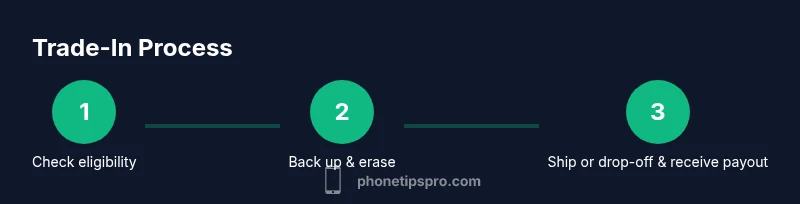
- Verify eligibility with at least two trade-in providers. 2) Back up data and prepare a restore point. 3) Sign out of iCloud and disable Find My iPhone. 4) Erase all content and settings and remove the SIM card. 5) Clean the device and photograph it from multiple angles. 6) Collect possible offers from several channels and compare. 7) Follow the shipping or drop-off instructions and preserve tracking numbers. 8) Confirm payment or credit after the device is received and processed.
How to evaluate offers and avoid scams
Always compare offers from multiple trusted sources. Check each partner’s legitimacy by verifying their address, customer reviews, and official contact methods. Beware offers that seem too good to be true or request unusual up-front payments or personal data. Confirm payout methods and processing times before sending your device. A cautious, methodical approach minimizes risk and helps you secure a fair deal.
Common mistakes and how to avoid them
Common mistakes include not backing up data, failing to disable activation lock, leaving the device locked, or sending in a device that isn’t properly prepared. Another pitfall is rushing to a single option without comparing alternatives. Take time to gather several quotes, verify device condition, and ensure you receive a legitimate tracking number for the shipment.
Post-trade-in: what happens to your device
After the trade-in is completed, the device typically goes to a refurbisher or reseller. They assess condition and may repair and resell it, recycled components, or use it for parts. This process supports sustainability by diverting e-waste from landfills. Nonfunctional devices are usually disposed of responsibly following environmental guidelines. You may receive a certificate of destruction if the device cannot be refurbished.
Alternatives to trad-ins: selling privately or gifting
Selling privately can often yield higher net value but requires more effort, safety precautions, and time. Gifting an old iPhone can be a thoughtful option for friends or family, especially if it still runs well. If you want a quick upgrade without the hassle, a trade-in remains the simplest path. Weigh the convenience against potential payout to decide the best route.
Troubleshooting delays and hold-ups
Delays can occur if the carrier or retailer needs extra verification or if your device fails their eligibility checks. Ensure you provide accurate model, storage, and condition details. If you encounter delays, contact customer support through official channels and keep records of all communications and shipment tracking.
Tools & Materials
- iPhone device(In working or restorable condition; include accessories if possible)
- SIM ejector tool(Needed to remove SIM tray during prep)
- Backup data ready(iCloud or computer backup before erasing)
- Charger and cable(Optional but helps prove condition and completeness)
- Microfiber cloth(For a quick clean before photos)
- Original box/accessories(Can boost offers when available)
Steps
Estimated time: 30-60 minutes
- 1
Verify trade-in eligibility
Check the model and storage capacity against current trade-in offers. Confirm any regional restrictions and note which channels are most favorable for your device. This initial check saves time later.
Tip: Start with at least two providers to ensure you have competitive offers. - 2
Back up your data
Back up all data to iCloud or a computer so you can restore essentials on a new device. Ensure your photos, contacts, and app data are safely stored before erasing.
Tip: Double-check that the backup completed successfully before proceeding. - 3
Sign out and disable Find My iPhone
Sign out of iCloud and Apple ID and disable Find My iPhone to remove activation lock, enabling the buyer to transfer ownership smoothly.
Tip: Keeping your iCloud password handy can prevent delays during the transfer. - 4
Erase all content and settings
Perform a factory reset to wipe data completely. This protects your privacy and meets the platform requirements for most trade-ins.
Tip: Do not skip this step even if you think data has been deleted by a prior reset. - 5
Remove SIM and clean the device
Take out the SIM card and give the device a gentle cleanup with a microfiber cloth to present a neat, accurate condition report.
Tip: Photography helps buyers verify condition; take photos in good light from multiple angles. - 6
Gather accessories and documentation
Collect any original box, charger, or cables if available. Include receipts or proof of purchase if you have them; they can improve trust and value.
Tip: Even simple extras can boost perceived value and offer a smoother process. - 7
Request and compare offers
Get quotes from multiple channels and compare base value, potential reductions, and payout timelines. Keep a simple tally to decide the best overall deal.
Tip: Beware of offers that require unusual processing steps or upfront payments. - 8
Submit the device and track the payout
Follow the provider's submission steps, receive a shipping label or drop-off instructions, and track the package. Confirm receipt and payout before closing the case.
Tip: Save tracking numbers and email confirmations for reference.
FAQ
What is a trade-in for an iPhone?
A trade-in lets you exchange your iPhone for credit or cash from a retailer, carrier, or refurbisher. The offered amount depends on model, storage, condition, and the presence of accessories.
A trade-in is where you swap your iPhone for credit or cash, based on its model, storage, and condition.
Do trade-in offers vary by model and condition?
Yes, newer models and devices in better condition generally receive higher offers. Damaged screens or missing parts reduce the value.
Yes. Newer models and better condition usually get higher offers.
Can I trade in a damaged iPhone?
Most programs accept damaged devices but may offer lower payouts or reject some types of damage. It's best to get quotes from multiple buyers to compare.
You can trade in a damaged iPhone, but the payout is often lower or some damage may be disqualifying.
Should I reset my iPhone before trade-in?
Yes. Back up data, sign out of iCloud, disable Find My iPhone, and erase all content and settings to protect your privacy and ensure a smooth transfer.
Yes. Back up, sign out, disable Find My iPhone, and erase all data.
How long do trade-ins take to pay?
Payout timing varies by program but typically occurs after the device is received and inspected. Some offer instant credit while others may take a few days.
Payout timing depends on the program; some give instant credit, others take a few days after receipt.
What documents are needed for trade-in?
Usually none beyond your device and accessories. Some programs may request proof of purchase if available.
Usually just the device and accessories; proof of purchase helps in some cases.
Watch Video
Quick Summary
- Back up data before erasing your iPhone
- Compare offers from multiple trusted channels
- Ensure activation lock is disabled and device is clean
- Track shipment and payout until completion