How Often iPhone Updates Happen: Cadence, Types, and Tips
Discover how often iPhone updates arrive, including major iOS releases, point updates, and security patches. Practical guidance to plan backups, data use, and when to install.


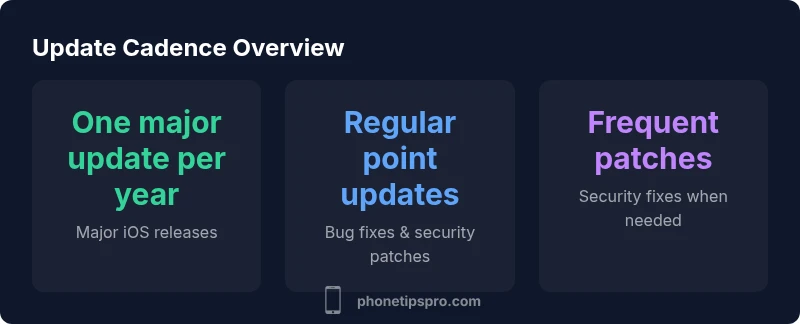
Typically one major iOS update per year, plus several point updates and ongoing security patches. Major releases usually arrive in the fall, with beta periods for developers and public testers. In parallel, Apple issues monthly or biweekly point updates to address bugs, performance, and vulnerabilities, and security patches roll out as needed to protect devices.
Why update cadence matters
For iPhone users, cadence matters because it shapes security, new features, and daily reliability. Understanding how often iphone updates arrive helps you plan backups, data usage, and app compatibility. According to Phone Tips Pro team, the typical pattern includes one major iOS release per year, plus multiple smaller updates that address bugs, performance, and security. The balance between introducing new capabilities and avoiding disruption is the core challenge Apple faces each year. In practice, a well-managed update cadence reduces frustration and improves device longevity. This section explains why cadence matters for everyday use, and how to interpret Apple's release notes to decide whether to install right away or wait for user feedback. You’ll also learn how update timing interacts with carrier schedules, device age, and your own usage patterns.
Phone Tips Pro recommends maintaining a predictable update rhythm to minimize unexpected downtime and maximize security.
How Apple schedules major iOS updates
Apple’s release cadence for iPhone updates is designed around a yearly major update cycle, typically accompanied by developer beta releases followed by a public beta period. The goal is to introduce notable features while collecting feedback to refine stability. In 2026, the pattern remains consistent: one major iOS update per year with a fall rollout, plus ongoing compatibility testing across devices released in the prior years. Understanding this cadence helps you plan backups, storage management, and planning for feature changes. It also helps you evaluate whether a new feature set aligns with your daily tasks, apps, and preferences. Phone Tips Pro notes that staying informed about beta changes can help power users prepare for the final release and avoid surprise after-install issues.
Understanding minor updates and security patches
Minor updates (point releases) are the workhorses of ongoing maintenance. They tackle bug fixes, performance improvements, and security patches on a near-monthly to biweekly basis depending on urgency and regional rollout. These updates are generally smaller in scope than major releases but are crucial for keeping iPhone devices secure and responsive. Security patches, in particular, address newly discovered vulnerabilities, sometimes within days of discovery. For most users, applying these updates promptly reduces risk, while planning around a major update can ensure you don’t experience feature changes during busy periods. Phone Tips Pro emphasizes prioritizing security patches when they appear and testing critical apps afterward to confirm compatibility.
Factors that influence update timing on iPhone
Several factors determine when an update lands on your device. Device age and performance, regional rollout schedules, carrier involvement (for some features), and user settings all influence timing. Older devices may not receive every feature in a major update, though security patches usually remain compatible longer. Regional differences can delay certain features or require additional server-side readiness. Environmental factors like network congestion or scheduled maintenance windows can also affect how quickly an update becomes widely available. By understanding these factors, you can better plan your update window and avoid interruptions during important tasks.
Practical tips for managing updates on your iPhone
To manage updates effectively, adopt a proactive, predictable routine. Enable automatic updates for security patches to ensure your device stays protected, while scheduling major updates during a low-demand period. Always back up your iPhone before installing any update, and ensure you have enough storage space for the upgrade. Review the release notes to understand new features and potential changes to settings or app behavior. If you rely on critical apps, check their compatibility notes after a major release and consider delaying the upgrade by a few days if you rely on essential workflows. Phone Tips Pro recommends testing updates on non-critical devices first when possible and maintaining a recovery plan in case something goes wrong.
How to check for updates and plan installs
Visualize your update plan using a simple checklist. Go to Settings > General > Software Update to check for the latest version, then decide whether to install immediately or wait for community feedback on stability. Turn on Automatic Updates in Settings > General > Software Update to keep security patches current. For major updates, schedule a backup during a quieter day, verify available storage, and allocate time for the installation. If you manage multiple iPhones, consider coordinating rollout windows to minimize disruption across your team or household.
Beta programs and developer seeds: pros and cons
Beta programs are valuable for power users and developers who want early access to features and can provide feedback that helps refine the final release. However, betas can be unstable or introduce issues with everyday apps. If you depend on precision timing for work or family tasks, opt for the public beta or skip beta testing altogether. Phone Tips Pro suggests a measured approach: participate in non-critical testing, review changes closely, and revert to the stable release if you encounter persistent issues. This mindset helps you balance access to new features with reliability.
Phone Tips Pro verdict: maintaining cadence for reliability
The Phone Tips Pro team recommends keeping a steady update cadence to maximize security and feature access while minimizing disruption. By understanding the standard schedule—one major update per year plus regular point updates and security patches—you can plan backups, storage, and app compatibility more effectively. Treat updates as a routine maintenance task rather than a reactive chore, and you’ll keep your iPhone running smoothly across the years.
Overview of iOS update cadence
| Update Type | Typical Frequency | Notes |
|---|---|---|
| Major iOS update | 1 per year | Brings new features; fall release |
| Point release | Monthly to biweekly | Bug fixes and security patches |
| Security patch | As released | Urgent fixes; often rolled out quickly |
FAQ
How often does Apple release major iOS updates?
Apple typically releases one major iOS update per year, usually in the fall, after a beta period. This cadence helps Apple test features and stability before a broad rollout.
Apple releases one big iPhone update each year, typically in the fall, after testing with developers and the public beta.
What is the difference between a major update and a point update?
Major updates introduce new features and redesigns, while point updates fix bugs, improve performance, and address security issues. Both are important for long-term device health.
Major updates bring new features; point updates fix bugs and security issues.
When should I install updates on my iPhone?
Install security patches promptly to reduce risk. Plan major updates when you have time to review changes and back up data, usually within a reasonable window after release notes are available.
Install security patches as soon as possible; plan major updates when it’s convenient.
Can updates slow down an older iPhone?
Occasionally, older devices may feel slower after larger updates due to feature changes or background processes. Backups, storage checks, and a fresh install can help restore performance.
Older iPhones can feel slower after big updates, but you can manage this with backups and maintenance.
How can I automate updates on iPhone?
Enable automatic updates in Settings to install security patches automatically. Consider delaying major updates until you have time to review and back up.
Turn on automatic updates to stay protected without manual checks.
“Update cadence is the backbone of iPhone reliability. Understanding the pattern helps users plan backups and stay secure.”
Quick Summary
- Plan major updates in fall and back up first
- Enable automatic security patches
- Check app compatibility after updates
- Deliberately schedule large updates for low-traffic periods
- Beta programs offer early access with caution