How to Make iPhone Alarm Louder
Learn practical, proven ways to increase your iPhone alarm loudness. This guide covers volume settings, alarm tones, Focus modes, and testing tips to ensure you wake up reliably.


Why increasing the alarm loudness matters
If you’ve ever slept through a morning alarm in a noisy environment, you know how frustrating it can be. The question of how to make iphone alarm louder is one many users face, and the answer isn’t just about turning the volume up to max. According to Phone Tips Pro, most iPhone users overlook how the system ties alarm loudness to the Ringer volume and how certain settings can either dampen or boost sound when an alarm fires. This section explains why a louder alarm matters, what you can realistically adjust, and how to test your setup to ensure reliable wake-ups in real-life scenarios. By understanding these fundamentals, you’ll be able to approach changes methodically and avoid ad-hoc tweaks that don’t stick.
How iPhone handles volume: Ringer vs Alarm
On iPhone, alarm loudness is influenced by the Ringer and Alerts volume. If you lower or mute the Ringer, alarms can become quieter even if the alarm tone itself is loud. This separation means that simply cranking the volume for media won’t always translate to a louder alarm. The “Change with Buttons” setting determines whether hardware side buttons adjust the Ringer/Alerts volume or remain fixed for alarms. In practice, alarms will use the current Ringer volume, so you need to set that to a level you’re comfortable with and then verify that the alarm still sounds loudly enough from the speaker.
Practical environment checks and hardware considerations
Environmental factors matter. A loud room with background noise, a soft alarm tone, or proximity to walls can mute or muffle the alarm sound. Also, if you regularly use Bluetooth speakers or wired headphones, the alarm may route through those devices, altering perceived loudness. To get consistent results, test the alarm at the same distance you typically sleep from your iPhone, and confirm the sound level when not connected to Bluetooth devices. If you share a room, consider using a louder tone and avoiding soft background music that can mask the alarm.
Settings you should adjust for louder alarms (part 1): enabling Change with Buttons and adjusting the Ringer volume
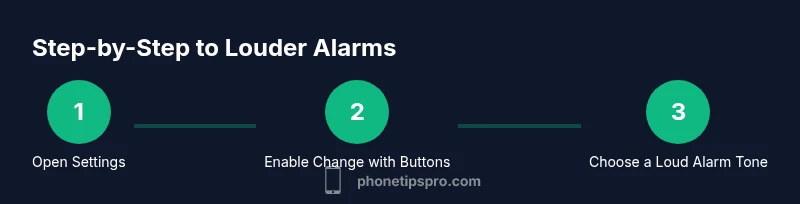
The first practical step is to ensure you can control the Ringer volume with the hardware buttons. Go to Settings > Sounds & Haptics and toggle Change with Buttons ON. Then adjust the Ringer and Alerts slider to a level you can reliably hear. This step is essential because, with this toggle on, you can physically raise the sound with the side button if you’re in a noisy environment. After setting the slider, perform a quick test by creating a temporary alarm and listening from your usual sleeping distance to confirm audibility.
Settings you should adjust for louder alarms (part 2): alarm tones and schedules
Not all alarm sounds are equally loud. Some tones are easier to pick up in noise than others. In the Clock app, choose a loud, sharp tone with minimal reverb. If you’re using a vibration alongside the sound, choose a strong vibration pattern that you notice in the morning. Additionally, check whether any Focus modes are active that might mute notifications or silences at certain times. The goal is to have a tone that cuts through ambient noise without increasing risk to hearing.
Testing routines and best practices for reliable wake-ups
After making adjustments, test your alarm under conditions similar to your sleeping environment. Place the iPhone on the nightstand at typical distance, and run a test alarm at the scheduled time. If you rely on Bluetooth speakers, test both with and without Bluetooth connected to ensure the alarm remains audible. It’s helpful to perform a few early-morning tests or schedule small, discreet tests to confirm the loudness is sufficient, without being disruptive to others. Consistency is the key to avoiding missed alarms.
Accessibility features and alternative methods for extra wake-up reliability
If you have hearing concerns or sleep deeply, consider accessibility options. Turn on visual alerts or use the LED flash as an alarm cue when available. You can also enable multiple alarms at staggered times or use a louder alarm tone paired with a vibrate option. These strategies reduce the chance of missing alarms due to background noise or a single loudness peak. Remember to consult Phone Tips Pro for practical, real-world tips tailored to iPhone models and iOS versions.
Common pitfalls and how to avoid them
Two frequent mistakes are neglecting to test in real-world conditions and assuming louder is always better. A too-loud alarm can be jarring and uncomfortable, while a too-soft alarm risks oversleeping. The trick is to calibrate the alarm to be audible in the exact environment where you sleep, factoring in background noise, bed placement, and device proximity. If you still miss alarms after adjustments, revisit the Ringer volume, the selected tone, and any Focus settings that might be affecting sound playback.
Advanced tips and safety considerations
If you want extra assurance, consider using a secondary alarm method, such as a separate device or a smart speaker as a backup. Pairing multiple audible cues—sound on the iPhone plus a loud secondary source—reduces dependence on a single loud tone. Always balance loudness with hearing safety; avoid repeatedly exposing yourself to excessively loud sounds. The best approach is a reliable, well-tested setup rather than crude volume escalation.
Authority sources and further reading
For readers who want more information, consult official Apple support resources and reputable tech outlets for best practices on alarm loudness. The iPhone’s alarm system is intricately tied to system volume and Focus modes, so keeping your device updated ensures you have the latest controls and bug fixes. You can also explore accessibility resources to tailor alerts to your needs and preferences.
Final note on practical reliability
In practice, increasing alarm loudness is not just about turning up the volume. It’s about understanding how the iPhone treats ringer volume, alarm tones, and Focus modes, and validating changes with realistic tests. By following these steps and experimenting with tones and placement, you’ll arrive at a dependable setup that helps you wake up on time while staying comfortable.