Sell iPhone Effectively: A Practical 2026 Guide for Top Prices
Learn how to sell your iPhone securely and for the best price in 2026. This step-by-step guide covers prep, pricing, selling channels, and data protection to protect your privacy.


This guide helps you sell your iPhone for the best price. You’ll learn how to evaluate value, safely back up and wipe data, choose the right selling channel, craft an appealing listing, handle payments securely, and complete ownership transfer. It also covers pricing strategies and scam prevention. By following these steps, you’ll maximize value while protecting your personal information.
Why people sell iPhone
People sell iPhones for a range of reasons, from upgrading to a newer model to decluttering and recouping device value. The main goal is to recover a fair portion of your device’s original cost, while ensuring your data stays safe. A well-planned sale can be faster and more profitable than trading in through a carrier, especially if you have accessories and a clean device. According to Phone Tips Pro, the most successful sellers begin by clarifying their price target and the channel they will use. This upfront planning reduces back-and-forth with buyers and lowers the risk of scams.
When you decide to sell, you’ll typically compare options such as official trade-in programs offered by Apple or carriers, third-party marketplaces, and direct sales to private buyers. Each channel comes with trade-offs: trade-ins are convenient and predictable but may pay less; private sales can yield higher prices but require more effort and risk management. Your choice should hinge on your priorities: speed of getting cash, privacy, and the level of effort you’re willing to invest. Keep in mind that the iPhone market values condition, model, storage, and whether the device is unlocked. A higher model, ample storage, and a clean battery can noticeably increase offers. The goal is to maximize net proceeds after any fees or shipping costs, while ensuring the device reaches a legitimate buyer.
Check your device value
Before you list or trade in, estimate your iPhone’s current value. Key factors include model generation, storage capacity, color, carrier lock status, cosmetic condition, battery health, and whether it includes original accessories. Start by identifying your exact model in Settings > General > About, and note the serial number. Then check multiple value guides from reputable sources to get a range rather than a single number. Unlocked devices typically fetch higher prices than carrier-locked devices, and models with higher storage (128GB, 256GB, etc.) often command more in the resale market. If battery health is low or you notice screen discoloration or missing buttons, expect steeper discounts from buyers. Finally, consider timing: demand can be seasonally higher around new-model releases or back-to-school periods. If you have accessories such as a charger, cable, case, or Apple original box, include them to improve perceived value. Be prepared to justify your asking price with photos and a concise condition description. A well-documented listing reduces buyer questions and speeds up the sale. By the end, you should have a price range and a plan for the best channel based on your device’s condition and features.
Prep your iPhone for sale
Data security comes first. Begin by backing up all data to iCloud or a trusted computer so you don’t lose contacts, photos, or apps. Sign out of iCloud, iTunes, and the App Store, then disable Find My iPhone and Activation Lock. Remove the SIM card and prepare the device for a factory reset to wipe all personal information. After the reset, recheck that the device boots to the setup screen and that the device is not linked to any account. Clean the device’s surface with a microfiber cloth and take high-quality photos from multiple angles. A well-prepared device with a clean finish can command higher offers. If you’re unsure about the steps, consult official support guides to avoid triggering Activation Lock issues. The goal is a data-safe, buyer-ready device that presents well in photos.
Gather documentation and accessories
Having the right extras can boost perceived value. Gather the original box, charging cable, adapter, earphones (if unused), and a protective case. If you have purchase receipts or warranty documentation, include them to build buyer confidence. Create a concise description sheet that lists model, storage capacity, color, carrier status (unlocked or locked), battery health, and any cosmetic notes. A short SKU or serial number reference helps buyers verify the device model. Accessory quality matters; cosmetic wear on cables or adapters can reduce offers, so replace or clarify condition as needed. A neat bundle with all components will perform better in photos and in negotiations.
Choosing your selling channel
Your choice of channel shapes price and effort. Official trade-in programs or carrier programs offer ease and predictability but can pay less than a private sale. Marketplaces and direct sales to individuals may produce higher net proceeds, but require more time, good photos, and clear communication. Before selecting a channel, set a minimum acceptable price and consider shipping costs or local meetup logistics. If privacy matters, prefer channels that facilitate easy settlement and tracking. For many sellers, combining channels—listing publicly while accepting an offline offer—can maximize exposure and leverage.
Step-by-step selling workflow
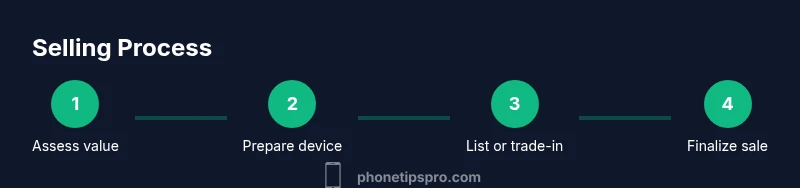
Selling a used iPhone follows a practical workflow: assess value, prepare device, decide on the channel, create your listing or initiate the trade, vet buyers or offers, finalize payment, and complete ownership transfer. Start with a clear price target and a plan for handling in-person meetups or shipping. Use a reliable payment method and confirm shipment tracking for any shipped devices. When a buyer is ready, verify identity and payment before handing over the device. After sale, confirm the buyer’s receipt and delete any transaction records you’ve saved, if appropriate. The structured process reduces friction and protects you from common scams. Overall, transparency and documentation are your best defenses against buyer disputes.
Pricing strategy and negotiation tips
Price strategically rather than simply listing a fixed price. Start with your target price, but consider listing slightly higher to leave room for negotiation. Use a realistic range based on model, storage, and condition, and be prepared to justify your price with condition photos and battery health notes. If you’re using a trade-in program, compare the offer to private-sale estimates and factor in shipping or pickup costs. In negotiations, maintain a calm, factual tone and avoid getting defensive. If a buyer makes a lowball offer, respond with a clear rationale and a slower, non-emotional counteroffer. A strong photo set, a thorough description, and prompt communication significantly improve your odds of closing at a favorable price.
Safety: avoiding scams and fraud prevention
Protect yourself from common scams by enforcing payment security and avoiding risky buyer behavior. Use trusted platforms that provide escrow or secure payment options, verify buyer profiles, and never ship before payment clears. When meeting in person, choose a public location, bring a friend, and verify the buyer’s offer details before handing over the device. If a request sounds too good to be true, it likely is: avoid wire transfers to unfamiliar accounts and never accept payment that isn’t verifiable. Securely remove all personal data and disable cloud services before selling. For added protection, document the device’s serial number and take timestamped photos of the device in its final condition. The Phone Tips Pro team recommends sticking to reputable channels and keeping all communications within the listing platform.
After sale: data privacy and device handoff
After completing the sale, ensure your data remains private. If you didn’t already, perform a factory reset, sign out of all accounts, and remove the device from your Apple ID. Confirm Activation Lock is disabled and that the device is no longer associated with you in Find My iPhone. If you plan to recycle or resell the device’s components, wipe the device thoroughly and provide the buyer with a clean slate. Save any relevant tax or receipt documents for your records. Finally, verify that your payment has arrived in full and that the buyer has received the device and any accessories as agreed. A thorough post-sale check protects you from post-transaction disputes and preserves your reputation as a trustworthy seller.
Authority sources and further reading
- Apple Support: Trade-in and Recycling options for iPhone devices (https://www.apple.com/shop/trade-in)
- Federal Trade Commission: Safe online buying and selling tips (https://www.consumer.ftc.gov/topics/online-safety)
- University study on consumer electronics resale value practices (https://www.stanford.edu/experiments/resale-values)
Tools & Materials
- iPhone device(Model, storage size, and color documented)
- Original box and accessories(Cable, charger, and headphones if unopened or in good condition)
- SIM tool(SIM ejector tool or paperclip)
- Backup solution(iCloud or computer backup to preserve data)
- Camera or phone stand(Helpful for taking stable photos)
Steps
Estimated time: 60-120 minutes
- 1
Assess value and set target price
Identify model, storage, battery health, and unlock status. Check multiple price guides to establish a realistic range and set a target price with a non-negotiable minimum in mind.
Tip: Use at least two reputable sources to avoid overpricing. - 2
Back up data and sign out
Back up contacts, photos, and apps, then sign out of iCloud, iTunes, and the App Store to protect your data before erasing.
Tip: Document important account details in a secure note before you sign out. - 3
Disable Find My iPhone and Activation Lock
Turn off Find My iPhone and deactivate Activation Lock so the buyer can use the device without obstruction.
Tip: Double-check that the device shows setup screen after reset. - 4
Erase all data and perform a factory reset
Wipe the device completely to remove personal data and restore factory settings.
Tip: Do a final check by turning on the device to confirm the setup screen appears. - 5
Gather accessories and packaging
Collect the original box, charger, cable, and any unused accessories to increase perceived value.
Tip: Include a short note listing all items to reduce buyer questions. - 6
Choose selling channel and prepare listing
Decide whether to trade-in, use a marketplace, or do a private sale. Prepare clear photos and a detailed description.
Tip: Highlight condition, unlock status, battery health, and storage space in the listing. - 7
Secure payment and arrange handoff
Agree on a safe payment method and verify funds before handing over the device or shipping.
Tip: Prefer platforms with escrow or buyer protection. - 8
Confirm transfer and close the sale
Ensure ownership transfer succeeds and keep a receipt or confirmation of sale for records.
Tip: Take a final photo of the shipped item and tracking as proof.
FAQ
Should I trade in my iPhone or sell privately for the best price?
Trade-ins are convenient but may pay less than private sales. Private sales can fetch higher prices but require more effort and risk management. Compare offers and consider fees, shipping, and timing before deciding.
Trade-ins are easier but may pay less. Private sales can pay more but take more work—compare offers and factor in fees.
How do I safely wipe my iPhone before selling?
Back up first, sign out of iCloud and other services, disable Find My iPhone, and perform a factory reset. Verify the setup screen appears after reset to ensure data is cleared.
Back up, sign out, disable Find My iPhone, and reset. Check the setup screen to confirm a clean wipe.
What documents should I provide when selling?
Include the model and storage details, original box and accessories, proof of purchase if available, and a brief device condition note. These items build trust with buyers.
Include model details, original accessories, proof of purchase if possible, and a clear condition note.
Is my iPhone unlocked or carrier-locked affecting price?
Unlocked devices typically fetch higher prices because they work with any carrier. If your device is carrier-locked, clarify the terms and be prepared for lower offers.
Unlocked usually earns more; if locked, be clear about which carriers are supported.
How long does a typical iPhone sale take?
From listing to payment and transfer, many sales complete within a few days on marketplaces, while trade-ins may take longer depending on processing times.
Most private sales take a few days; trade-ins depend on processing times.
What are common red flags when selling online?
Avoid buyers who rush payment, request unusual transfer methods, or pressure for immediate shipping. Always use secure channels and verify buyer details.
Watch for rushed payments or unusual transfer requests; use secure channels and verify buyers.
Watch Video
Quick Summary
- Verify model, storage, and unlock status before pricing.
- Back up data and wipe device securely before sale.
- Choose the right channel to balance price and effort.
- Use secure payment methods and document the sale.