Is My iPhone Unlocked? A Practical Guide
Learn how to determine if your iPhone is unlocked, test with a different carrier SIM, and what to do if it remains carrier-locked. A clear, step-by-step approach from Phone Tips Pro.


An iPhone is unlocked when the device is not restricted to a single carrier. To verify, try inserting a SIM from another carrier and check service. If calls and data work, the iPhone is unlocked; if you see SIM prompts or service issues, it may still be locked or require an official unlock.
What unlocked means for iPhones
According to Phone Tips Pro, determining whether your device is unlocked matters for how you switch networks. If you're wondering is my iphone unlocked, the answer hinges on how the device was sold and its current financing status. An unlocked iPhone can accept SIMs from any carrier without a carrier-specific code, while a locked iPhone works only with the original network until a carrier unlock is completed. The status depends on factors like purchase method (new, financed through a carrier, or trade-in) and whether any payments are outstanding. To avoid guesswork, verify status with official checks rather than rumors. This guide from Phone Tips Pro walks you through practical steps to confirm unlock status, what to expect when switching networks, and how to act if it is not yet unlocked.
In addition, understand that some models and regions have subtle differences in how unlocks are shown in settings. The goal is to establish a reliable, repeatable method so you can answer the core question is my iphone unlocked with certainty.
Quick at-home tests to determine unlock status
A fast way to gauge unlock status is a SIM swap test. Power off the iPhone, remove the current SIM, insert a SIM from a different carrier, and power back on. If the new SIM connects to a network, you can place calls and use data, which is a strong sign of unlock. If you encounter SIM not supported or unlock required prompts, the phone is likely still locked or restricted by the carrier. Some models reveal a carrier name or show roaming indicators after boot, but this is not universal. Always test with a SIM from a carrier you plan to use to avoid misinterpretation. If the device is financed through a carrier, unlocking often depends on meeting payment obligations or contract terms. While the at-home SIM test is informative, it is not a definitive proof in every case. Pair the results with official confirmation from the carrier to build a complete picture of unlock status, profile of the device, and future network compatibility.
Using Settings and a SIM test to verify unlock status
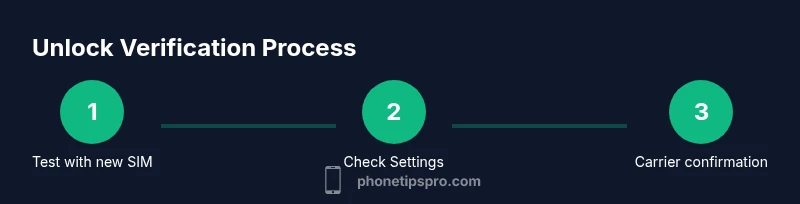
Begin with a SIM test as described above, then inspect the iPhone settings for signals. On some iPhones, go to Settings > General > About to check for a carrier lock line or status. If a message indicates that the device is unlocked or not tied to a specific carrier, that is strong evidence. In other cases, you may need to reach out to the carrier and provide the device IMEI to confirm unlock eligibility. Remember that even if the software indicates no lock, the device could still be restricted by hardware or policy until the carrier approves an unlock. Consistency between the live SIM test results and official carrier status reduces uncertainty and helps you plan a network transition with confidence.
Phone Tips Pro emphasizes using multiple verification signals to avoid ambiguity, especially for travelers and resale.
How carriers unlock iPhones and what you should know
Carrier unlock policies vary by provider and region. In many cases, unlock becomes available after the financing is paid in full or a service contract is completed. Some prepaid plans treat unlocking differently, and some devices may be permanently carrier restricted if purchased under certain terms. Although the concept of unlock is straightforward, the timing and eligibility can feel opaque. Always start with your carrier by checking their unlock requirements, submitting any needed information (IMEI, account details), and confirming that the device has passed any necessary safety checks. If the carrier approves, you should be able to insert a new SIM and access service without restrictions on subsequent reboots and updates. This section helps you understand typical timelines, what documentation to prepare, and how to avoid common pitfalls during the process. Phone Tips Pro also notes that staying informed about policy nuances reduces surprises during travel or when upgrading devices.
Common myths about unlocked iPhones
A frequent myth is that unlocking a phone also voids the warranty or disables Find My iPhone. In reality, unlocking by the carrier or Apple, when done properly and documented, should not damage warranties or safety features. Another myth is that unlocked means the phone will work on all networks immediately; some carriers may still impose regional or device-based limitations, or require updates. Some people think an unlocked iPhone can be used abroad without any restrictions; while generally true, roaming costs and carrier policies still apply. Finally, there is a belief that jailbreaking is necessary to unlock; this is false and risky, as jailbreaking can expose the device to security threats and instability, and voids warranties. Phone Tips Pro recommends sticking to official unlock paths and avoiding unofficial hacks.
Step-by-step verification workflow for is my iphone unlocked
- Prepare a SIM from a different carrier and a compliant test environment. 2) Power down, swap the SIM, and boot the device; observe whether service appears. 3) Open Settings to confirm there is no clear lock message. 4) Call the new carrier or use the carrier app to verify unlock status with the device IMEI. 5) Test making a call and using mobile data on the new SIM for 10-15 minutes. 6) If issues arise, document error messages and contact support for a formal unlock verification. 7) Keep records for resale or travel. Estimated total time: 15-45 minutes depending on service speed.
Troubleshooting if the device will not unlock
If live SIM testing fails and Settings show no clear unlock, revisit financing status, contract terms, and device eligibility with the carrier. Ensure the device is not reported lost or stolen, which can block unlocking and usage on new networks. Confirm there are no outstanding payments or device protection plans that might hinder approval. Collect the IMEI, model number, and carrier account details before calling. If the carrier cannot unlock after reasonable steps, escalate to Apple Support for device-level checks and potential alternatives, such as official authorized service or device reissue under policy.
Security, privacy, and best practices after unlocking
Unlocking is a gateway to network choice, but it also carries responsibility. After confirming unlock status, review Find My iPhone settings and iCloud status to avoid security gaps if the device is moved between networks. Keep software up to date to maintain compatibility with new carriers and ensure your data remains protected during transitions. When traveling internationally, plan ahead for roaming fees and ensure you have appropriate SIM cards ready. Finally, document the unlock steps and store records safely in case you need to prove status for resale, service support, or warranty reviews.
Tools & Materials
- SIM card from a different carrier(Active service; test with one or more SIMs from carriers you plan to use)
- SIM ejector tool or paperclip(Used to remove the SIM tray safely)
- iPhone IMEI(Found in Settings > General > About or on the device box)
- Carrier account details(Helpful when requesting official unlock confirmation)
Steps
Estimated time: 15-45 minutes
- 1
Gather a test SIM
Select a SIM from a different carrier that you actually plan to use. This gives you a practical test of network compatibility and avoids assumptions about carrier restrictions.
Tip: Have the SIM ready before you begin to minimize device downtime. - 2
Power off and swap the SIM
Power down the iPhone, eject the current SIM with the SIM tool, insert the new SIM, and reinsert the tray. Power the device back on and wait for it to initialize.
Tip: Handle the SIM tray gently to avoid damage. - 3
Check for service after boot
Look for a network name and signal bars associated with the new carrier. If service appears, note whether you can place calls and access data.
Tip: If you see SIM not supported, stop and proceed with official status checks. - 4
Inspect carrier status in Settings
Go to Settings > General > About and look for a carrier lock or unlock status message. This complements the live SIM test.
Tip: A clear unlocking message on About is a strong signal but not definitive alone. - 5
Verify with the carrier
Provide your IMEI and account details to the carrier or use their unlock portal to confirm eligibility and expected timeline.
Tip: Keep a record of any confirmation numbers or emails. - 6
Test again and document results
Make a call and use data on the new SIM for at least 10 minutes. If issues remain, escalate with documentation.
Tip: Capture screenshots of errors for support.
FAQ
What does it mean if my iPhone is locked to a carrier?
A carrier-locked iPhone will only work with the carrier it was purchased through until an official unlock is completed. Unlock eligibility depends on purchase terms, payments, and carrier policies.
A carrier-locked iPhone works only with one network unless you complete an official unlock with the carrier.
Can you unlock an iPhone if it is financed by a carrier?
Most carriers offer unlocking after certain conditions are met, typically paying off the device or finishing a contract. Timelines vary by provider and region.
Unlock availability often depends on paying off the device and meeting contract requirements.
Will unlocking affect Find My iPhone or warranty?
Proper carrier unlocking or Apple-supported unlocking should not affect Find My iPhone or the warranty. Always use official processes to preserve protections.
When done through official channels, unlocking should not impact Find My iPhone or warranty.
How long does the unlocking process take after requesting it?
Processing times vary by carrier and device status. Some unlocks are instant; others may take days after verification.
Unlock timing varies; check with your carrier for a specific ETA.
Can I unlock an iPhone for use in another country?
Yes, if the carrier approves the unlock and your device works on the target network. Roaming terms and local SIM compatibility still apply.
Unlocked devices usually work abroad, but check roaming costs and local network bands.
Should I jailbreak to unlock my iPhone?
Jailbreaking to bypass carrier locks is not recommended. It can compromise security, void warranty, and cause instability.
Avoid jailbreaking; use official unlock methods instead.
Watch Video
Quick Summary
- Test with a different SIM to verify unlock status
- Use Settings and official carrier status to confirm
- Request official unlock confirmation when needed
- Keep records for resale or travel