Can You Get iPhone Battery Replaced? Your Step-by-Step Guide
Learn whether you can get your iPhone battery replaced, where to go, what to expect, costs, timelines, and how to prepare. Phone Tips Pro breaks down official vs. third-party options and tips to protect your device.


Can you get iphone battery replaced? Yes—Apple or an authorized service provider can perform the replacement using genuine parts and official diagnostics. The service is designed to preserve safety, hours, and warranty coverage, with clear steps, typical wait times, and predictable outcomes. This guide explains how to decide, where to go, and what to expect during the replacement.
Why Battery Replacement Matters for iPhone Longevity
Battery health directly affects performance, charge longevity, and the reliability of features like optimized charging and peak performance. Over time, lithium-ion cells lose capacity, which can lead to shorter daily use and unexpected shutdowns. If you notice your device drains quickly, runs hot, or refuses to hold a charge, you may be dealing with degraded battery health. The question, can you get iphone battery replaced, is common because most users want to preserve device longevity without sacrificing safety or warranties. According to Phone Tips Pro, replacing the battery at the right time can restore responsiveness and extend the useful life of your iPhone, often costing far less than buying a new device. In addition to performance benefits, a fresh battery can improve resale value and reduce the risk of swelling or other battery-related hazards. This section explains why timing matters, how to spot the signs, and how a replacement aligns with long-term device health.
Where to Get It Done: Apple vs. Authorized Service Providers vs. DIY Risks
Choosing where to replace your iPhone battery matters for safety, warranty, and part quality. Apple stores and authorized service providers offer genuine Apple batteries, standardized diagnostic checks, and access to official repair procedures. These options generally preserve warranty coverage when performed by trained technicians. Independent repair shops may provide quicker turnaround or lower prices, but the parts quality and diagnostic rigor can vary. DIY replacements are possible in theory, but they carry higher risks of puncturing the battery, damaging internal components, or compromising water resistance. If you decide to explore third-party options, prioritize shops with certified technicians, access to original or third-party-but-specified-grade parts, and clear safety protocols. The Phone Tips Pro team recommends weighing warranty implications and long-term reliability when choosing a path for the replacement.
Costs, Time, and Service Models
Price and time for battery replacement vary by model, location, and service level. Official Apple service typically includes a diagnostic check, a genuine battery, and reassembly with safety-tested seals. Independent shops can be competitive on price and speed but may use different battery suppliers or adhesives. When budgeting, expect a range of options—from standard one-day service at some locations to longer mail-in procedures for non-urgent cases. Instead of chasing low upfront costs, consider the value of genuine parts, a formal warranty on the replacement, and the store’s ability to address any post-service issues. The goal is dependable performance and device safety, not just a lower price.
The Replacement Process: A High-Level Overview
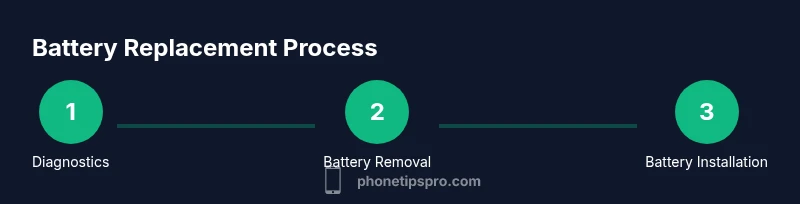
Think of the replacement as a multi-step service: diagnostic verification, battery disconnection, removal of the old cell, cleaning and adhesive replacement, installation of the new cell, and post-install tests. technicians follow safety protocols to minimize the risk of puncture or short circuits. Expect the process to take up to an hour or two in-store, with longer timelines for mail-in or busy periods. After installation, technicians reassemble, run diagnostics, and ensure your iPhone powers on correctly, battery health is restored, and charging calibration is accurate. If you’re curious about the exact sequence, know that the steps prioritize safety, part integrity, and device sealing.
Preparation: What to Do Before You Drop Off or Ship
Prepare by backing up data, turning off the device, and removing accessories. If you rely on iCloud backup or local backups, verify that the latest data is stored securely. Gather your device’s charging cable and any proof of purchase if you have warranty coverage. Before service, confirm whether your model qualifies for Apple’s Battery Service Program and whether your warranty or AppleCare coverage remains intact after replacement. Clear any locked screens and sign in to ensure technicians can access diagnostics if needed.
Data, Privacy, and Safety Considerations
A battery replacement involves internal components and access to personal data. Reputable service providers follow privacy practices and use sanitized tools to minimize the risk of data exposure. If you’re performing a third-party replacement, ensure you understand the data-handling policies of the shop and request a data wipe only if required. Safety is paramount: never puncture a battery, never bend it, and avoid charging or compressing it during the process. The safest route for most users is to choose Apple or an authorized provider to maintain device safety and warranty protections.
How to Verify a Successful Battery Replacement
After service, check that battery health shows a healthy maximum capacity and that the battery is charging normally. Run a quick battery drain test, confirm that the device doesn’t overheat in use, and ensure all functions—screen responsiveness, Face ID, and wireless charging (if applicable)—operate as expected. If the iPhone reports degraded battery health after replacement or exhibits unusual behavior, contact the service provider promptly for diagnostics or a retest. Store receipts and service notes for future reference, especially if you rely on AppleCare for ongoing protection.
Tools & Materials
- Pentalobe screwdriver (P2)(Required for opening iPhone bottom screws on most models.)
- Spudger tool(Non-conductive tool for disconnecting connectors.)
- Tri-point/Y000 or compatible pry tool(Used to separate components without damage.)
- Replacement battery compatible with your iPhone model(Genuine or approved third-party battery meeting safety standards.)
- Adhesive battery strips and/or double-sided tape(To secure the new battery and seal the device.)
- Isopropyl alcohol wipes (70%+), lint-free cloth(For cleaning contact points and surfaces.)
- Nylon or ESD-safe gloves (optional)(Helps keep the internal environment clean.)
- Magnetic mat or labeled tray(Keeps screws organized during disassembly.)
Steps
Estimated time: 60-90 minutes
- 1
Power down and prepare your workspace
Power off the iPhone completely and disconnect any accessories. Set up a clean, static-free workspace with good lighting. Gather all required tools and the replacement battery before starting to avoid mid-step interruptions.
Tip: Use an anti-static mat and wrist strap if available to minimize static damage. - 2
Open the device safely
Use the appropriate screwdriver to remove the bottom screws, then use a suction cup and opening pick to separate the screen assembly from the chassis. Do not force the display; work slowly to avoid flex cable damage.
Tip: Keep track of screws by size and position; lay them out in order. - 3
Disconnect the battery connector
Carefully locate and disconnect the battery connector using a spudger. This step prevents power from flowing while you replace the cell and reduces the risk of short circuits.
Tip: Only touch the connector edges; avoid metallic contact with internal circuits. - 4
Remove the old battery and adhesive
Gently lift the old battery away from the frame and remove adhesive strips. Use heat if needed to loosen adhesive, but avoid overheating the battery during removal.
Tip: Do not bend or puncture the battery casing. - 5
Install the new battery and reseal
Place the new battery, align it with the housing, and reattach the adhesive strips. Reconnect the battery connector and ensure the screen fits back without pressure on cables.
Tip: Test fit the screen before final sealing to verify alignment. - 6
Reassemble, test, and calibrate
Reattach any components, power the device, and run a basic test: charge, screen response, and performance checks. If available, perform a battery health calibration through the Settings menu.
Tip: Allow the device to complete a full cycle before drawing conclusions about health. - 7
Dispose of old battery responsibly
Place the old battery in a non-conductive container and take it to a proper e-waste or battery-recycling facility. Do not discard it with regular trash.
Tip: Check local guidelines for battery recycling options.
FAQ
Is it safe to replace an iPhone battery myself?
Battery replacement can be risky if you lack proper tools and knowledge. Puncturing the cell or damaging internal components can cause safety hazards. For most users, using Apple or an authorized provider is the safer option.
It’s best to go with official or authorized service to stay safe and preserve your device warranties.
How long does Apple battery replacement take?
Apple and some authorized providers offer same-day or next-day service, depending on location and model. Check ahead for appointment times and whether mail-in service is available.
Many locations offer quick service, but timing can vary by model and availability.
Will replacing the battery affect water resistance?
If done correctly by Apple or an authorized technician, seals and gaskets are replaced or resealed to restore water resistance. Improper DIY replacements can compromise this feature.
Professional replacement helps protect water resistance; DIY may weaken seals.
Does replacement affect warranty?
When performed by Apple or an authorized service provider, warranty coverage generally remains intact. If third-party parts are used or the service is not authorized, warranty terms may change.
Using official channels keeps warranty protections in place.
Are third-party batteries safe to use?
Third-party batteries can vary in quality and safety. If you choose a non-official part, ensure the supplier is reputable and that the product meets safety standards.
Quality matters—official parts are the safest option.
How can I tell if my battery needs replacement?
Go to Settings > Battery > Battery Health to see maximum capacity and peak performance capability. If health is degraded or you see sudden shutdowns, replacement is often warranted.
Check Battery Health in settings to gauge replacement need.
Watch Video
Quick Summary
- Verify battery health before replacement.
- Choose official or authorized service for safety and warranty.
- Expect 60–90 minutes in-store; longer for mail-in service.
- Back up data; confirm proper disposal of old battery.
- Post-replacement test your device to confirm performance.