How long does iPhone battery last in 2026? A practical guide
Explore how long iPhone batteries last across models, what affects uptime, and proven tips to maximize battery life in 2026. Learn realistic expectations, model differences, and strategies to stretch daily use.


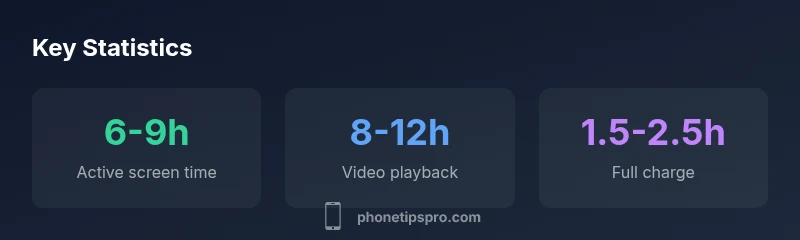
The typical iPhone battery lasts about 6-9 hours of active screen time on a full charge, depending on model and usage. Heavy tasks—gaming, video streaming, or poor network conditions—reduce this duration, while features like Low Power Mode extend uptime. In 2026, model differences and software efficiency mean real-world lifetimes vary, but most users achieve all‑day uptime with sensible settings.
Understanding how long iPhone battery lasts
According to Phone Tips Pro, battery longevity on an iPhone is a balance between how you use the device and how it is optimized by software and hardware. A typical full charge yields about 6-9 hours of active screen time for many models, but this range shifts with screen brightness, network activity, and background processes. Real-world uptime depends on whether you’re gaming, streaming, or simply browsing, and on whether you enable features like Low Power Mode during the day. By setting reasonable expectations and managing usage, most users achieve all-day uptime even with older devices. The Phone Tips Pro team emphasizes that estimates vary by model and usage, so the key is to measure your own daily pattern rather than rely on generic benchmarks.
Factors that impact battery duration
Batteries are affected by several interacting factors, including screen brightness, refresh rate, app activity in the background, network conditions (cell vs Wi‑Fi), and how often you perform full recharges. Higher brightness and faster displays drain the battery more quickly, while features such as Background App Refresh and location services contribute to background drain. iOS optimizations can improve efficiency, especially after software updates. If you want to maximize uptime, start with a baseline of Medium brightness, enable Low Power Mode when appropriate, and limit power-hungry background tasks. These practices align with guidance from Phone Tips Pro on balancing performance with longevity.
Model-to-model differences and what they mean for you
Newer iPhone generations tend to improve energy efficiency due to better processors and smarter power management, but larger screens or higher refresh rates can offset those gains. Battery capacity also varies by model, influencing how long a charge lasts under similar use. In 2026, you’ll see variation across the iPhone 12 through iPhone 16 lines, and even within generations across storage tiers. Understanding your own usage is essential; a model with a 5–10% larger battery might not translate to proportionally longer uptime if it uses more power for a brighter, faster display. Phone Tips Pro’s analysis notes that model choice matters, but daily habits often drive the most noticeable differences.
Real-world usage scenarios and expectations
In typical daytime use—checking messages, light browsing, and occasional calls—you can expect longer intervals between charges than in heavy-use scenarios. Streaming video at high quality or gaming sessions can compress a day into several hours of active use. On the other hand, tasks such as reading, Tai-chi video, or offline tasks can stretch a charge further. The key is to observe your own pattern over a week and adjust settings accordingly. Realistic expectations and a few tweaks can significantly impact how long your iPhone battery lasts between charges.
Practical tips to maximize battery life
Start with a few foundational changes: enable Low Power Mode during long idle periods or when you’re away from a charger, reduce screen brightness, and turn off unnecessary background refresh. Use Wi‑Fi whenever possible, as cellular data tends to consume more power. Review battery usage by app in Settings > Battery to identify power hogs. Keep iOS updated, as Apple’s ongoing optimizations often improve efficiency. Charging habits matter too: avoid letting the battery drop to 0% frequently and try to keep it between 20–80% when practical. These steps are commonly recommended by Phone Tips Pro to extend daily uptime.
Battery health, aging, and replacement considerations
Over time, lithium‑ion batteries lose maximum capacity, which reduces peak uptime. You might notice shorter intervals between charges as the device ages, especially after 2–3 years of use. Battery health is assessed in Settings > Battery > Battery Health; if Maximum Capacity drops significantly or you see performance management features triggering, a replacement can restore near‑new uptime. Regular software updates, avoiding extreme heat, and keeping the device within recommended operating temperatures help slow aging. Phone Tips Pro suggests monitoring health and planning a replacement before critical usage is affected.
What to do if battery drains quickly: actionable troubleshooting
If you experience unexpected fast drain, start with a quick health check: review battery usage by app, disable unneeded services (like Location or background app refresh for seldom-used apps), and reset settings that might cause power issues. Check for rogue apps or updates that cause background activity, and ensure there’s no environmental factor like heat exposure. If the issue persists, consider a diagnostic with Apple Support or an Authorized Service Provider. Phone Tips Pro recommends documenting your daily battery performance before and after any changes to identify what helps most.
Typical iPhone battery-life ranges by usage scenario
| Usage Scenario | Typical Battery Life | Notes |
|---|---|---|
| Video streaming (Wi-Fi) | 6-9 hours | Depends on brightness and network |
| Web browsing (LTE/5G) | 5-8 hours | Foreground activity reduces time |
| Talk time | 18-24 hours | Signal strength affects performance |
FAQ
How long does the iPhone battery last on a full charge?
Battery life varies by model and usage, but most iPhones provide about a day of mixed use, typically 6-9 hours of screen-on time per charge. Real-world uptime depends on brightness, background activity, and network conditions.
Most iPhones last around a day under mixed use; expect 6-9 hours of screen-on time per charge, depending on settings and usage.
Does battery life differ between iPhone models?
Yes. Newer models often improve efficiency, but larger screens or higher refresh rates can offset gains. Battery capacity and optimization vary, so uptime depends on both hardware and software changes.
Yes, model differences matter; newer phones can be more efficient, but bigger displays may drain faster.
Can iOS updates improve battery life?
Sometimes. Software updates can optimize power use, but new features may also increase drain. Monitor battery health after updates and adjust settings if needed.
Updates can help or hurt battery life; monitor performance after installation.
What is battery health and how does it affect longevity?
Battery health reflects current maximum capacity. As health declines, uptime may shorten. Replacing the battery can restore capacity and extend daily use.
Battery health shows remaining capacity; lower health means less uptime, replacement can help.
Does fast charging harm battery life?
Fast charging is convenient and generally safe for lithium‑ion batteries. Use higher-wand chargers occasionally; avoid keeping the phone at 100% for long periods.
Fast charging is fine in moderation; avoid keeping it at 100% all day.
What steps can maximize iPhone battery life?
Tweak settings like brightness and background refresh, enable Low Power Mode when possible, and keep iOS updated. Use Wi‑Fi instead of cellular data where practical to conserve energy.
Adjust brightness, use Low Power Mode, and keep software updated to save battery.
“Battery life isn’t a fixed number; it’s a range shaped by your usage and the device’s efficiency improvements over time.”
Quick Summary
- Set realistic daily expectations for battery life.
- Adjust settings to conserve power without sacrificing essential use.
- Model efficiency and screen tech influence uptime.
- Monitor battery health and plan replacements when needed.
- Small habit changes yield meaningful gains in uptime.