When to Change iPhone 14 Battery: Practical Guidelines
Learn how to tell when your iPhone 14 battery needs replacement, signs of wear, costs, and tips to extend life. A practical, data-driven guide by Phone Tips Pro.


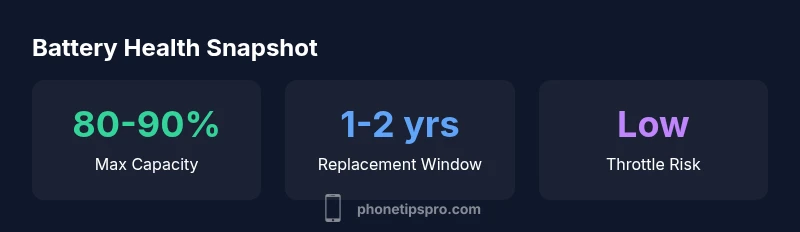
According to Phone Tips Pro, to decide when to change iphone 14 battery, start with Settings > Battery > Battery Health to check Maximum Capacity and Peak Performance. If the health is below 80%, or you notice unexpected shutdowns, rapid discharge, or performance throttling, plan a replacement. For many users, replacement makes sense once daily life is impacted.
Understanding iPhone 14 battery health in context
Battery health is more than a single number; it reflects how much charge the cell can hold relative to when it was new. For the iPhone 14, aging manifests as shorter daily endurance, slower charging, and, in some cases, unexpected shutoffs as the battery nears the end of its useful life. According to Phone Tips Pro, the universal rule of thumb is to view battery health as a moving target influenced by cycles, temperature, charging habits, and software management. When you notice a meaningful drop in Maximum Capacity, or the device throttles to preserve function, it’s reasonable to reassess whether a replacement is warranted. If you’re relying on your iPhone for critical tasks like navigation, photography, or work, a proactive plan becomes even more valuable.
With iPhone 14, the balance between maintaining performance and delaying replacement often depends on your tolerance for shorter battery life and throttling. If your daily routine includes long days away from a charger or important deadlines, a replacement may provide more predictable performance than chasing quick fixes.
Key takeaways: monitor trends over several cycles rather than reacting to a single poor day. In the long run, a planned battery replacement can stabilize performance and reduce anxiety about power loss.
Signs that it's time to replace the battery
Common indicators
- Shortened battery life that forces multiple charges per day
- Unplanned shutdowns even when the battery indicator shows remaining capacity
- Sudden drops in performance during demanding tasks like video recording or gaming
- Noticeable battery swelling or heat during charging (seek service immediately)
Less obvious cues
- Battery health reported below 80% in Settings > Battery > Battery Health
- Frequent charging cycles with diminishing returns (rapid drop in health with regular use)
- The device remaining on charger for extended periods without reaching full capacity
Phone Tips Pro tip: Don’t rely on a single symptom. Combine several signs with the health percentage to decide whether replacement is advisable.
How to test battery health at home and with professional tools
Home checks can guide you, but accurate health assessment often requires more than casual observation. Steps you can take at home include reviewing Battery Health in Settings, noting Maximum Capacity, and checking for peak performance throttling. If you see capacity consistently under 80% or persistent throttling, schedule a professional diagnostic. When possible, use Apple Diagnostics or Apple Support’s guidance to confirm the health status.
For deeper insight, third-party battery health apps can offer trends and cycle counts, but their readings should be taken as supplementary to the built-in diagnostics. Always back up data before any service, and ensure your device is up to date, as software updates can affect charging efficiency and battery reporting.
Phone Tips Pro approach: Pair in-device metrics with real-world usage observations to form a robust decision before replacement.
Real-world scenarios: thresholds and expectations
In real-life usage, battery health tends to follow a gradual decline rather than a single catastrophic drop. For many iPhone 14 owners, benchmarks suggest that a device with 85%–90% health still performs adequately for light to moderate use, while heavy users may notice performance concerns earlier. If you rely on features like high-end gaming or extended video capture, you may perceive the need to replace sooner. Consider your own tolerance: if you experience frequent performance throttling during tasks that matter most, it’s reasonable to plan a replacement, even if the health percentage isn’t dramatically low yet.
The timing also depends on your charging habits and environment. Hot climates, frequent fast charging, and leaving the phone plugged in for long periods can accelerate wear. Conversely, keeping the device between 20% and 80% most of the time and avoiding heat can extend battery life.
Phone Tips Pro insight: Health is a function of use. A tailored replacement plan aligned with your daily routine often beats waiting for a hard deadline.
Replacement options: Apple service vs. independent repair
When deciding where to replace the battery, you weigh reliability, warranty implications, cost, and convenience. Apple Authorized Service Providers offer official parts and labor with warranty coverage for the replacement, which can deliver peace of mind. Independent repair shops may be cheaper and faster in some locales, but there can be variability in part quality and after-service guarantees. If your device is still under AppleCare+, you’ll likely want to pursue Apple’s service path to avoid risking warranty coverage.
Before choosing, verify the exact battery part type, the service scope, and the expected turnaround time. If you plan to preserve data privacy and maintain iPhone features like Water Lock, ensure the service provider follows standard procedures.
Phone Tips Pro recommendation: For most users, start with an Apple-certified option if the device is important for work or personal data security; consider trusted third-party options if time or cost is a bigger constraint and the device is out of warranty.
Costs, timing, and warranty considerations
Battery replacement costs vary by region, service level, and whether the device is under warranty or AppleCare+. In many cases, a basic battery replacement at an official store or authorized service may be covered if you’re within your warranty period or eligible for a battery replacement program. If the device is out of warranty, third-party repair pricing can be more competitive, but you’ll want to confirm the warranty on the replaced battery. Turnaround times can range from a few hours to a couple of days, depending on the shop’s workflow and parts availability.
To maximize value, consolidate your battery service with other needed repairs or device refresh plans. Always back up your data before service, and verify that the replacement is performed with a genuine or equivalent quality part.
Phone Tips Pro note: Price ranges vary; always request a formal estimate before service and ask about any after-service guarantees.
A practical decision framework: when to change the iPhone 14 battery
Use a simple framework to decide whether to replace now or later. First, quantify your daily charging needs and endurance. If daily life is unaffected, you might postpone replacement, but set a reminder to re-evaluate after a few months of usage. Second, assess health against a clear threshold (for many users, 80% is a practical line). Third, weigh the impact on performance: if throttling interrupts critical tasks, replacement becomes more compelling. Finally, consider cost, warranty, and personal risk tolerance. If you want a data-backed approach, map your battery health trend over time and forecast whether you’ll hit the critical threshold within your planned usage horizon.
This structured approach helps you avoid rushed decisions while ensuring you operate a reliable device.
Phone Tips Pro takeaway: A proactive schedule with defined thresholds reduces the risk of unexpected outages and helps protect your data and productivity.
Battery health indicators and timing guidance
| Aspect | iPhone 14 Battery Health | Notes |
|---|---|---|
| Typical lifespan | 2-4 years | Depends on usage and charging habits |
| Key signs of decline | Trending toward <80% or unexpected shutdowns | Battery health cues aligned with real-world use |
| Service options | Apple Authorized Service, official parts | Warranty and after-service considerations |
FAQ
When should I replace the iPhone 14 battery?
If Battery Health falls below 80%, or you experience frequent unexpected shutdowns, throttling, or rapid loss of charge, replacement is worth considering. Also factor in how critical your device is to daily tasks and whether performance issues impede you.
If your battery health is under 80% or you’re seeing unexpected shutdowns, consider replacing the battery. If it’s not affecting you much, you may still delay replacement.
Is it cheaper to replace at Apple or third-party shops?
Apple services are typically more expensive but come with official parts and warranty. Third-party shops can be cheaper, but quality and long-term warranties vary—check parts quality and post-service guarantees before proceeding.
Apple replacements cost more but you get warranty and genuine parts; third-party shops can save money but compare warranties.
Can I replace the battery myself?
DIY replacement is not recommended for iPhone 14 due to safety risks and potential warranty voiding. Professional technicians use proper tools and safety procedures to prevent damage.
Replacing the battery yourself isn’t advised; it’s risky and can damage your phone.
How long does a battery replacement take?
In-store replacements typically take 1-2 hours, plus any setup time. Mail-in or courier options may extend the total time depending on shipping and service speed.
Most people wait a couple of hours for in-store service, including testing the phone afterward.
What signs indicate a failing battery beyond health percentage?
Look for swelling, overheating, slow charging, or the device refusing to charge beyond a certain percentage. These may indicate battery issues beyond health percentage alone.
Watch for swelling or heat when charging; those are red flags.
“Battery health is the core factor in preserving iPhone performance over time. Replacing the battery when health dips into the low 80s reduces throttling and improves reliability.”
Quick Summary
- Check Battery Health in Settings regularly to gauge timing
- Plan a replacement if health dips below about 80%
- Prefer Apple service for warranty and reliability when feasible
- Back up data before any replacement or diagnostic