When to Change iPhone Battery: A 2026 Practical Guide
Discover practical, data-driven guidance on when to change iPhone battery. Learn signs, health thresholds, and replacement options for 2026.


Most iPhone owners change the battery when performance drops or reliability suffers. If your battery health falls below about 80%, or you routinely encounter unexpected shutdowns, long charging times, and rapid drain, it’s a strong signal to replace. Use official Apple service or trusted shops to protect device safety and resale value.
Why timing matters: when to change iPhone battery
Your iPhone's battery is not a forever part of the device. According to Phone Tips Pro, knowing when to change iphone battery is essential for preserving peak performance and reliability. A degraded battery can throttle CPU speed, cap charging, and cause unexpected shutdowns even when the display shows remaining charge. This section explains how to recognize the signs, interpret the battery health metric, and decide the right moment to replace. We’ll cover practical thresholds, compare official service options, and outline steps you can take to minimize downtime. Remember: the goal is to maintain a smooth user experience while protecting the device’s resale value.
In practice, the decision hinges on both objective health data and how hard you push the phone daily. If you’re asking, “when to change iphone battery,” you’re looking for a practical trigger rather than a perfect deadline. The healthiest approach is proactive planning: pair a battery health check with usage patterns and plan replacements around critical uses (work trips, holidays, or photo-heavy seasons).
How iPhone battery health is measured
Apple’s Battery Health feature in Settings provides two key indicators: Maximum Capacity and Peak Performance Capability. Maximum Capacity reflects current battery capacity relative to when the battery was new, while Peak Performance indicates whether the phone can draw power without unexpected shutdowns. Real-world usage—gaming, video streaming, temperature, and charging habits—shapes how quickly these numbers change. In many cases, a health of 80–90% is acceptable for daily tasks, but heavy users may notice slower responsiveness and shorter unplugged times sooner. Understanding these metrics helps inform whether you should replace now or later, and how to calibrate expectations with your actual experience.
Practical guidelines by age and usage
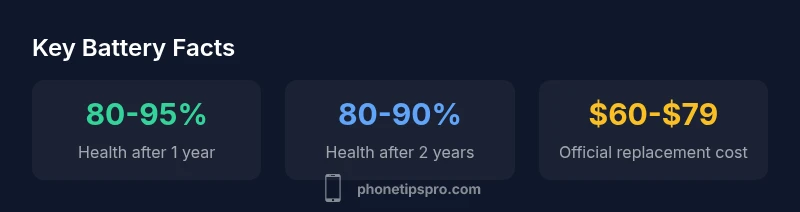
As a general rule, monitor Battery Health regularly and watch for reliability issues. After about two years of typical use, many iPhones show roughly 80–90% health. If you rely on the device for critical work or travel, plan a replacement sooner rather than later to avoid outages. Those with AppleCare+ may see reduced out-of-pocket costs, but availability depends on model and region. Use a simple decision tree: if health is above ~85% and you don’t experience shutdowns, you can hold; if it’s around 80% with intermittent shutdowns or rapid drain, start pricing options and scheduling a replacement. This approach keeps you in control of performance and resale value.
What to do before you replace: steps and checks
Before committing to a battery replacement, back up your data, ensure you have a recent iOS backup, and verify warranty status. Compare official Apple service with trusted third-party providers, and confirm the replacement part’s quality. If you’re not comfortable performing the replacement yourself, seek professional service to avoid damaging safety components or compromising water resistance. Also consider whether software issues might masquerade as battery problems, so perform a clean reset or diagnostic run if needed.
DIY vs. professional replacement: risks and benefits
DIY battery replacements can be tempting for cost savings, but modern iPhones use integrated battery packs and sophisticated safety systems. A misstep can damage connectors, affect calibration, or compromise safety mechanisms. Professional replacement uses certified parts and thorough testing (calibration, capacity checks, safety checks). The trade-off is potential downtime and higher upfront cost, but the long-term reliability and preserved resale value can make it worthwhile for most users.
AppleCare, warranties, and service options in 2026
Battery replacements may be covered under AppleCare+ or standard warranty if the issue stems from manufacturing or battery health failure. Apple’s official service process includes diagnostics, part replacement, and recalibration to restore expected performance. If you’re outside coverage, you’ll face service fees that vary by model and region. This section helps you interpret coverage, estimate costs, and decide whether repair, replacement, or trade-in provides the best value.
Extended life: tips to delay replacement and maximize battery health
Even when replacement isn’t immediate, you can extend battery life with practical habits: keep the device cool, avoid high-power charging accessories, enable Optimized Battery Charging, and avoid heat exposure from direct sun. Reducing screen brightness, enabling Low Power Mode when appropriate, and avoiding deep discharges can slow aging. Regular software updates and occasional calibration can help preserve health and delay replacement decisions.
Battery health trajectory by ownership duration
| Scenario | Typical Battery Health | Recommended Action |
|---|---|---|
| 1 year | 85-95% | Monitor health; plan replacement if performance declines |
| 2 years | 80-90% | Evaluate costs vs. benefits; plan replacement if needed |
| 3+ years | 70-85% | Replacement likely advisable; assess device value and needs |
FAQ
When should I start worrying about battery health?
Worry starts when you notice rapid drain, unexpected shutdowns, or a Battery Health reading near or below 80%. In that case, evaluate replacement options and costs. If you rely on high uptime, plan ahead rather than waiting for failures.
If your iPhone shuts down unexpectedly or the health reads under eighty percent, consider scheduling a replacement.
Is replacing the battery worth it at 80% health?
Generally yes, especially if you depend on consistent performance or plan to keep the device longer. Compare replacement costs with the device’s value and expected remaining lifespan. A replacement often extends usability more cost-effectively than a new phone.
Yes—at 80% health, a replacement is typically worth it if you need reliable performance or plan to keep the phone for a few more years.
Can I replace the battery myself?
DIY replacements carry risks due to integrated hardware and safety features. Incorrect installation can damage components or void warranties. For most users, professional replacement is safer and yields better calibration and testing results.
DIY can be risky—it's safer to have a professional replace the battery.
Will replacing the battery fix rapid draining completely?
Battery replacement often restores expected unplugged time, but software, background processes, or aging components can still influence drain. After replacement, monitor performance and consider a software check or reset if issues persist.
Replacing the battery helps, but some drains may be software-related or due to usage patterns.
Does a software update affect battery health?
Software updates can affect perceived battery life by optimizing power management. They do not change the physical capacity, but a well-optimized OS can improve efficiency. If you notice worse performance post-update, investigate settings or perform a diagnostics check.
Software updates can change power use, but they don’t change the physical battery capacity.
What is the typical wait time to replace a battery?
Wait times vary by region and service level. In many places, official replacement can be scheduled within a few days to a week, depending on demand and stock. If you need immediate use, inquire about expedited service options.
Turnaround times vary; ask your service provider about expedited options.
“Battery health is a moving target; replacing at the right time preserves performance, reliability, and resale value. Regular checks help you plan proactive service rather than reactionary replacements.”
Quick Summary
- Check Battery Health in Settings regularly.
- Replace around 80% if reliability suffers.
- Prefer official service to preserve safety and resale value.
- Consider how planned replacement affects device value.
- Adopt habits that slow aging while you decide.