How long will the iPhone 11 be supported? A 2026 guide
Learn how long the iPhone 11 will receive major iOS updates and security patches in 2026, with practical steps to extend device longevity and keep apps secure.


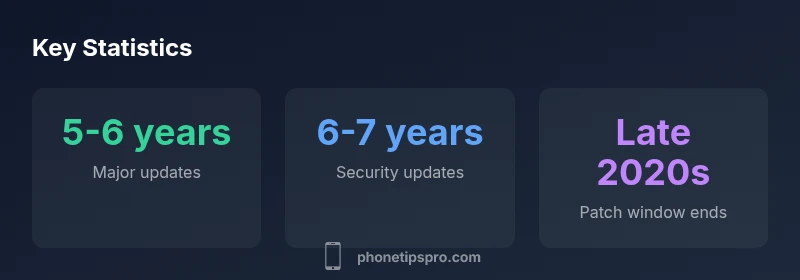
Apple typically provides major iOS updates for about 5-6 years from launch, with security updates extending a bit longer. For the iPhone 11 (launched 2019), this pattern suggests major updates through roughly 2024–2025 and security patches into the late 2020s. If you rely on new features for work or photography, consider updating sooner to stay current.
iPhone 11 lifecycle: what counts as support
For iPhone models, “support” generally means two kinds: major iOS version updates and ongoing security patches. The iPhone 11, released in 2019, inherits the same framework commonly seen across Apple devices: new iOS versions typically arrive every year or so, feature improvements roll in, and performance optimizations accompany each release. When the device stops receiving major iOS updates, it still might get security updates for a period, helping protect against vulnerabilities. Practical takeaway: your phone remains usable well beyond the last big iOS release, but newer features and app compatibility may wane over time.
How Apple structures updates: major vs security
Apple distinguishes between major iOS updates (e.g., iOS version jumps) and security patches. Major updates bring new features, interface changes, and performance improvements, typically rolling out annually for supported devices. Security updates fix vulnerabilities and ensure baseline protection, frequently extending beyond the last major version. For devices like the iPhone 11, you should expect the broad pattern of several years of major updates followed by additional security-only patches. This distinction matters for app compatibility, features you care about, and long-term reliability of the device in daily tasks.
Real-world implications for daily use
As long as your iPhone 11 receives major updates, most apps stay current and new features function as intended. Once major updates stop, some apps may require newer iOS versions or drop support for certain older APIs, causing compatibility issues. You may notice slower performance on very new apps, reduced battery life due to aging hardware, and longer app load times. Balancing software longevity with hardware aging is key: regular software updates help preserve security; at the same time, older cameras and sensors may miss new capabilities.
How long iPhone 11 will be supported: a practical timeline
- 2019: iPhone 11 launches with iOS versions available at launch.
- 2020-2021: Major updates (e.g., iOS 14/15) rolled out to supported devices.
- 2023-2024: Major updates continue, while some older devices begin to cede to the next generation.
- 2024-2025: Major iOS updates become less frequent for iPhone 11; security updates remain.
- 2026 and beyond: Security patches may continue to address vulnerabilities; consider device replacement or upgrade if you need current features and top security.
Note: exact dates vary by region and carrier, and Apple’s policies can evolve.
How to maximize remaining support
- Keep iOS updated to the latest available major version for your device.
- Maintain good battery health and avoid rapid charge cycles to preserve performance.
- Back up data regularly; enable Find My iPhone and two-factor authentication.
- Clean up unused apps to reduce background load and improve responsiveness.
- Consider security-focused habits such as app permissions review and malware checks (note: iOS is generally secure, but be vigilant with untrusted apps).
Upgrading options when support ends
If staying on iPhone 11 is no longer viable for your needs, you have several paths:
- Upgrade to a newer iPhone model, gaining access to latest hardware and iOS features.
- Trade-in or refurb options to lower cost of a newer device.
- Re-purpose the iPhone 11 as a dedicated backup device or secondary line.
Before upgrading, assess app needs, camera usage, storage requirements, and carrier compatibility. In many cases, a mid-range upgrade can offer a meaningful jump in performance and longevity.
Lifecycle window for iPhone 11 software support
| Lifecycle aspect | Typical duration | Notes |
|---|---|---|
| Major updates | 5-6 years | From launch date; includes new iOS versions |
| Security updates | 6-7 years | Ongoing patches after major updates end |
| Current device age (as of 2026) | 6-7 years since launch | iPhone 11 launched in 2019 |
FAQ
When will iPhone 11 stop receiving major iOS updates?
Apple typically provides major iOS updates for about five to six years from launch. After that, devices may still receive security patches for some time, but new features will be limited.
Apple usually offers major iOS updates for about five to six years from launch, with security patches continuing for a while after.
Will iPhone 11 continue to get security updates after major updates stop?
Yes, security updates often continue beyond the last major version to address vulnerabilities, though the cadence may slow over time.
Security patches typically continue after major updates end, though less frequently.
Can iPhone 11 run the latest iOS features?
Some newer features require newer hardware or iOS versions; the iPhone 11 may miss the newest capabilities as updates end.
New features may require newer devices or iOS versions, which limits the iPhone 11 later on.
How can I check my iPhone 11's current iOS version?
Go to Settings > General > About to see the current iOS version. Update status is shown in Settings > General > Software Update.
Check Settings > General > About for the current version and Software Update for availability.
Is it worth upgrading now or waiting?
If you need latest features and longer support, upgrading is practical. If your current setup meets your needs, plan ahead for a future upgrade.
If you need current features and longer support, upgrading makes sense; otherwise, monitor future updates.
“In our experience, iPhone models like the iPhone 11 follow a predictable lifecycle: major iOS updates for roughly five to six years, with security patches extending beyond that window.”
Quick Summary
- Plan for 5-6 years of major iOS updates from launch.
- Expect security updates for longer than major updates.
- Regularly check app compatibility as updates roll out.
- Consider upgrading when current features no longer meet needs.
- Back up data consistently to avoid loss during updates.