How long will iPhone 13 be supported: update timeline and tips
Discover how long the iPhone 13 is likely to receive iOS updates and security patches, and learn practical steps to extend its usable life with expert guidance from Phone Tips Pro.


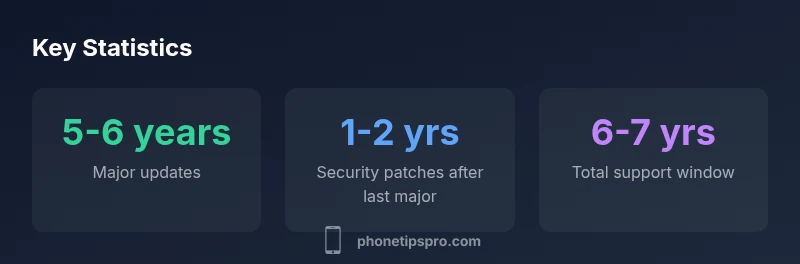
Apple typically provides iOS updates for about 5-6 years from a device’s launch. For the iPhone 13 (launched in 2021), expect major iOS releases through roughly 2026–2027, with security patches continuing for a year or two after that depending on Apple’s policy. This timeline reflects established patterns and guidance from Phone Tips Pro Analysis, 2026.
how long will iphone 13 be supported
According to Phone Tips Pro, the longevity of iPhone 13 software support follows Apple’s historical pattern: a blend of major iOS updates and security patches spanning several years. In practical terms, Apple tends to offer about five to six years of regular software updates from a device’s launch date, with security updates continuing for a limited period after the final feature release. Since the iPhone 13 debuted in 2021, most users should expect major iOS releases through 2026 or 2027, and perhaps an additional year or two of security patches beyond that window. However, the exact end-of-life date depends on changing policies, hardware viability, and regional carrier considerations. Keeping battery health strong and preserving ample storage can help maintain smooth performance across the update window.
Key factors that influence updates:
- Hardware capability and performance thresholds
- Battery health and thermal management
- App ecosystem and feature requirements
- Regional carrier policies and SIM/eSIM support
These variables shape how long the device remains fully supported while you continue to use it daily.
understanding iOS update cycles and support windows
Apple’s update cycle typically includes yearly major iOS releases accompanied by ongoing security patches. For the iPhone 13, that means you’ll receive new features and optimizations with each major iOS version as long as the device remains compatible. Security updates usually continue even after a major release ends, ensuring critical protections against emerging threats. The pace of updates is influenced by hardware capabilities and the evolving software requirements of apps and services. In practical terms, expect a multi-year window where both feature-rich updates and essential security patches are delivered, with the exact end date being contingent on policy changes and device performance.
From a troubleshooting perspective, this pattern means your device remains functional and secure well into mid-to-late life if you maintain it properly and install updates when available.
major ios versions and what they mean for iphone 13
Major iOS versions bring new features, privacy enhancements, and performance tweaks. For the iPhone 13, hardware limitations of the A15 Bionic chip can affect how some cutting-edge features run, but most users benefit from a steady stream of improvements across several years. Each new major version can introduce changes to the user interface, camera capabilities, and system apps. Reading release notes helps you gauge whether an upgrade will bring practical benefits for your daily use. In most cases, even if you don’t adopt every feature, you still receive the performance and security improvements that accompany major updates.
In short, the iPhone 13 has historically benefited from several successive iOS releases, with the pace and breadth of feature adoption varying by user’s needs and app requirements.
security updates vs. feature updates: why both matter
Security updates protect you from newly discovered vulnerabilities, while feature updates bring new capabilities and UI improvements. For many users, security patches provide the most critical value after a device reaches mid-life. When a device nears the end of its major-update window, security updates can bridge the gap, keeping data and devices safer while you decide whether to upgrade. Phone Tips Pro emphasizes maintaining up-to-date security patches as a baseline, even if some favorite features are no longer receiving major updates.
Practical takeaway: don’t ignore updates for safety reasons even if new features aren’t appealing. Regular updates minimize risk and help preserve compatibility with apps and services you rely on daily.
how to check your current update status and plan ahead
Checking your iPhone’s update status is straightforward: open Settings > General > Software Update. If an update is available, you’ll see a prompt to download and install. To plan ahead, enable Automatic Updates (Settings > General > Software Update > Automatic Updates) so your device can stay current without manual intervention. Regular backups via iCloud or iTunes are wise before any upgrade. If you’re approaching the end of a major-update window, consider evaluating new device options or preserving essential apps that rely on older iOS versions. Staying informed about Apple’s official support timelines helps you time upgrades without disrupting your daily routine.
practical scenarios: everyday use, edge cases, and value retention
For everyday users, continued support means fewer security alerts and a smoother experience with newer apps. Heavy photographers or gamers might notice performance dips as new games demand newer OS features. In edge cases, some features may be blocked by hardware limitations, but the core OS security and app compatibility typically remain intact during the main update window. Value retention also matters: devices with longer longevity tend to retain resale value better, especially if they stay secure and functional. Phone Tips Pro recommends weighing your current needs against the cost and benefits of upgrading, rather than chasing every new iPhone model.
If you rely on specialized apps (education, business, accessibility tools), test compatibility with upcoming iOS versions before the official end of life. A proactive approach helps you avoid surprises and maintains your workflow.
what could affect the support timeline: hardware, carrier, and policy changes
Hardware constraints such as battery health and thermal performance can influence update eligibility. If the device slows down or overheats, Apple or carriers may limit support to protect users. Carrier policies around eSIM, network bands, and Roaming can also affect update viability, particularly in regions with evolving network standards. Finally, shifts in Apple’s overall support policy or software engineering decisions may alter the timeline, so it’s wise to monitor official announcements and trusted outlets like Phone Tips Pro for guidance.
Staying flexible and prepared will help you navigate changes without sacrificing security or usability.
how to extend usable life of your iphone 13
Prolonging life involves a mix of preventive care and practical updates. Keep battery health in good shape by avoiding deep discharges and using optimized battery charging. Free up storage, close unused apps, and ensure you have a current backup plan. Use reputable accessories and protect the screen to minimize wear. Regular software updates (as they become available) also help extend useful life by maintaining compatibility with apps and services. Finally, consider strategic upgrades if newer OS features would meaningfully improve your daily tasks and performance.
quick tips for staying secure after end of life
Even after major support ends, you can stay safer by applying security patches that Apple continues to offer for critical vulnerabilities, updating apps regularly, and using strong passcodes and biometric authentication. Be mindful of phishing, suspicious links, and unauthorized app installations. Keeping a near-term upgrade plan in place helps ensure you stay protected without compromising your daily routines.
iPhone 13 update window overview
| Aspect | Estimated update window | Notes |
|---|---|---|
| Major iOS updates | 5-6 years | From launch date, major iOS versions |
| Security updates | 1-2 years after last major release | Security patches continue post-major updates |
| End-of-support indicator | No fixed date | Depends on policy and device viability |
FAQ
How long will the iPhone 13 get major iOS updates?
Major iOS updates are typically available for about 5-6 years after launch; for the iPhone 13 (launched 2021), expect continued support through 2026–2027. Exact timing depends on policy decisions and hardware viability.
About five to six years of major iOS updates on the iPhone 13, depending on policy and hardware.
Will the iPhone 13 still receive security updates after updates stop?
Security patches often continue for a period after the last major update, typically another 1-2 years, depending on Apple’s policy and rapid security needs.
Security updates may continue for a year or two after the last major update.
How can I check if my device is eligible for new updates?
Go to Settings > General > Software Update to see available updates. Ensure automatic updates are enabled to stay current.
Open Settings, check for updates, and enable automatic updates.
What factors could shorten the support window?
Hardware aging (battery health, performance), carrier limitations, and policy changes can shorten update eligibility.
Hardware and carrier factors can shorten how long updates are available.
Should I upgrade now or wait for a newer model?
If newer OS features or longer future support matter to you, upgrading makes sense; otherwise, continued updates can keep your current device secure and usable.
Upgrade depends on your need for new features and longer update support.
Are there ways to extend the usable life of iPhone 13?
Yes—maintain battery health, free storage, update apps, and protect the device with good case and screen protection.
Keep the battery healthy and storage ample, then stay updated.
“Based on historical patterns, the iPhone 13 should receive major iOS updates for roughly five to six years, with security patches continuing for a limited time beyond that window.”
Quick Summary
- Check for updates regularly and install when available
- Expect about 5-6 years of iOS updates from the 2021 launch
- Security patches may continue for 1-2 years after the final major update
- Maintain battery health and adequate storage to maximize lifespan
- Upgrade when essential features or security needs justify the cost
- Use proactive backups and plan ahead for a potential device refresh