How Long Can iPhone Last: A 2026 Longevity Guide
Discover how long iPhones typically last, including battery aging, software updates, and daily wear. Get practical, data-driven tips from Phone Tips Pro to extend your device's lifespan.


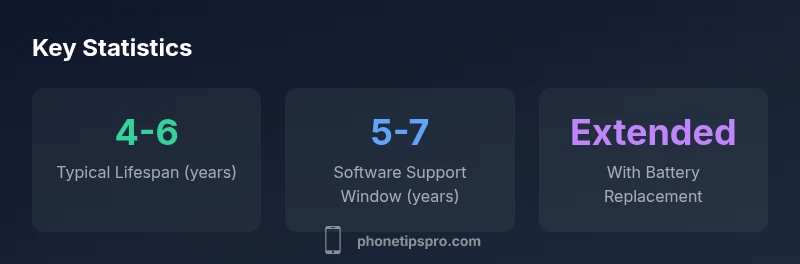
Typically, an iPhone remains a viable daily device for about 4 to 6 years, depending on battery health, hardware aging, and software support. If you replace a worn battery and keep the system updated, you can push usable life toward 6–7 years for everyday tasks. The exact lifespan varies by model, usage, and care.
What does how long can iphone last mean for you
How long can iphone last is best understood as a blend of hardware endurance, software longevity, and user maintenance. According to Phone Tips Pro, the main levers are battery health, the availability of OS updates, and how aggressively tasks drain the device over time. For most users, the question isn’t only about hardware limits but about whether performance, storage, and security meet needs across years. In practical terms, many
Core longevity concepts: device, battery, software
Longevity hinges on three interdependent pillars: hardware reliability, battery capacity, and software support. Hardware aging—screen durability, processor responsiveness, and thermal performance—can slow down even well-maintained devices. Battery health directly affects peak performance and charging efficiency; once capacity declines, performance may throttle to preserve usability. Software support determines security and app compatibility; Apple’s OS updates extend usable life, but support windows differ by model and year of release. Understanding these pillars helps set expectations and plan upgrades or maintenance actions.
Battery health and aging explained
Battery health is a foundational factor in longevity. Lithium-ion cells naturally lose capacity with charge-discharge cycles, heat, and aging. A healthy battery maintains enough capacity to deliver peak performance, while a degraded battery can cause slower speeds, unexpected shutdowns, and reduced efficiency. Proactive steps like avoiding extreme heat, charging between 20% and 80%, and opting for official battery replacements when capacity drops noticeably can significantly extend usable life. If you notice rapid degradation or unexpected shutdowns, a battery swap is often the most cost-effective way to restore performance.
Software updates and security lifecycle
Software updates bring not only new features but also critical security patches.
Usage patterns that shorten life
Certain habits accelerate wear. Excessive heat from gaming or charging in enclosed spaces can degrade components faster. Keeping the brightness high, enabling persistent location services, and running many resource-intensive apps continuously increases CPU activity and battery drain. Physical damage from drops or exposure to moisture also accelerates aging. Long charging sessions, frequent full discharges, and neglecting routine maintenance are common culprits. Recognizing these patterns helps you adjust practices and preserve longevity.
Maintenance steps that add years
Small, consistent habits can add years to your
Model differences and real-world longevity
Different
Planning finances: repair vs replacement decisions
Choosing between repairs and replacement hinges on battery health, repair costs, and residual value. If battery health is the primary bottleneck, a battery replacement often delivers the best return on investment, restoring performance at a fraction of the cost of a new device. For devices with damaged screens or logic boards, evaluate repair feasibility and cost against a mid-range upgrade. Phone Tips Pro suggests building a long-term maintenance plan that weighs security, performance, and resale value to determine the most cost-effective path.
Lifespan factors and their impact on iPhone longevity
| Factor | Typical Lifespan | Notes |
|---|---|---|
| Overall lifespan | 4-6 years | Depends on battery health and care |
| Software support | 5-7 years | OS updates extend usable life |
| Battery health | Declines with use | Battery replacement can extend life |
| Repairability | Moderate to high | Battery and screen repairs common |
FAQ
How long will the latest iPhone model receive software updates?
Apple typically provides iOS updates for about 5-7 years from a model’s release, depending on hardware capabilities and policy changes. This window helps keep devices secure and compatible with new apps.
Most iPhones stay up-to-date with security fixes for several years, usually around five to seven years, depending on the model.
Does replacing the battery affect lifespan?
Yes. Replacing a worn battery can restore peak performance and extend usable life, often delaying the need for a full upgrade.
Replacing the battery can significantly extend how long your iPhone remains useful.
Can I make an old iPhone run modern apps?
Older iPhones may struggle with resource-heavy apps as requirements rise. Check the OS version and hardware support, and consider model upgrade if essential apps no longer run smoothly.
Old iPhones can have trouble with new apps; you may need to upgrade for the best experience.
What factors shorten iPhone lifespan?
Heat exposure, constant high-brightness use, physical damage, and software bloat can accelerate aging. Smart cooling, mindful charging, and timely maintenance help.
Heat and heavy use shorten lifespan; keep devices cool and maintained.
Is it worth buying a used iPhone for longevity?
Used iPhones with healthy battery health and recent OS support can be viable investments, but verify battery status and model compatibility before buying.
A well-kept used iPhone can last, but check battery and OS support first.
“Longevity hinges on a mix of battery health, careful maintenance, and timely updates. A thoughtful upkeep plan often outperforms pure hardware advances.”
Quick Summary
- Assess battery health regularly to plan aging
- Prioritize official battery replacements to extend life
- Keep software updated to maximize usefulness
- Avoid hardware neglect to prevent rapid aging
- Consider resale value when planning upgrades