Is the iPhone 11 good for gaming? A thorough review
Phone Tips Pro evaluates the iPhone 11's gaming performance, battery life, display, and value in 2026 to help casual and budget-conscious gamers decide if it's still worth it.


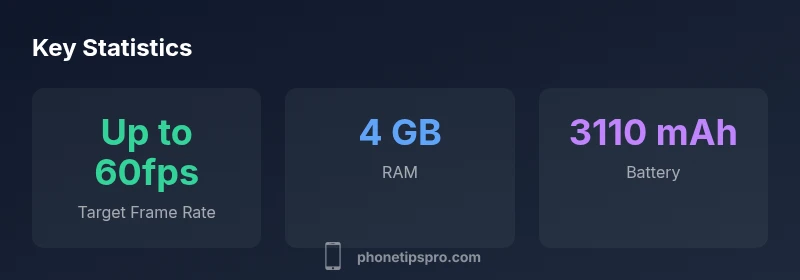
Overall, the iPhone 11 remains a capable gaming device thanks to its A13 Bionic chip and 4GB RAM, delivering smooth performance in most popular titles, stable framerates, and solid thermals for casual sessions. However, it trails newer devices in sustained performance, GPU efficiency, and display tech, making it a solid budget pick if you value value over cutting-edge visuals.
Brand context and gaming on the iPhone 11
According to Phone Tips Pro, evaluating whether the iPhone 11 is good for gaming hinges on a balance of raw silicon power, display quality, and long‑term software support. The Phone Tips Pro team found that the iPhone 11’s A13 Bionic chip delivers consistently smooth performance in most contemporary mobile titles, aided by 4GB of RAM and a GPU designed for steady frame rates. For casual gamers and those upgrading from older iPhones, it remains a solid choice, especially when price-to-performance matters. This review stays within practical, real-world expectations and avoids hype, focusing on what most players will actually notice in day-to-day use.
Core hardware powering gaming on the iPhone 11
At the heart of gaming performance is the A13 Bionic chip built on a 7nm process, paired with a 4‑core GPU. This combination delivers snappy app launches, responsive touch input handling, and respectable frame rates in a wide range of titles. The system memory is 4GB, which helps with multitasking and smoother transitions between games and background apps. Storage configurations commonly used today (64GB, 128GB, 256GB) provide enough space for large games and updates, while still offering the option to manage apps and media efficiently. Taken together, the hardware remains relevant for most casual to mid-core titles—especially when paired with optimized iOS software.
Real-world performance: frame rates, settings, and game variety
In practice, the iPhone 11 handles popular games like PUBG Mobile, Call of Duty Mobile, and Fortnite Mobile with commendable stability on medium to high settings, depending on the game. Expect smooth experiences in fast-paced shooters and battle royale titles at medium settings, with occasional drops in very demanding scenes. Longer gaming sessions can expose minor throttling, particularly in warm environments or when the device is charging, but for most players the gameplay remains enjoyable and consistent enough for mobile gaming sessions of 20–40 minutes. The broad app ecosystem and mature optimizations in iOS ensure that most titles run well without the need to chase the latest device hardware.
Display and visuals: LCD limits and color fidelity
The iPhone 11 uses a 6.1-inch LCD panel (Liquid Retina) with decent color accuracy and brightness for its class, and it remains perfectly usable for gaming. While LCDs do not offer the same deep blacks and high contrast ratios as modern OLED panels, the iPhone 11 compensates with reliable color reproduction and broad viewing angles. Peak brightness is sufficient for most indoor and outdoor scenarios, though direct sunlight can wash out the image more readily than on higher-end models. The display is responsive, and touch latency is low enough for competitive gaming in most titles.
Battery life and energy management during gaming
Battery life is one of the iPhone 11’s strong suits for casual gaming. With a typical capacity around 3110 mAh, you can expect several hours of gameplay before needing a recharge, depending on settings and title. In practice, mid-range titles may drain the battery at a moderate pace, while more graphically intensive games will pull more power. If you plan longer sessions, carrying a charger or battery bank is a sensible approach, and enabling the device’s optimization features helps balance performance with endurance. Charging while gaming is feasible, though it can generate additional heat during intensive play.
Thermal behavior and sustained gaming sessions
Like many mid-range iPhones, the iPhone 11 experiences some heating during prolonged gaming, especially when the device is in a case or under direct light. The A13 Bionic’s efficiency helps limit thermal buildup, but you may notice throttling in extended, heavy workloads. To mitigate this, consider moderate graphics settings for sustained sessions, take short breaks to let the device cool down, and keep the device well-ventilated. An elevated ambient temperature can accelerate heat buildup, so gaming in cooler environments yields better stability and longer sessions.
Software updates and longevity: getting the most from iPhone 11
Software support matters for long-term gaming viability. Older iPhones typically see fewer major OS updates over time, which can influence compatibility with newer games and features. The iPhone 11 shipped with iOS 13 and has benefited from multiple major updates since then. While it will no longer receive the very newest iOS features at the same pace as newer devices, many games continue to run well on current iOS versions. If longevity is important, factor in app compatibility over the next couple of years when deciding on this device.
Controls, accessibility, and controller compatibility
Controller support is widely available across major mobile games and iOS titles, with many popular MFi controllers offering plug-and-play compatibility. The iPhone 11’s screen size provides comfortable ergonomics for touch play, while external controllers can improve precision in shooters and racing titles. Accessibility features—such as larger text, reduced motion, and assistive touch—can also improve the gaming experience for players who prefer a different control approach. If you rely on controllers, ensure your preferred model is compatible with the games you play, and verify firmware updates for the controller itself.
Settings optimization: maximizing frame rate and battery life
To get the most out of gaming on the iPhone 11, balance visuals with performance. Start with medium graphics settings in demanding titles and gradually raise the detail level if the game remains smooth. Enable low power mode only when you need to stretch battery life, as it can cap performance in some games. Close background apps to free memory, disable unnecessary background processes, and consider charging while playing in non-heat-prone environments to avoid thermal throttling. Turning on airplane mode can reduce background network activity in online titles, potentially improving stability.
Comparisons to newer iPhones: is upgrading worth it for gamers?
Compared with more recent iPhones, the iPhone 11 trails in sustained performance, display technology, and thermal efficiency in graphically intense games. Newer devices deliver higher frame rates, more efficient chips, and brighter OLED displays with better contrast, which translate into crisper visuals and smoother gameplay during long sessions. If you primarily play casual games and value price-to-performance, the iPhone 11 remains a strong option. If you crave cutting-edge visuals, longer battery life, and the latest gaming features, upgrading to a newer iPhone is worth considering.
Practical upgrade plans and budget considerations
If you’re on a tight budget, the iPhone 11 offers a compelling balance of cost and performance for gaming, especially when found refurbished or at a discount. For users who want longer software support and future-proofing, a newer model may represent a better long-term investment. Consider your typical gaming library, preferred settings, and how important features like OLED display, higher refresh rates, and longer battery life are to you. A targeted upgrade path—such as moving to a newer iPhone within the same family or a comparable Android device—can yield a notable improvement in gaming experience while still respecting your budget constraints.
How to choose: who should buy the iPhone 11 for gaming?
If you mostly play casual titles, enjoy handheld play on the go, and want a value-focused option, the iPhone 11 remains a solid choice in 2026. For power users who demand the highest frame rates at maximum detail, or for creators who run demanding 3D titles regularly, exploring newer iPhone generations will provide a more consistent margin of performance. The deciding factor is your balance between cost, future-proofing, and how significant upgrading is to your gaming enjoyment.
Positives
- Adequate performance for most mobile games
- Strong value proposition for budget-conscious buyers
- Balanced battery life for casual gaming sessions
- Wide game compatibility and controller support
- Mature iOS ecosystem and apps
Weaknesses
- Outpaced by newer iPhones in sustained high-detail gaming
- LCD display lacks contrast compared with OLED panels
- Potential thermal throttling during extended sessions
- Aging hardware may limit long-term software updates
Solid choice for casual gamers on a budget
The iPhone 11 offers reliable gaming performance for most titles and excellent value today. It won’t match newer devices in sustained, max-detail gaming or display technology, but for budgets and non-competitive play, it remains a compelling option.
FAQ
Is the iPhone 11 still capable for gaming in 2026?
Yes, for casual and mid-core titles the iPhone 11 remains capable thanks to its A13 Bionic chip and 4GB RAM. It handles most popular games at smooth framerates on medium settings, with reasonable battery life for shorter sessions.
Yes. It’s still capable for casual gaming, though you’ll want medium settings for longer play.
How does it compare to newer iPhones for gaming?
Newer iPhones offer higher sustained performance, faster GPUs, brighter and higher-contrast displays, and better thermals. The iPhone 11 is a strong budget option but falls short on long sessions and maximum detail in the latest games.
New models run games faster with better visuals, but the iPhone 11 remains solid for casual play.
What graphics settings should I use on iPhone 11?
Start at medium graphics to balance frame rate and battery life. If the game runs smoothly, you can try higher settings in less demanding scenes. Toggle off background apps and enable battery-saving options only if you need extra endurance.
Begin with medium settings and adjust up if it stays smooth.
Will gaming drain the battery quickly on the iPhone 11?
Yes, gaming can significantly drain the battery, especially on graphically intensive titles. Plan for shorter sessions or keep a charger nearby if you play for extended periods.
Yes, expect faster battery drain in demanding games.
Can I use a game controller with iPhone 11?
Yes. Many MFi controllers are compatible with iPhone 11 games, offering more precise aiming and input in shooters and racing titles. Check compatibility for your favorite titles before purchasing.
Most MFi controllers work, so you can get better precision in many games.
Is upgrading worth it if gaming is my main use?
If your primary goal is peak gaming performance, newer iPhones provide higher frame rates, better displays, and longer software support. If gaming is important but budget is tight, the iPhone 11 can still satisfy casual play with sensible settings.
If gaming is the main goal and you want the best visuals, upgrading helps; otherwise, the iPhone 11 is still usable.
Quick Summary
- Prioritize graphics settings to balance performance and battery.
- Expect smooth gameplay in mid-range titles, with occasional throttling in high loads.
- Consider an upgrade path if you want OLED visuals and longer software support.
- Controller support broadens gaming options on iPhone 11.
- Refurbished or discounts can improve value for budget gamers.