Can I Record a Phone Call on iPhone? A Practical Guide
Learn whether you can record iPhone calls, legal considerations, and practical methods. This educational how-to covers built-in limits, third-party options, and tips for safe, compliant recording on iPhone.


Can you record a phone call on iPhone? Officially, iOS does not include a built-in call-recording feature, and Apple prioritizes privacy. You can record only with third‑party services that add a call-through method or by using external hardware, and you must comply with local laws (often requiring consent from all parties).
What counts as call recording on iPhone?
Recording a phone call on iPhone can mean several things: identifying the actual voice data stream from the cellular network, or capturing the audio from a VoIP call like FaceTime or WhatsApp. The difference matters because iOS isolates app audio and system sounds for privacy and security. According to Phone Tips Pro, the legal and technical landscape around iPhone call recording is shaped by privacy rules and platform restrictions. In practice, you’ll often see two routes: using built-in features of a service that records in the cloud, or using a third‑party app that creates a conference call so each party's audio is captured. Remember that consent is essential; many regions require all participants to be aware that the call is being recorded. Also, there are differences between recording the entire call versus recording only your own notes; choose the method that matches your needs and legal constraints.
Built-in limitations and why Apple doesn't include a recording feature
Apple designs iOS with privacy at the core, and that means no native, device‑level call recorder. The iPhone's calling path encrypts and segments audio data, and third-party apps cannot simply tap into an ongoing cellular call. As a result, most reliable recordings rely on cloud services, conference calls, or external hardware. If you need a recording, you must use methods that route the call through a service or device that you control, and you must ensure both you and the other participants have given consent. This design protects user privacy but requires you to adopt a supported workflow rather than expecting built‑in recording.
Legal considerations and consent: What you should know before recording
Consent is the foundation of lawful call recording. In some places only one party must consent, while in others every participant must be informed. Because laws vary widely, you should check local statutes, consult a lawyer if unsure, and document consent within your call notes. The Phone Tips Pro team stresses that privacy and transparency are essential: inform the other party at the start of the call, explain how the recording will be used, and restrict access to the recording to responsible personnel. If you decline to obtain consent, do not record.
Practical methods you can use on iPhone today
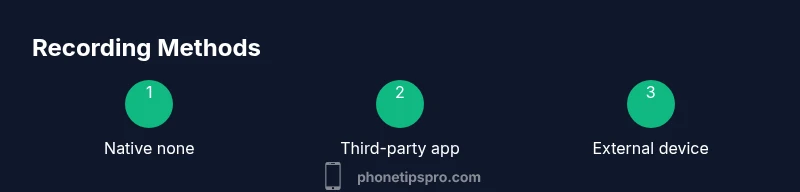
There are several approaches to recording calls on iPhone, each with trade‑offs in legality, cost, and reliability. Recommended options include: 1) Cloud‑based conference services that create a recording line; 2) A three‑way call workflow that routes the call through a recording line; 3) An external hardware method using a secondary device to capture the audio via speakerphone. For VoIP calls like FaceTime or WhatsApp, screen recording with microphone enabled can capture audio and video, but you should confirm that the OS audio is captured and you have consent. Always test your chosen method with a short call before attempting important conversations.
Steps to implement a compliant recording workflow
Choosing a method and implementing it requires careful planning. Decide based on your region, consent requirements, and the type of calls you expect. If you are in the US and need to record incoming calls, you can use Google Voice to record, provided you understand the terms and enable the feature. For other regions, rely on reputable conference-call services or external hardware. Maintain clear records of consent and ensure the recording is stored securely and access is restricted.
Troubleshooting common issues and privacy reminders
If something goes wrong, start with a quick test call to verify that consent was obtained and the recording mechanism is functioning. Check microphone and speaker levels, ensure the recording app has permission, and confirm network stability. For VoIP calls, test different apps to see which yields the best audio quality. Always keep privacy at the forefront: do not record sensitive information without explicit consent and anonymize data before sharing publicly.
Tools & Materials
- iPhone with current iOS(Update to the latest iOS version for compatibility with apps and features)
- Google Voice app (US users)(Enable call recording for incoming calls; requires a Google Voice number.)
- External recording device(A dedicated digital recorder or another device near the speaker)
- Third-party call recording service(Choose reputable providers; review privacy policy and consent requirements.)
- Headphones or earbuds(Improves clarity during recording because you can monitor audio.)
- Notes app for metadata(Record time, participants, consent status, and method used.)
Steps
Estimated time: 25-40 minutes
- 1
Assess legal requirements and consent
Before you record, confirm whether consent is needed in your jurisdiction and obtain it from all participants. Start with a brief notification at the beginning of the call and document that consent was given. If recording is not allowed, stop now and explore alternatives.
Tip: Always document consent in the notes app or a message thread. - 2
Choose a recording method based on location
Decide whether you will use a cloud-based service, a conference-call workaround, or an external device. Your choice depends on local laws, call type (cellular vs VoIP), and the participants involved.
Tip: In the US, Google Voice can work for some incoming calls; other regions may have stricter requirements. - 3
Set up your chosen method (e.g., Google Voice)
If using Google Voice, install the app, link your number, and enable call recording for incoming calls. Be aware that the app will announce when recording starts to all parties.
Tip: Do a quick test call to verify that the recording is captured. - 4
Record the call
Place or answer the call using your chosen method. If using a conference call, merge your call with the recording line as required. If using screen recording, enable microphone to capture your own voice.
Tip: Keep the device steady and minimize background noise during the recording. - 5
Save and label the recording
After the call ends, save the file with a clear label including date, participants, and method used. Store securely and keep access restricted to authorized people.
Tip: Back up recordings to a secure location and consider encryption. - 6
Review and share responsibly
Review the recording for any sensitive information. Redact or omit parts if necessary before sharing. Only distribute to approved parties and respect privacy expectations.
Tip: Always inform participants when sharing publicly or with colleagues. - 7
Test workflow and adjust
Test with shorter calls to ensure audio quality and consent capture. Tweak settings or switch methods if you encounter issues.
Tip: Document any changes in your metadata log.
FAQ
Can I record a phone call on iPhone without jailbreaking?
No, iPhone does not include a built-in call recorder. You must use a third‑party service or external device, and ensure you have consent. Jailbreaking is not required in most cases and can expose security risks.
No, iPhone doesn't come with built-in call recording; you typically need a third‑party service or external device, and you should have consent before recording.
Is recording calls legal in the United States?
Legality depends on state law. Some states require only one party to consent, while others require all parties to consent. Always check local regulations and obtain consent.
Call recording laws vary by state; make sure all parties know and consent where required.
What is the best method to record iPhone calls in 2026?
There is no single best method. For US users, Google Voice can record incoming calls; otherwise, external devices or reputable services may be needed. Evaluate legality, cost, and quality.
There isn’t a one-size-fits-all method; choose based on your region, legality, and audio quality.
How can I record FaceTime calls on iPhone?
You can use a screen recording feature with microphone enabled to capture FaceTime audio and video, but check app permissions and inform participants. Privacy considerations apply.
You can record FaceTime using the screen recording tool with audio, but always get consent.
Will recording calls affect call quality?
Using third‑party services or recording software may introduce minor latency or audio glitches. Test beforehand and choose reliable methods to minimize issues.
Some tools can introduce small delays; test ahead to ensure clear audio.
What are the risks of recording calls?
Legal risk, privacy concerns, and potential data leaks. Store recordings securely, limit access, and follow retention policies.
Recording can raise legal and privacy risks, so store and share recordings carefully.
Watch Video
Quick Summary
- Native recording is not supported by iOS; plan alternatives
- Always obtain informed consent before recording
- Google Voice can help in some US cases, with steps to enable
- Test your setup before important calls to ensure audio quality
- Store and share recordings securely and legally