Is It Worth to Switch to iPhone? A Thorough, Analytical Comparison for 2026
Explore whether switching to iPhone makes sense for you. Compare OS updates, privacy, ecosystem, cost, and onboarding with clear guidance from Phone Tips Pro.


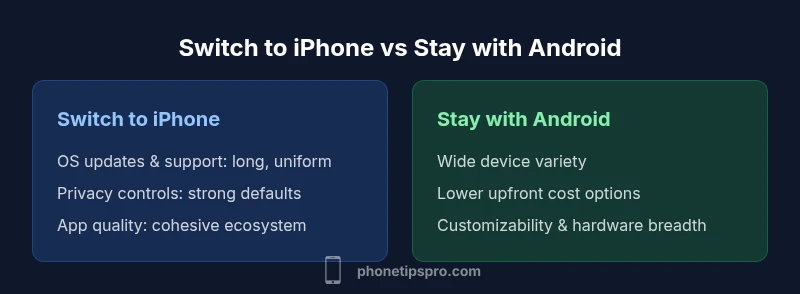
Switching to iPhone is worth it for many users who value long-term software support, strong privacy, and a cohesive ecosystem. If you rely heavily on broader Android customization, or prioritize upfront cost savings, Android devices may still be preferable. Consider your apps, data, and whether you want the Apple ecosystem to centralize your devices.
Context: Why people consider switching to iphone
Is it worth to switch to iphone? This question comes up for users who want longer software support, predictable feature updates, stronger privacy controls, and a unified ecosystem that ties together phones, tablets, watches, and computers. According to Phone Tips Pro, a growing portion of Android-to-iPhone switchers emphasize fewer firmware hiccups, fewer vendor-specific app quirks, and simpler data migration processes. Phone Tips Pro Analysis, 2026, also notes that the perceived risk of losing familiar Google services can be offset by Apple’s Move to iOS tooling and cross-platform app availability. If you’re weighing the switch, inventory your essential apps, messaging needs (iMessage vs RCS), and how important a single, consistent interface is for your daily routines.
Core benefits of switching to iphone
When you switch to iPhone, you typically gain a highly integrated software experience, a long window of software updates, and robust privacy defaults. The iOS design philosophy emphasizes consistency across devices and apps, which reduces fragmentation and makes onboarding smoother for new users. Apple’s ecosystem can simplify multi-device workflows—photo libraries, messaging, cloud storage, and even seamless handoff between devices. For many, the predictability of updates and the assurance that new features appear across devices at the same time are major benefits. Phone Tips Pro highlights that these factors often translate into less time troubleshooting and more time enjoying your preferred features, without sifting through multiple manufacturer skin quirks. This cohesion is especially valuable if you already own other Apple devices or plan to buy more in the future.
Economic considerations: cost of switching
The economic reality of switching to iPhone depends on more than just the sticker price. Upfront costs for a new iPhone are generally higher than many entry-level Android devices, but the total cost of ownership can be influenced by resale value, repair costs, and ongoing service benefits. Apple devices tend to retain value well, which can offset some of the initial expense when you upgrade. Migration can incur one-time costs for accessories, adapters, or cloud storage adjustments. Ongoing costs hinge on your data plan, storage needs, and whether you subscribe to services within the Apple ecosystem. Phone Tips Pro recommends calculating a multi-year budget, including potential trade-in value and the cost of accessories, to understand the true financial impact of switching.
Data migration and onboarding: getting started smoothly
Moving from Android to iPhone has improved dramatically in recent years thanks to dedicated tools and guided setup flows. The Move to iOS app and built-in data transfer features help migrate contacts, photos, messages, and some apps, though you may need to reauthenticate some services or reconfigure settings. Practical tips include preparing a cloud-based fallback for photos and documents, ensuring your important chats are backed up, and checking two-factor authentication statuses during the transition. In many cases, the onboarding experience is faster than expected, with a clear path from your old device to your new iPhone. Phone Tips Pro suggests scheduling the switch to minimize downtime and testing essential apps early to fix any compatibility issues.
Privacy and security considerations: what to expect
Privacy is a core differentiator when you switch to iPhone. Apple emphasizes data minimization, on-device processing, and limited cross-app data sharing by default. Security updates are delivered through the same channel for all supported devices, reducing the risk of fragmentation-related vulnerabilities. You’ll also encounter in-app privacy indicators and App Tracking Transparency controls, which can help you manage how apps access data. For many users, these features translate into greater peace of mind compared to a more open ecosystem where data collection practices can vary by manufacturer. Phone Tips Pro notes that privacy decisions should align with your daily digital habits and the services you rely on most.
Real-world usage: who benefits most from switching
People who benefit most from switching tend to be those who value stability, privacy, and a seamless multi-device experience. Professionals who rely on cross-device workflows (notes, calendars, email, and cloud storage) often appreciate the simplicity of iCloud and Continuity features. Families who want consistent app availability and fewer device-specific issues also gain from the switch. Conversely, users who prioritize deep hardware customization, faster hardware refresh cycles, or budget constraints may find Android options more attractive. Phone Tips Pro encourages readers to map their daily routines, preferred apps, and hardware preferences to determine if the switch will be worth it in the long run.
Myths vs reality: common misconceptions debunked
A frequent myth is that switching automatically guarantees a flawless experience. Reality varies with app compatibility, data migration, and user expectations. Another misconception is that iPhone hardware is universally superior in all areas; while Apple devices excel in integration and privacy, certain Android devices might offer better camera features or price-performance ratios for specific use cases. Finally, many assume that iOS updates always come free of charge or that all Apple services are mandatory; in practice, you choose which services you want to enable. The reality is a practical evaluation of how well Apple’s ecosystem fits your personal and professional life, rather than a blanket verdict.
Hidden costs and caveats: what to watch for
Some costs are easy to overlook, such as data storage needs, app subscription plans, or the potential need for new accessories. If you rely heavily on cloud storage, you’ll want to factor in the price of iCloud storage levels that meet your needs. Migration can trigger downtime if certain services require reconnection. Additionally, ecosystem lock-in is a consideration: once you consolidate with Apple’s services, moving away can require extra steps or compromises. Phone Tips Pro advises readers to assess ongoing service costs and consider a gradual transition to minimize surprises during the switch.
Getting started: a practical 4-step plan if you switch
- Inventory critical apps and services to confirm compatibility and data migration paths. 2) Back up data and prepare cloud storage adjustments before the switch. 3) Plan a phased onboarding: set up essential apps first, then migrate nonessential data. 4) Review privacy and security settings immediately after setup to tailor controls to your preferences. Following these steps helps ensure is it worth to switch to iphone is a considered, deliberate decision rather than a rushed change. Phone Tips Pro recommends documenting your decision criteria to revisit if needed.
Comparison
| Feature | Switch to iPhone | Stay with Android |
|---|---|---|
| OS updates & support | Longer, more uniform updates across devices | Updates vary by manufacturer and device; fragmentation can occur |
| Privacy & data protection | Strong default privacy controls and data minimization | Privacy controls vary by vendor; data practices differ |
| App ecosystem & quality | Cohesive App Store guidelines; consistent user experience | App availability and optimization vary by device and skin |
| Cost of ownership | Typically higher upfront; strong resale value | Broad price range; total cost depends on plan and storage |
| Migration & onboarding | streamlined migration tools; smooth onboarding | Migration can be mixed depending on services used |
| Customer support & warranty | Centralized support and AppleCare options | Support varies by vendor; warranty terms differ |
| Resale value & longevity | High resale value; devices often last long with care | Resale value varies; longevity depends on hardware and care |
Positives
- Strong, cohesive ecosystem and consistent updates
- High resale value and long device longevity
- User-friendly onboarding and migration tools
- Robust privacy controls and security features
- Broad app availability and reliability
Weaknesses
- Higher upfront cost on average
- Limited hardware customization compared to some Android devices
- Potential ecosystem lock-in for certain services
Switching to iPhone is advantageous for users who want long-term software support, strong privacy, and a cohesive cross-device experience.
The Phone Tips Pro team finds that the major advantages—consistent updates, privacy protections, and ecosystem unity—often outweigh upfront costs for many users. If customization, price sensitivity, or service variety are your priorities, Android remains a viable alternative.
FAQ
Is it worth switching to iPhone if I care about privacy?
Yes, for many users privacy features are stronger on iPhone due to on-device processing and transparent controls. Consider your app usage and data-sharing habits to determine if this benefit aligns with your daily routine.
Yes—privacy is a strong factor for many switchers, especially if you use multiple Apple devices.
How easy is data migration from Android to iPhone?
Migration tools like Move to iOS simplify transferring contacts, photos, and messages, but some apps and chat histories may require additional steps. A backup plan helps ensure a smooth transition.
Migration is easier now, but some apps may need extra setup.
Will I lose access to my favorite apps after switching?
Most popular apps are available on iOS, though some Android-exclusive services may not have exact equivalents. Check essential apps before switching to avoid gaps in functionality.
Most apps are on iPhone, but check your essentials first.
Is switching worth it for casual smartphone users?
If comfort, privacy, and ecosystem integration matter, it can be worthwhile. If you delight in hardware customization or budget devices, you might prefer staying with Android or exploring mid-range options.
It depends on what you value most in a phone and ecosystem.
What are the long-term cost considerations?
Consider storage plans, app subscriptions, and potential trade-in value. While initial costs may be higher, resale value and fewer maintenance hassles can balance long-term expenses.
Think beyond the initial price to subscriptions and resale value.
Quick Summary
- Assess your app ecosystem before switching
- Consider total cost of ownership beyond upfront price
- Factor data migration ease into the decision
- Weigh privacy benefits against ecosystem lock-in
- Expect strong resale value with iPhone