How to Protect iPhone from Theft in 2026: A Practical Guide
Learn practical, step-by-step strategies to protect your iPhone from theft in 2026. From Find My iPhone to secure backups, follow expert tips to keep data safe and recover quickly.


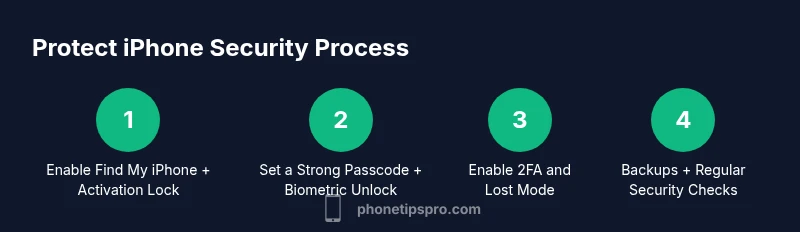
This guide shows you how to protect your iPhone from theft with a proactive, step-by-step plan. You’ll enable Find My iPhone and Activation Lock, set a strong passcode and biometric authentication, enable two-factor authentication, configure Lost Mode and remote wipe, and review location-sharing and backups. Have your Apple ID ready and your device updated.
Why Protect iPhone from Theft Matters
In a world where smartphones carry a wealth of personal data, protecting your iPhone from theft is not just about recovering the device—it’s about safeguarding privacy, finances, and your personal information. The stakes are higher than ever in 2026, when thieves may exploit unlocked devices to drain accounts, access sensitive messages, or siphon credentials. According to Phone Tips Pro, a proactive protection plan reduces risk by combining device-level security, cloud-based safeguards, and smart daily habits. A stolen iPhone is not merely a loss of hardware; it can become a gateway to identity misuse if data remains unprotected. By adopting a defense-in-depth approach, you create multiple barriers that deter thieves and give you faster recovery options.
This section explains why starting with core protections matters and how quickly you can implement practical steps that make a real difference. The goal is to minimize data exposure, keep your device usable in a pinch, and preserve your peace of mind. You’ll see that even small changes—like enabling a strong passcode and turning on location services—have outsized effects when combined with responsible backup practices and a calm, ready response plan. Protecting your iPhone from theft is a shared responsibility between hardware, software, and habits, and the payoff is reliable access to your information when it matters most.
Core Security Foundations for iPhone
Protecting your iPhone from theft starts with solid core security foundations. Activation Lock ties your device to your Apple ID, making it extremely difficult for a thief to use it. Two-factor authentication adds another layer of protection for your account, so even if the password is compromised, access remains guarded. Strong passcodes combined with biometric unlock (Face ID or Touch ID) prevent quick unauthorized access. These measures not only guard your data but also enable faster recovery if your device goes missing. According to Phone Tips Pro, these foundations form the backbone of an effective anti-theft strategy and should be enabled before you ever encounter a loss.
Additionally, keep your Apple ID secure by avoiding password reuse and staying vigilant against phishing attempts. Regularly review connected devices and trusted locations, removing any you don’t recognize. A well-protected account translates into safer backups, smoother Lost Mode activation, and a higher likelihood of reclaiming your device if it’s misplaced or stolen.
Essential Settings to Enable Now
The quickest way to raise your protection level is to enable a handful of critical settings. Turn on Find My iPhone and ensure Activation Lock is active. Enable Location Services for essential apps but review app permissions to minimize unnecessary data sharing. Use a long, unique passcode and enable Face ID or Touch ID for day-to-day unlocks. Turn on Two-Factor Authentication for your Apple ID, then configure Lost Mode and remote wipe options so you can secure and erase data remotely if the device is taken. Finally, review backup settings so your data remains recoverable, even if the phone is lost.
These steps are practical and fast to implement, requiring only a few minutes to set up. The payoff is a dramatically reduced risk of data compromise and a clearer path to recovery if the device vanishes.
Daily Habits to Reduce Theft Risk
Beyond the initial setup, daily habits matter. Regularly check that Find My iPhone is enabled and that your device is enrolled in iCloud backups. Be mindful of where you store your phone—avoid leaving it unattended in public spaces, especially in cars or cafeterias. Watch for phishing attempts that could reveal your Apple ID or passcodes, and never write down secure credentials in easily accessible places.
Consider enabling Lost Mode as soon as the device is suspected missing, and learn how to use Remote Wipe if needed. Maintain a minimal footprint of personal data on the device: decline unnecessary location permissions and log out of sensitive accounts on shared devices. A disciplined routine reduces risk, meaning you’ll spend less time worrying about theft and more time enjoying your iPhone without fear of data loss.
Physical Security and Accessories That Help
Physical security is a practical complement to software protections. Use a sturdy case and screen protector to deter accidental damage that could complicate recovery. Carry your device with you or store it in a secure, policy-compliant bag when traveling. Consider a lanyard or tether for active environments—this reduces the chance of a drop or theft from a pocket. For increased security, enable a mechanical lock on accessories like leather cases or wallets that hold the iPhone and essential cards. While none of these steps guarantees theft prevention, they raise the bar and reduce the odds of a successful theft or loss.
An organized, intentional setup makes theft less appealing to a would-be thief, and it buys you time to react if the device goes missing.
Recovery, Response, and Data Safety After Theft
If your iPhone is stolen, act quickly and calmly. Open Find My iPhone on another device and mark the phone as Lost, which locks it and displays a message with contact information. If you believe the device is in danger or the thief may access sensitive data, initiate Remote Erase to wipe data remotely—but only after you confirm the device cannot be recovered. Contact your carrier to suspend service and prevent SIM cloning, and file a police report with the device’s IMEI/MEID. Keep your Apple ID secure and change passwords for linked services. These steps minimize data exposure and increase the likelihood of device recovery.
The overall strategy is to act decisively yet methodically, documenting actions and preserving evidence for authorities. By following a structured response, you reduce risk, protect your privacy, and improve your chances of recovering the device. Phone Tips Pro’s guidance emphasizes speed, accuracy, and calm decision-making when theft occurs.
Maintaining Security: Regular Audits and Updates
Security is not a one-and-done task. Schedule regular audits of your iPhone’s security posture, at least quarterly. Confirm that Find My iPhone, Activation Lock, and 2FA remain active. Review trusted devices on your Apple ID and remove any you no longer recognize. Keep iOS updated to the latest version, as updates include critical security patches that close known vulnerabilities. Audit app permissions, especially those with location access, and remove or limit permissions where possible. These practices help ensure that your defenses remain strong over time and adapt to new threats.
Tools & Materials
- iPhone (latest model or supported hardware)(Ensure the device is updated to the latest iOS version before starting.)
- Apple ID credentials(Have your Apple ID username and password handy; enable 2FA if not already on.)
- Strong passcode and biometrics(Use a long alphanumeric passcode and enable Face ID/Touch ID.)
- Find My iPhone activated(Enable Find My iPhone and ensure Activation Lock is on.)
- Backup solution (iCloud or computer)(Verify automatic backups and test a restore scenario.)
- Reliable internet access(Needed to enable remote features and perform backups.)
- Security-conscious mindset(Be vigilant about phishing and suspicious apps.)
Steps
Estimated time: 15-25 minutes
- 1
Enable Find My iPhone and Activation Lock
Open Settings, tap your name, then iCloud, and turn on Find My iPhone. Ensure Activation Lock is enabled by following the on-screen prompts. These settings lock the device to your Apple ID and support remote recovery.
Tip: Do this first to guarantee you can locate, lock, or erase your device remotely. - 2
Set a strong passcode and biometric unlock
Choose a long, unique alphanumeric passcode and enable Face ID or Touch ID. This prevents quick guesses by thieves and ensures unauthorized users cannot easily access your data.
Tip: Avoid simple patterns or easily guessed codes like birthdays. - 3
Enable Two-Factor Authentication (2FA) for Apple ID
Turn on 2FA for your Apple ID to add a second verification layer. This protects your iCloud data, backups, and device recovery options even if your password is compromised.
Tip: Keep recovery contact methods up to date in case you need to regain access. - 4
Configure Lost Mode and Remote Erase
In Find My iPhone, enable Lost Mode to lock the device and display a custom message. Prepare Remote Erase as a last resort to wipe data if recovery seems unlikely.
Tip: Lost Mode can deter theft and help responders identify your device. - 5
Review Location Services and Find My network
Limit location access to essential apps and enable Find My network features. This helps locate the device when it’s offline or out of wifi/cell range.
Tip: Keep Location Services on for your important apps but prune unneeded apps. - 6
Set up Regular Backups and Data Protection
Verify automatic iCloud or computer backups. Regular backups ensure you can restore data quickly after a loss or wipe, reducing disruption.
Tip: Test restoring a backup to confirm data integrity. - 7
Calibrate your security routine with a test
Occasionally simulate a loss by using Find My to locate; verify that you can lock, display a message, and erase if necessary.
Tip: Regular practice reduces panic during an actual incident. - 8
Schedule periodic reviews and updates
Set a reminder every few months to review security settings, update iOS, and confirm 2FA status for your Apple ID.
Tip: Security is a moving target—keep current with evolving threats.
FAQ
What is Activation Lock and why is it essential when protecting your iPhone from theft?
Activation Lock ties your iPhone to your Apple ID, making it useless to thieves even if they reset the device. It requires your credentials to reactivate the phone, providing a strong barrier against unauthorized use.
Activation Lock ties your iPhone to your Apple ID, making the device almost unusable for thieves without your credentials.
How do I enable Find My iPhone and Lost Mode on my device?
Go to Settings, tap your name, select Find My, and turn on Find My iPhone. In the same menu, enable Lost Mode to lock the device and display a message with contact details.
Open Settings, tap your name, go to Find My, enable Find My iPhone, and switch on Lost Mode.
Will security features affect device performance?
Enabling security features like Find My, 2FA, and regular backups has minimal impact on day-to-day performance but significantly improves protection. You may notice slight delays during initial encryption or network synchronization.
Security features add a little overhead during setup and syncing, but they pay off with much stronger protection.
What should I do if my iPhone is stolen while traveling?
Contact the local authorities, notify your carrier to suspend service, and use Find My to mark the device Lost. If recovery is unlikely, consider remote erase to protect data.
Tell authorities and your carrier, then use Find My to lock and wipe if needed.
Is it safe to store backups in iCloud?
iCloud backups are encrypted in transit and at rest; enable two-factor authentication and use a strong Apple ID password to keep backups secure.
iCloud backups are secure when you use 2FA and a strong password.
Can I locate a stolen iPhone if it is turned off?
If the iPhone is turned off, Find My may show last known location, but continuous tracking and remote actions require the device to connect to the network. Plan for recovery but accept some limitations.
If the phone is off, continuous tracking isn’t possible, but you may still see last known location.
Watch Video
Quick Summary
- Enable critical anti-theft features first.
- Use a strong, unique passcode with biometrics.
- Keep data safe via regular backups and 2FA.
- Have a clear recovery plan for theft or loss.