Replace iPhone Battery in Apple Store: A Practical How-To
Learn how to replace iphone battery in apple store with a clear, step-by-step plan. Book, backup data, and understand service expectations with tips from Phone Tips Pro.


Goal: replace iphone battery in apple store. You’ll learn how to book service, back up your iPhone, bring required documents, and what to expect from diagnostic checks to battery replacement. This Phone Tips Pro walkthrough covers warranty considerations, pricing ranges, and post-service tips for a smooth experience.
Why Apple Store is the recommended route for a battery replacement
Choosing the official Apple Store or Apple Authorized Service Providers ensures you receive genuine batteries, trained technicians, and warranty-aligned service. The official path reduces the risk of counterfeit parts and compatibility issues with iOS software diagnostics. Phone Tips Pro emphasizes that, for many iPhone models, battery service eligibility and coverage depend on your warranty status and AppleCare+. By selecting the Apple Store, you also gain access to standardized testing that confirms device safety and performance after the replacement, helping you avoid surprises with post-service battery health.
What to expect during your Apple Store visit
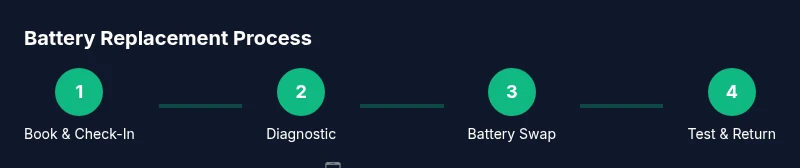
When you arrive for a battery replacement, you’ll typically go through a quick check-in, a brief diagnostic, and then the battery replacement itself if the device qualifies for service. Expect a technician to verify your iPhone’s model, assess current battery health, and confirm eligibility for service under warranty or out-of-warranty pricing. You’ll receive an estimated timeline and a receipt detailing the service work performed. Phone Tips Pro notes that keeping your expectations aligned with the store’s diagnostic outcomes helps prevent miscommunication and speeds up the process.
Pricing, coverage, and turnaround timelines
Pricing for battery replacement at an Apple Store varies by iPhone model and warranty coverage. If your device is under warranty or covered by AppleCare+, the battery service may be included or discounted; otherwise, you’ll see standard service pricing based on model and region. Apple’s service workflow typically includes on-site diagnostics followed by battery replacement if needed. Turnaround time can depend on store demand and parts availability, with some repairs completed the same day and others requiring a follow-up visit or mail-in service. Phone Tips Pro Analysis, 2026, highlights that understanding your coverage before you go can save you time and money, especially when planning a return trip.
How to prepare your iPhone before the appointment
Preparation is key to a smooth experience. Back up your data via iCloud or a computer to prevent data loss, then sign out of Find My iPhone and disable Activation Lock if required by the store. Gather your device, a government-issued photo ID, any proof of purchase or service eligibility, and your appointment confirmation. Having these ready minimizes the time you spend at the counter and helps the technician complete the service efficiently. Phone Tips Pro’s guidance emphasizes backup first to protect personal data.
Data privacy and device handling during service
Apple stores prioritize data privacy and device handling. Your device is opened in a controlled environment with technicians using certified tools. Normally, the battery replacement involves swapping the old unit with a genuine Apple battery and re-testing the device to confirm safety and performance. It’s normal to be asked to re-enter passcodes or re-enable features after the repair. If you’re concerned about data privacy, you can request that technicians avoid accessing personal apps and accounts beyond necessary diagnostics.
In-store process: diagnosis, replacement, and testing
The in-store process typically begins with a diagnostic check to confirm battery health and assess any related issues (like charging circuits or performance drains). If the battery needs replacement, technicians perform the swap using an Apple-certified battery and verify physical connection integrity, software reporting, and battery health metrics. After replacement, a quick series of tests ensures that the device charges correctly, powers on reliably, and meets safety standards. You’ll be shown battery health results and guided through setup steps so you can resume usage with confidence.
Alternatives to in-store service
If you cannot visit an Apple Store, consider an Apple Authorized Service Provider for warranty-protected service with genuine parts. For DIY-minded users, third-party repair shops or mail-in services exist, but they typically void warranties or compromise Apple’s software integrity. Phone Tips Pro recommends weighing the value of device protection and the risk of third-party parts before choosing an alternative path. In some cases, Apple offers mail-in battery service, which can be convenient if you travel or live far from a store.
Aftercare and battery health monitoring
After a battery replacement, monitor the device for charging behavior, screen brightness impact, and thermal performance. Re-enable Find My iPhone, set up iCloud backups, and track battery health in Settings > Battery to confirm the improvement. If you notice abnormal drain, swelling, or quick discharge within the first week, contact Apple Support for a follow-up check. Phone Tips Pro reminds users to keep the device software up to date to ensure the latest battery management improvements are active.
Common pitfalls and how to avoid them
Avoid arriving without an appointment or failing to back up data; both can extend your visit. Ensure you bring required identification and any proof of purchase if asked. Don’t bypass the diagnostic process—skipping checks can mask real issues and lead to misdiagnosis. If the store quotes a lead time that seems long, ask for a status update and a confirmed appointment window. Phone Tips Pro encourages proactive communication to avoid delays and ensure transparency throughout the service.
What to do if the service doesn’t go as planned
If the battery replacement fails to meet expectations, start by reviewing the service receipt and the warranty terms. Contact Apple Support to discuss next steps, including potential rework, replacement parts, or a replacement device if the issue persists. Keep records of all communications and any diagnostic reports provided by the technician. The Phone Tips Pro team recommends remaining polite but persistent, citing your service agreement and the expected battery performance.
Tools & Materials
- Backup device(Back up to iCloud or a computer to protect data before service)
- Appointment evidence(Bring the appointment confirmation or QR code)
- Government-issued photo ID(Required for identification at store checkout)
- Proof of purchase (optional)(Receipts or order numbers can help verify eligibility)
- Charging cable(Useful if troubleshooting charging during visit)
Steps
Estimated time: 60-120 minutes
- 1
Check eligibility and book appointment
Verify your iPhone model and warranty status, then schedule an appointment at the Apple Store or via the Apple Support app. A confirmed slot minimizes wait time and ensures technicians can accommodate your device.
Tip: If you’re under AppleCare+, confirm coverage online before booking to avoid surprises at the counter. - 2
Back up your iPhone
Back up your data to iCloud or a computer to prevent data loss during the service. This step is crucial because even a routine battery swap can require factory resets or software reinstallation.
Tip: Use a recent backup date to minimize data restoration work after service. - 3
Sign out and prepare the device
Disable Find My iPhone and Note your passcode in a secure place. Have any required passwords ready in case the technician needs access for diagnostics or setup after replacement.
Tip: Leaving the passcode recorded at the store is not recommended; bring it only if required by the technician. - 4
Bring required documents
Carry your appointment confirmation and a government-issued photo ID. Having proof of purchase can help verify eligibility and speed up the process.
Tip: Verify the store accepts your preferred payment method beforehand to avoid delays. - 5
Check in at the service desk
Present your documents, device, and appointment details. The staff will identify the model and confirm the service plan before proceeding to the diagnostic.
Tip: Ask for an estimated wait time and the next available diagnostic slot if the store is busy. - 6
Diagnostic assessment
The technician runs battery-health diagnostics to confirm the need for replacement and checks for related issues in charging circuitry or software.
Tip: If issues are found beyond the battery, request a full diagnostic summary for future reference. - 7
Authorize battery replacement
If replacement is required, approve the service and review any warranty implications. The technician uses a genuine Apple battery and certified tools.
Tip: Ask for a parts warranty on the replacement and any expected performance metrics. - 8
Post-replacement testing
The device is tested for charging, startup reliability, and battery health indicators. Ensure the screen, speakers, and buttons operate normally.
Tip: Request a quick demonstration of battery life expectations and charging behavior before leaving. - 9
Collect device and review the receipt
Retrieve your iPhone, the service receipt, and any warranty documentation. Confirm the replacement date and the service scope in writing.
Tip: Keep the receipt and record battery health post-replacement for monitoring purposes.
FAQ
Is battery replacement at Apple Store free if I’m under warranty?
If your iPhone is covered by AppleCare+ or a standard warranty, battery service terms can include no charge or a reduced fee. Outside of coverage, standard service pricing applies. Always confirm current policies at the time of service.
If you’re covered by warranty, battery service may be free or discounted. Check your coverage at the store before proceeding.
Do I need an appointment to replace my iPhone battery at the Apple Store?
Appointments are strongly recommended to reduce wait times and ensure a technician is available. Some locations may accommodate walk-ins, but availability varies by store.
Yes, it’s best to book an appointment to minimize delays.
What should I back up before service?
Back up all data through iCloud or a computer. This protects personal information in case of any software updates or resets during the service.
Back up your data so you don’t lose photos, contacts, or apps.
What documents should I bring to the Apple Store?
Bring appointment confirmation and a government-issued photo ID. Proof of purchase can help verify eligibility for service if needed.
Bring your ID and appointment details for a smoother check-in.
Will a battery replacement affect my data or settings?
Battery replacement should not erase data, but some software updates or resets can occur during diagnostics. Back up beforehand and verify data after service.
Your data should stay intact, but back up to be safe.
Can Apple replace a battery on older iPhone models?
Apple generally offers battery service on supported models, subject to availability and policy. Some older devices may have different pricing or eligibility requirements.
Older models are eligible for battery service where supported by Apple’s policy.
Watch Video
Quick Summary
- Schedule an appointment to minimize wait times
- Back up data before service to prevent loss
- Expect genuine Apple parts and certified technicians
- Check warranty coverage before agreeing to service
- Test device thoroughly after replacement