Difference Between iPhone and Android: An Analytical Comparison
A data-driven, analytical look at how iPhone and Android differ in ecosystem design, updates, customization, security, and ownership costs to help you decide which platform fits your needs.


The difference between a iphone and android is not just hardware; it's the ecosystem, software updates cadence, app distribution, and customization options. This quick comparison highlights the core tradeoffs, so you can choose based on needs, costs, and how you use your phone. Whether you value privacy, long-term support, or a highly personalized experience, the choice matters.
Core Philosophies Behind iPhone and Android Ecosystems
The two dominant smartphone ecosystems operate under different design philosophies. Apple pursues a tightly integrated, end-to-end experience, where hardware, software, services, and accessories are designed to work together. Android represents a broader, more open framework that invites multiple manufacturers, custom skins, and a wide range of hardware choices. The difference between a iphone and android is not merely a feature list; it's a lens for evaluating how updates arrive, how apps are hosted, how users customize interfaces, and how privacy controls are implemented in practice. According to Phone Tips Pro, this distinction matters most when you plan to keep a device for several years, or when you rely on cross-device workflows such as tablets, wearables, and cloud services. Apple emphasizes predictability and cohesion, which reduces variability but constrains experimentation. Android, by contrast, rewards flexibility and diversity, at the cost of potentially uneven update cadence and vendor-specific experiences. Both models aim to optimize usability; they simply prioritize the user journey differently.
Update Cadence and Longevity
Update cadence is a central differentiator between the two platforms. iPhone devices typically receive iOS updates on a uniform schedule across models, with several years of support and timely security patches. Android, by contrast, shows more variance: OS updates depend on the device maker, carrier, and region, which can lead to staggered release timelines and differing features across devices. For users who plan to keep a phone for many years, this difference matters for security and app compatibility. Phone Tips Pro notes that the longevity of a device is often tied to the update policy, hardware support, and the ecosystem’s commitment to backward compatibility. In practice, an iPhone may offer a smoother long-term experience, while Android devices may offer more options for rapid hardware refresh, cost flexibility, and choice in manufacturer features.
Customization and Personalization
Customization is a hallmark of Android. Users can alter home screens, widgets, default apps, and even the user interface through manufacturer skins or custom ROMs. iPhone emphasizes a consistent, controlled user experience with limited system-wide customization. This difference matters for power users who want to tailor every aspect of their device, versus everyday users who prefer a uniform, predictable interface. Phone Tips Pro highlights that customization can come with complexity and potential stability trade-offs on some Android devices, while the iPhone’s curated experience emphasizes predictability and ease of use—especially for those already integrated into Apple services and devices.
Security, Privacy, and Data Handling
Security models diverge in philosophy and implementation. iPhone relies on a closed ecosystem with strict app review, strong sandboxing, and privacy controls designed to minimize data leakage. Android offers flexible security features but depends more on device-level elements from OEMs and users to enable app permissions and updates. The result is a trade-off between robust default protections (iPhone) and broader control over permissions, app behavior, and data sharing (Android). For many users, privacy and data protection are front-of-mind when choosing a platform, and this is reflected in default settings, transparency reports, and the ease of enabling privacy-focused options within each OS.
App Stores, Ecosystems, and Distribution
App distribution shapes the user experience dramatically. Apple’s App Store maintains strict review processes that emphasize quality, uniformity, and security, which often translates to higher app quality and consistency across devices. Google’s Play Store philosophy prioritizes breadth, with a wider range of apps and variability in app behavior due to diversity in devices. This leads to a broader app landscape on Android but can introduce inconsistency in performance and app restrictions. Developers face different requirements for each platform, which affects release timelines, feature parity, and the pace of innovation for users.
Hardware Integration vs Diversity
iPhone represents integrated hardware and software design; each device is engineered to align with Apple’s software optimizations and services. Android, however, encompasses a broad spectrum of devices—from compact models to premium flagships and budget options—across various manufacturers and price points. This diversity enables more competitive pricing and hardware variety but can complicate OS updates, device-specific features, and software support timelines. The trade-off is a choice between a highly controlled experience and a wide, dynamic market with more hardware options.
Costs of Ownership and Value Retention
Ownership costs include initial price, ongoing service plans, battery replacements, and potential resale value. iPhones typically command strong resale value and longer software support, contributing to favorable total cost of ownership for some users. Android devices display wide price bands, frequent promotions, and variable long-term value depending on the manufacturer and model. Evaluating ownership requires looking beyond sticker price to consider update longevity, accessory compatibility, and the ability to reuse or trade in devices at meaningful values.
Data Migration and Cross-Platform Compatibility
Transferring data between iOS and Android is feasible but involves steps like cloud backups, device-to-device transfer tools, and platform-specific apps. Cross-platform compatibility improves with mature cloud ecosystems (photos, contacts, calendars, messaging) and verified data migration features. The practical takeaway is to plan ahead if you’re switching platforms: check app availability, data locations, and whether critical services have reliable cross-platform support. The more data and apps you rely on, the more important a smooth migration plan becomes.
Global Availability and Market Realities
Platform adoption varies by region due to carrier ecosystems, local regulations, and pricing strategies. In some markets, Android devices dominate due to affordability and device variety, while in others, iPhone devices are strongly favored for their ecosystem integration and resale value. Understanding regional realities helps in budgeting, selecting carrier plans, and anticipating software update timelines. For international users, these factors often influence the total cost of ownership and the practical benefits of each platform.
Use-Case Scenarios: When Each Platform Excels
For users who prioritize seamless integration across devices (iPhone, iPad, Mac, Apple Watch) and prioritize privacy, the iPhone tends to be the stronger option. If you value hardware variety, customization freedom, and a wider range of price points, Android tends to meet those needs more effectively. Professionals relying on cross-platform workflows may benefit from choosing based on app availability and collaboration tools, while casual users might prefer the simplicity and consistency of a single ecosystem. The choice is ultimately about which tradeoffs align with your daily routines and long-term goals.
Common Myths and Misconceptions
A common myth is that iPhone is always more secure than Android. Security depends on updates, configurations, and user behavior, not just the platform label. Another misconception is that Android devices always offer inferior app quality; in reality, quality varies by developer and device, not solely by OS. Finally, some assume iPhone updates are universal and lasting forever; while Apple provides long support, device longevity depends on the hardware lifecycle and user needs. Distinguishing myths from reality helps you assess the platform more objectively.
The Future of iPhone and Android: Trends to Watch
Both ecosystems are evolving with AI features, improved privacy controls, and deeper integration across services. Expect more cross-device features, better on-device AI, and enhanced data protection options. For Android, watch for accelerated trends in customization, open standards, and broader hardware innovations from the ecosystem of manufacturers. For iPhone, anticipate deeper service integration, extended software support, and tighter ecosystem optimization. Staying informed helps you anticipate how platform changes may affect long-term value and usability.
Decision Checklist: A Practical Roadmap for Buyers
Use this checklist when deciding between iPhone and Android: 1) List your must-have features (privacy, ecosystem, customization, hardware options). 2) Consider total cost of ownership (price, trade-in value, maintenance). 3) Evaluate app availability and cross-platform needs. 4) Check update cadence and device longevity. 5) Reflect on how important data migration and backups are to you. A structured evaluation makes the choice clearer.
Comparison
| Feature | iPhone | Android |
|---|---|---|
| Update cadence | Regular, Apple-controlled updates across models | Varies by device/manufacturer/carrier/region |
| Customization | Low; controlled UI and defaults | High; widgets, default apps, skins, ROM options |
| App quality and security controls | High consistency via App Store review | Broader app catalog with varying quality and controls |
| Hardware variety | Limited to Apple devices | Wide range across brands, prices, and form factors |
| Total cost of ownership | Often higher upfront, strong resale value | Broader price range; potential savings upfront but variable long-term value |
| Data migration ease | Apple-friendly data transfer and iCloud ecosystem | Google-based migration paths with cross-platform tools |
| Privacy controls | Strong default privacy and app permissions | Privacy depends on OEM settings and user configurations |
Positives
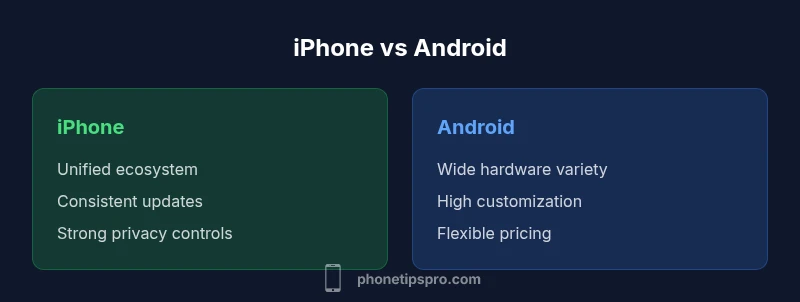
- Unified ecosystem with cohesive hardware and software
- Regular, reliable software updates and consistent security
- Strong app quality control and privacy features
- Long-term resale value and brand support
Weaknesses
- Typically higher upfront cost and total ownership
- Limited customization compared to Android
- Less hardware variety and flexibility in pricing
Neither platform is universally better; choose iPhone for ecosystem cohesion and predictable updates, or Android for customization and hardware choice.
If you value a seamless, privacy-focused experience with long update support, pick iPhone. If you want customization, device variety, and flexible pricing, Android is the better fit. The right choice aligns with how you use your devices daily.
FAQ
What is the main difference between iPhone and Android?
The main difference is philosophy: iPhone emphasizes a tightly integrated ecosystem with uniform updates, while Android prioritizes customization and hardware diversity. This affects updates, app quality, and user control.
The core difference is that iPhone offers a cohesive ecosystem and steady updates, while Android gives you more customization and device variety.
Which is more secure, iPhone or Android?
Security depends on updates, configurations, and user behavior. iPhone tends to have stronger default protections due to App Store controls, while Android security varies by OEM, patch cadence, and user settings.
iPhone generally has stronger defaults due to its controlled store, but good security on Android depends on timely updates and settings.
Can Android be as easy to use as iPhone?
Yes, with modern Android devices and stock or near-stock experiences, user interfaces are intuitive. However, the level of customization can introduce variability in setup and maintenance.
Android can be very user-friendly, especially on polished skins, but it may require more setup due to flexibility.
Do iPhones receive updates as quickly as Android devices?
iPhones typically receive updates quickly and broadly, while Android updates can be slower and uneven across devices depending on the manufacturer and carrier.
Apple tends to push updates quickly, whereas Android timelines vary by device and region.
Is cost of ownership higher on iPhone overall?
Initial price is often higher for iPhones, but longer software support and resale value can offset costs over time. Android devices offer a wider price range with potentially lower upfront costs.
iPhone can cost more upfront, but it may pay off with longer software support and resale value.
Are there apps exclusive to one platform that affect choice?
Many major apps are available on both platforms, but some exclusive features or early releases exist. The decision should consider which apps matter most to you and their platform availability.
Most big apps are on both platforms, but some exclusives may influence your choice.
Quick Summary
- Identify your priority: ecosystem vs customization
- Evaluate update cadence and support length
- Assess total cost of ownership and data migration needs
- Test cross-device workflows early if possible
- Consider regional device availability and pricing