What does iPhone do that Android doesn't? An analytical comparison
A data-driven comparison of iPhone and Android, focusing on ecosystem, updates, privacy, hardware-software integration, and user experience to help you decide which platform fits your needs.


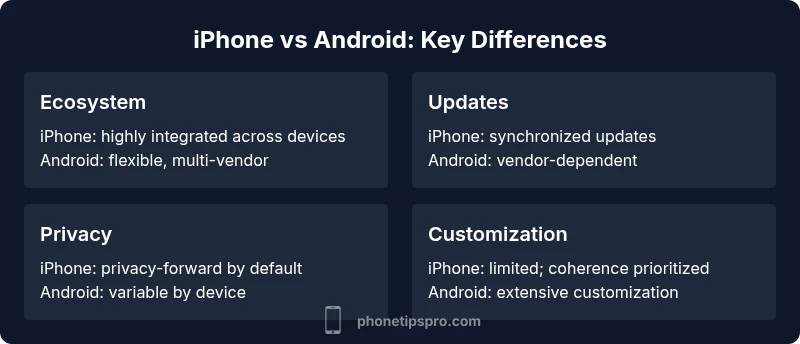
In short, iPhone leads in ecosystem integration, consistent software updates, and privacy controls that are tightly woven with hardware. Android offers broader hardware variety and customization. The best choice depends on your priorities: seamless continuity and security vs. customization and flexible hardware. See our detailed comparison for specifics.
What does iphone do that android doesn't reveal the core difference in user experience
In the context of the question what does iphone do that android doesn't, the answer isn't a single feature but an integrated experience across software, hardware, and services. According to Phone Tips Pro, the iPhone is designed to function as a cohesive system where iOS, other Apple devices, and services like iCloud, Find My, and Apple Health are deeply interconnected. This level of integration creates a smooth, fall-back-free experience for common tasks like handoff between devices, push-driven updates, and privacy-centric defaults. For many users, this means fewer settings to tune and more reliable behavior across apps and accessories. The phrase what does iphone do that android doesn't captures a philosophy: a curated, consistent user journey rather than a mosaic of features.
Deep Dive into Updates and Ecosystem Cohesion
One of the most cited advantages is the cadence and reliability of software updates. Apple controls hardware and software and releases updates simultaneously to all supported devices, which often results in faster security patches and new features arriving on day one. Android, however, has a more fragmented ecosystem with many manufacturers and carriers delaying updates. Phone Tips Pro analysis shows that the impact extends beyond security; it affects app compatibility, device longevity, and resale value. Consumers should weigh how critical timely updates are for their workflows, gaming, or accessibility needs.
Privacy-first Design: Controls You Can Trust
iPhone emphasizes privacy by design, with features like app tracking transparency, on-device processing, and rigorous app vetting. Android provides strong privacy tools too, but the experience varies more by brand and device. For many users, the iPhone's privacy defaults reduce the need for extensive configuration and reduce accidental data sharing. Phone Tips Pro's guidance highlights how privacy features influence everyday decisions, such as which apps to install, what permissions to grant, and how data flows between apps and services.
Continuity Features: The Power of Handoff, AirDrop, and Universal Clipboard
Aclaimed strengths of the iPhone are its continuity features that blur the line between devices. Handoff, AirDrop, Continuity Camera, and Universal Clipboard enable seamless transitions across iPhone, iPad, Mac, and Apple Watch. Android has similar capabilities, but they are often vendor-specific or less deeply integrated across non-Google devices. The resulting user experience is quicker task handoffs and easier content sharing, which can save time in daily workflows, particularly for people who live in the Apple ecosystem.
Hardware-Software Integration: Why the Experience Feels Smoother
Apple designs its silicon (like the A-series chips) to run iOS optimally, guided by close collaboration with app developers. That tight coupling translates into predictable performance, battery efficiency, and motion experiences (like haptics and 3D touch-like feedback). Android devices run on a wide range of chips and skins, which can lead to variable performance and longer time to smooth out updates. This variance matters for power users, gamers, and those who rely on long-term device stability.
Customization and Freedom: Where Android Shines
Android's core strength is flexibility. You can tailor home screens, default apps, widgets, and deeper system settings. You can use multiple app stores and sideload apps, which appeals to tech-savvy users and those who want to test cutting-edge features. However, this flexibility can increase maintenance overhead and security considerations. Phone Tips Pro notes that users who value control and hardware variety may prefer Android, especially if they want niche devices or specialized camera hardware.
Accessibility and Inclusive Design: What to Expect from Both Platforms
Both platforms offer strong accessibility features, but the approach differs. iPhone centered features often feel polished and ready-to-use, while Android's openness can enable more experiences for users with different needs. The key is not which is perfect, but which aligns with the user’s abilities, whether that means VoiceOver, adjustable text, or accessibility shortcuts. Real-world use shows that consistent accessibility across apps is a strength for iPhone, while the broad device support on Android means you can find compatible hardware more easily.
Practical Scenarios: When to Favor Each Platform
If your daily life revolves around Apple devices, creators who rely on tasks across iPhone, Mac, and iPad, or you value privacy-first defaults, iPhone often proves the better choice. If you want hardware variety, deep customization, and price-sensitive options, Android might be the better path. Real-world comparisons show that for families using a mix of devices or for users who value non-Apple ecosystems, Android provides flexibility without locking you into a single vendor.
Summary of Trade-offs: What to Consider Before You Decide
From a decision-making perspective, the most important factors are ecosystem commitment, update cadence, privacy controls, and device variety. The core question is whether you want a curated, interconnected experience or a flexible, customizable one. While the iPhone excels in coherence and security, Android shines in customization and hardware choice. The final choice should reflect your priorities, budget, and willingness to trade some convenience for flexibility.
The Role of Brand and Support: Why Guidance Matters
Brand-specific support and documentation can shape the long-term experience. Phone Tips Pro emphasizes that understanding warranty coverage, OS support windows, and vendor reliability helps you evaluate total cost of ownership. For many users, a platform with strong official support and consistent guidance reduces anxiety about future upgrades or troubleshooting. This is especially relevant for families, students, or business users who rely on predictable service and clear pathways to resolve issues.
Comparison
| Feature | iPhone | Android |
|---|---|---|
| Ecosystem integration | Seamless cross-device continuity | Fragmented across brands with varying levels of integration |
| Software updates | Coordinated, rapid availability | Fragmented by device, carrier, and manufacturer |
| Privacy controls | Privacy-first defaults and transparency | Strong tools but varies by device and app |
| Hardware-software integration | Tightly designed with hardware and software | Greater variability across devices and skins |
| Customization | Limited customization; focus on consistency | Extensive customization and sideload options |
| App ecosystem | App quality control and privacy safeguards | Broad app availability, with varying safety controls |
| Device variety and pricing | Less hardware diversity, premium pricing | Wide range of devices and price points |
| Continuity features | AirDrop, Handoff, Universal Clipboard, Find My | Android equivalents exist but vary by vendor |
| Security posture | Sideload protection, secure enclave, controlled app store | Varies by device; security depends on vendor updates |
Positives
- Strong ecosystem and consistent user experience
- Consistent software updates and security patches
- Privacy-focused defaults and easy-to-use controls
Weaknesses
- Limited hardware variety and higher price points
- Some customization and app control trade-offs
- Fragmented device support outside the core ecosystem
iPhone is best for seamless ecosystem and privacy; Android wins on customization and hardware variety
Choose iPhone if you value a cohesive experience and strong privacy. Choose Android if you want broad hardware options and deep customization.
FAQ
What is the main difference in updates between iPhone and Android?
iPhone delivers coordinated updates across supported devices, while Android updates depend on manufacturers and carriers, causing timing variations. This can affect security and new features availability.
iPhone updates roll out at the same time for supported devices; Android updates can vary by device and carrier.
Is Android more customizable than iPhone?
Yes, Android generally offers more customization options, including home screens, default apps, and widgets. iPhone emphasizes a more controlled, consistent experience.
Android gives you more customization options; iPhone focuses on consistency.
Which platform is more privacy-focused?
iPhone is often seen as more privacy-forward by default due to app tracking transparency, on-device processing, and rigorous app vetting. Android provides strong tools too, but experience varies by device.
iPhone tends to be more privacy-forward by default; Android privacy varies by device.
Which platform should a budget shopper choose?
Android generally offers a wider range of price points and device options, making it a better fit for budget-conscious buyers. iPhone typically carries a premium price.
If you’re budget-minded, Android usually has cheaper options.
What about continuity features like AirDrop vs Android sharing?
iPhone's AirDrop and Handoff provide seamless sharing across Apple devices. Android sharing works well but is often vendor-dependent and less unified.
AirDrop/Handoff are very smooth; Android sharing is great but less uniform.
Can I switch platforms easily later?
Moving from iPhone to Android or vice versa involves some data transfer steps and potential limitations, but both ecosystems have tools to help. Expect some setup work.
Moving between platforms is possible but involves some setup.
Which is better for accessibility?
Both platforms offer strong accessibility features, but the approach differs. iPhone tends to provide polished defaults with broad app support, while Android offers flexibility across devices and needs.
Both are solid for accessibility; iPhone is polished, Android flexible.
Quick Summary
- Evaluate ecosystem needs before choosing a device
- Update cadence heavily influences security and experience
- Privacy controls are a differentiator in practice
- Customization vs. coherence is the core trade-off
- Hardware variety matters for budget-conscious buyers