iPhone to Android Migration: A Practical Guide for 2026
A data-driven comparison of migrating from iPhone to Android, covering data transfer, app availability, privacy, and long-term considerations. Learn planning, execution, and decision factors for 2026 with expert guidance from Phone Tips Pro.


Comparing iPhone-to-Android migration options helps you pick the best path when switching platforms. This guide weighs data transfer ease, app availability, privacy, cost, and long-term support. We’ll cover practical migration steps, how to preserve memories, and what you might lose by moving away from iPhone. By the end, you’ll know whether switching to Android makes the most sense for you in 2026.
Why iPhone to Android Migration Is More Common Than You Think
According to Phone Tips Pro, the decision to move from iPhone to Android is driven by customization options, cost considerations, and a desire for broader hardware choices. In 2026, more users weigh the tradeoffs of staying in Apple's ecosystem versus embracing Android's flexible approach. The migration path is not only about hardware; it involves software ecosystems, data portability, and service interoperability. By planning the transition around essential data types (contacts, photos, chats) and evaluating app availability, you can avoid common friction points and set realistic expectations. This analysis helps you map a rough timeline, identify necessary backups, and anticipate potential issues such as compatibility of third-party accessories and data formats. A methodical plan can reduce friction and preserve essential memories while enabling you to leverage Android's strong cloud and customization options.
Understanding these dynamics is critical because the decision affects how you manage your day-to-day workflows, from messaging to media storage. The practical path involves concrete steps for extracting data from iCloud, exporting contacts, and ensuring your photos and videos remain accessible on Android devices. Phone Tips Pro’s approach emphasizes transparency: you should know what transfers easily, what requires work, and what you’ll need to replace with Android-friendly alternatives. This foundation helps you minimize downtime and keep essential services uninterrupted as you navigate the switch.
Core Differences You'll Encounter When Switching
Switching from iPhone to Android introduces several fundamental differences: messaging ecosystems (iMessage/FaceTime vs SMS/Google Messages), app availability and sign-in flows, hardware diversity across brands, and the way updates are rolled out by device manufacturers. The Phone Tips Pro team notes that while Android offers broad customization and hardware variety, the lack of a single, uniform OS experience can increase complexity for newcomers. Expect changes in privacy controls, default apps, and integration with other devices (watch, laptop, car). Clarify your priorities: a uniform software experience versus flexibility and choice. In practice, this means adjusting habits around where your data lives (cloud providers) and which services you rely on for email, maps, and productivity. You’ll also notice differences in gesture navigation, notification management, and battery optimization across devices, which can influence your day-to-day usage patterns. A structured plan helps you transition smoothly while preserving essential workflows and minimizing friction during setup.
Planning Your Data Transfer (What to Move and What to Leave Behind)
Data portability is the linchpin of a smooth migration. Begin by cataloging items you plan to move: contacts, calendars, photos and videos, notes, and select app data (like chat histories from WhatsApp). Core data like contacts and calendars can be moved via cloud sync or vCard exports; photos and videos benefit from Google Photos or Drive, which offer cross-platform access. Messages are trickier: iMessages are not natively transferable to Android, but you can forward or export critical conversations via approved methods. Health data from iPhone health apps generally does not transfer to Android gadgets, so plan to re-create or substitute in your new ecosystem. Finally, assess app data and settings—some apps provide cloud-based sync, others rely on device-bound storage. By sorting items into transferable versus non-transferable categories, you minimize post-switch disruption and avoid over-purchasing new apps or services.
How to Transfer Data Efficiently
Begin with a concrete plan: ensure you have active accounts on both sides of the switch—your Google account for Android and the Apple ID for iOS—for authentication and backups. Use official tools designed for cross-platform moves, such as Switch to Android, which helps port contacts, photos, and calendars, and Google Photos for media. For contacts and calendars, export from iCloud as a VCF file and import into Google Contacts/Calendar. WhatsApp chat histories can often be migrated from iOS to Android using WhatsApp's chat transfer features, provided you meet device and app version requirements. After data transfer, install your essential apps from the Google Play Store and sign in with the appropriate accounts. Finally, test critical data like messages, photos, and documents to ensure everything survived the transition. This approach minimizes data gaps and helps you verify that your most-used content is accessible on Android.
Managing Apps and Backed Up Data
Android and iOS apps vary in availability and functionality. Most widely-used apps exist on both platforms, but a subset of iOS-only apps may not have direct Android equivalents. The key is to replace missing apps with solid Android alternatives and to configure cloud backups for ongoing safety. Review each app’s data-synchronization options—many popular services offer cross-platform sync via cloud storage (Google Drive, Dropbox, OneDrive). For media, rely on Google Photos for ongoing backups; ensure automatic uploads are enabled, and consider enabling high-quality or original-quality options based on your storage plan. When it comes to device backups, Android devices leverage Google One and OEM cloud services; keep a separate backup strategy for local files and offline data when needed. This approach reduces the risk of data loss and keeps your content accessible regardless of platform.
Transferring Media, Messages, and History
Transferring media and chat history demands careful planning. Photos and videos are typically the easiest to migrate through cloud backups; ensure you have a backup strategy that covers your most important memories. For messages, Android supports SMS/MMS and RCS; iMessages do not migrate directly, so expect some gaps or need for alternative tracing methods. Whom you chat with frequently can influence how you shift to cross-platform messaging; consider WhatsApp and Telegram as universal options that preserve conversations and media. For call history, voicemails, and other app-specific data, verify whether the individual apps offer cloud-based backups you can import post-switch. Your goal is to preserve essential conversations and memories while establishing stable cross-platform access to your data.
Privacy, Security, and Account Re-setup
Moving from iPhone to Android also means rethinking privacy and security. On Android, privacy controls are implemented at multiple layers: Google account permissions, device-level settings, and app-specific controls. Expect variations across device manufacturers in updates and support cycles. It remains essential to enable two-factor authentication (2FA) for key accounts and to periodically review app permissions. Re-setup your accounts with robust, unique passwords and consider adopting a password manager. You’ll need to reconfigure biometric locks, notification preferences, and privacy settings on Android to fit your security posture. The switch also presents an opportunity to review what services you use, what data you share, and how you manage location, ad tracking, and cloud backups. A thoughtful approach helps you maintain control over your digital footprint during the transition.
Costs, Coverage, and Long-Term Considerations
Financial considerations are central to the decision to switch. Android devices span a wide price range, from budget options to flagship models, enabling substantial upfront savings or budget-friendly upgrades. Long-term costs depend on device maintenance, software updates, data plans, and cloud storage. Android updates are distributed by OEMs and carriers and can vary by device; some devices receive faster updates than others, which may influence long-term support. Network coverage and data plans also play a major role in total cost of ownership—switching can affect roaming costs, SIM options (including eSIM), and carrier-specific features. The total economic picture includes resale value, trade-in opportunities, and ongoing subscription costs for apps and cloud storage. Consider a cost-benefit analysis that weighs upfront price against ongoing service fees and the value of unlocked hardware flexibility.
Switching Without Losing Value: Trade-In and Aftercare
Maximize value by evaluating trade-in options before you switch. Many manufacturers and retailers offer trade-in programs that require device authentication and data erasure, so back up first and wipe your iPhone according to best practices. After switching, adopt a simple aftercare plan: configure cross-platform backups, keep essential apps updated, and monitor storage usage across devices. Regularly review security settings and privacy permissions, so your Android experience stays aligned with your preferences. If you later return to iPhone or switch again, you’ll have a documented migration path, backups, and a proven process for minimizing downtime.
The Bottom Line: A Practical Path Forward
Migrating from iPhone to Android is feasible and increasingly common as both ecosystems mature. A clear plan that prioritizes data transfer, app availability, privacy, and long-term support helps you manage expectations and reduce downtime. With official migration tools, cloud services, and careful app substitutions, you can preserve memories, keep access to essential data, and enjoy Android’s customization and hardware variety. The decision should be guided by your personal priorities—whether you value a uniform OS experience or freedom of hardware choice.
Next Steps and Resource Checklist
- List essential data types to transfer (contacts, photos, calendars, chats).
- Prepare your Google account and any cloud backups you’ll rely on.
- Run through app availability and note substitutes for iOS-exclusive apps.
- Create a back-up of critical content before starting.
- Schedule a migration window and set expectations with your contacts about updated contact details.
Comparison
| Feature | Switch to Android | Stay with iPhone |
|---|---|---|
| Data transfer ease | High with official tools like Switch to Android and Google services | Not applicable; you remain on iOS |
| App availability & ecosystem | Broad Android app catalog; strong Google service integration; hardware variety | Apple ecosystem strength; many apps optimized for iOS; uniform experience |
| Messaging & continuity | iMessage/FaceTime not available on Android; use SMS, Google Messages, or WhatsApp | iMessage/FaceTime remain native to iPhone; continuity not available on Android |
| Privacy controls & security | Privacy varies by device; Google Play Protect and OS-level controls; OEM policies matter | iOS offers consistent privacy features and uniform security updates across devices |
| Software updates & longevity | Update timing depends on device manufacturer; lifecycle varies | iOS devices typically receive longer and more uniform updates |
| Media transfer & backup options | Google Photos/Drive streamline cross-platform media transfer | iCloud-based media requires workaround for Android; cross-platform access not native |
| Total cost of ownership | Wide price range enables cost-conscious choices; potential long-term savings | Higher baseline cost for premium Apple devices; strong resale value |
| Trade-in value & resale | Extensive trade-in options; depreciation varies by model | Apple devices retain high resale value but trade-in options can be selective |
Positives
- Wide device selection at multiple price points
- Official migration tools simplify data transfer
- Greater customization and default app control
- Flexible cloud storage and cross-platform services
Weaknesses
- Loss of iMessage and iCloud continuity
- Some iOS apps may be unavailable on Android or require substitutes
- Fragmented OS update cadence across devices
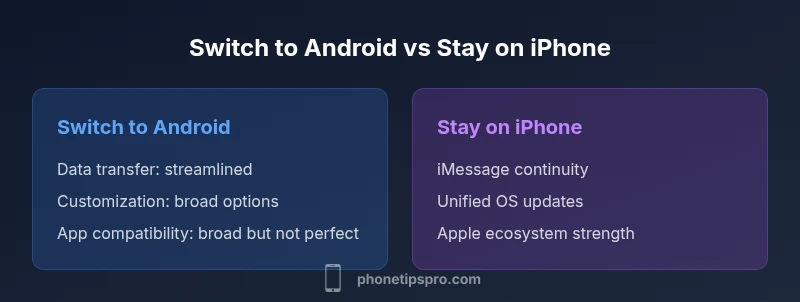
Switch to Android offers customization and cost benefits for many users; staying with iPhone preserves iMessage, iCloud continuity, and a uniform OS experience.
If you prioritize customization and price flexibility, Android is a strong choice. If you rely on iMessage and seamless Apple ecosystem features, staying on iPhone may be the safer path. Use official migration tools to minimize data loss, and prepare for app substitutions where needed.
FAQ
Can I transfer all data from iPhone to Android?
Most contacts, calendars, photos, and selected app data can be moved using official tools and cloud backups. Some items—like iMessages, Health data, and certain app data—may not transfer automatically and require manual workarounds.
Most basics transfer, but iMessages and health data may need extra steps.
What data cannot be moved?
iMessages, Health data, and some app-specific data often don’t migrate cleanly to Android. You may need to rely on forwarded messages, manual exports, or new app configurations.
iMessages and health data usually don’t migrate automatically.
Will iMessage work after switching to Android?
iMessage does not work on Android. Before switching, disable iMessage to avoid missing texts and use SMS or cross-platform apps for messaging.
No—iMessage won’t work on Android. Turn it off before you switch.
How do I transfer photos and contacts?
Use Google Photos or Google Drive for media, and export contacts from iCloud as a VCF file to import into Google Contacts. Calendars can be migrated via Google Calendar integration.
Use Google Photos for photos, and import contacts via Google Contacts.
Is it possible to switch back to iPhone later?
Yes, you can switch back, but you’ll need to repeat migration steps to move data the other way and re-install iOS apps. Plan ahead for data backups and re-authentication.
You can switch back, but expect reconfigurations and backups.
Which Android devices are best for iPhone users in 2026?
There isn’t a single best Android for everyone. Look for devices with strong security updates, good battery life, and robust Google services integration. Your choice should align with your budget, preferred screen size, and camera needs.
Pick an Android that matches your priorities for updates, battery, and features.
Quick Summary
- Assess iMessage importance before switching
- Plan data transfer with official tools first
- Expect app substitutes on Android
- Consider trade-in value and long-term device support